
Free CRM template for Google Sheets
Keep every lead and customer in one list with their stage, deal value, last contact and next step. The sheet flags follow-ups that are overdue or due this week and sums up your pipeline by stage, so nothing slips through the cracks. It's a free, simple CRM for a small business or a one-person sales team.
Pro Want a pipeline board, forecast and next steps that don't slip? See CRM Pro →| Contact | Company | Phone | Source | Stage | Deal value | Win chance | Weighted value | Last contact | Days since | Touches | Next step | Next step date | Follow-up | |
|---|---|---|---|---|---|---|---|---|---|---|---|---|---|---|
| Rachel Kim | Summit Dental Partners | rachel@summitdental.com | (614) 555-0142 | Referral | Negotiating | $14,400.00 | 75% | $10,800.00 | Oct 15, 2026 | 3 | 1 | Send revised contract with Saturday cleaning | Oct 20, 2026 | This week |
| Tom Becker | Becker and Lowe CPAs | tbecker@beckerlowe.com | (614) 555-0187 | Website | Proposal sent | $9,600.00 | 50% | $4,800.00 | Oct 8, 2026 | 10 | 1 | Follow up on proposal | Oct 15, 2026 | Overdue |
| Angela Ruiz | Northpoint Business Park | aruiz@northpointbp.com | (614) 555-0119 | Cold call | Contacted | $42,000.00 | 20% | $8,400.00 | Oct 12, 2026 | 6 | 1 | Walk-through of buildings B and C | Oct 22, 2026 | This week |
| Derek Shaw | Shaw Auto Group | dshaw@shawauto.com | (614) 555-0163 | Trade show | Proposal sent | $21,600.00 | 50% | $10,800.00 | Sep 30, 2026 | 18 | 1 | Call to answer questions on the quote | Oct 14, 2026 | Overdue |
| Priya Nair | Bright Futures Daycare | priya@brightfutures.org | (614) 555-0175 | Referral | Won | $7,800.00 | 100% | $7,800.00 | Oct 2, 2026 | 16 | 1 | Kickoff walk-through | Oct 19, 2026 | |
| Mark Ellison | Ellison Law Office | mark@ellisonlaw.com | (614) 555-0108 | Website | Lead | $4,800.00 | 10% | $480.00 | Oct 16, 2026 | 2 | 1 | Intro call | Oct 21, 2026 | This week |
| Jen Morales | Riverside Fitness | jen@riversidefit.com | (614) 555-0151 | Google search | Contacted | $12,000.00 | 20% | $2,400.00 | Sep 14, 2026 | 34 | 1 | Send price for nightly cleaning | Sep 25, 2026 | Overdue |
| Sam Okoye | Okoye Pediatrics | sokoye@okoyepeds.com | (614) 555-0136 | Referral | Negotiating | $18,000.00 | 75% | $13,500.00 | Oct 10, 2026 | 8 | 1 | Confirm start date | Oct 24, 2026 | This week |
| Linda Fox | Fox Real Estate | linda@foxrealty.com | (614) 555-0194 | Website | Lost | $6,000.00 | 0% | $0.00 | Sep 20, 2026 | 28 | 1 | Went with cheaper bid. Check back in spring. | ||
| Chris Patel | Patel Family Dentistry | chris@pateldds.com | (614) 555-0128 | Trade show | Lead | $8,400.00 | 10% | $840.00 | Aug 28, 2026 | 51 | 1 | Email intro and price sheet | Oct 30, 2026 | Later |
| Hannah Wright | Wright Insurance Agency | hwright@wrightins.com | (614) 555-0170 | Cold call | Proposal sent | $6,600.00 | 50% | $3,300.00 | Oct 13, 2026 | 5 | 1 | Check proposal was received | Oct 18, 2026 | This week |
| Omar Haddad | Lakeview Medical Plaza | ohaddad@lakeviewmed.com | (614) 555-0112 | Referral | Won | $36,000.00 | 100% | $36,000.00 | Sep 26, 2026 | 22 | 2 | Monthly check-in | Oct 26, 2026 | |
| Beth Carson | Carson Architecture | beth@carsonarch.com | (614) 555-0181 | Google search | Contacted | $7,200.00 | 20% | $1,440.00 | Oct 5, 2026 | 13 | 1 | Set next step |
| Stage | Deals | Value | Weighted value | Win chance |
|---|---|---|---|---|
| Today's date | Oct 18, 2026 | |||
| Lead | 2 | $13,200.00 | $1,320.00 | 10% |
| Contacted | 3 | $61,200.00 | $12,240.00 | 20% |
| Proposal sent | 3 | $37,800.00 | $18,900.00 | 50% |
| Negotiating | 2 | $32,400.00 | $24,300.00 | 75% |
| Won | 2 | $43,800.00 | $43,800.00 | 100% |
| Lost | 1 | $6,000.00 | $0.00 | 0% |
| Open pipeline | 10 | $144,600.00 | $56,760.00 | |
| Win rate (won out of closed) | 66.7% | |||
| Follow-ups overdue | 3 | |||
| Follow-ups due this week | 5 | |||
| Open deals with no next step | 1 | |||
| Open deals not contacted in 30+ days | 2 |
| Stage | Win chance | What it means |
|---|---|---|
| Lead | 10% | A name and a reason to reach out, no conversation yet |
| Contacted | 20% | You've talked and they're open to hearing more |
| Proposal sent | 50% | They have a price in writing |
| Negotiating | 75% | Working out terms, start date or price |
| Won | 100% | Signed or paid |
| Lost | 0% | They said no, went elsewhere or went quiet for good |
| Date | Contact | Type | What happened |
|---|---|---|---|
| Aug 28, 2026 | Chris Patel | Meeting | Met at the Columbus small business expo. Interested after their lease renews. |
| Sep 14, 2026 | Jen Morales | Call | Wants nightly cleaning of locker rooms and floors. Asked for a price. |
| Sep 18, 2026 | Omar Haddad | Meeting | Walk-through of all three floors. Needs medical-grade disinfection. |
| Sep 20, 2026 | Linda Fox | Call | Chose another company on price. |
| Sep 26, 2026 | Omar Haddad | Signed 12-month contract. Start October 1. | |
| Sep 30, 2026 | Derek Shaw | Sent quote for showroom and service area, 5 nights a week. | |
| Oct 2, 2026 | Priya Nair | Call | Approved the proposal. Start date October 20. |
| Oct 5, 2026 | Beth Carson | Call | Office of 12. Open to a quote early next year. |
| Oct 8, 2026 | Tom Becker | Sent proposal for twice-weekly cleaning. | |
| Oct 10, 2026 | Sam Okoye | Meeting | Agreed on price. Waiting on their start date. |
| Oct 12, 2026 | Angela Ruiz | Call | Manages 3 buildings. Wants a walk-through first. |
| Oct 13, 2026 | Hannah Wright | Sent proposal. | |
| Oct 15, 2026 | Rachel Kim | Meeting | Wants Saturday cleaning added. Revising contract. |
| Oct 16, 2026 | Mark Ellison | Filled in the website form. Booked an intro call. |
What's inside
- A contact list with company, email, phone, lead source, stage and deal value
- Follow-up flags: Overdue, This week, Later, or Set next step when a deal has none
- Days since you last spoke to each contact, and how many times you've been in touch
- A pipeline summary by stage with deal count, total value and weighted value
- Your win rate, plus counts of overdue follow-ups and deals that have gone quiet
- An activity log for calls, emails and meetings, and win chances you can change
How to use it
Download your copy
Click "Free download" to save the .xlsx file. It opens in Excel, or in Google Sheets: open a blank sheet (sheets.new) and choose File, then Import, then Upload.
Set your stages
On the Stages tab, keep the six sample stages or rename them, and set a win chance for each. If you rename a stage, use the new name on the Contacts tab too.
Add your contacts
On the Contacts tab, add one row per deal with the contact, company, source, stage and an estimated deal value. Fill in when you last spoke and what happens next, with a date.
Log what happens
After every call, email or meeting, add a line to the Activity tab and update Last contact, Next step and Next step date on the Contacts tab.
Keep the date current
On the Pipeline tab, replace the date in Today's date with =TODAY(). Follow-up flags and Days since then stay up to date on their own.
Check it every morning
Sort or filter the Contacts tab by Follow-up to see who's overdue and who's due this week. Glance at the Pipeline tab once a week.
Tips
Every open deal needs a next step
A deal with no next step is a deal you'll forget. Watch the Open deals with no next step count on the Pipeline tab and keep it at zero.
Use weighted value for forecasting
Weighted value is deal value times win chance. It's a more honest guess at what you'll close than adding up every deal at full value.
Add dropdowns for Stage and Source
Select the Stage column, choose Data > Data validation and point it at the stage names on the Stages tab. It stops typos that would leave deals out of the pipeline totals.
Mark lost deals, don't delete them
Keep lost deals with a note about why. They count toward your win rate, and some of them come back later.
Questions
Can Google Sheets be used as a CRM?
Yes, for a small business or a solo seller it works well. You get a shared contact list, deal stages and follow-up reminders without paying for software. Once you have a big team or need email tracking, a dedicated CRM may suit you better.
How do I make a simple CRM in Google Sheets?
Make one row per deal with the contact, stage, value, last contact and next step date. Add a formula that flags overdue next steps and a summary by stage. This template has all of that built in.
What is weighted pipeline value?
It's each deal's value times its chance of closing. A $20,000 deal at 50% counts as $10,000. Adding these up gives a realistic forecast.
Can my team share it?
Yes. Click Share in Google Sheets and add your team as editors. Add an Owner column if you want to show who's handling each deal.
Does it work in Excel?
Yes. Download the Excel file. Replace the date on the Pipeline tab with =TODAY() there too.
Is this CRM template free?
Yes. Download the .xlsx file and open it in Excel or Google Sheets with no sign-up.
Pro version
CRM Pro
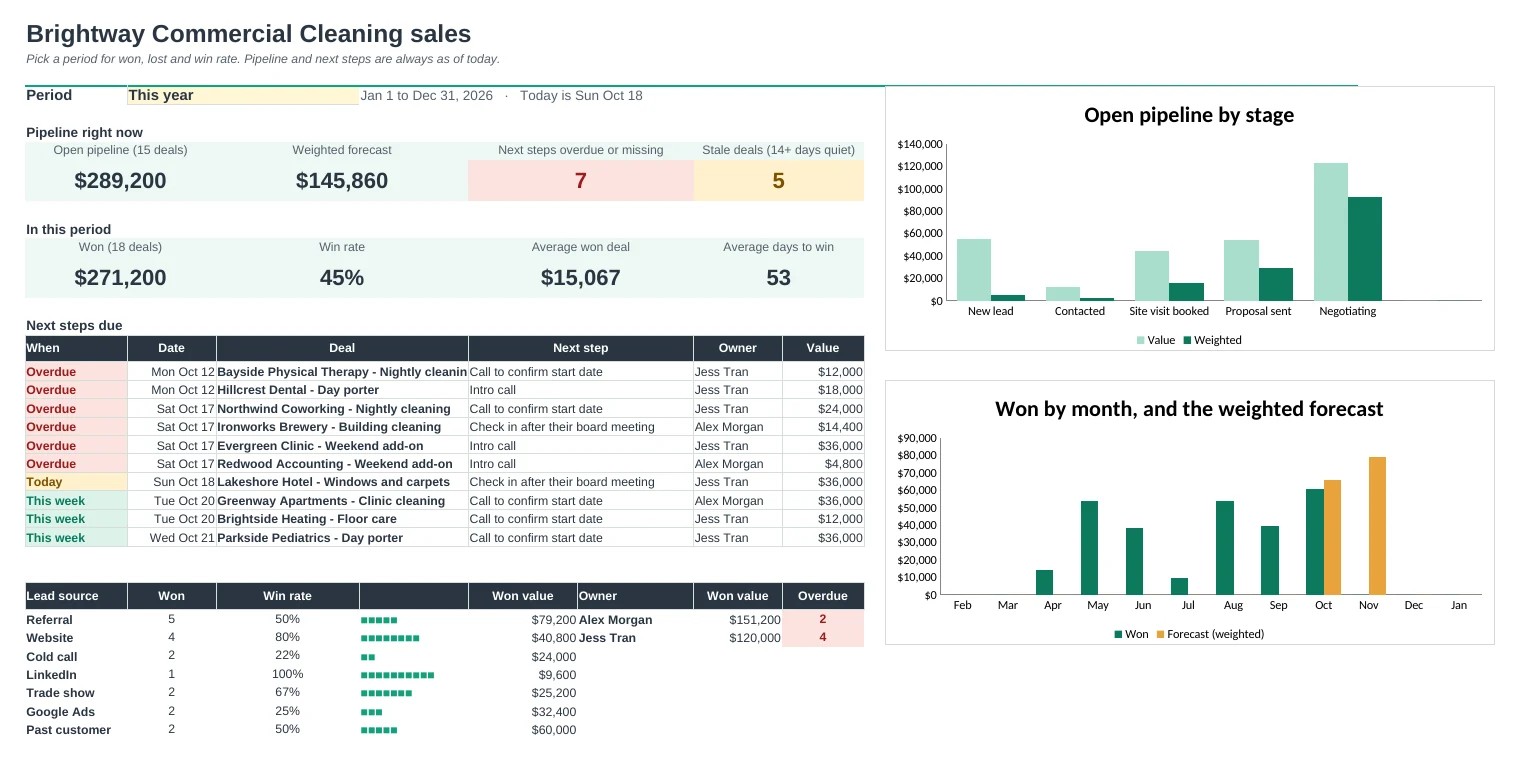
A simple CRM for a small business or a one-person sales team: contacts, deals and activity in three lists, with a pipeline board, weighted forecast, win rate and next steps due.
Next steps you won't miss
Every open deal has a next step and a date. The Dashboard lists what's overdue, due today and due this week, and flags deals with no next step.
Spot deals going quiet
Log calls, emails and meetings in one short row. Deals with no activity for 14 days are marked stale, and contacts you haven't spoken to in a while show as going cold.
Your pipeline as a board
The Board shows every open deal in its stage column, biggest first, with the next step date. Change the stage on Deals and the card moves.
A forecast you can trust
Each stage has a win chance, so you see the weighted forecast as well as the total, plus won value by month next to what's expected to close.
Know what's working
Pick a period to see won value, win rate, average deal and days to win, broken down by lead source and by owner, and why deals were lost.
Everything about a contact on one page
Pick a contact on the Contact Card to see their details, every deal and their full activity history, newest first. Handy before a call.
| Free | Pro |
|---|---|
| Contacts with a stage and value | Separate Contacts, Deals and Activity lists with dropdowns |
| Pipeline totals by stage | Board of open deals by stage |
| Weighted value | Weighted forecast and a forecast-by-month chart |
| Overdue follow-up flag | Next steps due list, stale deals and contacts going cold |
| · | Win rate, average deal and days to win for any period |
| · | Reports by lead source, owner and lost reason |
| · | Contact Card with full history |
| · | Your own stages, sources and owners |
$19 one-time
9 tabs: Start Here, Dashboard, Board, Deals, Contacts, Activity, Contact Card, Reports and Setup. You get two copies: one filled in with a sample business's contacts and deals so you can see it working, and a blank one ready for your own.
Get CRM Pro for $19- Instant download after checkout
- Works in Google Sheets and Excel
- Yours to keep and reuse every year