
Free quote and estimate template for Google Sheets
List the labor, materials and other costs for a job, set your markup, and the sheet builds a customer quote with tax, a deposit and the balance due. Your costs and profit stay on their own tabs, so the customer only sees the price. Use it for a quote, an estimate or a bid.
Pro Want a price list, good/better/best options and quote follow-ups? See Quotes and Estimates Pro →| QUOTE | |||
|---|---|---|---|
| Brightside Remodeling LLC | Quote no. | Q-2026-118 | |
| 1520 Lakeview Rd, Madison, WI 53704 | Quote date | Oct 14, 2026 | |
| (608) 555-0193 | quotes@brightsideremodel.com | Valid for (days) | 30 | |
| Valid until | Nov 13, 2026 | ||
| Prepared for | Quote total | $8,586.64 | |
| Karen and Mike Sullivan | |||
| 418 Birch St, Madison, WI 53711 | |||
| ksullivan@email.com | (608) 555-0127 | |||
| Job: Hall bathroom remodel. Replace tub with tiled walk-in shower, new tile floor, vanity, toilet and exhaust fan. | |||
| What's included | Price | ||
| Labor | $4,218.75 | ||
| Materials | $2,718.00 | ||
| Equipment and disposal | $713.00 | ||
| Subcontractors | $528.00 | ||
| Subtotal | $8,177.75 | ||
| Sales tax rate | 5% | ||
| Sales tax | $408.89 | ||
| Total | $8,586.64 | ||
| Deposit to book | 30% | ||
| Deposit due | $2,575.99 | ||
| Due on completion | $6,010.65 | ||
| Estimated time on site: 2 to 3 weeks. Start date set when the deposit is received. | |||
| Prices are good until the Valid until date. Changes to the scope are quoted separately before work starts. | |||
| Accepted by (signature and date): |
| Section | Item | Qty | Unit | Unit cost | Your cost | Markup | Price | Profit |
|---|---|---|---|---|---|---|---|---|
| Labor | Demo old tub, tile and vanity | 10 | hours | $55.00 | $550.00 | 25% | $687.50 | $137.50 |
| Labor | Rough plumbing for new shower valve | 6 | hours | $85.00 | $510.00 | 25% | $637.50 | $127.50 |
| Labor | Install cement board and waterproofing | 8 | hours | $55.00 | $440.00 | 25% | $550.00 | $110.00 |
| Labor | Tile walls and floor | 22 | hours | $60.00 | $1,320.00 | 25% | $1,650.00 | $330.00 |
| Labor | Set vanity, toilet and fixtures | 6 | hours | $55.00 | $330.00 | 25% | $412.50 | $82.50 |
| Labor | Paint and trim | 5 | hours | $45.00 | $225.00 | 25% | $281.25 | $56.25 |
| Materials | Porcelain wall and floor tile | 120 | sq ft | $4.25 | $510.00 | 20% | $612.00 | $102.00 |
| Materials | Thinset, grout and waterproofing | 1 | lot | $310.00 | $310.00 | 20% | $372.00 | $62.00 |
| Materials | Cement board and screws | 10 | sheets | $16.50 | $165.00 | 20% | $198.00 | $33.00 |
| Materials | Shower valve and trim kit | 1 | each | $285.00 | $285.00 | 20% | $342.00 | $57.00 |
| Materials | 36 in vanity with top | 1 | each | $640.00 | $640.00 | 20% | $768.00 | $128.00 |
| Materials | Toilet | 1 | each | $260.00 | $260.00 | 20% | $312.00 | $52.00 |
| Materials | Paint, caulk and trim | 1 | lot | $95.00 | $95.00 | 20% | $114.00 | $19.00 |
| Equipment and disposal | Dumpster, 10 yard | 1 | each | $425.00 | $425.00 | 15% | $488.75 | $63.75 |
| Equipment and disposal | Tile saw rental | 3 | days | $65.00 | $195.00 | 15% | $224.25 | $29.25 |
| Subcontractors | Electrician: GFCI outlet and exhaust fan | 1 | job | $480.00 | $480.00 | 10% | $528.00 | $48.00 |
| Item | Amount |
|---|---|
| Your cost | $6,740.00 |
| Price to customer (before tax) | $8,177.75 |
| Profit | $1,437.75 |
| Profit margin | 17.6% |
| Overall markup | 21.3% |
| Labor hours | 57 |
| Labor cost | $3,375.00 |
| Materials cost | $2,265.00 |
| Equipment and disposal cost | $620.00 |
| Subcontractor cost | $480.00 |
| Lines not in a section | 0 |
What's inside
- An estimate worksheet for labor, materials, equipment and subcontractors, each with your cost and markup
- A customer-facing quote that shows a price for each section, sales tax, the deposit and what's due on completion
- A valid-until date worked out from the quote date
- A Job Profit tab with your total cost, profit, margin, overall markup and labor hours
- Different markups for each line, so you can mark up materials less than labor
- Works in Google Sheets and Excel, and prints or saves as a PDF
How to use it
Download your copy
Click "Free download" to save the .xlsx file. It opens in Excel, or in Google Sheets: open a blank sheet (sheets.new) and choose File, then Import, then Upload.
Add your business details
On the Quote tab, replace Brightside Remodeling with your name, address and contact details. Edit the notes at the bottom to match how you work.
Price the job
On the Estimate tab, add a line for each piece of work or material. Use one of the four section names, then fill in quantity, unit, your cost per unit and your markup.
Fill in the customer and scope
Back on the Quote tab, add the customer's name, address and a one-line description of the job. Set your sales tax rate and the deposit you ask for.
Check your profit
Look at the Job Profit tab before you send anything. If the margin is thinner than you'd like, raise the markup on a few lines.
Send the quote
Open the Quote tab and choose File > Download > PDF, with Current sheet selected so your costs stay private. Email it or print it for a signature.
Tips
Markup is not margin
A 25% markup on a $100 cost gives a $125 price, but your margin is only 20% of the price. The Job Profit tab shows both, so you know which one you're looking at.
Price your own time too
Put your own hours on the Labor lines at a real hourly rate, even if you're a one-person business. Otherwise the job looks more profitable than it is.
Add a buffer for surprises
Older homes and old wiring hide problems. Add a contingency line or a little extra markup on risky jobs, and say in the notes that hidden damage is quoted separately.
Ask about sales tax
Which parts of a job are taxable depends on your state and trade. Check with your accountant and set the sales tax rate to 0% if it doesn't apply.
Questions
What's the difference between a quote and an estimate?
An estimate is a best guess that can change. A quote is a fixed price you agree to honor for a set time. This template works for both. Change the title and the notes to say which one it is.
How do I make a quote in Google Sheets?
Download this template, list your costs on the Estimate tab with a markup, then fill in the customer on the Quote tab. The prices and totals fill in for you. Download the Quote tab as a PDF to send it.
How do I work out markup?
Price equals your cost times one plus the markup. A $640 vanity with a 20% markup is $640 x 1.2 = $768. The Estimate tab does this on every line.
Can I use this as a bid sheet?
Yes. The Estimate tab works as a bid worksheet for any job you price by labor and materials. Use the Job Profit tab to check the bid still makes money.
Does the customer see my costs and markup?
Not if you send only the Quote tab as a PDF. It shows a price per section and the totals. If you share the whole sheet, they can see every tab.
Is this quote template free?
Yes. Download the .xlsx file and open it in Excel or Google Sheets, with no sign-up.
Pro version
Quotes and Estimates Pro
Price jobs from your own price list with your markup, offer good, better and best options, print a clean quote and follow up until you get an answer.
Price jobs in minutes
Pick items from your price list and type the quantity. Your markup, labor rates and tax are applied for you, and you see the cost, profit and margin on every quote.
Offer options
Put shared work in every option and add Good, Better and Best lines. The quote shows each option's total, deposit and balance side by side.
A quote that looks professional
Pick a quote number and print it or save it as a PDF, with your details, the customer's, the scope, valid-until date, terms and a place to sign. Your cost and profit never print.
Know who to call next
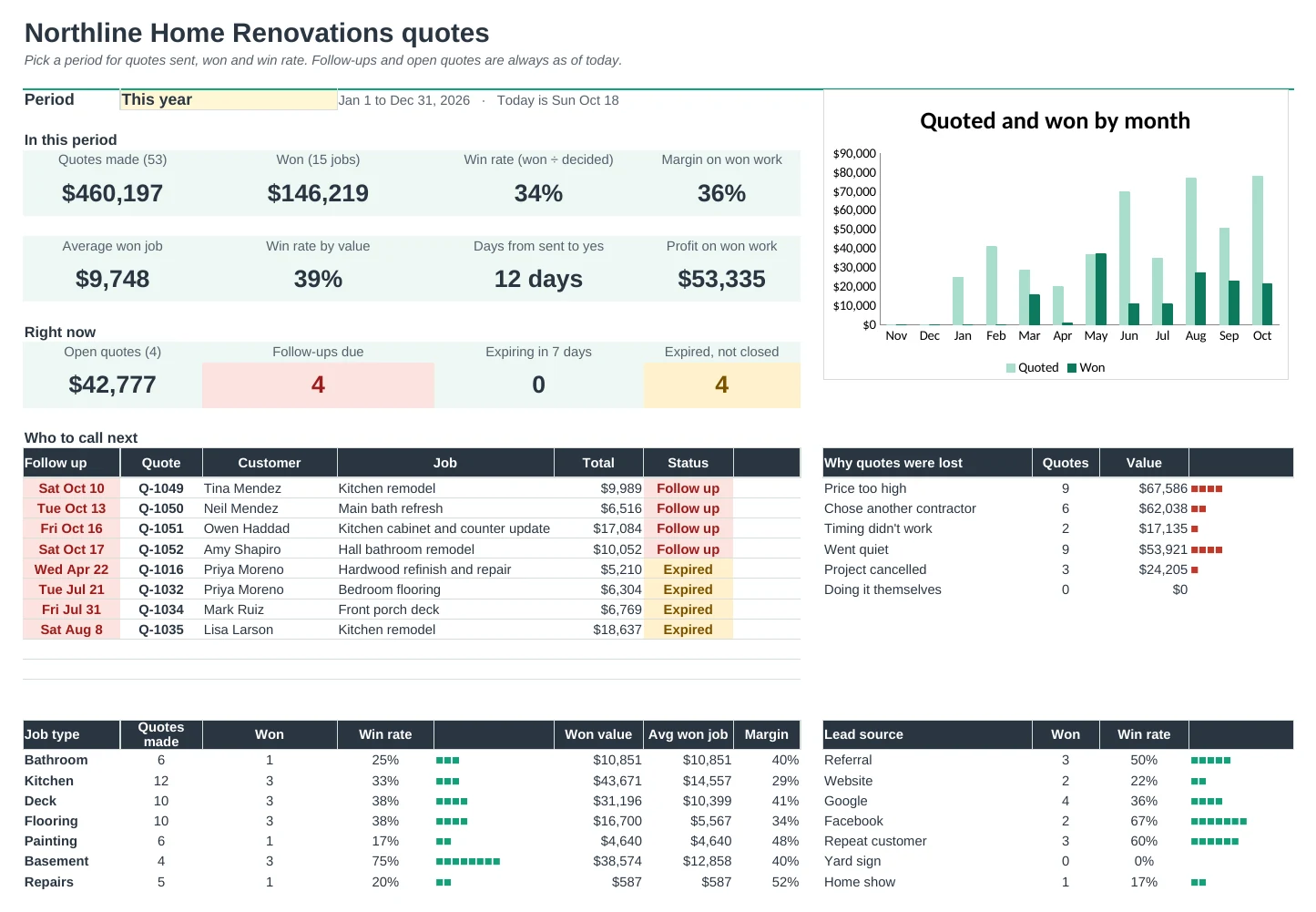
Type the date you sent each quote. Quotes that need a follow-up turn red and expired ones turn amber, and the Dashboard lists who to call next.
See your win rate
Mark each quote Won or Lost, with the reason. See your win rate, the value you've quoted and won, and your margin on won work, by job type and lead source.
Set up once
Your business details, tax rate, deposit, markups, job types and lost reasons live on Setup. Every quote and dropdown uses them.
| Free | Pro |
|---|---|
| One quote at a time | Every quote in one file, print any of them |
| Type each item and cost | Pick from your price list; prices fill in |
| One markup for the job | Markup by category, or set a price per item |
| · | Good, better and best options with their own totals |
| · | Follow-up dates, expiry and status flags |
| · | Dashboard with win rate, value won and who to call next |
| · | Win rate by job type and lead source, and why you lost |
| · | Customer list with quotes, wins and open value |
$19 one-time
8 tabs: Start Here, Dashboard, Quote, Quotes, Lines, Price List, Customers and Setup. You get two copies: one filled in with a sample renovation company so you can see it working, and a blank one ready for your own prices and jobs.
Get Quotes and Estimates Pro for $19- Instant download after checkout
- Works in Google Sheets and Excel
- Yours to keep and reuse every year