
Free commission spreadsheet template
Log each sale, set every rep's commission plan once, and the sheet works out what each rep earns each month. It handles tiered rates, a bonus for hitting quota and sales that don't count until the customer pays. The summary shows each rep's total for the quarter.
Pro Want rep statements, splits, clawbacks and a leaderboard worked out for you? See Sales Commission Pro →| Date | Rep | Customer | What was sold | Sale amount | Customer paid |
|---|---|---|---|---|---|
| Jul 2, 2026 | Ana Torres | Lakeshore Dental Group | Reception seating and front desk | $6,850.00 | |
| Jul 7, 2026 | Marcus Reed | Cobalt Insurance | 24 task chairs | $8,640.00 | |
| Jul 9, 2026 | Jess Kim | Greenfield Library | Study tables and chairs | $5,420.00 | |
| Jul 14, 2026 | Devon Hall | Prairie Credit Union | Branch office refresh | $12,300.00 | |
| Jul 16, 2026 | Ana Torres | Hartwell Law LLP | Partner offices, 4 suites | $14,200.00 | |
| Jul 21, 2026 | Marcus Reed | Summit Physical Therapy | Waiting room seating | $3,150.00 | |
| Jul 24, 2026 | Jess Kim | Oak Park Pediatrics | Exam room storage | $2,980.00 | |
| Jul 28, 2026 | Ana Torres | Riverbend Coworking | Hot desks and lockers | $7,600.00 | |
| Jul 30, 2026 | Devon Hall | Metro Title Co. | Conference room table and chairs | $4,450.00 | |
| Aug 4, 2026 | Marcus Reed | Cobalt Insurance | Standing desks, 12 | $9,360.00 | |
| Aug 6, 2026 | Ana Torres | Lakeshore Dental Group | Break room furniture | $3,200.00 | |
| Aug 11, 2026 | Jess Kim | Westview High School | Teacher workroom | $11,850.00 | |
| Aug 13, 2026 | Devon Hall | Prairie Credit Union | Second branch | $11,900.00 | |
| Aug 18, 2026 | Marcus Reed | Northgate Logistics | Warehouse office build-out | $15,400.00 | |
| Aug 20, 2026 | Jess Kim | Greenfield Library | Children's area seating | $4,300.00 | |
| Aug 25, 2026 | Ana Torres | Bluebird Marketing | Open office benching | $8,900.00 | |
| Aug 27, 2026 | Devon Hall | Elm Street Bakery Co. | Office chairs, 6 | $1,650.00 | |
| Sep 1, 2026 | Ana Torres | Hartwell Law LLP | Library shelving | $5,600.00 | |
| Sep 3, 2026 | Marcus Reed | Summit Physical Therapy | Staff room tables | $2,400.00 | |
| Sep 8, 2026 | Jess Kim | Oak Park Pediatrics | Front desk | $6,750.00 | |
| Sep 10, 2026 | Devon Hall | Metro Title Co. | Closing room upgrade | $7,300.00 | |
| Sep 15, 2026 | Ana Torres | Riverbend Coworking | Phone booths, 3 | $13,800.00 | |
| Sep 17, 2026 | Marcus Reed | Cobalt Insurance | Manager offices, 3 | $10,950.00 | |
| Sep 22, 2026 | Jess Kim | Westview High School | Library tables | $9,200.00 | |
| Sep 24, 2026 | Ana Torres | Bluebird Marketing | Lounge seating | $4,300.00 | |
| Sep 28, 2026 | Devon Hall | Prairie Credit Union | Drive-thru teller chairs | $2,100.00 | |
| Sep 29, 2026 | Marcus Reed | Northgate Logistics | Break room | $5,250.00 |
| Month | Rep | Paid sales | Tier 1 sales | Tier 2 sales | Tier 3 sales | Commission | Bonus | Total payout | Effective rate | Of quota |
|---|---|---|---|---|---|---|---|---|---|---|
| July 2026 | Ana Torres | $28,650.00 | $10,000.00 | $15,000.00 | $3,650.00 | $1,915.00 | $500.00 | $2,415.00 | 8.4% | 143.3% |
| July 2026 | Marcus Reed | $11,790.00 | $10,000.00 | $1,790.00 | $0.00 | $625.30 | $0.00 | $625.30 | 5.3% | 59% |
| July 2026 | Jess Kim | $8,400.00 | $8,000.00 | $400.00 | $0.00 | $344.00 | $0.00 | $344.00 | 4.1% | 56% |
| July 2026 | Devon Hall | $16,750.00 | $10,000.00 | $6,750.00 | $0.00 | $1,005.00 | $0.00 | $1,005.00 | 6% | 93.1% |
| August 2026 | Ana Torres | $12,100.00 | $10,000.00 | $2,100.00 | $0.00 | $647.00 | $0.00 | $647.00 | 5.3% | 60.5% |
| August 2026 | Marcus Reed | $24,760.00 | $10,000.00 | $14,760.00 | $0.00 | $1,533.20 | $500.00 | $2,033.20 | 8.2% | 123.8% |
| August 2026 | Jess Kim | $16,150.00 | $8,000.00 | $8,150.00 | $0.00 | $809.00 | $300.00 | $1,109.00 | 6.9% | 107.7% |
| August 2026 | Devon Hall | $13,550.00 | $10,000.00 | $3,550.00 | $0.00 | $813.00 | $0.00 | $813.00 | 6% | 75.3% |
| September 2026 | Ana Torres | $19,400.00 | $10,000.00 | $9,400.00 | $0.00 | $1,158.00 | $0.00 | $1,158.00 | 6% | 97% |
| September 2026 | Marcus Reed | $13,350.00 | $10,000.00 | $3,350.00 | $0.00 | $734.50 | $0.00 | $734.50 | 5.5% | 66.8% |
| September 2026 | Jess Kim | $15,950.00 | $8,000.00 | $7,950.00 | $0.00 | $797.00 | $300.00 | $1,097.00 | 6.9% | 106.3% |
| September 2026 | Devon Hall | $7,300.00 | $7,300.00 | $0.00 | $0.00 | $438.00 | $0.00 | $438.00 | 6% | 40.6% |
| Rep | Tier 1 rate | Tier 2 starts at | Tier 2 rate | Tier 3 starts at | Tier 3 rate | Monthly quota | Bonus at quota |
|---|---|---|---|---|---|---|---|
| Ana Torres | 5% | $10,000.00 | 7% | $25,000.00 | 10% | $20,000.00 | $500.00 |
| Marcus Reed | 5% | $10,000.00 | 7% | $25,000.00 | 10% | $20,000.00 | $500.00 |
| Jess Kim | 4% | $8,000.00 | 6% | $20,000.00 | 8% | $15,000.00 | $300.00 |
| Devon Hall | 6% | $10,000.00 | 6% | $25,000.00 | 6% | $18,000.00 | $0.00 |
| Rep | Paid sales | Commission | Bonuses | Total payout | Effective rate | Months at quota | Waiting on payment |
|---|---|---|---|---|---|---|---|
| Ana Torres | $60,150.00 | $3,720.00 | $500.00 | $4,220.00 | 7% | 1 | $4,300.00 |
| Marcus Reed | $49,900.00 | $2,893.00 | $500.00 | $3,393.00 | 6.8% | 1 | $5,250.00 |
| Jess Kim | $40,500.00 | $1,950.00 | $600.00 | $2,550.00 | 6.3% | 2 | $0.00 |
| Devon Hall | $37,600.00 | $2,256.00 | $0.00 | $2,256.00 | 6% | 0 | $2,100.00 |
| Total | $188,150.00 | $10,819.00 | $1,600.00 | $12,419.00 | 6.6% | 4 | $11,650.00 |
What's inside
- Tiered commission: a different rate for each slice of a rep's monthly sales, like tax brackets
- A separate plan for every rep, including a simple flat rate if that's how you pay
- A bonus when a rep hits their monthly quota, and each rep's percent of quota
- Only sales marked Customer paid count, so you don't pay commission on money you haven't collected
- A quarterly summary with total payout, effective rate, months at quota and sales still waiting on payment
- Works in Google Sheets and Excel
How to use it
Download your copy
Click "Free download" to save the .xlsx file. It opens in Excel, or in Google Sheets: open a blank sheet (sheets.new) and choose File, then Import, then Upload.
Set up each rep's plan
On the Reps tab, enter each rep's name, their three tier rates, where tiers 2 and 3 start, their monthly quota and the bonus for hitting it. For a flat rate, use the same rate in all three tiers.
Log your sales
On the Sales tab, add one row per sale with the date, rep, customer, what was sold and the amount. Spell rep names exactly as they are on the Reps tab.
Tick Customer paid
Tick the box once the customer has paid. Unticked sales show up as Waiting on payment on the Summary tab and count in the month of the sale once ticked.
Check the Commission tab
Each row is one rep for one month. To add a month, copy the last four rows below themselves and change the month to the new one.
Pay out from the Summary
The Summary tab totals commission and bonuses for each rep. Use Total payout as the amount to add to their paycheck.
Tips
Write the plan down
Give each rep their tiers, quota and bonus in writing before the month starts. Disagreements about commission are almost always about rules nobody wrote down.
Watch the effective rate
Effective rate is total payout divided by sales. If it creeps up, your top tier or bonus may be more generous than you meant.
Decide what happens with refunds
If a sale is cancelled after commission is paid, enter a negative sale in the month it's refunded. That takes the commission back the next payout.
Commission is taxable pay
Commission and bonuses are usually paid through payroll as wages. Ask your accountant or payroll provider how to handle withholding.
Questions
How do I calculate commission in Google Sheets?
For a flat rate, multiply the sale by the rate: =E2*5%. For tiers, this template splits each rep's monthly sales into tier 1, 2 and 3, multiplies each slice by its rate and adds them up.
How does tiered commission work here?
Each tier's rate only applies to the sales inside that tier. With tiers at $10,000 and $25,000, a $28,650 month earns tier 1 on the first $10,000, tier 2 on the next $15,000 and tier 3 on the last $3,650. That is how Ana Torres earns $1,915 in July in the sample.
Can each rep have a different commission rate?
Yes. Every rep has their own row on the Reps tab with their own rates, tier starting points, quota and bonus.
What if I only pay commission once the customer pays?
That's how the template works. Only sales with Customer paid ticked are counted. Untick it for sales you're still waiting on.
Does this work in Excel?
Yes. Download the Excel file. All the lookups and totals work the same way.
Is the commission template free?
Yes. Download it, with no sign-up.
Pro version
Sales Commission Pro
Set each rep's plan once, log every deal, and get the monthly payout, a printable statement and a leaderboard without touching a formula.
Plans that fit real teams
Give each plan a base rate, two accelerator tiers that start at a share of quota, and a bonus for hitting quota. One plan works for reps with different quotas.
Splits and refunds handled
Share a deal between two reps with a split %. A refund goes on the same row as the sale and claws back commission in the month it happens, inside the window you choose.
Pay on cash or on close
Choose whether a sale counts when the deal closes or when the customer pays. Unpaid deals are flagged once they pass your limit.
A statement for every rep
Pick a rep and a month to get one printable page: sales counted, each tier, bonus, clawbacks, adjustments and every deal behind the number.
See who's winning
The leaderboard ranks reps by % of quota for the month and the year so far, with a month-by-month colour grid of everyone's results.
Quarter and year totals
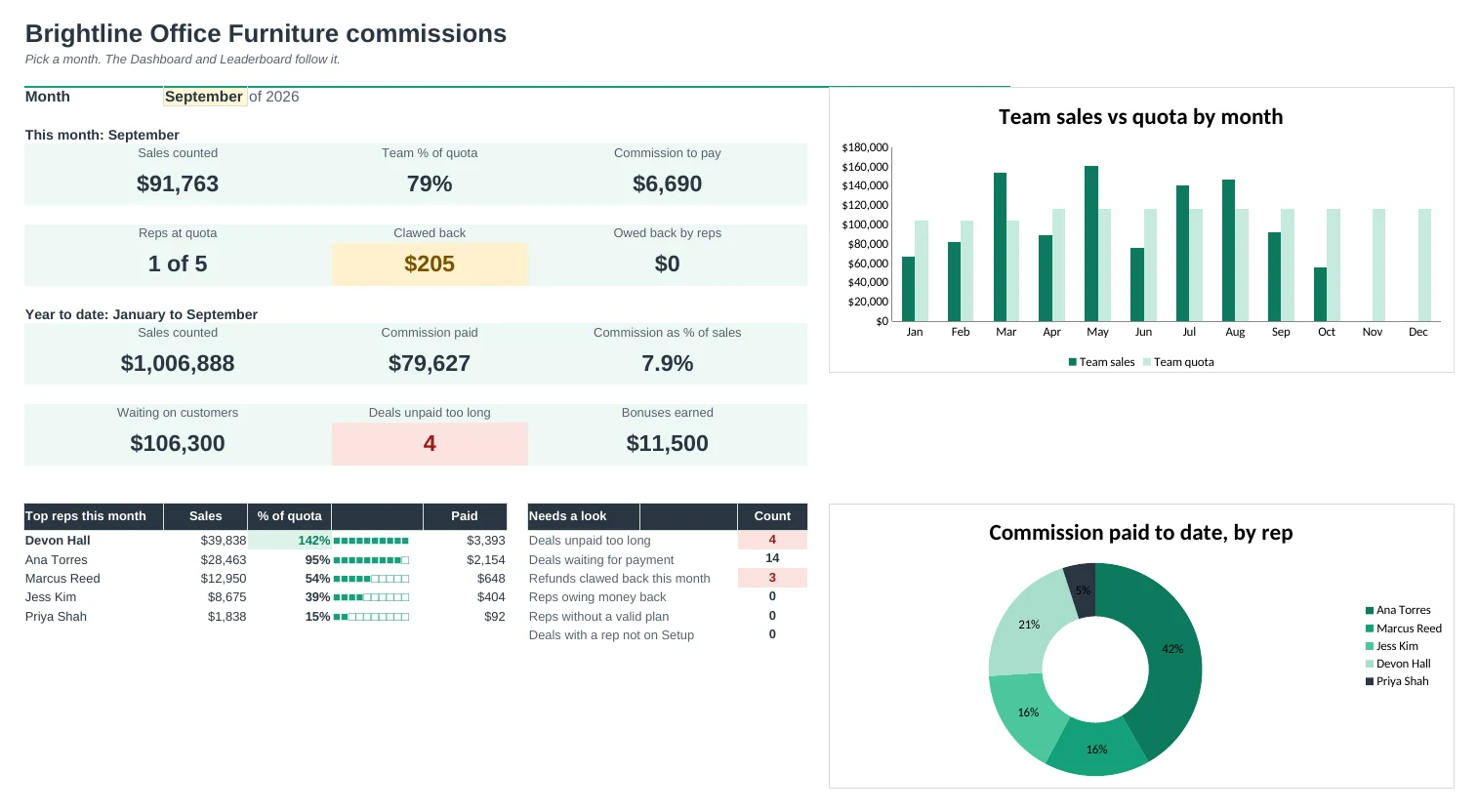
Each rep's quarterly attainment and payouts, team totals by month, and the Dashboard shows sales, payouts and what needs a look.
| Free | Pro |
|---|---|
| Sales log with a paid checkbox | Deal log with deal types, splits, date paid and refunds |
| Tiered rates per rep | Plans with tiers based on % of quota, shared by any number of reps |
| Bonus at quota | Bonus at quota, plus prizes, draws and corrections |
| Quarterly summary | Quarterly and to-date attainment and payouts |
| · | Clawbacks on refunds, with money owed carried forward |
| · | Printable statement per rep and month |
| · | Leaderboard and month-by-month quota grid |
| · | Dashboard with charts and a pick-a-month view |
$19 one-time
9 tabs: Start Here, Dashboard, Deals, Statement, Payouts, Quarters, Leaderboard, Adjustments and Setup. You get two copies: one filled in with a sample sales team so you can see it working, and a blank one ready for your own reps and deals.
Get Sales Commission Pro for $19- Instant download after checkout
- Works in Google Sheets and Excel
- Yours to keep and reuse every year