
Free payroll spreadsheet template
Enter each employee's hours and the sheet works out gross pay, overtime, withholding and net pay for the pay period. You set every rate yourself, so it fits your state and each employee's W-4. It also builds a simple pay stub and shows what the payroll costs you in total. This is a calculator, not tax advice.
Pro Paying a few people yourself and want stubs and year-to-date totals? See Payroll Pro →| Employee | Pay type | Regular hours | Overtime hours | Rate | Gross pay | Federal income tax | State income tax | Social Security | Medicare | Other deductions | Net pay |
|---|---|---|---|---|---|---|---|---|---|---|---|
| Maria Lopez | Salary | $2,150.00 | $215.00 | $86.00 | $133.30 | $31.18 | $85.00 | $1,599.52 | |||
| James Carter | Hourly | 80 | 4 | $19.50 | $1,677.00 | $134.16 | $67.08 | $103.97 | $24.32 | $0.00 | $1,347.47 |
| Aisha Brown | Hourly | 72 | 0 | $17.00 | $1,224.00 | $73.44 | $48.96 | $75.89 | $17.75 | $25.00 | $982.96 |
| Kevin Nguyen | Hourly | 80 | 6.5 | $21.00 | $1,884.75 | $188.48 | $75.39 | $116.85 | $27.33 | $85.00 | $1,391.70 |
| Rosa Martinez | Hourly | 64 | 0 | $16.50 | $1,056.00 | $52.80 | $31.68 | $65.47 | $15.31 | $0.00 | $890.74 |
| Tyler Reed | Hourly | 38 | 0 | $15.00 | $570.00 | $22.80 | $17.10 | $35.34 | $8.27 | $0.00 | $486.49 |
| Total | 334.00 | 10.50 | $8,561.75 | $686.68 | $326.21 | $530.82 | $124.16 | $195.00 | $6,698.88 |
| Employee | Pay type | Hourly rate | Salary per pay period | Federal withholding (%) | State withholding (%) | Other deductions | Notes |
|---|---|---|---|---|---|---|---|
| Maria Lopez | Salary | $2,150.00 | 10 | 4 | $85.00 | Manager, health plan | |
| James Carter | Hourly | $19.50 | 8 | 4 | $0.00 | Lead cook | |
| Aisha Brown | Hourly | $17.00 | 6 | 4 | $25.00 | Barista, 401(k) | |
| Kevin Nguyen | Hourly | $21.00 | 10 | 4 | $85.00 | Cook, health plan | |
| Rosa Martinez | Hourly | $16.50 | 5 | 3 | $0.00 | Server | |
| Tyler Reed | Hourly | $15.00 | 4 | 3 | $0.00 | Part-time dishwasher |
| Setting | Value |
|---|---|
| Business name | Corner Table Cafe |
| Pay period start | Oct 4, 2026 |
| Pay period end | Oct 17, 2026 |
| Pay date | Oct 23, 2026 |
| Overtime pay (times hourly rate) | 1.5 |
| Employee Social Security (%) | 6.2 |
| Employee Medicare (%) | 1.45 |
| Employer Social Security (%) | 6.2 |
| Employer Medicare (%) | 1.45 |
| Employer unemployment and other (%) | 0 |
| Rates change. Check every rate above with the IRS, your state or your accountant before you run payroll. |
| Pay stub | Amount |
|---|---|
| Employee | Aisha Brown |
| Business | Corner Table Cafe |
| Pay period start | Oct 4, 2026 |
| Pay period end | Oct 17, 2026 |
| Pay date | Oct 23, 2026 |
| Regular hours | 72.00 |
| Overtime hours | 0.00 |
| Hourly rate | $17.00 |
| Gross pay | $1,224.00 |
| Federal income tax | $73.44 |
| State income tax | $48.96 |
| Social Security | $75.89 |
| Medicare | $17.75 |
| Other deductions | $25.00 |
| Total deductions | $241.04 |
| Net pay | $982.96 |
| Item | Amount |
|---|---|
| Employees paid | 6 |
| Total gross pay | $8,561.75 |
| Federal income tax withheld | $686.68 |
| State income tax withheld | $326.21 |
| Social Security withheld | $530.82 |
| Medicare withheld | $124.16 |
| Other deductions | $195.00 |
| Total net pay to employees | $6,698.88 |
| Employer Social Security | $530.83 |
| Employer Medicare | $124.15 |
| Employer unemployment and other | $0.00 |
| Total cost of this payroll | $9,216.73 |
| Taxes to set aside for deposits | $2,322.85 |
| Check: gross minus deductions minus net | $0.00 |
What's inside
- Hourly and salaried employees on one pay run, with overtime at the multiplier you choose
- Federal and state income tax withholding as a percentage you set for each employee
- Social Security, Medicare and other deductions like health insurance or retirement
- Net pay for every employee, with totals for the whole pay run
- A pay stub you can fill for any employee by typing their name
- A summary with employer taxes, the total cost of payroll and how much to set aside for tax deposits
How to use it
Download your copy
Click "Free download" to save the .xlsx file. It opens in Excel, or in Google Sheets: open a blank sheet (sheets.new) and choose File, then Import, then Upload.
Check every rate on Settings
Enter your business name, the pay period and pay date, and your overtime multiplier. The sample Social Security and Medicare rates are there to show how it works. Confirm the current rates with the IRS or your accountant before using them.
Add your employees
On the Employees tab, list each person with their pay type, hourly rate or salary per pay period, withholding percentages and any regular deductions.
Work out withholding
Federal withholding depends on each employee's W-4 and pay. Use the IRS withholding tables in Publication 15-T, your state's guide, or ask your accountant, then enter the result as a percentage.
Enter hours each pay period
On the Pay Run tab, type regular and overtime hours for hourly staff. Salaried staff need no hours. Gross pay, deductions and net pay fill in.
Print pay stubs and save the run
On the Pay Stub tab, type an employee's name to fill their stub. Before the next pay period, duplicate the Pay Run tab and rename it with the dates so you keep a record.
Tips
Keep a copy of every pay run
You need payroll records for tax filings and W-2s at year end. One duplicated tab per pay period, named by date, is an easy way to keep them.
Overtime is usually weekly
Under federal rules, overtime is generally based on hours over 40 in a workweek, not per pay period. Work out overtime hours week by week, then enter the total here.
Set aside tax money right away
Move the Taxes to set aside amount into a separate account on payday. Withheld taxes belong to the government, and late deposits come with penalties.
Know when to switch
As your team grows, a payroll service can handle withholding tables, deposits and year-end forms for you. This sheet is great for checking their numbers too.
Questions
Can I do payroll in Google Sheets?
You can work out gross pay, deductions and net pay in Google Sheets, and this template does that. You still have to pay the taxes, file the forms and follow your state's rules, which a spreadsheet can't do for you.
Is this payroll template tax advice?
No. It's a calculator that uses the rates you type in. Withholding depends on each employee's W-4, your state and current IRS rules. Check with an accountant or payroll provider before you pay anyone.
How does it calculate federal income tax?
It multiplies gross pay by the percentage you set for that employee. It doesn't read IRS tables for you. Use Publication 15-T or a payroll calculator to find the right amount, then set the percentage to match.
Does it handle the Social Security wage limit?
No. Social Security tax stops once an employee's pay for the year passes a yearly limit. If anyone on your team earns near that limit, ask your accountant how to handle it.
How do I calculate net pay?
Net pay is gross pay minus everything withheld: federal and state income tax, Social Security, Medicare and other deductions. The Pay Run tab shows each piece.
Is the payroll spreadsheet free?
Yes. Download the .xlsx file and open it in Excel or Google Sheets, with no sign-up.
Pro version
Payroll Pro
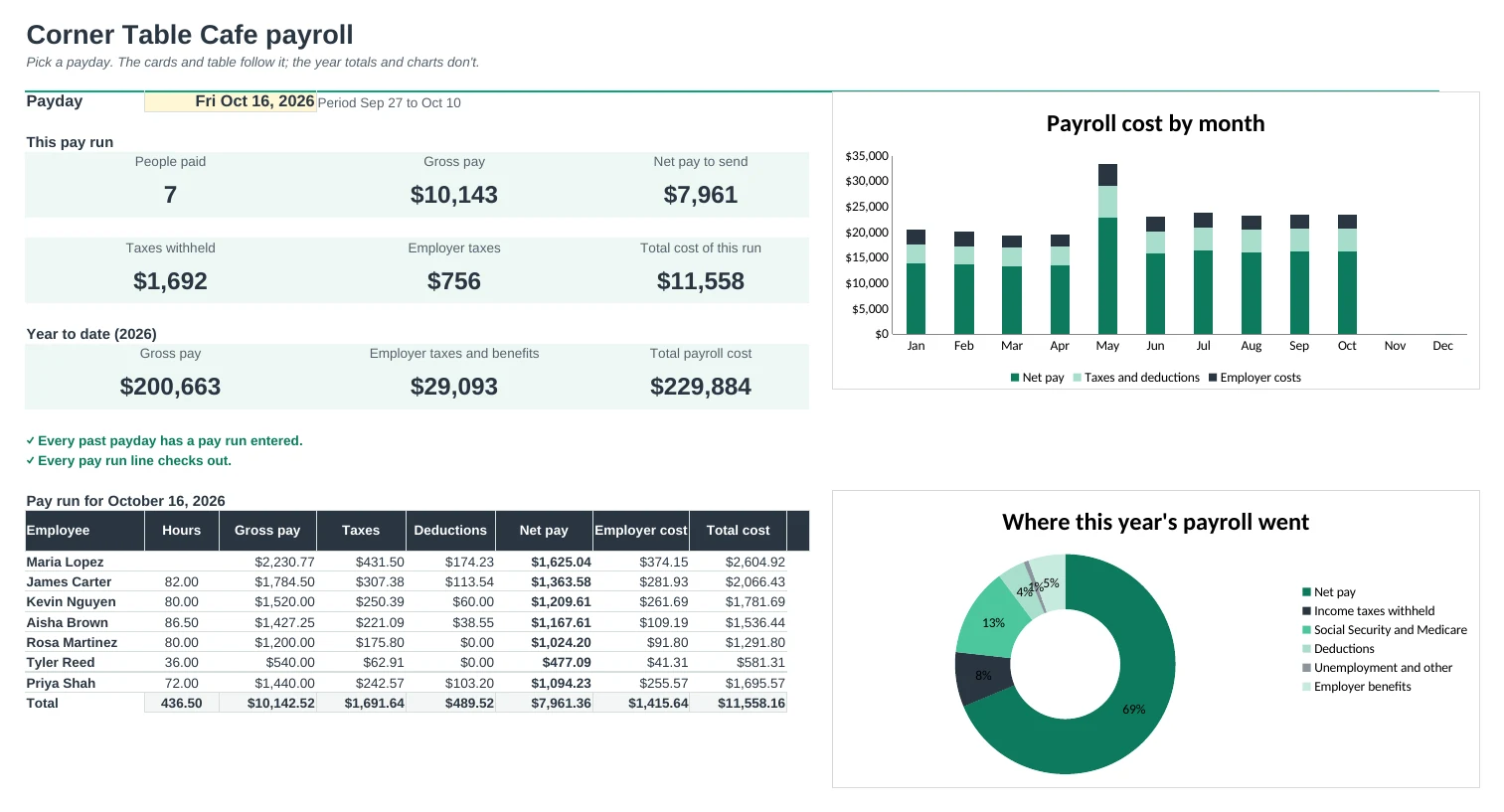
Type hours once per payday and get gross to net pay, your employer costs, printable pay stubs and year-to-date totals, using rates you set.
One line per person per payday
Pick the payday and the employee, type the hours. Salaried staff need no hours. Overtime, paid leave, bonuses and reimbursements are handled for you.
Wage caps applied for you
Social Security stops at the yearly wage cap and unemployment taxes stop at their wage bases, using each person's year-to-date pay. Every rate and cap is on Setup for you to update.
Pay stubs with year to date
Pick an employee and a payday to print a clear pay stub: hours, rates, each tax and deduction, net pay, and year-to-date totals for every line.
Know what payroll really costs
See employer Social Security and Medicare, unemployment taxes and benefits on top of gross pay, for each pay run and for the year.
A calendar of every payday
Weekly, every two weeks, twice a month or monthly. Every pay period and payday is worked out, with each run's totals and a flag for any payday you missed.
Totals for your returns
Year to Date lists each employee's totals and adds them up by quarter. It's a calculator, not tax advice: get withholding amounts from the official tables or your accountant.
| Free | Pro |
|---|---|
| One pay period | Every payday of the year |
| Withholding rates you set | Rates you set, plus exact per-paycheck overrides |
| Simple pay stub | Pay stub with year-to-date totals |
| · | Social Security and unemployment wage caps |
| · | Pre-tax retirement and health deductions |
| · | Pay calendar for weekly to monthly schedules |
| · | Year-to-date and quarter totals |
| · | Dashboard with cost charts |
$19 one-time
8 tabs: Start Here, Dashboard, Pay Runs, Pay Stub, Pay Calendar, Year to Date, Employees and Setup. You get two copies: one filled in with a sample seven-person cafe and ten months of pay runs so you can see it working, and a blank one ready for your own team.
Get Payroll Pro for $19- Instant download after checkout
- Works in Google Sheets and Excel
- Yours to keep and reuse every year