
Free printable daily planner
Plan one day on one page. Block out your hours on the left, pick the three things that matter most, and list the rest of your to-dos and notes on the right. Fill it in on screen, or print a fresh page each morning and use a pen.
| Time | Schedule | Done | Priorities, to-dos and notes |
|---|---|---|---|
| Date | Nov 4, 2026 | Wed | |
| 6:00 AM | Wake up, water, stretch | TOP 3 (do these first) | |
| 7:00 AM | Breakfast, kids to school | Send budget report to Sam | |
| 8:00 AM | Commute, call Mom | Book flights for Thanksgiving | |
| 9:00 AM | Team meeting | Pay the water bill | |
| 10:00 AM | Finish budget report | TO-DO | |
| 11:00 AM | Finish budget report | Return library books | |
| 12:00 PM | Lunch and a walk | Order a birthday gift for Jess | |
| 1:00 PM | Client call (Dana) | Sign the field trip form | |
| 2:00 PM | Email and admin | Call the vet about Max's shots | |
| 3:00 PM | Dentist 3:30, leave by 3:10 | Pick up dry cleaning | |
| 4:00 PM | Pick up kids | Reply to the HOA email | |
| 5:00 PM | Dinner: tacos | ||
| 6:00 PM | Soccer practice | NOTES | |
| 7:00 PM | Homework help | Dentist: ask about the night guard | |
| 8:00 PM | Tidy up, lunches for tomorrow | Dana wants the proposal by Friday | |
| 9:00 PM | Read, lights out by 10 | ||
| Tomorrow | Dentist bill, gym bag, Jess's gift | ||
| Top 3 done | 2 of 3 | To-dos done: 3 of 6 |
| Time | Schedule | Done | Priorities, to-dos and notes |
|---|---|---|---|
| Date | |||
| 6:00 AM | TOP 3 (do these first) | ||
| 7:00 AM | |||
| 8:00 AM | |||
| 9:00 AM | |||
| 10:00 AM | TO-DO | ||
| 11:00 AM | |||
| 12:00 PM | |||
| 1:00 PM | |||
| 2:00 PM | |||
| 3:00 PM | |||
| 4:00 PM | |||
| 5:00 PM | |||
| 6:00 PM | NOTES | ||
| 7:00 PM | |||
| 8:00 PM | |||
| 9:00 PM | |||
| Tomorrow | |||
| Top 3 done | 0 of 0 | To-dos done: 0 of 0 |
What's inside
- Hourly schedule from 6 AM to 9 PM; change the first time and every hour below moves with it
- A Top 3 box for the things that must get done, kept apart from the rest of the to-do list
- Checkboxes for every task, with a count of how many you finished at the bottom
- Room for notes and a line for what to carry over to tomorrow
- Type a date and the day of the week fills in by itself
- A blank page tab ready to print, and it fits one letter-size page
How to use it
Make your copy
Click "Make a copy" to save the planner to your Google Drive. The Excel download works the same way.
Type the date
Put today's date next to Date, like 11/4/2026. The weekday appears beside it. Type =TODAY() instead if you want it to change every day by itself.
Pick your top 3
Before anything else, write the three tasks that would make today a good day. Do these first.
Block out your hours
Fill in the Schedule column with meetings, school runs and anything at a set time. Then put your top 3 into the gaps.
Add to-dos and notes
List the smaller jobs under TO-DO and tick each box as you go. Use NOTES for anything you need to remember.
Print a blank page
Open the Blank Page tab, then go to File > Print. Choose Portrait and letter size, set Scale to "Fit to page", and turn on "Show gridlines" under Formatting so you get lines to write on.
Tips
Plan tomorrow tonight
Spend two minutes at the end of the day filling in the Tomorrow line. It's much easier to start the morning when the list is already there.
Start earlier or later
The first time is 6:00 AM. Type 5:00 AM or 8:00 AM in that cell and every hour below shifts with it.
Print a week at once
Right-click the Blank Page tab and choose Duplicate a few times. Then use File > Print and choose "Workbook" under Print to get one page per tab.
Be honest about time
If your hours are full before you add your top 3, something has to move. A planner that fits on one page is a nudge to keep the day doable.
Questions
How do I print the daily planner?
Open the tab you want, then File > Print. Pick Portrait, letter size and "Fit to page". Turn on gridlines under Formatting. In Excel, use File > Print and choose "Fit Sheet on One Page".
Can I make the hours half-hourly?
Yes. Change TIME(1,0,0) to TIME(0,30,0) in the time formulas and insert more rows. The page will get longer, so you may need to print it at a smaller scale.
Can I use it on my phone?
Yes. Open your copy in the Google Sheets app. You can tick boxes and type in any cell. Printing works best from a computer.
How do I keep a page for every day?
Duplicate the Daily Planner tab each morning and rename it with the date. Or print the Blank Page tab and keep the paper pages in a binder.
Is this daily planner free?
Yes. Copy it to Google Drive or download the Excel file. There's no sign-up.
Pro version
Daily Planner Pro
Plan your days in three short lists and print a dated, filled-in planner page for any day or a whole week.
A page for every day, already dated
Set a start date once. Type any date on Day Page and the whole page builds itself: schedule, top 3, to-dos, habits and notes.
Print a week in one go
Week Pages prints seven dated pages from the first day you pick, with your time blocks and tasks already on them.
Block your time in colour
Add time blocks with a category like Work, Family or Health. Each one shows on the half-hour schedule in its own colour.
One task list
Give each to-do a due date and priority. It shows up on that day's page, and anything overdue gets flagged.
Keep your habits going
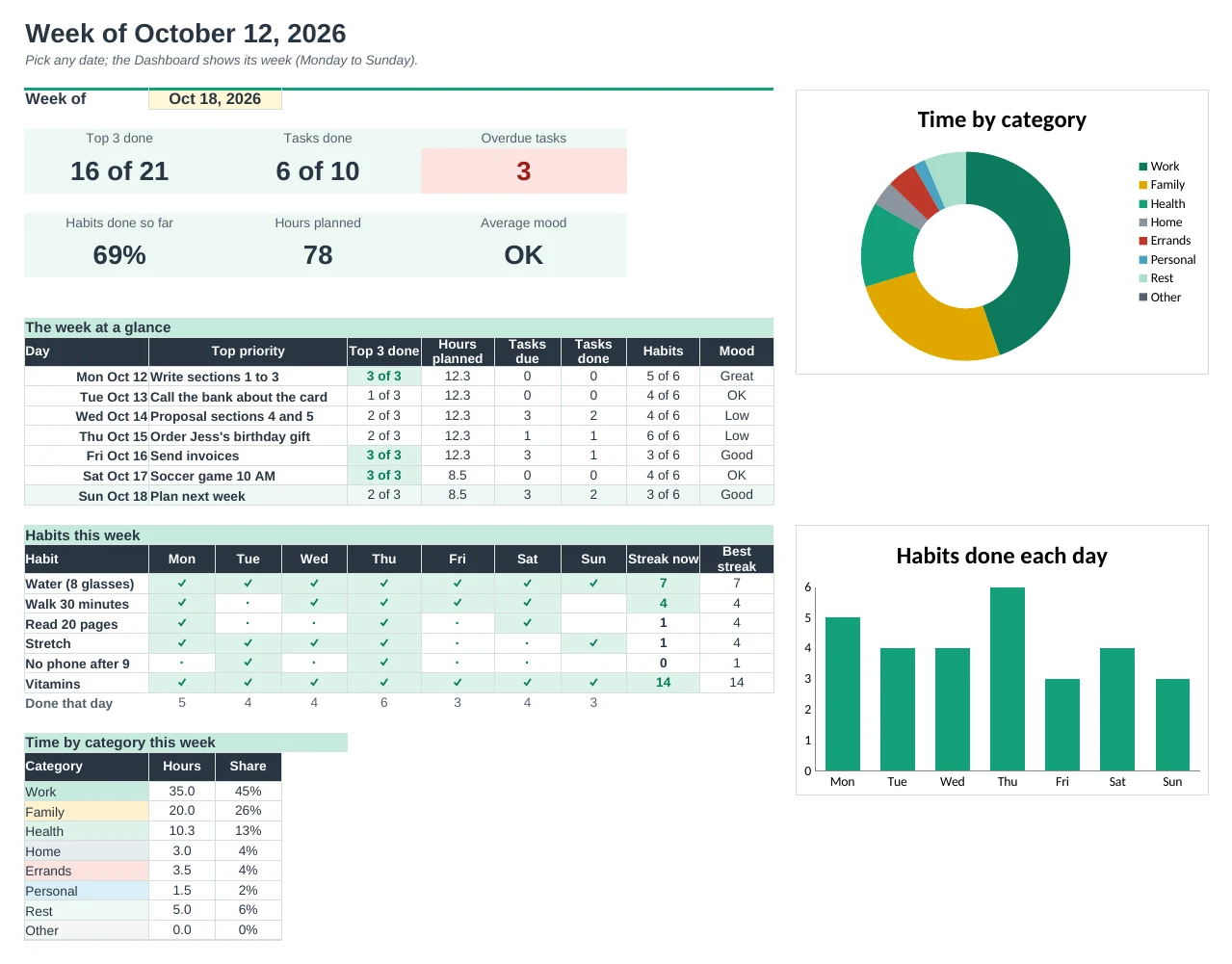
Tick up to 6 habits each day. Pages show your streaks, and the Dashboard shows this week's ticks and your best streak.
Look back at your week
The Dashboard shows top 3 done, tasks done, hours by category and your average mood for any week you pick.
| Free | Pro |
|---|---|
| One page you retype each day | Dated pages for every day from one start date |
| Hourly schedule | Half-hour schedule, coloured by category |
| Top 3 and to-do list | Top 3, plus tasks that show up on their due date |
| · | Habit tracker with streaks |
| · | Print a week of pages at once |
| · | Weekly review dashboard with charts |
| · | Mood, notes and grateful-for on every page |
$19 one-time
8 tabs: Start Here, Dashboard, Day Page, Week Pages, Days, Schedule, Tasks and Setup. You get two copies: one filled in with three weeks of sample plans so you can see it working, and a blank one ready for your own.
Get Daily Planner Pro for $19- Instant download after checkout
- Works in Google Sheets and Excel
- Yours to keep and reuse every year