
Free to-do list template for Google Sheets
Write down everything you need to do, give it a due date and a priority, and tick it off when it's done. The list tells you what's overdue, what's due today and what's coming up this week, and a summary shows how much is left in each part of your life.
Pro Want a Today view, repeating tasks and projects that never stall? See To-Do List Pro →| Done | Task | List | Priority | Due | Days left | Status | Notes |
|---|---|---|---|---|---|---|---|
| Book flu shots for the family | Family | High | Nov 2, 2026 | Done | Booked at the pharmacy | ||
| Renew car registration | Errands | High | Nov 3, 2026 | -1 | Overdue | Need proof of insurance | |
| Pay credit card bill | Money | High | Nov 4, 2026 | 0 | Due today | ||
| Call plumber about the kitchen tap | Home | Medium | Nov 5, 2026 | 1 | Next 7 days | ||
| Set up a meeting with my new manager | Work | Medium | Nov 5, 2026 | 1 | Next 7 days | ||
| Return library books | Errands | Low | Nov 1, 2026 | Done | |||
| Send Mia's soccer fee | Family | Medium | Nov 6, 2026 | 2 | Next 7 days | $85, e-transfer to coach | |
| Clean out the gutters | Home | Medium | Nov 8, 2026 | 4 | Next 7 days | Borrow Dave's ladder | |
| Finish quarterly report | Work | High | Nov 9, 2026 | 5 | Next 7 days | ||
| Book flights for Christmas | Family | High | Nov 10, 2026 | 6 | Next 7 days | Prices go up after the 15th | |
| Cancel unused streaming service | Money | Low | Oct 30, 2026 | Done | |||
| Order Thanksgiving turkey | Errands | Medium | Nov 13, 2026 | 9 | Later | 14 lb, pick up the 25th | |
| Swap to winter tires | Errands | Medium | Nov 14, 2026 | 10 | Later | ||
| Buy birthday gift for Dad | Family | Medium | Nov 20, 2026 | 16 | Later | ||
| Check home insurance renewal | Money | Medium | Nov 25, 2026 | 21 | Later | Compare two quotes | |
| Replace smoke alarm batteries | Home | High | Nov 1, 2026 | Done | |||
| Update resume | Work | Low | No date | ||||
| Sort the garage | Home | Low | No date | Donate pile and dump run | |||
| Item | Count |
|---|---|
| Today's date | Nov 4, 2026 |
| Open tasks | 14 |
| Done | 4 |
| Percent done | 22.2% |
| Overdue | 1 |
| Due today | 1 |
| Due in the next 7 days | 6 |
| High priority still open | 4 |
| Open tasks by list | |
| Home | 3 |
| Family | 3 |
| Errands | 3 |
| Money | 2 |
| Work | 3 |
What's inside
- A checkbox for every task, so ticking one off is a single click
- Status works itself out: Overdue, Due today, Next 7 days, Later, No date or Done
- Days left until each due date, counted from the date on the Summary tab
- Group tasks into lists like Home, Work, Family, Errands and Money
- A summary with open tasks, percent done, overdue count and open tasks per list
- Room for 40 tasks, and works in Google Sheets and Excel
How to use it
Download your copy
Click "Free download" to save the .xlsx file. It opens in Excel, or in Google Sheets: open a blank sheet (sheets.new) and choose File, then Import, then Upload.
Set today's date
On the Summary tab, the first value is the date the list counts from. Type =TODAY() there and it will always use the current date.
Clear the samples and add your tasks
Delete the sample tasks, then type one task per row. Add a list name, a priority (High, Medium or Low) and a due date if it has one.
Tick things off
Click the checkbox when a task is done. Its status changes to Done and it drops out of the open counts.
Sort when it gets long
Select the task rows, then use Data, then Sort range, to sort by Due or Priority. The Status and Days left columns follow each task.
Tips
Check the summary each morning
Overdue and Due today are the two numbers that matter. If both are zero, the rest can wait for its turn.
Keep tasks small
"Clean the garage" sits on a list for months. "Fill one donate box" gets done this weekend.
Use a filter to focus
Click Data, then Create a filter, and filter the List column to one list, or hide Done tasks, without deleting anything.
Make your own lists
Rename the lists on the Summary tab to match yours, like School or Garden, and use the same names in the List column.
Questions
How does the sheet know what's overdue?
It compares each due date with the date on the Summary tab. The sample uses a fixed date so the example makes sense. Type =TODAY() in that cell and it stays current.
How do I add more than 40 tasks?
Insert rows above the last task row and copy the Days left and Status formulas down. Then stretch the ranges in the Summary formulas to include the new rows.
Can I add checkboxes in Google Sheets myself?
Yes. Select the cells, then click Insert, then Checkbox. The Done column already has them for every row in the template.
Can I share the list with someone?
Yes. Click Share and add their email. With edit access you can both tick off tasks and see each other's changes.
Does it work in Excel?
Yes. Download the .xlsx file. In Excel the Done column uses a TRUE or FALSE dropdown instead of a checkbox.
Is it free?
Yes. Download the .xlsx file and open it in Excel or Google Sheets. No sign-up needed.
Pro version
To-Do List Pro
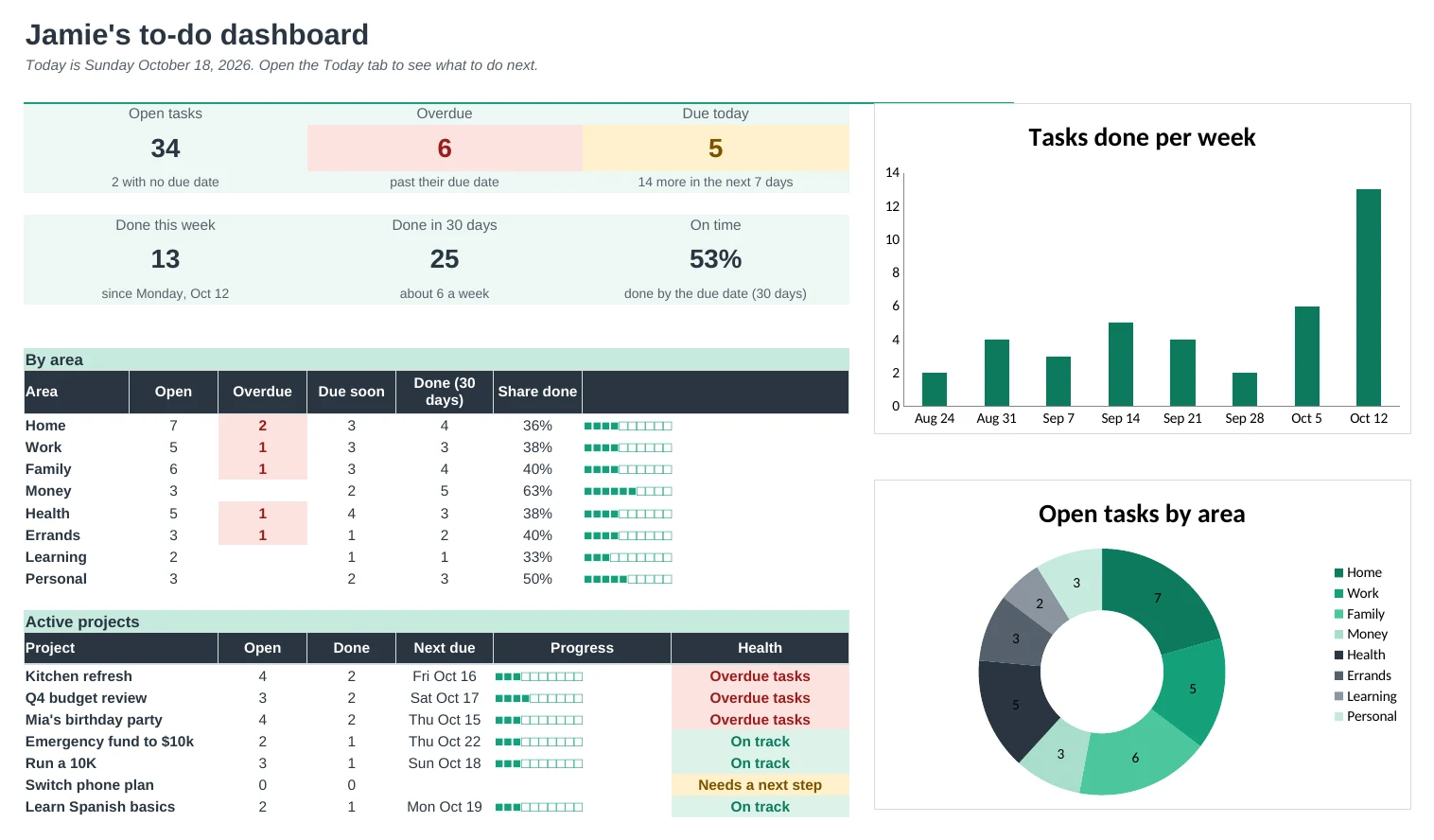
One list for everything, with a Today view sorted by priority, repeating tasks that come back by themselves, projects and a weekly review.
Know what to do today
Today lists anything overdue, due today or starred, most important first, with the minutes it will take next to the time you have.
Repeating tasks, no scripts
Set a task to repeat daily, on weekdays, weekly, monthly or yearly. Type the date you did it and it comes back on its next due date. Works in Google Sheets and Excel.
Projects that keep moving
Group tasks into projects with progress bars and a next due date. A project with nothing left to do is flagged 'Needs a next step'.
Plan your week
Next 7 Days lays out the week day by day with high-priority tasks marked. Print it for the fridge or your desk.
A weekly review in 20 minutes
A short checklist, what you finished, what's overdue, what's due next week and which projects need you.
See your progress
The Dashboard shows tasks done per week, how often you finish on time and which areas of life are slipping.
| Free | Pro |
|---|---|
| Checkboxes and due dates | Done dates that feed your stats |
| Overdue and due-soon flags | A Today view sorted by priority |
| Lists by area | Areas and projects with progress |
| · | Repeating tasks with no scripts |
| · | Printable next-7-days planner |
| · | Weekly review with a checklist |
| · | Dashboard with charts and an on-time rate |
| · | Time estimates against the time you have |
$19 one-time
8 tabs: Start Here, Dashboard, Today, Next 7 Days, Tasks, Projects, Weekly Review and Setup. You get two copies: one filled in with a sample list so you can see it working, and a blank one ready for your own tasks.
Get To-Do List Pro for $19- Instant download after checkout
- Works in Google Sheets and Excel
- Yours to keep and reuse every year