
Free weekly schedule template for Google Sheets
Lay out your week in half-hour slots from 6am to 10pm, Monday to Sunday. Type what you're doing in each slot and a summary tab adds up the hours for each activity, so you can see how much time goes to work, family, chores and yourself.
| Time | Monday | Tuesday | Wednesday | Thursday | Friday | Saturday | Sunday |
|---|---|---|---|---|---|---|---|
| Dates | Nov 2, 2026 | Nov 3, 2026 | Nov 4, 2026 | Nov 5, 2026 | Nov 6, 2026 | Nov 7, 2026 | Nov 8, 2026 |
| 6:00 AM | Gym | Gym | Gym | ||||
| 6:30 AM | Gym | Gym | Gym | ||||
| 7:00 AM | Meals | Meals | Meals | Meals | Meals | ||
| 7:30 AM | School run | School run | School run | School run | School run | ||
| 8:00 AM | Commute | Commute | Commute | Commute | Commute | Meals | |
| 8:30 AM | Work | Work | Work | Work | Work | ||
| 9:00 AM | Work | Work | Work | Work | Work | Soccer | Meals |
| 9:30 AM | Work | Work | Work | Work | Work | Soccer | Meals |
| 10:00 AM | Work | Work | Work | Work | Work | Soccer | |
| 10:30 AM | Work | Work | Work | Work | Work | Family time | |
| 11:00 AM | Work | Work | Work | Work | Work | Errands | Family time |
| 11:30 AM | Work | Work | Work | Work | Work | Errands | Family time |
| 12:00 PM | Meals | Meals | Meals | Meals | Meals | Errands | |
| 12:30 PM | Work | Work | Work | Work | Work | Meals | |
| 1:00 PM | Work | Work | Work | Work | Work | Chores | |
| 1:30 PM | Work | Work | Work | Work | Work | Chores | |
| 2:00 PM | Work | Work | Work | Work | Work | Chores | Cooking |
| 2:30 PM | Work | Work | Work | Work | Work | Chores | Cooking |
| 3:00 PM | Work | Work | Work | Work | Work | Cooking | |
| 3:30 PM | Work | Work | Work | Work | Work | ||
| 4:00 PM | Work | Work | Work | Work | Commute | Me time | |
| 4:30 PM | Work | Work | Work | Work | Me time | ||
| 5:00 PM | Commute | Commute | Commute | Commute | Cooking | ||
| 5:30 PM | Cooking | Cooking | Cooking | Cooking | Cooking | ||
| 6:00 PM | Meals | Meals | Meals | Meals | Family time | Dinner with friends | Meals |
| 6:30 PM | Family time | Soccer | Errands | Family time | Dinner with friends | ||
| 7:00 PM | Family time | Soccer | Errands | Book club | Family time | Dinner with friends | |
| 7:30 PM | Chores | Chores | Book club | Family time | Dinner with friends | ||
| 8:00 PM | Family time | Book club | Family time | Dinner with friends | Plan the week | ||
| 8:30 PM | Me time | Me time | Family time | Book club | Family time | Dinner with friends | |
| 9:00 PM | Me time | Me time | |||||
| 9:30 PM |
| Activity | Hours this week | Per day | Share of the week |
|---|---|---|---|
| Work | 39.00 | 5.57 | 34.8% |
| Commute | 5.00 | 0.71 | 4.5% |
| School run | 2.50 | 0.36 | 2.2% |
| Gym | 3.00 | 0.43 | 2.7% |
| Meals | 9.50 | 1.36 | 8.5% |
| Cooking | 4.50 | 0.64 | 4% |
| Chores | 3.00 | 0.43 | 2.7% |
| Errands | 2.50 | 0.36 | 2.2% |
| Soccer | 2.50 | 0.36 | 2.2% |
| Family time | 6.50 | 0.93 | 5.8% |
| Me time | 3.00 | 0.43 | 2.7% |
| Other (not in this list) | 5.50 | 0.79 | 4.9% |
| Total scheduled | 86.50 | 12.36 | 77.2% |
| Free (blank slots) | 25.50 | 3.64 | 22.8% |
What's inside
- Monday to Sunday in 30-minute slots from 6:00 AM to 10:00 PM
- Type the Monday date once and the whole week's dates fill in
- Change the first time slot and every row below shifts to match
- An hours summary that adds up time per activity, per day and as a share of the week
- Catches anything not on your activity list, so typos and one-offs still count
- Works in Google Sheets and Excel
How to use it
Make your copy
Click "Make a copy" to put the schedule in your Google Drive, or download the Excel version.
Set the week
Type the Monday date in the Dates row under Monday. The other six days follow.
Set your start time
The first slot is 6:00 AM. Type an earlier or later time in that cell and every slot below moves with it.
Fill in your week
Type an activity in each slot it takes up. Use the same word each time, like "Work" or "Gym". To fill a block fast, type it once and drag the small square at the cell's corner down.
Check the summary
Open Hours Summary to see your week in hours. Rename the activities there to match the words you use, and add your own rows.
Tips
Fill in the fixed stuff first
Start with work, school runs and anything you can't move. What's left blank is the time you really have to plan.
Keep a short list of words
The summary matches exact words. "Gym" and "gym" count together, but "Gym class" is different. The Other line shows anything that didn't match.
Color your blocks
Select a block and pick a fill color for each activity. It makes the week easy to read at a glance.
Duplicate it for next week
Right-click the tab, choose Duplicate, then change the Monday date. Your routine carries over and you only edit what's different.
Questions
Can I use one-hour slots instead?
The slots are set to 30 minutes, and the summary counts each filled slot as half an hour. For hourly blocks, just fill two slots per hour.
Can my week start on Sunday?
Yes. Rename the day headers so they start with Sunday, then type a Sunday date in the first date cell. The dates and the summary work the same way.
Why doesn't an activity show in the summary?
The summary only counts cells that match the activity name exactly. Check the spelling, or add the word as a new row. Unmatched entries show in the Other line.
Can I share it with my family?
Yes. Click Share in Google Sheets and add their email addresses. Give them view access, or edit access if they should add their own plans.
Does it work in Excel?
Yes. Download the .xlsx file. The dates, times and summary formulas all work in Excel.
Pro version
Weekly Schedule Pro
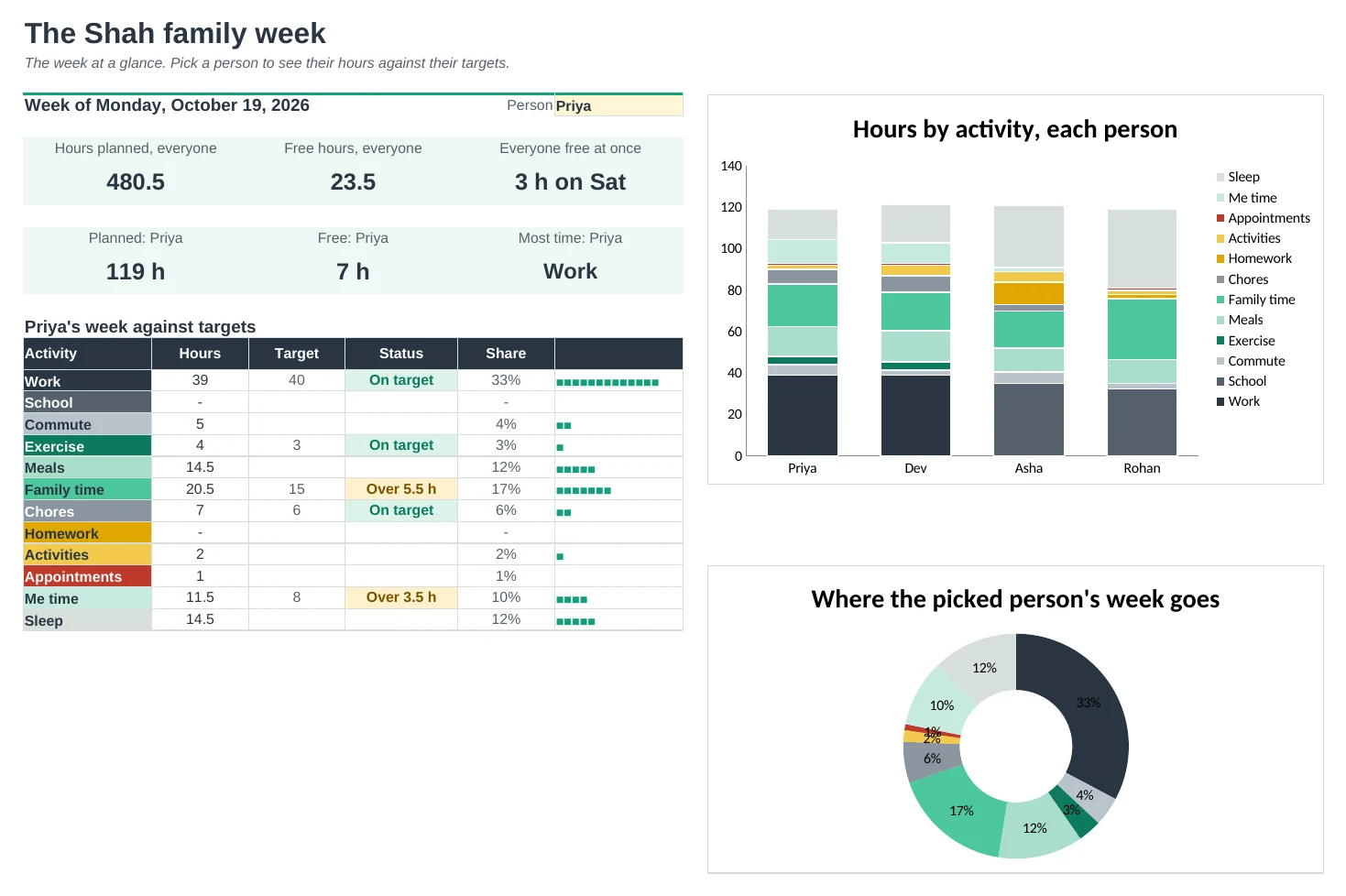
Plan the week for up to four people: pick an activity in each time slot, watch it colour itself, and see the hours add up against your goals.
Colour-coded without the painting
Pick an activity from the dropdown in any time slot and the cell takes that activity's colour. Rename an activity on Setup and it keeps its colour.
One tab per person
Up to four people each get their own week, side by side with a key that adds up their hours. Each one prints on a single landscape page.
Hours against your goals
Set weekly targets, like 40 hours of work or 3 hours of exercise. Each activity shows On target, Over or Short, so you can see where the week is drifting.
Find time when everyone is free
Pick a day on the Everyone tab to see all four schedules next to each other. Slots where nobody has plans are marked 'Everyone free'.
The week at a glance
The Dashboard shows planned and free hours, a chart of everyone's week by activity, and a breakdown for the person you pick.
Slots that fit your day
Choose 15, 30 or 60 minute slots and the time you start. Type the first day of the week once and every date fills in.
| Free | Pro |
|---|---|
| One person | Up to four people, one tab each |
| Fixed 30-minute slots | 15, 30 or 60 minute slots |
| Colour cells by hand | Cells colour themselves by activity |
| Hours per activity | Hours against weekly targets, with flags |
| · | Everyone tab: all schedules for one day, free time marked |
| · | Free hours per day and per week |
| · | Dashboard with charts |
$19 one-time
9 tabs: Start Here, Dashboard, Everyone, one schedule tab for each of four people, Hours and Setup. You get two copies: one filled in with a sample family so you can see it working, and a blank one with starter activities ready for your own week.
Get Weekly Schedule Pro for $19- Instant download after checkout
- Works in Google Sheets and Excel
- Yours to keep and reuse every year