
Free daily checklist template
Write your routine once, then tick it off each day of the week. Tasks are grouped by morning, afternoon and evening, and each one can repeat every day, on weekdays or on weekends. The sheet counts what you did and shows how each day and each part of the day went.
Pro Want routines for the whole family with cards you can print? See Daily Routine Checklist Pro →| When | Task | Repeat | Mon | Tue | Wed | Thu | Fri | Sat | Sun | Done | Planned | % done |
|---|---|---|---|---|---|---|---|---|---|---|---|---|
| Week of | Nov 2, 2026 | 2 | 3 | 4 | 5 | 6 | 7 | 8 | ||||
| Morning | Make the bed | Every day | 6 | 7 | 85.7% | |||||||
| Morning | Drink a glass of water | Every day | 7 | 7 | 100% | |||||||
| Morning | Take medication | Every day | 7 | 7 | 100% | |||||||
| Morning | 10-minute stretch | Every day | 4 | 7 | 57.1% | |||||||
| Morning | Check today's calendar | Weekdays | 5 | 5 | 100% | |||||||
| Morning | Pack lunch | Weekdays | 4 | 5 | 80% | |||||||
| Afternoon | Walk after lunch | Weekdays | 3 | 5 | 60% | |||||||
| Afternoon | Clear the inbox | Weekdays | 4 | 5 | 80% | |||||||
| Afternoon | Start dinner by 5:30 | Every day | 6 | 7 | 85.7% | |||||||
| Evening | Tidy the kitchen | Every day | 6 | 7 | 85.7% | |||||||
| Evening | Lay out tomorrow's clothes | Weekdays | 3 | 5 | 60% | |||||||
| Evening | Plan tomorrow's top 3 | Weekdays | 4 | 5 | 80% | |||||||
| Evening | Read 15 minutes | Every day | 6 | 7 | 85.7% | |||||||
| Evening | Screens off by 10 PM | Every day | 4 | 7 | 57.1% | |||||||
| Anytime | Start a load of laundry | Weekends | 2 | 2 | 100% | |||||||
| Anytime | Meal plan and grocery list | Weekends | 1 | 2 | 50% | |||||||
| Anytime | Call or text family | Weekends | 1 | 2 | 50% | |||||||
| Done | 13 | 12 | 11 | 12 | 9 | 8 | 8 | 73 | ||||
| Planned | 14 | 14 | 14 | 14 | 14 | 11 | 11 | 92 | ||||
| % done | 92.9% | 85.7% | 78.6% | 85.7% | 64.3% | 72.7% | 72.7% | 79.3% |
| Part of the day | Tasks | Planned | Done | % done |
|---|---|---|---|---|
| Morning | 6 | 38 | 33 | 86.8% |
| Afternoon | 3 | 17 | 13 | 76.5% |
| Evening | 5 | 31 | 23 | 74.2% |
| Anytime | 3 | 6 | 4 | 66.7% |
| Whole week | 17 | 92 | 73 | 79.3% |
| Best day | 92.9% |
What's inside
- One routine, seven days: a checkbox for every task on every day of the week
- Set each task to repeat every day, on weekdays or on weekends, and the planned count follows
- Done count and percent for every task, plus a done, planned and percent row for each day
- Summary tab by morning, afternoon, evening and anytime, so you can see which part of the day slips
- Dates for the week fill in from one Week of cell
- Prints on one page for the fridge, or works on screen in Google Sheets and Excel
How to use it
Download your copy
Click "Free download" to save the .xlsx file. It opens in Excel, or in Google Sheets: open a blank sheet (sheets.new) and choose File, then Import, then Upload.
Set the week
Type the Monday date in the Week of cell. The small day numbers under Mon to Sun change to match.
Write your routine
Replace the sample tasks with yours. Put Morning, Afternoon, Evening or Anytime in the When column, and Every day, Weekdays or Weekends in Repeat.
Tick as you go
Click the box when a task is done. The Done and % done columns and the rows at the bottom update straight away.
Look back on Sunday
Open the Summary tab to see which part of the day went well and which slipped. Change one thing for next week.
Start next week
Right-click the tab and choose Duplicate, or just untick everything and type the new Monday date. Your routine stays put.
Tips
Print it for the fridge
Go to File > Print. Choose Portrait, set Scale to "Fit to width" and turn on "Show gridlines" under Formatting. Untick everything first so the boxes print empty, then tick them with a pen.
Keep the list short
Ten to fifteen tasks is plenty. A routine you finish feels better than a long one you abandon by Wednesday.
Stack tasks onto habits you have
"Take medication" right after "Drink a glass of water" is easier to remember than at a random time. Order the list the way your day really runs.
Use the blank rows
There are three empty rows before the totals. Type new tasks there and they are counted everywhere. To add more, insert rows above the last empty one.
Questions
How is this different from a habit tracker?
A habit tracker follows a few habits across a whole month. This checklist is your full daily routine for one week, grouped by time of day, so you can work down it each morning and evening.
What if a task is only on some days?
Set Repeat to Weekdays or Weekends. For other patterns, like Monday and Thursday only, leave Repeat blank and the task still counts its ticks without a planned number.
Can I print a blank daily checklist?
Yes. Untick all the boxes, then File > Print with "Fit to width". You'll get empty boxes to tick by hand. Turn on gridlines so the rows are easy to follow.
Can the whole family use it?
Yes. Duplicate the tab for each person and put their name in the tab. Share the file and everyone ticks their own tab.
Does it work in Excel?
Yes. Download the .xlsx file. In Excel the boxes show as TRUE or FALSE with a dropdown instead of a checkbox.
Is it free?
Yes. Download the .xlsx file and open it in Excel or Google Sheets. No sign-up needed.
Pro version
Daily Routine Checklist Pro
Morning, after-school and bedtime routines for everyone in the house, with printable routine cards, a monthly grid and streaks.
A routine for each person
Give everyone their own routines: a morning and bedtime for each child, an evening reset for you. Up to 6 people and 12 routines.
Steps that change by day
Each routine can run every day, on weekdays, at weekends or on days you pick, and so can each step. Gym clothes on Tuesday and Thursday, bath every other night.
Print a card for the fridge
Pick a person and print their week: each routine with step times and a box for every day, with grey dots on days a step doesn't happen.
Tick once a day
Type x when a routine is done and p if it was partly done. Days a routine isn't on are greyed out and never count as missed.
Streaks that are fair
Weekday routines keep their streak over the weekend, and today stays open until tomorrow. Partly done still counts.
See the month at a glance
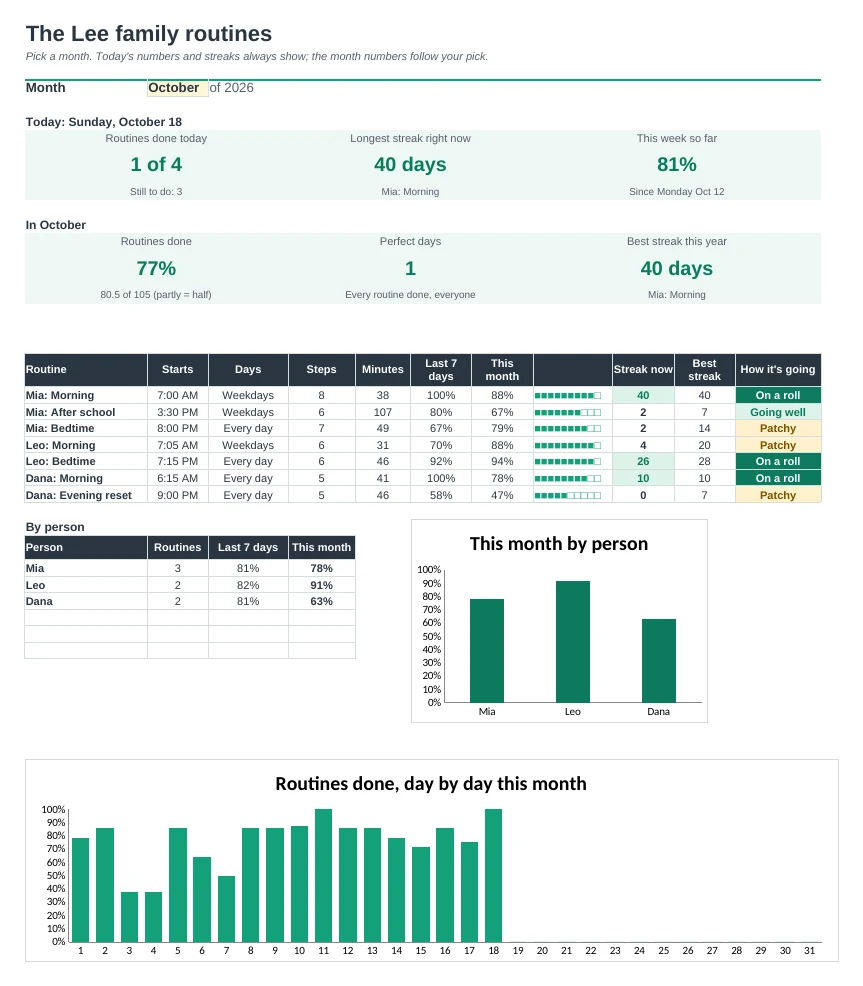
Month Grid shows every routine for every day, for one person or the whole family. The Dashboard shows today, this week, streaks and each person.
| Free | Pro |
|---|---|
| One routine for one week | Routines for up to 6 people, all year |
| Every day, weekdays or weekends | Plus custom days for routines and for single steps |
| Done count per day | Streaks, perfect days and a month grid |
| Printable checklist | Printable routine cards with step times |
| · | Dashboard with today, this week and each person |
| · | Start times worked out from step minutes |
| · | Routine ideas for ages 3 to adult |
$19 one-time
8 tabs: Start Here, Dashboard, Check-offs, Month Grid, Routine Cards, Steps, Routine Ideas and Setup. You get two copies: one filled in with a sample family so you can see it working, and a blank one ready for your own routines.
Get Daily Routine Checklist Pro for $19- Instant download after checkout
- Works in Google Sheets and Excel
- Yours to keep and reuse every year