
Free family tree template for Google Sheets
Add each relative once, with their birth and death years and the IDs of their parents. The sheet works out which generation everyone belongs to and draws a four-generation tree for any person you pick, from them back to their great-grandparents. Gaps show up as "not added yet", so you can see where to dig next.
Pro Want charts and named relationships that work themselves out from one list? See Family Tree Pro →| Start person | Parents | Grandparents | Great-grandparents |
|---|---|---|---|
| Thomas Hayes (1905-1978) | |||
| Robert Hayes (1935-2011) | |||
| Margaret Hayes (1908-1990) | |||
| Michael Hayes (b. 1962) | |||
| Patrick Byrne (1910-1972) | |||
| Dorothy Hayes (1938-2019) | |||
| Helen Byrne (1913-1999) | |||
| Emily Carter (b. 1994) | |||
| Jose Lopez (1912-1980) | |||
| Luis Lopez (1939-2015) | |||
| Rosa Lopez (1915-2001) | |||
| Karen Hayes (b. 1964) | |||
| (not added yet) | |||
| Maria Lopez (b. 1941) | |||
| (not added yet) |
| ID | First name | Last name | Birth surname | Born (year) | Died (year) | Birthplace | Parent 1 ID | Parent 2 ID | Spouse ID | Gen (no parents listed) | Generation | Age or age at death | Notes |
|---|---|---|---|---|---|---|---|---|---|---|---|---|---|
| 1 | Thomas | Hayes | 1905 | 1978 | Boston, MA | 2 | 1 | 1 | 73 | Worked on the Boston docks | |||
| 2 | Margaret | Hayes | Quinn | 1908 | 1990 | Cork, Ireland | 1 | 1 | 1 | 82 | Came to Boston in 1926 | ||
| 3 | Patrick | Byrne | 1910 | 1972 | Philadelphia, PA | 4 | 1 | 1 | 62 | ||||
| 4 | Helen | Byrne | Walsh | 1913 | 1999 | Philadelphia, PA | 3 | 1 | 1 | 86 | |||
| 5 | Jose | Lopez | 1912 | 1980 | Guadalajara, Mexico | 6 | 1 | 1 | 68 | ||||
| 6 | Rosa | Lopez | Garcia | 1915 | 2001 | Guadalajara, Mexico | 5 | 1 | 1 | 86 | |||
| 7 | Robert | Hayes | 1935 | 2011 | Boston, MA | 1 | 2 | 8 | 2 | 76 | Navy, 1953 to 1957 | ||
| 8 | Dorothy | Hayes | Byrne | 1938 | 2019 | Philadelphia, PA | 3 | 4 | 7 | 2 | 81 | ||
| 9 | Luis | Lopez | 1939 | 2015 | San Antonio, TX | 5 | 6 | 10 | 2 | 76 | |||
| 10 | Maria | Lopez | Ortiz | 1941 | El Paso, TX | 9 | 2 | 2 | 85 | Parents not added yet | |||
| 11 | Michael | Hayes | 1962 | Boston, MA | 7 | 8 | 12 | 3 | 64 | ||||
| 12 | Karen | Hayes | Lopez | 1964 | San Antonio, TX | 9 | 10 | 11 | 3 | 62 | |||
| 13 | Susan | Reed | Hayes | 1965 | Boston, MA | 7 | 8 | 14 | 3 | 61 | |||
| 14 | David | Reed | 1963 | Hartford, CT | 13 | 3 | 3 | 63 | Married into the family | ||||
| 15 | Emily | Carter | Hayes | 1994 | Boston, MA | 11 | 12 | 18 | 4 | 32 | |||
| 16 | Daniel | Hayes | 1997 | Boston, MA | 11 | 12 | 4 | 29 | |||||
| 17 | Jake | Reed | 1992 | Hartford, CT | 14 | 13 | 4 | 34 | |||||
| 18 | James | Carter | 1993 | Denver, CO | 15 | 4 | 4 | 33 | Married into the family | ||||
| 19 | Ava | Carter | 2023 | Boston, MA | 18 | 15 | 5 | 3 | |||||
| Item | Value |
|---|---|
| This year | 2026 |
| Tree starts with person ID | 15 |
| Tree starts with | Emily Carter (b. 1994) |
| People in the tree | 19 |
| Living | 10 |
| Generations | 5 |
| Earliest birth year | 1905 |
| People by generation | |
| Generation 1 | 6 |
| Generation 2 | 4 |
| Generation 3 | 4 |
| Generation 4 | 4 |
| Generation 5 | 1 |
| Generation 6 | 0 |
What's inside
- A people list with ID, names, birth surname, birth and death years, birthplace, parents, spouse and notes
- Generation numbers worked out from the parent links, oldest ancestors first
- A tree tab that shows any person, their parents, grandparents and great-grandparents
- Change one ID on the Summary tab and the tree redraws for someone else in the family
- Missing ancestors show as "not added yet", so the gaps in your research are easy to spot
- Works in Google Sheets and Excel, and you can share it with relatives who want to help
How to use it
Download your copy
Click "Free download" to save the .xlsx file. It opens in Excel, or in Google Sheets: open a blank sheet (sheets.new) and choose File, then Import, then Upload.
Start with what you know
On the People tab, give each person a number in the ID column, then add their name, birth year and birthplace. Start with yourself, your parents and your grandparents.
Link parents
For each person, type their parents' IDs in Parent 1 ID and Parent 2 ID. Keep the same order each time, for example father first, so the tree lays out the same way.
Set generations for the top
For people with no parents in the list, like your oldest ancestors or someone who married in, type a number in Gen (no parents listed). Use 1 for the oldest generation. Everyone else's generation works itself out.
Pick who the tree is about
On the Summary tab, change Tree starts with person ID. The Family Tree tab shows that person on the left with three generations of ancestors to the right.
Print or share it
Open the Family Tree tab, click File, then Print, and choose Landscape and Fit to width. Or click Share and invite relatives to fill in what they know.
Tips
Ask the oldest relatives first
Grandparents and great-aunts remember names, places and dates that aren't written anywhere. A short phone call can fill a whole generation.
Use birth surnames
Record each person's surname at birth in Birth surname. Records like birth and marriage certificates use it, and it's often the key to the next generation back.
Write down where you found it
Use Notes for sources, like "1940 census" or "Aunt Rosa", so you or a relative can check it later.
Only know a rough year?
Type your best guess in Born (year) and add "about" in Notes. You can fix it when you find a record.
Questions
How do I make a family tree in Google Sheets?
List everyone on the People tab with an ID and their parents' IDs. This template then works out generations and draws the tree on the Family Tree tab, so there's no drawing or merging cells.
How does it work out the generation?
It follows each person's parents up the list until it reaches someone with no parents listed, then counts the steps. That top person's Gen (no parents listed) number is the starting point, 1 if it's empty.
How many generations does the tree show?
The Family Tree tab shows four: the start person, parents, grandparents and great-grandparents. To go further back, change the start person to a grandparent and the chart moves up the family.
Can I add brothers, sisters, cousins and children?
Yes. Add anyone to the People tab with their parents' IDs. They get a generation number and can be the start of the tree, which shows ancestors, not siblings.
Does it work in Excel?
Yes. Download the .xlsx file. The generation numbers and the tree work the same way in Excel.
Is this family tree template free?
Yes. Download the .xlsx file and open it in Excel or Google Sheets. No sign-up.
Pro version
Family Tree Pro
Type each relative once and pick their parents. The sheet names every relationship and draws the charts for you.
Type each person once
Add someone on People and pick their parents and spouse from a dropdown. There's no numbering to keep straight and nothing to type twice.
Every relationship named
Each person shows how they're related to you: grandmother, great-uncle, half-sister, 2nd cousin once removed, or in-law.
Work out any two people
The relationship tab finds the closest ancestor two people share and shows both family lines up to them.
Charts that draw themselves
A five-generation ancestor chart, a family group sheet, an indented descendant list and a timeline with ages. Pick anyone and print it on one page.
Keep your sources
Log each record with how reliable it is, from an original record to a family story. People shows how many sources back each person up.
Know where to dig next
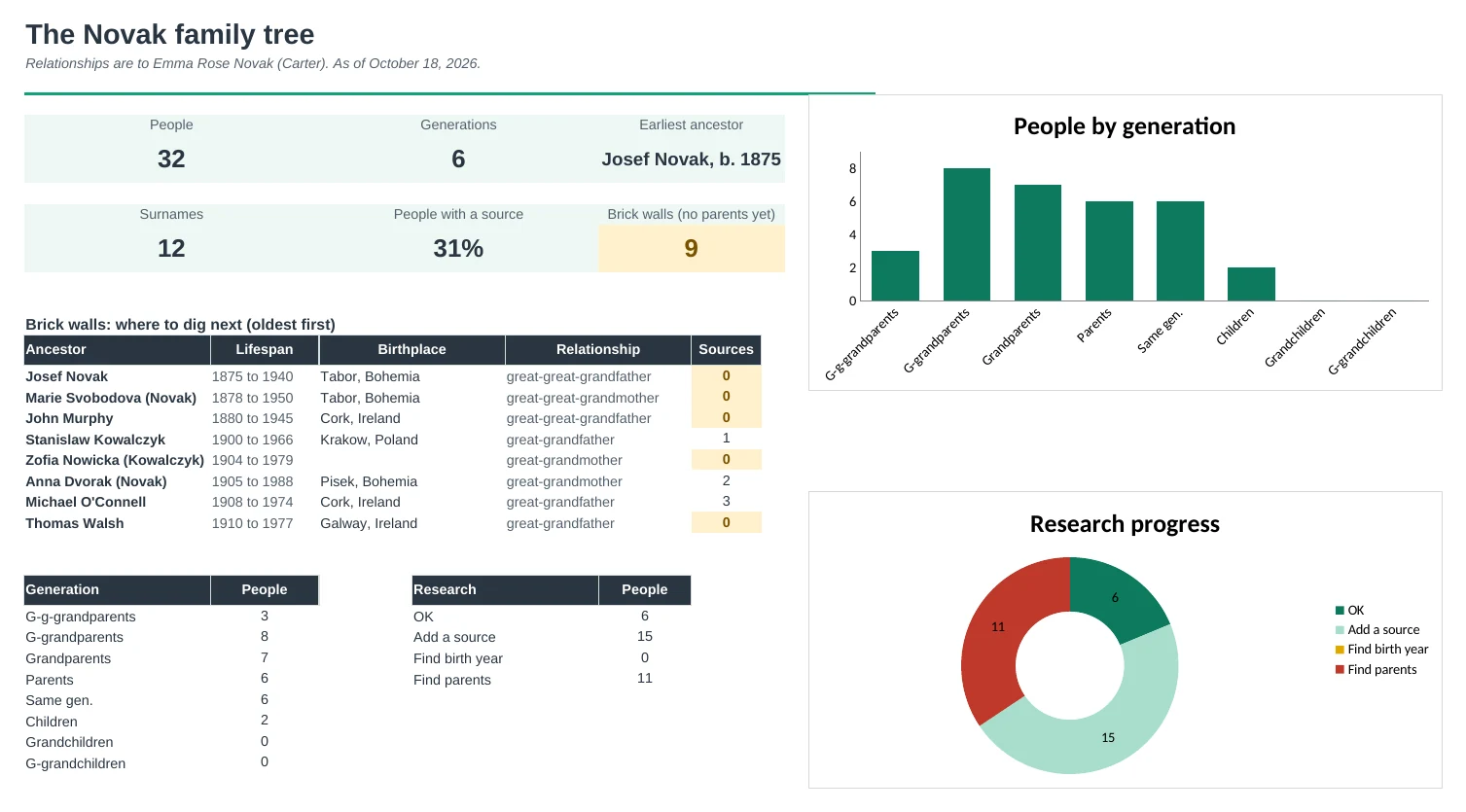
The Dashboard lists your brick walls, the ancestors with no parents yet, oldest first. Each person shows the next thing to find.
| Free | Pro |
|---|---|
| People list with parent IDs | Pick parents and spouse from a dropdown |
| Four-generation tree for one person | Five-generation ancestor chart for anyone |
| Generation number | Named relationship to you on every row |
| · | Relationship calculator for any two people |
| · | Family group sheet and descendant list |
| · | Timeline of events with ages |
| · | Sources with reliability ratings |
| · | Dashboard with brick walls and research progress |
$19 one-time
11 tabs: Start Here, Dashboard, Ancestor Chart, Family Group, Descendants, Relationship, Timeline, People, Events, Sources and Setup. You get two copies: one filled in with a sample family across five generations so you can see it working, and a blank one ready for your own.
Get Family Tree Pro for $19- Instant download after checkout
- Works in Google Sheets and Excel
- Yours to keep and reuse every year