
Free recipe template for Google Sheets
Type a recipe once: the details, the ingredients and the method, side by side on one card. Change how many people you're feeding and every amount scales to match. A recipe index keeps all your recipes in one list with ratings, times and how often you make them, and a converter handles cups, spoons, ounces and grams.
Pro Want every recipe in one place, with a search for what you can cook tonight? See Recipe Collection Pro →| Detail | Value | Ingredient | Amount | Unit | Scaled amount | Step | Method |
|---|---|---|---|---|---|---|---|
| Recipe | Chicken tortilla soup | Boneless chicken thighs | 1.5 | lb | 2.25 | 1 | Heat the oil in a large pot over medium heat. Cook the onion and jalapeno for 5 minutes. |
| Category | Soup | Olive oil | 2 | tbsp | 3 | 2 | Add the garlic, cumin and chili powder and stir for 1 minute. |
| Serves (as written) | 6 | Onion, diced | 1 | whole | 1.5 | 3 | Add the chicken, broth and tomatoes. Bring to a boil, then simmer, covered, for 20 minutes. |
| Want to serve | 9 | Garlic cloves, minced | 3 | cloves | 4.5 | 4 | Lift out the chicken, shred it with two forks and put it back in the pot. |
| Scale by | 1.5 | Jalapeno, seeded and diced | 1 | whole | 1.5 | 5 | Stir in the beans and corn and simmer 5 more minutes. |
| Prep (min) | 15 | Ground cumin | 2 | tsp | 3 | 6 | Turn off the heat. Stir in the lime juice, cilantro and salt. Taste and adjust. |
| Cook (min) | 35 | Chili powder | 1 | tsp | 1.5 | 7 | Serve with crushed tortilla chips, plus avocado or sour cream if you like. |
| Total (min) | 50 | Chicken broth | 6 | cups | 9 | ||
| Source | Aunt Rosa's card | Diced tomatoes (14.5 oz can) | 1 | can | 1.5 | ||
| Notes | Freezes well for 3 months | Black beans, drained (15 oz can) | 1 | can | 1.5 | ||
| Frozen corn | 1 | cup | 1.5 | ||||
| Salt | 1 | tsp | 1.5 | ||||
| Lime juice | 2 | tbsp | 3 | ||||
| Fresh cilantro, chopped | 0.25 | cup | 0.38 | ||||
| Tortilla chips, to serve | 3 | cups | 4.5 | ||||
| Recipe | Category | Serves | Prep (min) | Cook (min) | Total (min) | Rating (1-5) | Made it | Times made | Last made | Notes |
|---|---|---|---|---|---|---|---|---|---|---|
| Chicken tortilla soup | Soup | 6 | 15 | 35 | 50 | 5 | 4 | Oct 25, 2026 | Recipe Card tab | |
| Sheet pan chicken fajitas | Dinner | 4 | 15 | 25 | 40 | 5 | 6 | Oct 28, 2026 | ||
| Spaghetti with meat sauce | Dinner | 6 | 10 | 40 | 50 | 4 | 9 | Oct 30, 2026 | ||
| Turkey chili | Dinner | 8 | 20 | 60 | 80 | 4 | 3 | Oct 11, 2026 | ||
| Lemon garlic salmon | Dinner | 4 | 10 | 15 | 25 | 5 | 5 | Oct 21, 2026 | ||
| Black bean tacos | Dinner | 4 | 10 | 15 | 25 | 4 | 7 | Oct 14, 2026 | ||
| Overnight oats | Breakfast | 2 | 5 | 0 | 5 | 4 | 12 | Nov 2, 2026 | ||
| Buttermilk pancakes | Breakfast | 4 | 10 | 20 | 30 | 5 | 3 | Sep 27, 2026 | ||
| Banana bread | Baking | 10 | 15 | 60 | 75 | 5 | 4 | Oct 4, 2026 | Uses 3 ripe bananas | |
| Chocolate chip cookies | Baking | 24 | 20 | 12 | 32 | 5 | 6 | Sep 12, 2026 | ||
| Greek salad | Side | 4 | 15 | 0 | 15 | 4 | 2 | Aug 30, 2026 | ||
| Roasted sweet potatoes | Side | 4 | 10 | 30 | 40 | 4 | 5 | Oct 25, 2026 | ||
| Chicken pot pie | Dinner | 6 | 30 | 45 | 75 | 0 | Want to try | |||
| Pumpkin pie | Baking | 8 | 20 | 55 | 75 | 0 | For Thanksgiving | |||
| Thai peanut noodles | Dinner | 4 | 15 | 10 | 25 | 0 | Saved from a blog | |||
| Amount | From | To | Result | Unit | Kind | Size (tsp or g) | |
|---|---|---|---|---|---|---|---|
| 1.5 | cup | tbsp | 24 | tsp | Volume | 1 | |
| 2 | tbsp | tsp | 6 | tbsp | Volume | 3 | |
| 1 | cup | ml | 236.59 | fl oz | Volume | 6 | |
| 250 | ml | cup | 1.06 | cup | Volume | 48 | |
| 8 | oz | g | 226.8 | pint | Volume | 96 | |
| 500 | g | lb | 1.1 | quart | Volume | 192 | |
| 3 | tbsp | cup | 0.19 | gallon | Volume | 768 | |
| 1 | lb | cup | Can't convert | ml | Volume | 0.2 | |
| liter | Volume | 202.88 | |||||
| g | Weight | 1 | |||||
| kg | Weight | 1,000 | |||||
| oz | Weight | 28.35 | |||||
| lb | Weight | 453.59 | |||||
| Item | Value |
|---|---|
| Recipes | 15 |
| Made at least once | 12 |
| Still to try | 3 |
| Ready in 30 minutes or less | 6 |
| Average rating | 4.5 |
| Times cooked, all recipes | 66 |
| Recipes by category | |
| Breakfast | 2 |
| Dinner | 7 |
| Soup | 1 |
| Side | 2 |
| Baking | 3 |
What's inside
- A recipe card with details, ingredients and the method side by side on one page
- Type how many people you're feeding and every ingredient amount scales for you
- Total time worked out from prep and cook time
- A recipe index with category, servings, times, a 1 to 5 rating, a Made it tick and when you last made it
- A unit converter for teaspoons, tablespoons, cups, milliliters, ounces, pounds and grams
- Prints a clean recipe card from Google Sheets, and works in Excel too
How to use it
Download your copy
Click "Free download" to save the .xlsx file. It opens in Excel, or in Google Sheets: open a blank sheet (sheets.new) and choose File, then Import, then Upload.
Fill in a recipe card
On the Recipe Card tab, type the recipe name, how many it serves and the prep and cook times. List the ingredients with an amount and unit, then the steps in the Method column.
Scale it
Change Want to serve. Scale by works itself out, and the Scaled amount column shows what to use. Set Want to serve back to the original number to cook it as written.
One tab per recipe
Right-click the Recipe Card tab, choose Duplicate and rename the copy after the recipe. Clear it and type the next one.
Add it to the index
Put every recipe on the Recipe Index, even ones you only want to try. Tick Made it and update Times made and Last made when you cook it.
Print a card
Open a recipe tab and click File, then Print. Choose Landscape and Fit to width so the ingredients and method fit on one page.
Tips
Write amounts as numbers
Type amounts like 1/2 as 0.5 so they can scale. Put words like "to taste" or "a pinch" in the ingredient name and leave Amount empty.
Round the scaled amounts
1.33 cups is hard to measure. Round to the nearest quarter cup, and use the Unit Converter to switch 0.19 cups into about 3 tablespoons.
Watch salt and spices when scaling
Doubling everything works for most ingredients, but salt, spices and baking powder sometimes need less. Add them a little at a time and taste.
Find recipes fast
On the Recipe Index, click Data, then Create a filter. Filter by Category, or sort by Total (min) to find something quick on a busy night.
Questions
How do I make a recipe card in Google Sheets?
Copy this template, then fill in the Recipe Card tab: details on the left, ingredients in the middle and the method on the right. Duplicate the tab for each new recipe.
How does the recipe scaling work?
Scale by is Want to serve divided by Serves (as written). Each ingredient amount is multiplied by that number, rounded to two decimals.
Can I keep a whole cookbook in one spreadsheet?
Yes. Give each recipe its own tab and list them all on the Recipe Index. Use the Notes column on the index to say which tab a recipe is on.
Can I convert cups to grams?
Not directly. Cups measure volume and grams measure weight, so it depends on the ingredient. The converter handles volume to volume and weight to weight, and says Can't convert for mixed pairs. Type units exactly as they appear in its Unit list.
Can I print my recipes?
Yes. In Google Sheets, open the recipe tab, click File, then Print, and pick Landscape with Fit to width. Untick Show gridlines under Formatting for a cleaner card.
Is this recipe template free?
Yes. Download the .xlsx file and open it in Excel or Google Sheets. No sign-up.
Pro version
Recipe Collection Pro
All your recipes in one place: scale and convert any of them, print a clean card, and find what you can cook tonight.
Find what you can cook
Type what's in the fridge, or tick it on the Pantry tab. What Can I Cook lists the recipes you're closest to making and names what's missing.
Scale and convert in one step
Pick how many you're feeding and choose as written, US or metric. Amounts show as kitchen fractions like 1 1/2 cups or 2/3 tsp, not 0.667.
Print a recipe card
One clean page with ingredients, numbered steps, your notes and the last tips from your cook log.
Know the cost per serving
Type each ingredient's pack price once. Every recipe works out its batch cost and cost per serving, even when the recipe says cups and the bag says pounds.
Ratings, tags and favourites
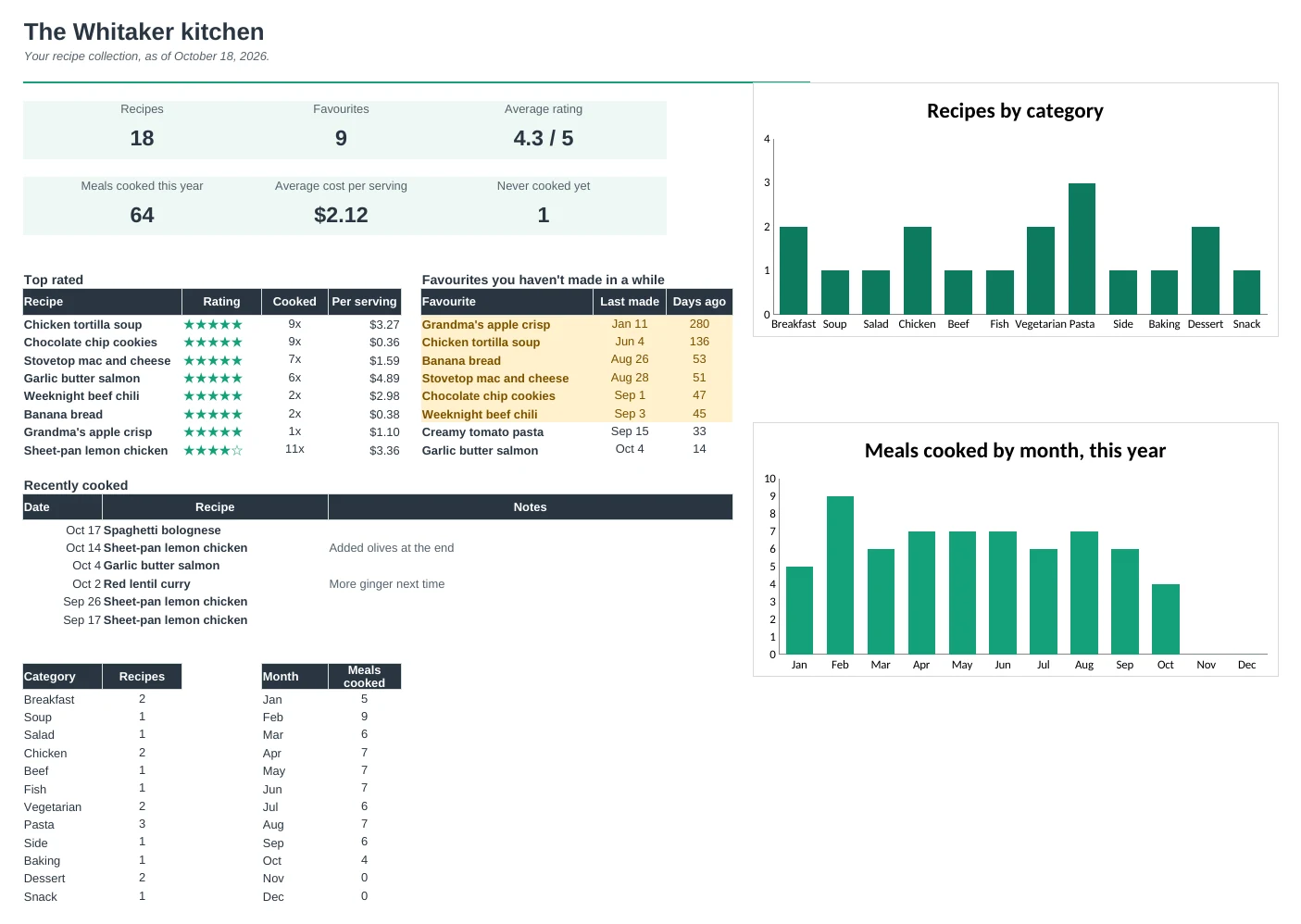
Filter by category, tag, time or favourites. The Dashboard shows your top rated recipes and the favourites you haven't made in a while.
A cook log with notes
Add a line each time you cook something. Times made, last made and notes like 'less salt next time' follow onto the card.
| Free | Pro |
|---|---|
| One recipe card at a time | Every recipe in one collection, picked from a dropdown |
| Scale servings | Scale and convert to US or metric, in kitchen fractions |
| Recipe index with ratings | Dashboard with top rated, due favourites and charts |
| Unit converter | Converter with cups to grams by ingredient, and oven temperatures |
| · | What Can I Cook search by ingredient |
| · | Cost per serving from your pantry prices |
| · | Tags, favourites and category filters |
| · | Cook log with notes that show on the card |
$19 one-time
11 tabs: Start Here, Dashboard, Recipe Card, What Can I Cook, Recipes, Ingredients, Method, Cook Log, Pantry, Converter and Setup. You get two copies: one filled in with 18 sample recipes so you can see it working, and a blank one with a starter pantry ready for your own recipes.
Get Recipe Collection Pro for $19- Instant download after checkout
- Works in Google Sheets and Excel
- Yours to keep and reuse every year