
Free fire drill log template
Log every fire drill in one place: when and where it happened, how many people got out, how long it took and what went wrong. The sheet checks each evacuation time against your target, keeps track of fixes until they're done and works out when each building's next drill is due.
Pro Want a drill schedule by building and shift, roll-call checks and printable drill records? See Fire Drill Log Pro →| Date | Time | Building | Type | Shift | People out | Minutes | Seconds | Evac time | Target met | All accounted for | Issues found | Action needed | Fixed | Led by | Signed off by | Follow-up | Result |
|---|---|---|---|---|---|---|---|---|---|---|---|---|---|---|---|---|---|
| Nov 12, 2025 | 10:15 AM | Head office | Announced | Day | 64 | 2 | 50 | 2:50 | Yes | Yes | Linda Park | R. Owens | Closed | OK | |||
| Nov 19, 2025 | 2:30 PM | Warehouse | Announced | Day | 38 | 2 | 40 | 2:40 | Yes | Yes | Mike Torres | R. Owens | Closed | OK | |||
| Dec 3, 2025 | 9:45 AM | Store 2 | Announced | Day | 22 | 2 | 10 | 2:10 | Yes | Yes | Jen Adler | R. Owens | Closed | OK | |||
| Feb 10, 2026 | 11:00 AM | Head office | Unannounced | Day | 71 | 4 | 20 | 4:20 | No | No | Two visitors not on the sign-in sheet | Make visitor sign-in mandatory at reception | Linda Park | R. Owens | Closed | Review | |
| Feb 24, 2026 | 10:30 PM | Warehouse | Unannounced | Night | 17 | 2 | 55 | 2:55 | Yes | Yes | Alarm hard to hear in the freezer area | Add a strobe light in the freezer | Mike Torres | R. Owens | Closed | Review | |
| Mar 5, 2026 | 3:20 PM | Store 2 | Unannounced | Day | 26 | 2 | 35 | 2:35 | Yes | Yes | Back exit blocked by delivery pallets | Keep a clear zone painted on the floor | Jen Adler | R. Owens | Closed | Review | |
| May 12, 2026 | 10:00 AM | Head office | Announced | Day | 68 | 2 | 58 | 2:58 | Yes | Yes | Linda Park | R. Owens | Closed | OK | |||
| May 27, 2026 | 2:00 PM | Warehouse | Announced | Day | 41 | 2 | 45 | 2:45 | Yes | Yes | Mike Torres | R. Owens | Closed | OK | |||
| Jun 4, 2026 | 12:30 PM | Store 2 | Announced | Day | 31 | 2 | 5 | 2:05 | Yes | Yes | Jen Adler | R. Owens | Closed | OK | |||
| Aug 11, 2026 | 1:45 PM | Head office | Unannounced | Day | 66 | 3 | 40 | 3:40 | No | Yes | Floor 3 warden was on vacation, no backup named | Name a backup warden for every floor | Linda Park | R. Owens | Open | Review | |
| Aug 12, 2026 | 11:00 PM | Warehouse | Unannounced | Night | 15 | 3 | 25 | 3:25 | No | Yes | New staff unsure where the assembly point is | Add the assembly point to new hire training | Mike Torres | R. Owens | Closed | Review | |
| Sep 3, 2026 | 4:10 PM | Store 2 | Unannounced | Day | 28 | 2 | 20 | 2:20 | Yes | Yes | Jen Adler | R. Owens | Closed | OK | |||
| Nov 3, 2026 | 10:30 AM | Head office | Announced | Day | 73 | 2 | 55 | 2:55 | Yes | Yes | Stairwell B door slow to close | Facilities to adjust the door closer | Linda Park | Open | Review | ||
| Nov 12, 2026 | 11:15 AM | Store 2 | Announced | Day | 30 | 1 | 58 | 1:58 | Yes | Yes | Jen Adler | Needs sign-off | OK |
| Building | Drills | Avg evac (min) | Over target | Open follow-ups | Last drill | Next due | Drill status |
|---|---|---|---|---|---|---|---|
| Head office | 5 | 3.3 | 2 | 2 | Nov 3, 2026 | Feb 1, 2027 | OK |
| Warehouse | 4 | 2.9 | 1 | 0 | Aug 12, 2026 | Nov 10, 2026 | Overdue |
| Store 2 | 5 | 2.2 | 0 | 0 | Nov 12, 2026 | Feb 10, 2027 | OK |
| Setting | Value | Notes |
|---|---|---|
| Today's date | Nov 16, 2026 | Type today's date, or =TODAY() to keep it current |
| Target evacuation time (seconds) | 180 | 180 = 3 minutes. Set the goal your fire safety plan or fire marshal uses |
| Days between drills | 90 | 90 is about every quarter. Set the schedule your rules or policy require |
| Drills logged | 14 | |
| Average evacuation (minutes) | 2.8 | |
| Drills over target | 3 | |
| Open follow-ups | 2 | Fixes not done yet, or someone not accounted for with no action written down |
What's inside
- One row per drill with date, time, building, type, shift, headcount and evacuation time
- Each evacuation time checked against a target you set
- Issues and fixes tracked until they're ticked off and signed off
- Next drill due date for every building, flagged Overdue or Due soon
- Average evacuation time and open follow-ups by building
- Works in Google Sheets and Excel, and prints cleanly for an inspector
How to use it
Download your copy
Click "Free download" to save the .xlsx file. It opens in Excel, or in Google Sheets: open a blank sheet (sheets.new) and choose File, then Import, then Upload. The sample has a year of drills at three sites.
Set your rules
On the Settings tab, set your target evacuation time in seconds and how many days you allow between drills. Type today's date, or enter =TODAY().
List your buildings
Type your building names on the By Building tab. Use exactly the same names in the Drill Log.
Log each drill
After a drill, add a row with the date, time, building and how long the evacuation took in minutes and seconds. Note anything that went wrong and what needs fixing.
Close out the fixes
Tick Fixed when an action is done and add who signed the drill off. Follow-up shows Open until both happen.
Plan the next drill
The By Building tab shows each site's last drill and when the next one is due. Book the overdue ones first.
Tips
Check what your rules require
How often you need drills, and what you must record, depends on your building type, state and local fire code. Ask your local fire marshal or safety advisor and set the sheet to match.
Mix announced and unannounced drills
Announced drills teach the route. Unannounced drills show what really happens. The Type column lets you compare the two.
Run drills on every shift
Night and weekend staff need practice too. Log the shift so gaps are easy to spot.
Time it from the alarm
Start the clock when the alarm sounds and stop it when the last person reaches the assembly point. Use the same method every time so the times compare fairly.
Questions
What should a fire drill log include?
The date and time, the building or area, who led it, how many people evacuated, how long it took, any problems found and what was done about them, plus a sign-off. This template has a column for each.
How often should you hold fire drills?
It depends on the type of building and where you are. Schools, care homes and workplaces often have different rules. Check with your local fire marshal, then set Days between drills on the Settings tab.
What is a good evacuation time?
There's no single number for every building. Many plans aim for a few minutes, but the right target depends on your building and people. Ask your fire safety advisor and set it on the Settings tab.
Why enter minutes and seconds separately?
It keeps the times easy to type and lets the sheet compare and average them. The Evac time column shows them together, like 2:45.
Can I print it for an inspection?
Yes. In Google Sheets choose File, then Print, and pick fit to width. In Excel, set the page to landscape. The hidden helper columns don't print.
Can I use it in Excel?
Yes. Download the .xlsx file. All the checks, follow-ups and due dates work in Excel.
Pro version
Fire Drill Log Pro
Plan drills by building and shift, log each one with its evacuation time and roll call, and fix what you find, with a printable record for every drill.
Set it up once
List your buildings with a target evacuation time and assembly point, then add a drill plan: which building and shift, and how often. You set the frequency your fire code, licence or insurer asks for.
Know what's due
Schedule shows every building and shift with the last drill, the next one due and Overdue or Due soon flags, plus a month-by-month grid so missed shifts stand out.
Log a drill in a minute
One row per drill: building, shift, type, people on the roll, people accounted for and the evacuation time. The target check and roll-call result fill themselves in.
Close out every issue
Blocked exits, alarms not heard, roll-call gaps: each issue gets a fix, an owner and a due date. A drill only shows Complete once its issues are fixed and it's signed off.
A record for the binder
Drill Record prints any drill on one page with the result, the issues it found and how they were fixed, plus lines to sign.
See if you're getting faster
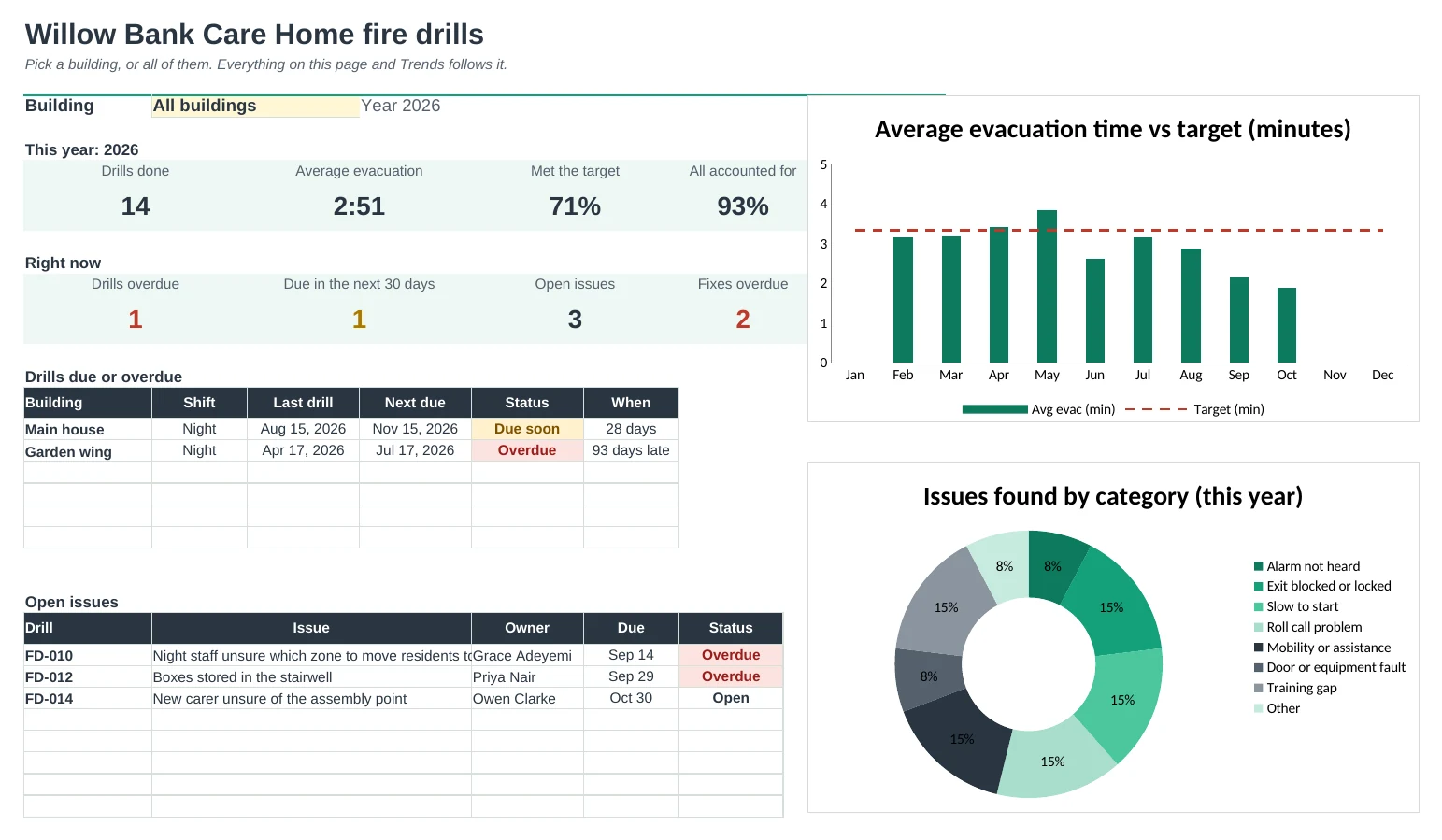
Pick a building or all of them. The Dashboard and Trends show average evacuation time against your target, month by month, and which problems keep coming up.
| Free | Pro |
|---|---|
| Next due date per building | Schedule by building and shift, with your own frequency |
| Evacuation time vs one target | A target per building, averages and slowest times |
| One fix per drill | As many issues per drill, each with an owner and due date |
| · | Roll call: expected vs accounted for |
| · | Printable record for any drill |
| · | Dashboard with a building picker and charts |
| · | Trends by month and by building |
$19 one-time
8 tabs: Start Here, Dashboard, Drill Log, Issues, Schedule, Drill Record, Trends and Setup. You get two copies: one filled in with a sample care home so you can see it working, and a blank one ready for your own buildings.
Get Fire Drill Log Pro for $19- Instant download after checkout
- Works in Google Sheets and Excel
- Yours to keep and reuse every year