
Free fridge and freezer temperature log template
Write down each fridge, freezer or hot holding temperature as you take it, and the sheet checks it against that unit's safe range. Readings that are too warm or too cold get flagged, and the log reminds you to write down what you did about it. A summary shows how often each unit stays in range.
Pro Want missed-check tracking, corrective actions and printable monthly sheets? See Temperature Log Pro →| Date | Time | Unit | Reading (°F) | Lowest OK | Highest OK | Result | Action taken | Initials | Follow-up |
|---|---|---|---|---|---|---|---|---|---|
| Nov 16, 2026 | 7:00 AM | Walk-in cooler | 37 | 33 | 41 | OK | MR | ||
| Nov 16, 2026 | 7:00 AM | Reach-in fridge (line) | 38 | 33 | 41 | OK | MR | ||
| Nov 16, 2026 | 7:00 AM | Freezer | -4 | -10 | 0 | OK | MR | ||
| Nov 16, 2026 | 11:30 AM | Hot holding well | 158 | 135 | 200 | OK | TJ | ||
| Nov 16, 2026 | 3:00 PM | Walk-in cooler | 39 | 33 | 41 | OK | TJ | ||
| Nov 16, 2026 | 3:00 PM | Reach-in fridge (line) | 44 | 33 | 41 | Too warm | Door left ajar during rush. Closed it, moved dairy to walk-in, rechecked at 15:30 | TJ | Action logged |
| Nov 16, 2026 | 3:30 PM | Reach-in fridge (line) | 40 | 33 | 41 | OK | TJ | ||
| Nov 16, 2026 | 3:00 PM | Freezer | -2 | -10 | 0 | OK | TJ | ||
| Nov 16, 2026 | 3:00 PM | Hot holding well | 129 | 135 | 200 | Too cold | Soup reheated and well turned up. Rechecked at 15:20: 152 | TJ | Action logged |
| Nov 17, 2026 | 7:00 AM | Walk-in cooler | 36 | 33 | 41 | OK | MR | ||
| Nov 17, 2026 | 7:00 AM | Reach-in fridge (line) | 37 | 33 | 41 | OK | MR | ||
| Nov 17, 2026 | 7:00 AM | Freezer | 3 | -10 | 0 | Too warm | MR | Add action | |
| Nov 17, 2026 | 11:30 AM | Hot holding well | 161 | 135 | 200 | OK | SK | ||
| Nov 17, 2026 | 3:00 PM | Walk-in cooler | 38 | 33 | 41 | OK | SK | ||
| Nov 17, 2026 | 3:00 PM | Reach-in fridge (line) | 39 | 33 | 41 | OK | SK | ||
| Nov 17, 2026 | 3:00 PM | Freezer | -1 | -10 | 0 | OK | SK | ||
| Nov 17, 2026 | 3:00 PM | Hot holding well | 135 | 200 | No reading | SK | Take reading |
| Unit | Type | Lowest OK (°F) | Highest OK (°F) | Notes |
|---|---|---|---|---|
| Walk-in cooler | Cold holding | 33 | 41 | Back of kitchen |
| Reach-in fridge (line) | Cold holding | 33 | 41 | Under the grill station |
| Freezer | Frozen | -10 | 0 | Chest freezer, dry store |
| Hot holding well | Hot holding | 135 | 200 | Soup and sides |
| Unit | Readings | In range | Out of range | % in range | Average °F | Needs follow-up |
|---|---|---|---|---|---|---|
| Walk-in cooler | 4 | 4 | 0 | 100% | 37.5 | 0 |
| Reach-in fridge (line) | 5 | 4 | 1 | 80% | 39.6 | 0 |
| Freezer | 4 | 3 | 1 | 75% | -1 | 1 |
| Hot holding well | 3 | 2 | 1 | 66.7% | 149.3 | 1 |
| All units | 16 | 13 | 3 | 81.3% | 2 |
What's inside
- A log with date, time, unit, reading, action taken and initials on every row
- Each unit's own safe range, set once on the Units tab and looked up for every reading
- Every reading marked OK, Too warm or Too cold
- A follow-up flag when a bad reading has no action written down, or a check was missed
- A summary per unit: readings, % in range and average temperature
- Works in Google Sheets on a phone or tablet, and in Excel
How to use it
Download your copy
Click "Free download" to save the .xlsx file. It opens in Excel, or in Google Sheets: open a blank sheet (sheets.new) and choose File, then Import, then Upload. The sample is two days of checks in a small kitchen.
Set up your units
On the Units tab, list every fridge, freezer and hot holding unit you check, with the lowest and highest temperature that's OK for each.
Check your safe ranges
The sample ranges follow common US guidance: cold food at 41°F or below, frozen food at 0°F or below and hot food at 135°F or above. Confirm the limits that apply to you with your local health department.
Log each check
Add a row each time you take a reading: date, time, unit, the temperature and your initials. Type the unit name exactly as it is on the Units tab.
Act on bad readings
If a reading shows Too warm or Too cold, fix the problem, write what you did in Action taken and take a new reading. Follow-up shows Add action until you do.
Review it weekly
Look at the Summary tab. A unit that keeps drifting out of range may need a repair before it fails.
Tips
Check at the same times every day
Pick set times, like opening, mid-day and closing, and stick to them. Gaps in a log are the first thing an inspector notices.
Use a separate thermometer
Built-in displays can be off. A probe or fridge thermometer placed in the middle of the unit gives a truer reading.
Log the recheck
After fixing a problem, add the new reading as its own row. It shows the problem was handled, not just noted.
Working in Celsius?
Change the header to Reading (°C) and enter the ranges in °C on the Units tab. The checks work the same way.
Questions
What should a temperature log include?
The date, time, which unit was checked, the reading, the initials of the person who checked it and what was done if the reading was out of range. This template has all of those, plus an automatic in-range check.
What temperature should a fridge be?
Common US food safety guidance is 41°F or below for cold holding, and many places recommend 40°F or below for home fridges. Freezers are usually kept at 0°F or below. Check the rules that apply to your business with your local health department.
How often should I check temperatures?
Many kitchens check at least twice a day, often at opening and closing, and more often for hot holding. Your local health code or food safety plan may set a schedule, so follow that.
Can I use it for a vaccine or medication fridge?
You can log any unit by adding it on the Units tab with its own range. Vaccine and medication storage have their own rules, so set the ranges from the manufacturer or your health authority.
Can staff fill it in on a phone?
Yes. Share your Google Sheets copy with your team and they can add readings from the Google Sheets app.
Can I use it in Excel?
Yes. Download the .xlsx file. The range lookups, flags and summary all work in Excel.
Pro version
Temperature Log Pro
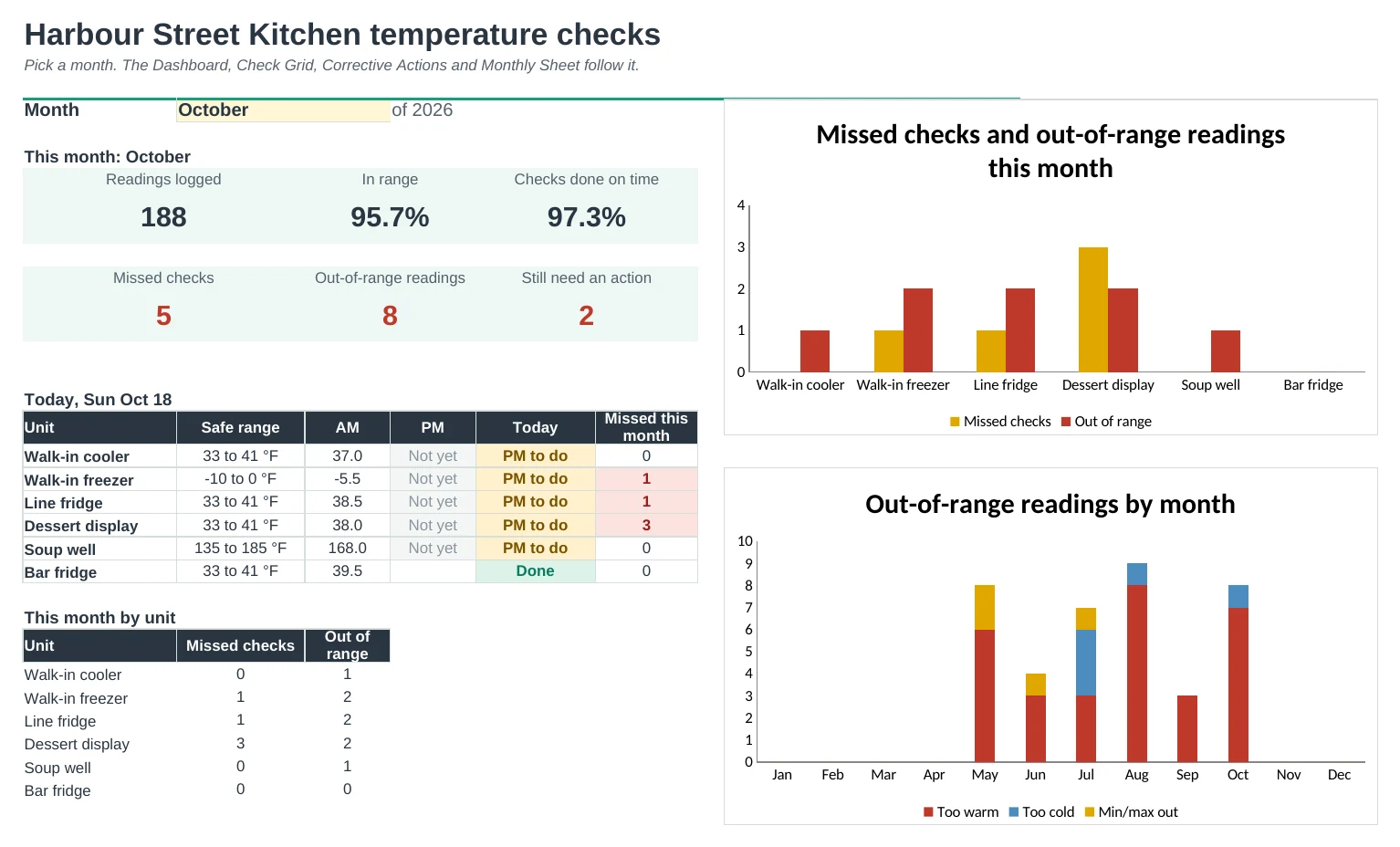
Log every fridge, freezer and hot-holding check in one place and see missed checks, bad readings and fixes at a glance, with a printable sheet for each unit.
Set your units up once
List every fridge, freezer, hot well or vaccine fridge on Setup with its own safe range and how many checks a day it needs. Every dropdown, check and report follows that list.
Type each reading in one place
Date, time, unit and temperature on one log. The sheet knows if it was the morning or afternoon check and flags anything too warm, too cold or outside range on the min/max memory.
Missed checks jump out
Check Grid shows every unit for every day of the month: green ticks, amber for one missed check, red for a missed day or a bad reading. Days you're closed are greyed out.
Every problem gets an action
An out-of-range reading asks what you did about it. Pick an action, add a note and type the recheck; it shows Fixed once the unit is back in range.
Ready for the inspector
Monthly Sheet prints one unit's month on a page with AM and PM readings, initials, min/max and actions. Corrective Actions lists every bad reading with a sign-off line.
Spot the unit that keeps drifting
Trends charts the daily readings against the safe range and shows out-of-range readings for every unit, month by month.
| Free | Pro |
|---|---|
| One safe range per unit | Each unit with its own range and checks a day |
| Flags bad readings | Flags bad readings and min/max excursions |
| · | Missed-check grid for every unit and day |
| · | Corrective action log with rechecks |
| · | Printable monthly sheet per unit |
| · | Dashboard with today's checks and charts |
| · | Trends by unit and month |
$19 one-time
8 tabs: Start Here, Dashboard, Temp Log, Check Grid, Corrective Actions, Monthly Sheet, Trends and Setup. You get two copies: one filled in with a sample kitchen so you can see it working, and a blank one ready for your own units.
Get Temperature Log Pro for $19- Instant download after checkout
- Works in Google Sheets and Excel
- Yours to keep and reuse every year