
Free employee training log template
Keep every employee's training in one list: the course, when they finished it, how many hours it took and how long it's good for. The sheet works out each expiry date and flags training that's expired, due soon or not done yet. Summary tabs show where each person and each course stands.
Pro Want a training matrix that flags expired and missing training by itself? See Training Tracker Pro →| Employee | Department | Course | Required | Completed | Hours | Valid for (months) | Expires | Days left | Status | Provider | Certificate # |
|---|---|---|---|---|---|---|---|---|---|---|---|
| Carlos Mendez | Warehouse | Forklift operator certification | Yes | Dec 4, 2023 | 8 | 36 | Dec 4, 2026 | 18 | Due soon | Safety Pro Training | FL-20931 |
| Carlos Mendez | Warehouse | First aid and CPR | Yes | Nov 20, 2024 | 4 | 24 | Nov 20, 2026 | 4 | Due soon | Red Cross | CPR-55120 |
| Carlos Mendez | Warehouse | Hazard communication | Yes | Nov 10, 2025 | 1.5 | 12 | Nov 10, 2026 | -6 | Expired | In-house | |
| Dana Whitfield | Warehouse | Forklift operator certification | Yes | Mar 17, 2025 | 8 | 36 | Mar 17, 2028 | 487 | Current | Safety Pro Training | FL-21877 |
| Dana Whitfield | Warehouse | Hazard communication | Yes | Jan 12, 2026 | 1.5 | 12 | Jan 12, 2027 | 57 | Due soon | In-house | |
| Dana Whitfield | Warehouse | Fire extinguisher training | Yes | Oct 28, 2025 | 1 | 12 | Oct 28, 2026 | -19 | Expired | City Fire Dept. | |
| Grace Kim | Office | Harassment prevention | Yes | Dec 1, 2025 | 2 | 12 | Dec 1, 2026 | 15 | Due soon | Online course | HP-7731 |
| Grace Kim | Office | First aid and CPR | No | Feb 9, 2026 | 4 | 24 | Feb 9, 2028 | 450 | Current | Red Cross | CPR-60215 |
| Grace Kim | Office | Excel for reporting | No | May 14, 2026 | 6 | No expiry | Online course | ||||
| Marcus Hill | Drivers | Defensive driving | Yes | Dec 2, 2024 | 4 | 24 | Dec 2, 2026 | 16 | Due soon | National Safety Council | DD-4410 |
| Marcus Hill | Drivers | Hazard communication | Yes | Feb 9, 2026 | 1.5 | 12 | Feb 9, 2027 | 85 | Current | In-house | |
| Marcus Hill | Drivers | OSHA 10-hour general industry | No | Jun 20, 2025 | 10 | No expiry | Online course | OSHA-10-88231 | |||
| Priya Shah | Office | Harassment prevention | Yes | Oct 30, 2026 | 2 | 12 | Oct 30, 2027 | 348 | Current | Online course | HP-8102 |
| Priya Shah | Office | New hire orientation | Yes | Oct 26, 2026 | 3 | No expiry | In-house | ||||
| Priya Shah | Office | Fire extinguisher training | Yes | 12 | Not done | City Fire Dept. | |||||
| Tom Becker | Warehouse | Forklift operator certification | Yes | Aug 3, 2026 | 8 | 36 | Aug 3, 2029 | 991 | Current | Safety Pro Training | FL-23015 |
| Tom Becker | Warehouse | First aid and CPR | Yes | Jan 15, 2025 | 4 | 24 | Jan 15, 2027 | 60 | Due soon | Red Cross | CPR-57004 |
| Tom Becker | Warehouse | Fire extinguisher training | Yes | Mar 16, 2026 | 1 | 12 | Mar 16, 2027 | 120 | Current | City Fire Dept. |
| Employee | Courses | Hours | Current | Due soon | Expired | Not done | Overall |
|---|---|---|---|---|---|---|---|
| Carlos Mendez | 3 | 13.5 | 0 | 2 | 1 | 0 | Action needed |
| Dana Whitfield | 3 | 10.5 | 1 | 1 | 1 | 0 | Action needed |
| Grace Kim | 3 | 12 | 2 | 1 | 0 | 0 | Renew soon |
| Marcus Hill | 3 | 15.5 | 2 | 1 | 0 | 0 | Renew soon |
| Priya Shah | 3 | 5 | 2 | 0 | 0 | 1 | Action needed |
| Tom Becker | 3 | 13 | 2 | 1 | 0 | 0 | Renew soon |
| Everyone | 18 | 69.5 | 9 | 6 | 2 | 1 |
| Course | Records | Current | Due soon | Expired | Not done | Hours |
|---|---|---|---|---|---|---|
| Forklift operator certification | 3 | 2 | 1 | 0 | 0 | 24 |
| First aid and CPR | 3 | 1 | 2 | 0 | 0 | 12 |
| Hazard communication | 3 | 1 | 1 | 1 | 0 | 4.5 |
| Fire extinguisher training | 3 | 1 | 0 | 1 | 1 | 2 |
| Harassment prevention | 2 | 1 | 1 | 0 | 0 | 4 |
| Defensive driving | 1 | 0 | 1 | 0 | 0 | 4 |
| OSHA 10-hour general industry | 1 | 1 | 0 | 0 | 0 | 10 |
| New hire orientation | 1 | 1 | 0 | 0 | 0 | 3 |
| Excel for reporting | 1 | 1 | 0 | 0 | 0 | 6 |
| Setting | Value | Notes |
|---|---|---|
| Today's date | Nov 16, 2026 | Type today's date, or =TODAY() to keep it current |
| Warn me this many days before expiry | 60 | Training that expires within this many days shows as Due soon |
| Training hours logged | 69.5 | |
| Records needing action | 3 | Expired or not done yet |
| Records due soon | 6 |
What's inside
- One row per person per course, with completion date, hours, provider and certificate number
- Expiry dates worked out from how many months each course is valid for
- Statuses for every record: Current, Due soon, Expired, Not done or No expiry
- A warning window you set, like 60 days, so renewals don't sneak up on you
- Summaries by employee and by course, with total training hours
- Works in Google Sheets and Excel
How to use it
Download your copy
Click "Free download" to save the .xlsx file. It opens in Excel, or in Google Sheets: open a blank sheet (sheets.new) and choose File, then Import, then Upload. The sample is a small distribution company's training records.
Set today's date
On the Settings tab, type today's date or enter =TODAY() so statuses stay current. Change the warning window if 60 days doesn't suit you.
Add your records
Enter one row per person per course. Leave Completed blank for training someone still needs to do, and it shows as Not done.
Set how long each course is valid
Put the number of months in Valid for, like 12 for yearly training. Leave it blank for training that doesn't expire.
Update the summary lists
Type your employee names on the By Employee tab and your course names on the By Course tab, spelled exactly as in the log. Copy the formulas down for new rows.
Check it monthly
Filter the Status column for Expired, Due soon and Not done. Book those sessions before the next check.
Tips
Check your own renewal rules
How long training stays valid depends on your industry, state and the provider. The sample periods are examples, so confirm yours with the course provider or your safety or HR advisor.
Add a new row for each renewal
When someone renews, add a new row instead of overwriting the old one. You keep a full history, and the old row can be deleted once you no longer need it.
Link the certificate
Paste a link to the scanned certificate in Google Drive into the Certificate # column. Handy when an inspector or client asks for proof.
Use the same course names
"First aid and CPR" and "CPR/First Aid" count as two courses in the summary. Pick one name and stick to it.
Questions
What should a training log include?
At least the employee, course, date completed and who ran it. Hours, expiry date and a certificate number make it much more useful, especially for safety training that needs renewing. This template has all of these.
How does it work out the expiry date?
It adds the Valid for months to the completion date. A course finished on March 17, 2025 that's valid for 36 months expires on March 17, 2028.
Can I track training that hasn't happened yet?
Yes. Add the row with the course and leave Completed blank. It shows as Not done until you fill in the date.
Is this enough to meet OSHA or other legal requirements?
It helps you keep records, but it isn't legal advice and doesn't know which training your business needs. Check your requirements with a safety professional, your insurer or an employment lawyer.
Can I use it as a personal training log?
This one is built for tracking employees' courses and certifications. For workouts, see our workout log template instead.
Can I use it in Excel?
Yes. Download the .xlsx file. The expiry dates, statuses and summaries all work in Excel.
Pro version
Training Tracker Pro
Log each course once and see who is trained, what has expired and what needs renewing next, in a colour-coded training matrix.
Log training in one place
Add a row when someone finishes a course: date, person, course and certificate number from dropdowns. Hours and the expiry date fill in from your course list.
A training matrix that keeps itself
Everyone against every course, showing the expiry month. Red for expired or missing, amber for due soon, green for current, grey where the role doesn't need it.
Required training by role
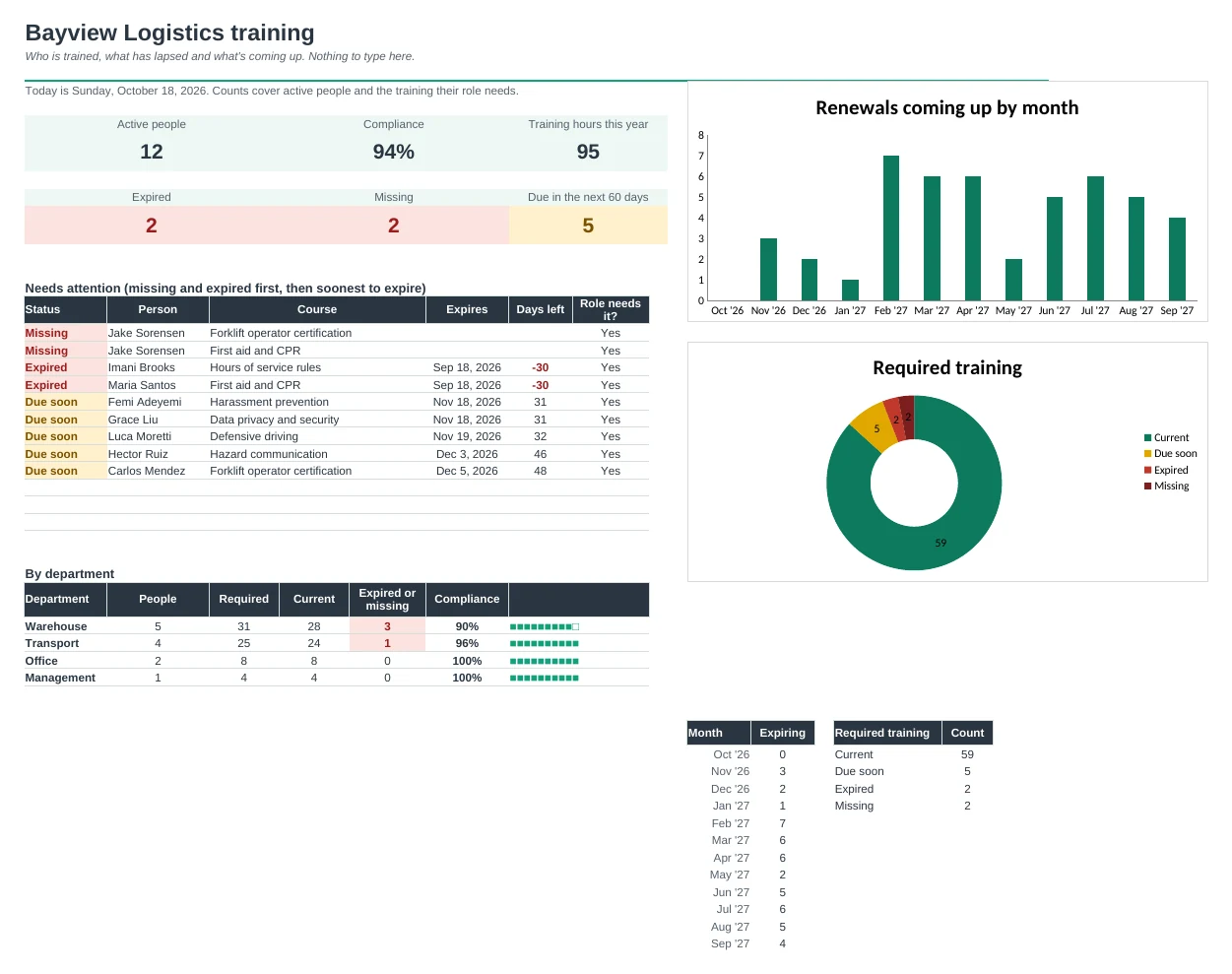
Mark each course for all staff or for the roles that need it. Compliance per person, per course and per department is worked out for you.
Book renewals in time
The Expiring list shows what's missing, what has expired and what runs out next, with days left. When someone renews, add the new row and the old one steps aside.
Training hours per person
See each person's hours this year next to a yearly target you set for their role, so continuing education goals don't slip.
Records ready for an audit
Print one person's full training record with dates, providers, certificate numbers, expiry dates and sign-off lines.
| Free | Pro |
|---|---|
| Training list with expiry dates | One log, with renewals replacing old records |
| Summary by employee and course | Training matrix with expiry colours |
| · | Required training by role, with compliance % |
| · | Expiring list: missing, expired and coming up |
| · | Hours per person against a yearly target |
| · | Printable training record per person |
| · | Dashboard with renewals by month and a needs-attention list |
$19 one-time
9 tabs: Start Here, Dashboard, Matrix, Expiring, Training Log, People, Courses, Certificates and Setup. You get two copies: one filled in with a sample 13-person logistics company so you can see it working, and a blank one ready for your own team and courses.
Get Training Tracker Pro for $19- Instant download after checkout
- Works in Google Sheets and Excel
- Yours to keep and reuse every year