
Free goal tracker spreadsheet
Write each goal as a number you can measure, like dollars saved, miles run or books read, with a deadline. Log your progress whenever you check in and the sheet shows how far you've come, compares it with how much time has passed, and tells you if you're on track, behind or done.
Pro Want quarterly milestones, weekly check-ins and a one-page plan you can print? See Goal Tracker Pro →| Goal | Area | Unit | Start | Target | Current | Start date | Deadline | Progress | Time used | Days left | Milestones | Status | Next step |
|---|---|---|---|---|---|---|---|---|---|---|---|---|---|
| Pay off the Visa card | Money | $ owed | 6,200 | 0 | 1,800 | Mar 1, 2026 | Dec 31, 2026 | 71% | 81.3% | 57 | 1 of 3 | Behind | Extra $400 on the 15th |
| Save a $5,000 emergency fund | Money | $ saved | 800 | 5,000 | 4,400 | Jan 1, 2026 | Dec 31, 2026 | 85.7% | 84.3% | 57 | 2 of 3 | On track | Auto-transfer $350 a month |
| Run a half marathon | Health | miles | 3 | 13.1 | 9 | Jun 1, 2026 | Apr 12, 2027 | 59.4% | 49.5% | 159 | 1 of 3 | On track | Long run every Saturday |
| Lose 15 pounds | Health | lbs | 192 | 177 | 185 | Aug 1, 2026 | Feb 1, 2027 | 46.7% | 51.6% | 89 | 1 of 2 | Behind | Pack lunch 4 days a week |
| Read 20 books this year | Learning | books | 0 | 20 | 17 | Jan 1, 2026 | Dec 31, 2026 | 85% | 84.3% | 57 | None | On track | Read before bed, not the phone |
| Finish an online Excel course | Career | modules | 0 | 12 | 5 | Sep 1, 2026 | Dec 15, 2026 | 41.7% | 61% | 41 | 0 of 2 | Behind | Two modules a week |
| Learn 500 Spanish words | Learning | words | 0 | 500 | 95 | Oct 1, 2026 | Mar 31, 2027 | 19% | 18.8% | 147 | 0 of 2 | On track | 15 minutes on the app daily |
| Repaint the bedroom and hallway | Home | rooms | 0 | 2 | 2 | Sep 1, 2026 | Oct 31, 2026 | 100% | 100% | 0 | 3 of 3 | Done | Done! |
| Clear out the garage | Home | boxes sorted | 0 | 20 | 0 | Nov 15, 2026 | Dec 20, 2026 | 0% | 0% | 46 | 0 of 1 | Not started | Start after Thanksgiving |
| Goal | Milestone | Due | Done | Status |
|---|---|---|---|---|
| Pay off the Visa card | Balance under $4,000 | Jul 31, 2026 | Done | |
| Pay off the Visa card | Balance under $2,000 | Oct 31, 2026 | Overdue | |
| Pay off the Visa card | Card paid off | Dec 31, 2026 | Upcoming | |
| Save a $5,000 emergency fund | First $2,500 saved | Jun 30, 2026 | Done | |
| Save a $5,000 emergency fund | Three months of rent saved | Oct 31, 2026 | Done | |
| Save a $5,000 emergency fund | $5,000 saved | Dec 31, 2026 | Upcoming | |
| Run a half marathon | Run 10K without stopping | Sep 15, 2026 | Done | |
| Run a half marathon | Sign up for the race | Nov 30, 2026 | Upcoming | |
| Run a half marathon | 10-mile long run | Feb 28, 2027 | Upcoming | |
| Lose 15 pounds | Down 5 pounds | Oct 1, 2026 | Done | |
| Lose 15 pounds | Down 10 pounds | Dec 1, 2026 | Upcoming | |
| Finish an online Excel course | Finish modules 1 to 6 | Oct 31, 2026 | Overdue | |
| Finish an online Excel course | Pass the final quiz | Dec 15, 2026 | Upcoming | |
| Learn 500 Spanish words | First 100 words | Nov 15, 2026 | Due soon | |
| Learn 500 Spanish words | Order a meal in Spanish | Jan 31, 2027 | Upcoming | |
| Repaint the bedroom and hallway | Buy paint and supplies | Sep 10, 2026 | Done | |
| Repaint the bedroom and hallway | Bedroom painted | Sep 30, 2026 | Done | |
| Repaint the bedroom and hallway | Hallway painted | Oct 31, 2026 | Done | |
| Clear out the garage | Book a donation pickup | Dec 1, 2026 | Upcoming | |
| Date | Goal | Value | Note |
|---|---|---|---|
| Apr 1, 2026 | Pay off the Visa card | 5,400 | Tax refund helped |
| Apr 1, 2026 | Save a $5,000 emergency fund | 1,900 | |
| Jun 1, 2026 | Pay off the Visa card | 4,300 | |
| Jun 30, 2026 | Read 20 books this year | 11 | |
| Jul 1, 2026 | Save a $5,000 emergency fund | 2,950 | |
| Jul 5, 2026 | Run a half marathon | 5 | |
| Aug 1, 2026 | Pay off the Visa card | 3,100 | |
| Aug 30, 2026 | Run a half marathon | 7 | |
| Sep 1, 2026 | Lose 15 pounds | 189 | |
| Sep 20, 2026 | Repaint the bedroom and hallway | 1 | Bedroom done |
| Sep 30, 2026 | Finish an online Excel course | 3 | |
| Oct 1, 2026 | Pay off the Visa card | 2,250 | |
| Oct 1, 2026 | Save a $5,000 emergency fund | 4,100 | |
| Oct 1, 2026 | Lose 15 pounds | 186 | |
| Oct 15, 2026 | Learn 500 Spanish words | 60 | |
| Oct 25, 2026 | Run a half marathon | 9 | Knee felt fine |
| Oct 26, 2026 | Repaint the bedroom and hallway | 2 | Hallway done |
| Oct 31, 2026 | Read 20 books this year | 17 | |
| Oct 31, 2026 | Finish an online Excel course | 5 | Fell behind, catch up in Nov |
| Nov 1, 2026 | Pay off the Visa card | 1,800 | Slower in October |
| Nov 1, 2026 | Save a $5,000 emergency fund | 4,400 | Bonus went in |
| Nov 1, 2026 | Lose 15 pounds | 185 | Halloween candy |
| Nov 1, 2026 | Learn 500 Spanish words | 95 | |
| Item | Value |
|---|---|
| Today | Nov 4, 2026 |
| Goals | 9 |
| Done | 1 |
| On track | 4 |
| Behind | 3 |
| Overdue | 0 |
| Not started | 1 |
| Average progress | 56.5% |
| Milestones done | 8 of 19 |
| Milestones overdue | 2 |
| Milestones due in the next 14 days | 1 |
| Check-ins logged in the last 30 days | 9 |
| Average progress: Money | 78.3% |
| Average progress: Health | 53% |
| Average progress: Learning | 52% |
| Average progress: Career | 41.7% |
| Average progress: Home | 50% |
What's inside
- Goals with a start value, target and deadline, in any unit: dollars, pounds, miles, books
- Works for goals that go down too, like paying off a card or losing weight
- Progress compared with time used, so Status says On track, Behind, Overdue or Done
- A progress log: type a new number on any date and Current picks up the latest one
- Milestones for each goal with due dates, checkboxes and overdue flags
- A summary with goal counts by status and average progress by area of life
How to use it
Download your copy
Click "Free download" to save the .xlsx file. It opens in Excel, or in Google Sheets: open a blank sheet (sheets.new) and choose File, then Import, then Upload.
Set today's date
On the Summary tab, type =TODAY() in the Today cell. The sample uses a fixed date so the example makes sense.
Write your goals
On the Goals tab, add one goal per row with a unit, where you're starting from, the target, a start date and a deadline. Leave Current alone; it fills in from the log.
Break them into milestones
On the Milestones tab, add a few steps for each goal with a due date. Use the exact goal name from the Goals tab so the counts match.
Log your progress
Whenever you check in, add a row to Progress Log with the date, the goal and the new number. Current, Progress and Status on the Goals tab update.
Review once a week
Look at Status and the Summary tab. Anything Behind needs a smaller next step or a later deadline.
Tips
Make every goal a number
"Get fit" is hard to track. "Run 13.1 miles" or "Walk 10,000 steps a day for 30 days" gives the sheet something to measure.
Log the total, not the change
In the Progress Log, type where you are now, like $4,400 saved, not how much you added this week.
Pick a check-in day
Sunday evening works for most people. A quick log entry each week keeps the tracker honest and only takes a minute.
Print it for the wall
Go to File > Print, choose Landscape and "Fit to width", and turn on gridlines under Formatting. A printed Goals tab on the fridge is a daily reminder.
Questions
How does the tracker know if I'm on track?
It compares Progress (how far you are from start to target) with Time used (how much of the time from start date to deadline has passed). If progress is equal or ahead, you're on track.
Can I track a goal that goes down?
Yes. Put the higher number in Start and the lower one in Target, like 6,200 owed down to 0. Progress still counts up from 0% to 100%.
What if a goal is yes or no?
Use a unit like "done" with Start 0 and Target 1, then log a 1 when it's finished. Or split it into milestones and track the steps.
Why isn't Current changing?
The goal name in the Progress Log must match the Goals tab exactly. Copy and paste the name to be safe. If a goal has no log entries, Current shows the start value.
Can I add more goals?
Yes. There's room for 20 goals, 40 milestones and 60 log entries. To add more, insert rows above the last row of a tab and copy the formulas down, then stretch the ranges on the other tabs.
Is the goal tracker free?
Yes. Download the .xlsx file and open it in Excel or Google Sheets. No sign-up needed.
Pro version
Goal Tracker Pro
Turn yearly goals into quarterly milestones and one weekly action, then check in once a week and see what's on track.
From a year to this week
Each goal gets quarterly milestones and one weekly action you control, like three runs or $100 to savings. The big goal stops feeling far away.
One check-in a week
Once a week, add a row per goal: the new number, how many actions you did and a line on how it went. Progress, statuses and every view update from that.
Know if you're on track
Progress is compared with how much time has gone, so each goal says On track, Behind, Overdue or Done, and tells you how much you need each week to catch up.
Any kind of goal
Numbers that go up (save, read, walk), numbers that go down (pay off a card) and yes/no goals like passing an exam, all in the same list.
See your whole life at once
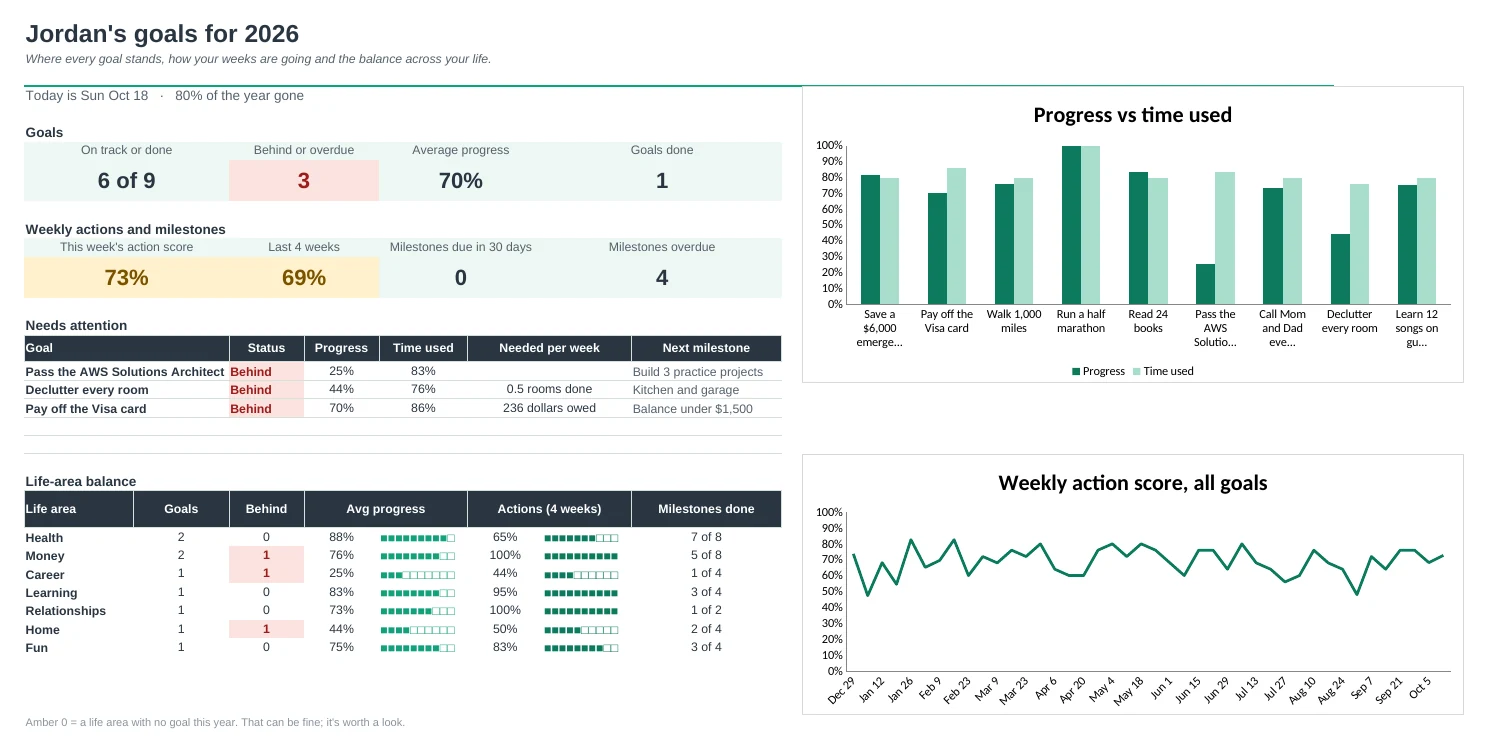
The Dashboard shows progress against time for every goal, your weekly action score over the year, and how each life area is doing.
A plan you can pin up
Goal Plan prints every goal, why it matters, Q1 to Q4 milestones and the weekly action on one page, with done milestones ticked.
| Free | Pro |
|---|---|
| Goals with a target and deadline | Goals with a weekly action and a weekly target |
| Number goals | Number goals up or down, plus yes/no goals |
| Milestones list | Quarterly milestones with due and overdue flags |
| Progress log | Weekly check-in with actions, wins and next focus |
| · | This Week view with a week score |
| · | Year grid: every goal, every week |
| Summary by status and area | Dashboard with charts and life-area balance |
| · | Printable one-page goal plan |
$19 one-time
9 tabs: Start Here, Dashboard, Goals, Check-ins, Milestones, This Week, Year, Goal Plan and Setup. You get two copies: one filled in with a sample year of goals so you can see it working, and a blank one ready for your own.
Get Goal Tracker Pro for $19- Instant download after checkout
- Works in Google Sheets and Excel
- Yours to keep and reuse every year