
Free printable habit tracker
List up to ten habits, then tick a box each day you do one. The tracker counts your done days, works out your current and best streak, and tells you if you're on track for the goal you set. Use it on your phone, or print the grid and stick it on the fridge.
| Habit | Goal (days) | 1 | 2 | 3 | 4 | 5 | 6 | 7 | 8 | 9 | 10 | 11 | 12 | 13 | 14 | 15 | 16 | 17 | 18 | 19 | 20 | 21 | 22 | 23 | 24 | 25 | 26 | 27 | 28 | 29 | 30 | 31 | Done | Status | % of days | Streak | Best streak |
|---|---|---|---|---|---|---|---|---|---|---|---|---|---|---|---|---|---|---|---|---|---|---|---|---|---|---|---|---|---|---|---|---|---|---|---|---|---|
| Day of week | Sun | Mon | Tue | Wed | Thu | Fri | Sat | Sun | Mon | Tue | Wed | Thu | Fri | Sat | Sun | Mon | Tue | Wed | Thu | Fri | Sat | Sun | Mon | Tue | Wed | Thu | Fri | Sat | Sun | Mon | |||||||
| Drink 8 glasses of water | 25 | 16 | On track | 88.9% | 7 | 7 | |||||||||||||||||||||||||||||||
| Walk 30 minutes | 20 | 14 | On track | 77.8% | 3 | 6 | |||||||||||||||||||||||||||||||
| Read 20 pages | 25 | 17 | On track | 94.4% | 11 | 11 | |||||||||||||||||||||||||||||||
| Take vitamins | 28 | 18 | On track | 100% | 18 | 18 | |||||||||||||||||||||||||||||||
| Stretch 10 minutes | 15 | 10 | On track | 55.6% | 2 | 3 | |||||||||||||||||||||||||||||||
| Journal before bed | 15 | 9 | On track | 50% | 2 | 2 | |||||||||||||||||||||||||||||||
| In bed by 10:30 PM | 20 | 13 | On track | 72.2% | 2 | 4 | |||||||||||||||||||||||||||||||
| No-spend day | 12 | 8 | On track | 44.4% | 2 | 2 | |||||||||||||||||||||||||||||||
| Practice Spanish 15 min | 20 | 15 | On track | 83.3% | 5 | 5 | |||||||||||||||||||||||||||||||
| No phone first hour | 18 | 6 | Behind | 33.3% | 2 | 2 | |||||||||||||||||||||||||||||||
| Habits done | 7 | 8 | 6 | 7 | 7 | 5 | 6 | 6 | 7 | 10 | 8 | 5 | 5 | 8 | 6 | 6 | 10 | 9 | 0 | 0 | 0 | 0 | 0 | 0 | 0 | 0 | 0 | 0 | 0 | 0 | 0 | 126 | 70% |
| Item | Value |
|---|---|
| Month starts | Nov 1, 2026 |
| Today | Nov 18, 2026 |
| Days in the month | 30 |
| Days so far | 18 |
| Habits tracked | 10 |
| Check-ins so far | 126 |
| Overall completion | 70% |
| Perfect days (every habit done) | 2 |
| Habits on track or goal met | 9 |
| Habits behind | 1 |
| Longest current streak | 18 |
| Best streak this month | 18 |
What's inside
- A full month grid: habits down the side, days 1 to 31 across, a checkbox in every square
- Done days, percent of days and goal status for each habit, worked out as you tick
- Current streak and best streak per habit, so you can see a run building
- A daily count along the bottom and a count of perfect days on the Summary tab
- Change the month start date and the weekday row updates for any month
- Prints on one landscape page, or works in Google Sheets and Excel
How to use it
Make your copy
Click "Make a copy" to save the tracker to your Google Drive. There's an Excel download too if you'd rather use that.
Set the month
On the Summary tab, type the first day of your month in Month starts, like 12/1/2026. The weekday row on the tracker changes to match, and day 31 goes blank in shorter months.
Set today's date
The sample uses a fixed date so the example makes sense. Type =TODAY() in the Today cell and the streaks and percents keep up by themselves.
Add your habits
Clear the sample ticks, then type your habits in the Habit column. In Goal (days), put how many days this month you're aiming for. Not every habit needs to be every day.
Tick each day
Click the box for each habit you did. Done, Status, % of days and Streak update right away.
Print it if you like paper
Go to File > Print. Pick Landscape, set Scale to "Fit to page" and turn on "Show gridlines" under Formatting. Tick the boxes on screen first, or print it blank and fill it in by hand.
Tips
Start with three habits
Ten habits on day one is a lot. Pick two or three you care about most, get them going, then add more next month.
Make goals realistic
A goal of 20 days out of 30 still builds the habit and leaves room for sick days and busy weekends. Status shows "On track" if your pace gets you there.
Don't break the chain
Streak counts the days in a row up to today. If today isn't ticked yet, it still shows yesterday's streak, so it doesn't reset before bedtime.
Start a new month
Right-click the Habit Tracker tab and choose Duplicate. Rename it, untick all the boxes, and change Month starts on the Summary tab. Keep the old tab to look back on.
Questions
How do I print the habit tracker?
Open File > Print in Google Sheets. Choose Landscape and "Fit to page" so all 31 days fit on one sheet. In Excel, use File > Print and pick "Fit Sheet on One Page".
How is the streak worked out?
The tracker counts how many days in a row you've ticked, ending today. If today isn't ticked yet, it counts up to yesterday. Hidden columns to the right do the counting.
What does "Out of reach" mean?
Even if you tick every day left this month, you can't hit the goal. Lower the goal or just aim to beat last month.
Can I track more than ten habits?
Yes. Insert rows above the Habits done row and copy a habit row's formulas down. Then stretch the ranges on the Summary tab to include the new rows.
What happens to day 31 in a 30-day month?
Its weekday cell goes blank so you know to skip it. Leave those boxes unticked and the counts stay right.
Is the habit tracker free?
Yes. Copy it to Google Drive or download the Excel file. No sign-up, no email.
Pro version
Habit Tracker Pro
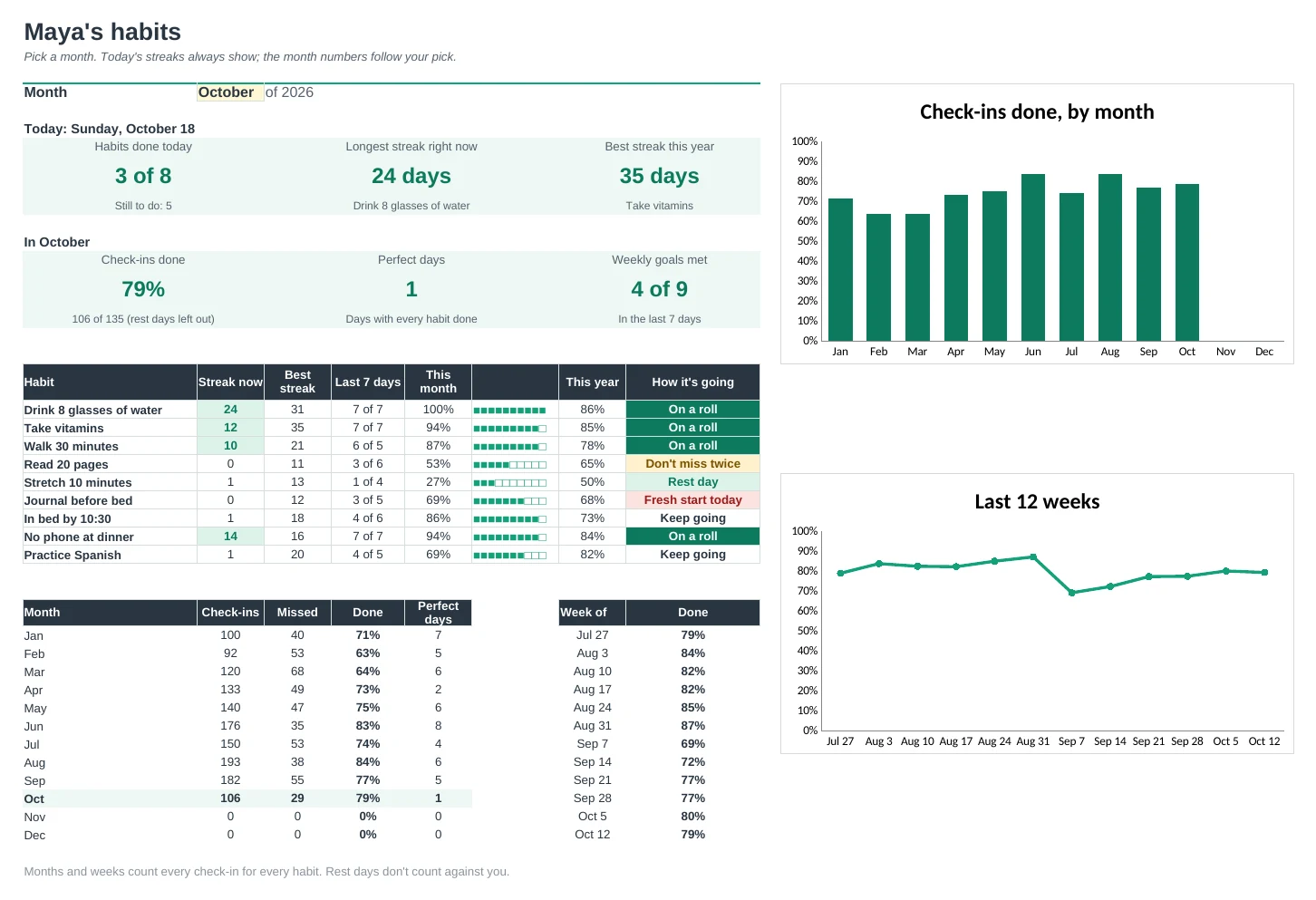
A whole-year habit tracker: tick one row a day and it works out your streaks, a month grid, a year heat map and a printable chart.
One row a day, all year
Type x when you do a habit and s for a planned rest day. No new tab every month: the whole year lives on one Daily Log.
Streaks that forgive rest days
Rest days keep your streak going, and habits you don't do every day get a weekly goal instead. Gym three times a week counts as a win.
Gentle nudges, not guilt
Each habit shows how it's going: On a roll, On track, Don't miss twice or Fresh start today. Missing one day is normal; the sheet helps you get back on the next.
See your whole year in one picture
The Year Heat Map shades every day by how much got done, for all habits or just one. Watch the green fill in month by month.
Print a chart for the fridge
Pick a month and print a clean tracker with your habits, a tiny version for hard days, shaded weekends and a few lines to reflect on the month.
Set it up in five minutes
List your habits on Setup with a weekly goal and a start date. Every tab follows, and new habits never count as missed before they started.
| Free | Pro |
|---|---|
| One month at a time | The whole year on one log |
| Current and best streak | Streaks that keep going through rest days |
| Goal in days per month | Goal in days per week, with a weekly review |
| · | Dashboard with today's streaks and charts |
| · | Gentle status for each habit |
| · | Year heat map, all habits or one |
| · | Filled-in month view and a blank printable chart |
| · | Tiny version for hard days and a why for each habit |
$19 one-time
8 tabs: Start Here, Dashboard, Daily Log, Month View, Year Heat Map, Weekly Review, Printable and Setup. You get two copies: one filled in with a sample year so you can see it working, and a blank one ready for your own habits.
Get Habit Tracker Pro for $19- Instant download after checkout
- Works in Google Sheets and Excel
- Yours to keep and reuse every year