
Free homeschool planner template for Google Sheets
Plan each lesson with the child, subject and how long it took, then tick it off when it's done. The planner adds up hours by week, by subject and by child, so you can see what you've covered and keep a record of your school year.
Pro Want printable weekly plans for each child and attendance records that fill themselves in? See Homeschool Planner Pro →| Date | Week of | Child | Subject | Lesson | Minutes | Done | Notes |
|---|---|---|---|---|---|---|---|
| Sep 28, 2026 | Sep 28, 2026 | Emma | Math | Fractions: equivalent fractions | 60 | ||
| Sep 28, 2026 | Sep 28, 2026 | Emma | Reading | Charlotte's Web ch. 1-3 | 50 | ||
| Sep 28, 2026 | Sep 28, 2026 | Noah | Math | Adding with regrouping | 40 | ||
| Sep 28, 2026 | Sep 28, 2026 | Noah | Reading | Phonics: long vowel teams | 35 | ||
| Sep 29, 2026 | Sep 28, 2026 | Emma | Science | Plant cells under the microscope | 75 | ||
| Sep 29, 2026 | Sep 28, 2026 | Noah | Science | Plant cells under the microscope | 45 | ||
| Sep 30, 2026 | Sep 28, 2026 | Emma | Writing | Paragraph with a topic sentence | 45 | ||
| Sep 30, 2026 | Sep 28, 2026 | Emma | History | Jamestown settlement | 50 | ||
| Sep 30, 2026 | Sep 28, 2026 | Noah | Writing | Copywork and spelling list 4 | 20 | ||
| Oct 1, 2026 | Sep 28, 2026 | Noah | Art | Watercolor leaves | 45 | ||
| Oct 5, 2026 | Oct 5, 2026 | Emma | Math | Fractions: adding like denominators | 60 | ||
| Oct 5, 2026 | Oct 5, 2026 | Noah | Math | Subtracting with regrouping | 40 | ||
| Oct 6, 2026 | Oct 5, 2026 | Emma | Reading | Charlotte's Web ch. 4-6 | 50 | ||
| Oct 6, 2026 | Oct 5, 2026 | Noah | Reading | Library read-aloud | 30 | ||
| Oct 7, 2026 | Oct 5, 2026 | Emma | History | Plymouth and the Mayflower | 50 | ||
| Oct 7, 2026 | Oct 5, 2026 | Noah | History | Plymouth and the Mayflower | 35 | ||
| Oct 8, 2026 | Oct 5, 2026 | Emma | Science | Nature walk: leaf sorting | 90 | Brought a field guide | |
| Oct 8, 2026 | Oct 5, 2026 | Noah | Science | Nature walk: leaf sorting | 90 | ||
| Oct 9, 2026 | Oct 5, 2026 | Emma | History | Field trip: living history farm | 180 | ||
| Oct 9, 2026 | Oct 5, 2026 | Noah | History | Field trip: living history farm | 180 | ||
| Oct 12, 2026 | Oct 12, 2026 | Emma | Math | Fractions quiz | 50 | ||
| Oct 12, 2026 | Oct 12, 2026 | Emma | Writing | Book report outline | 35 | ||
| Oct 13, 2026 | Oct 12, 2026 | Noah | Math | Two-step word problems | 40 | ||
| Oct 13, 2026 | Oct 12, 2026 | Noah | Writing | Spelling list 5 | 20 | Didn't get to it | |
| Oct 14, 2026 | Oct 12, 2026 | Emma | Art | Pumpkin still life sketch | 45 | ||
| Oct 15, 2026 | Oct 12, 2026 | Emma | Reading | Charlotte's Web ch. 7-9 | 50 | ||
| Oct 19, 2026 | Oct 19, 2026 | Emma | Math | Fractions: unlike denominators | 45 | ||
| Oct 19, 2026 | Oct 19, 2026 | Noah | Math | Telling time to 5 minutes | 30 | ||
| Oct 20, 2026 | Oct 19, 2026 | Emma | Science | Seed dissection | 50 | ||
| Oct 21, 2026 | Oct 19, 2026 | Noah | Reading | Frog and Toad, story 1 | 25 |
| Week of | Math | Reading | Writing | Science | History | Art | Total hours | Done | Still to do |
|---|---|---|---|---|---|---|---|---|---|
| Sep 28, 2026 | 1.67 | 1.42 | 1.08 | 2.00 | 0.83 | 0.75 | 7.75 | 10 | 0 |
| Oct 5, 2026 | 1.67 | 1.33 | 0.00 | 3.00 | 7.42 | 0.00 | 13.42 | 10 | 0 |
| Oct 12, 2026 | 1.50 | 0.83 | 0.58 | 0.00 | 0.00 | 0.75 | 3.67 | 5 | 1 |
| Oct 19, 2026 | 0.00 | 0.00 | 0.00 | 0.00 | 0.00 | 0.00 | 0.00 | 0 | 4 |
| Subject | Lessons | Done | Hours done | Hours goal | Of goal |
|---|---|---|---|---|---|
| Math | 8 | 6 | 4.83 | 200 | 2.4% |
| Reading | 6 | 5 | 3.58 | 200 | 1.8% |
| Writing | 4 | 3 | 1.67 | 140 | 1.2% |
| Science | 5 | 4 | 5.00 | 140 | 3.6% |
| History | 5 | 5 | 8.25 | 140 | 5.9% |
| Art | 2 | 2 | 1.50 | 80 | 1.9% |
| All subjects | 30 | 25 | 24.83 | 900 | 2.8% |
| Child | Grade | Lessons done | Hours done | Still to do | Hours goal | Of goal |
|---|---|---|---|---|---|---|
| Emma | 5th | 14 | 14.83 | 2 | 540 | 2.7% |
| Noah | 2nd | 11 | 10.00 | 3 | 360 | 2.8% |
What's inside
- One lesson list for every child, with date, subject, minutes and a Done checkbox
- Week of worked out from each date, so lessons group into school weeks on their own
- A By Week tab with hours per subject and what's still to do each week
- A Subjects tab with lessons done, hours done and progress toward your yearly goal
- A Children tab with each child's lessons and hours for the year
- Works in Google Sheets and Excel, and prints cleanly
How to use it
Download your copy
Click "Free download" to save the .xlsx file. It opens in Excel, or in Google Sheets: open a blank sheet (sheets.new) and choose File, then Import, then Upload.
Set up your children and subjects
Put your children's names and grades on the Children tab and your subjects on the Subjects tab. The subject headers on the By Week tab should match, so rename those too.
Plan the week ahead
On the Lessons tab, add a row for each lesson with the date, child, subject, a short lesson name and the minutes you expect. Leave Done unticked.
Tick lessons off as you go
Check Done when a lesson is finished and fix the minutes if it ran long or short. Only ticked lessons count toward hours.
Set your goals
Type a yearly hours goal for each subject and each child. If your state or provider asks for hours, use their numbers. The Of goal column shows how far along you are.
Review each week
The By Week tab shows hours per subject and what's still to do. Add a row for each new week by typing its Monday date.
Tips
Plan light, log honestly
Plan a few core lessons a day and add field trips, library visits and nature walks as they happen. Real learning counts.
Untick and move
Didn't get to something? Change its date to next week. The Still to do count follows it, and nothing gets lost.
Check your state's rules
Homeschool rules on hours, subjects and records differ by state. Look up what yours asks for, and keep this sheet as your record if it fits.
Print a week for the fridge
Sort the Lessons tab by date, select one week and print just that selection. Kids like ticking off a paper copy too.
Questions
Is this homeschool planner free?
Yes. Download the .xlsx file and open it in Excel or Google Sheets. There's no sign-up.
Can I print it?
Yes. Any tab prints from File, then Print. To print one week, sort the Lessons tab by date, select that week's rows and choose to print the selection.
Does it work for more than one child?
Yes. Every lesson has a Child column, and the Children tab adds up lessons and hours for each one. Add a row there for each extra child.
How are hours counted?
Each ticked lesson adds its minutes to that subject, week and child, and the sheet turns minutes into hours. Unticked lessons are plans and don't count yet.
Will this meet my state's record-keeping rules?
It depends on your state. The planner keeps dates, subjects and hours, which many families use as a log, but check your state's homeschool rules for what you need to keep.
Can I add more subjects?
Yes. Add the subject to the Subjects tab and insert a matching column on the By Week tab, then copy the formulas from the column next to it.
Pro version
Homeschool Planner Pro
Plan lessons for every child, print a weekly plan for each one, and keep attendance and hours records that fill in as you mark lessons done.
Set up the year once
Add your children, subjects (marking the core ones), school dates and breaks. Set your own goals for days and hours to match your state's rules.
Print a week for each child
Pick a child and a week and get a Monday to Friday page with every lesson and a box to tick. Reading and field trips for that week are on it too.
Records that keep themselves
Mark a lesson done and the attendance log, hours by subject and core hours update. Every school day of the year is listed, with breaks greyed out.
Finish the curriculum on time
List each book or course with its number of lessons. Curriculum shows how many lessons a week you need to finish by the last day and flags anything behind.
Field trips count
Log trips for one child or everyone. The hours count toward that day and that subject for whoever went.
Reading list for everyone
Track each child's books and family read-alouds, with what's being read now and how many are finished.
| Free | Pro |
|---|---|
| One lesson list | One lesson list for every child, planned ahead |
| Hours by week, subject and child | Hours by subject and child, core vs other subjects |
| · | Printable weekly plan for each child |
| · | Attendance log for every school day, with breaks |
| · | Curriculum pace: lessons a week needed to finish |
| · | Reading list with read-alouds |
| · | Field trip log that counts toward hours |
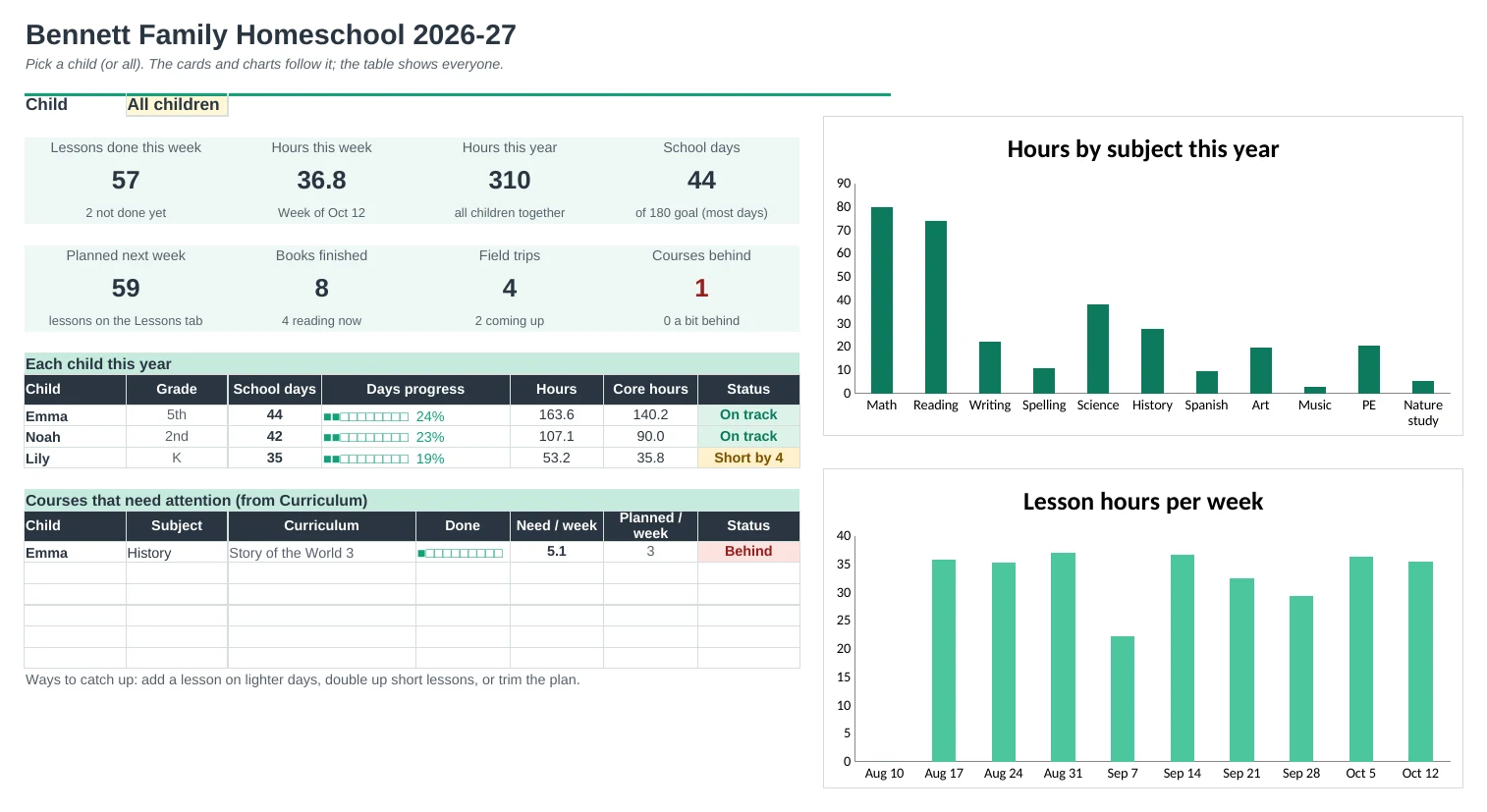
| · | Dashboard with a child picker and progress toward your goals |
$19 one-time
10 tabs: Start Here, Dashboard, Weekly Plan, Lessons, Attendance, Hours, Curriculum, Reading List, Field Trips and Setup. You get two copies: one filled in with a sample family of three so you can see it working, and a blank one ready for your own.
Get Homeschool Planner Pro for $19- Instant download after checkout
- Works in Google Sheets and Excel
- Yours to keep and reuse every year