
Free assignment tracker template for Google Sheets
Put every assignment for the term in one list with its class and due date. Tick each one off when it's handed in, add your score when it comes back, and the sheet shows your grade in each class, how much is left to do and which weeks are going to be busy.
Pro Want weighted grades, a final exam calculator and your GPA? See Assignment Tracker Pro →| Class | Assignment | Type | Due date | Done | Score | Out of | Grade | Letter | Notes |
|---|---|---|---|---|---|---|---|---|---|
| Biology | Lab 1: Microscope basics | Lab | Sep 11, 2026 | 18 | 20 | 90% | A | ||
| English | Personal narrative essay | Essay | Sep 18, 2026 | 88 | 100 | 88% | B | ||
| Statistics | Homework 1 | Homework | Sep 18, 2026 | 9 | 10 | 90% | A | ||
| History | Reading response 1 | Homework | Sep 22, 2026 | 10 | 10 | 100% | A | ||
| Spanish | Vocab quiz 1 | Quiz | Sep 25, 2026 | 17 | 20 | 85% | B | ||
| Statistics | Homework 2 | Homework | Sep 25, 2026 | 8 | 10 | 80% | B | ||
| Biology | Cell structure quiz | Quiz | Oct 2, 2026 | 21 | 25 | 84% | B | ||
| History | Map assignment | Homework | Oct 6, 2026 | 14 | 15 | 93.3% | A | ||
| Statistics | Midterm exam | Exam | Oct 9, 2026 | 82 | 100 | 82% | B | Review chapter 4 mistakes | |
| English | Poetry analysis | Essay | Oct 13, 2026 | 45 | 50 | 90% | A | ||
| Biology | Lab 2: Osmosis | Lab | Oct 16, 2026 | 20 | Submitted, not graded yet | ||||
| Spanish | Oral presentation | Project | Oct 16, 2026 | 50 | Not graded yet | ||||
| Statistics | Homework 3 | Homework | Oct 20, 2026 | 10 | Problems 1 to 24, odd only | ||||
| History | Reading response 2 | Homework | Oct 21, 2026 | 10 | |||||
| Biology | Midterm exam | Exam | Oct 23, 2026 | 100 | Chapters 1 to 6. Study group Wed. | ||||
| English | Research paper outline | Essay | Oct 27, 2026 | 20 | |||||
| Spanish | Vocab quiz 2 | Quiz | Oct 30, 2026 | 20 | |||||
| History | Midterm exam | Exam | Nov 4, 2026 | 100 | |||||
| Statistics | Group project | Project | Nov 13, 2026 | 50 | Partners: Maya and Leo | ||||
| Biology | Lab 3: Enzymes | Lab | Nov 20, 2026 | 20 | |||||
| English | Research paper | Essay | Nov 24, 2026 | 100 | |||||
| Spanish | Final exam | Exam | Dec 11, 2026 | 100 |
| Class | Assignments | Done | Left to do | Points earned | Points graded | Grade so far | Letter |
|---|---|---|---|---|---|---|---|
| Biology | 5 | 3 | 2 | 39 | 45 | 86.7% | B |
| English | 4 | 2 | 2 | 133 | 150 | 88.7% | B |
| Statistics | 5 | 3 | 2 | 99 | 120 | 82.5% | B |
| History | 4 | 2 | 2 | 24 | 25 | 96% | A |
| Spanish | 4 | 2 | 2 | 17 | 20 | 85% | B |
| All classes | 22 | 12 | 10 | 312 | 360 | 86.7% | B |
| Week of | Due | Not done | Quizzes and exams |
|---|---|---|---|
| Sep 7, 2026 | 1 | 0 | 0 |
| Sep 14, 2026 | 2 | 0 | 0 |
| Sep 21, 2026 | 3 | 0 | 1 |
| Sep 28, 2026 | 1 | 0 | 1 |
| Oct 5, 2026 | 2 | 0 | 1 |
| Oct 12, 2026 | 3 | 0 | 0 |
| Oct 19, 2026 | 3 | 3 | 1 |
| Oct 26, 2026 | 2 | 2 | 1 |
| Nov 2, 2026 | 1 | 1 | 1 |
| Nov 9, 2026 | 1 | 1 | 0 |
| Nov 16, 2026 | 1 | 1 | 0 |
| Nov 23, 2026 | 1 | 1 | 0 |
| Nov 30, 2026 | 0 | 0 | 0 |
| Dec 7, 2026 | 1 | 1 | 1 |
| Dec 14, 2026 | 0 | 0 | 0 |
| Dec 21, 2026 | 0 | 0 | 0 |
What's inside
- Every assignment for every class in one list, sorted by due date
- A Done checkbox, plus score, grade percent and letter grade for each assignment
- A Classes tab with your grade so far and how many assignments are left in each class
- A By Week tab that shows how much is due each week and where the quizzes and exams fall
- Grades only count work that's been marked, so a missing score never drags your average down
- Works in Google Sheets and Excel
How to use it
Download your copy
Click "Free download" to save the .xlsx file. It opens in Excel, or in Google Sheets: open a blank sheet (sheets.new) and choose File, then Import, then Upload.
Add your classes
On the Classes tab, replace the sample class names with yours. Use the same names in the Class column of the Assignments tab.
Enter the term from your syllabus
Go through each syllabus once and add every assignment, quiz and exam with its due date and how many points it's worth. Then sort the list by Due date.
Tick it off when it's handed in
Check Done as soon as you submit something. The Classes tab updates how many are left.
Add scores as they come back
Type your score in the Score column. Grade, Letter and your grade so far for that class fill in by themselves.
Plan around busy weeks
Set the first Week of date to the Monday your term starts. The By Week tab then shows which weeks are packed, so you can start early.
Tips
Do the syllabus in one sitting
The first week of term is the easiest time to enter everything. After that you only tick boxes and add scores.
Sort by due date every week
Select the list and sort by Due date. The top unticked rows are what to work on next.
Check your syllabus for weighting
Grade so far adds up points. If your class counts exams as 50% no matter the points, treat this number as a guide and use the syllabus for the exact grade.
Write the details in Notes
Page numbers, group partners, submission links. Everything you need to start the task in one place.
Questions
Is this assignment tracker free?
Yes. Download the .xlsx file and open it in Excel or Google Sheets. There's no sign-up.
How is the grade worked out?
Grade so far is the points you've earned divided by the points possible, counting only assignments with a score. Ungraded work is left out until the score comes in.
Can I change the letter grade scale?
Yes. The Letter formulas use 90, 80, 70 and 60 percent. Edit those numbers in the Letter columns to match your school's scale.
Does it work for weighted grades?
Not exactly. It adds up points across everything in a class. If your teacher weights categories like exams and homework differently, use it as a close guide and check the syllabus.
Can I use it on my phone?
Yes. Open your copy in the Google Sheets app to tick off work or check what's due.
How many assignments can it hold?
The class and week totals look at the first 300 rows, which covers a full year of classes. Copy the Grade and Letter formulas down as you add rows.
Pro version
Assignment Tracker Pro
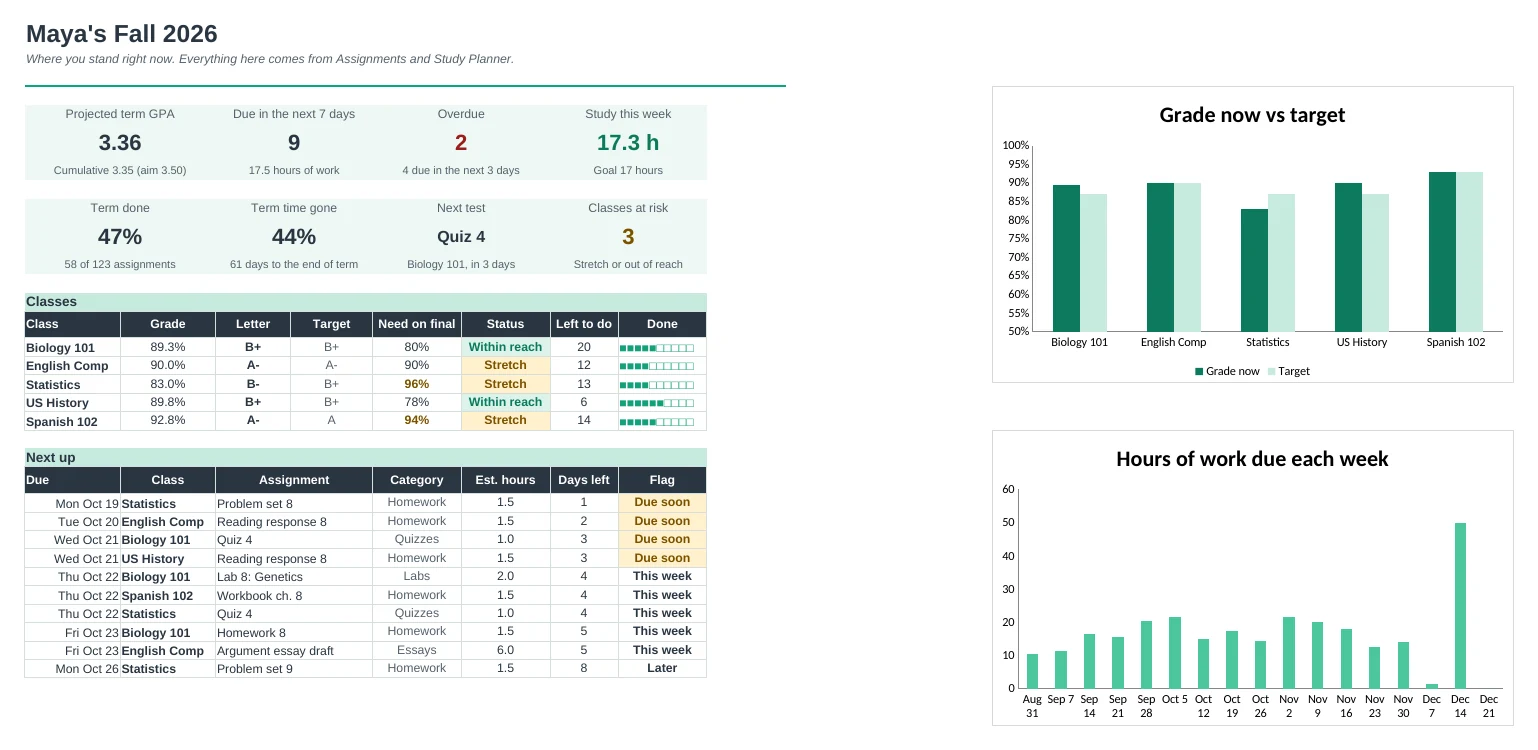
Put in your syllabus once and see what's due this week, your grade in every class, what you need on each final and your GPA.
Set up the term once
Add your classes, credits, target grades and the grade weights from each syllabus. Your school's grade scale and GPA points go on the same tab.
See what's due
A week board shows the next 7 days with everything due each day and the hours of work it needs. Overdue work is flagged in red.
Know your grade
Type each score as it comes back. Grades works out every category average and your grade so far, counting only work that's been graded.
What you need on the final
For each class, see the score you need on the final to hit your target, and to get an A, B or C, with a flag when it's a stretch or out of reach.
Plan your study time
Log study sessions against a weekly goal for each class, and see every upcoming test with when to start studying and how much you've done for it.
Track your GPA
See your projected GPA for the term, add past terms for your cumulative GPA, and try what-if letters to see what it takes to reach your goal.
| Free | Pro |
|---|---|
| One list of assignments | One list, plus a 7-day week board |
| Grade from points | Weighted categories from your syllabus, or points |
| Classes tab with grade so far | Grades tab with every category average |
| · | What you need on the final for each grade |
| · | Projected term GPA and cumulative GPA |
| · | Study planner with weekly goals and test countdowns |
| · | Dashboard with overdue and due-soon flags |
| · | Your school's grade scale, editable |
$19 one-time
8 tabs: Start Here, Dashboard, This Week, Assignments, Grades, Study Planner, GPA and Setup. You get two copies: one filled in with a sample student's fall term so you can see it working, and a blank one ready for your own classes.
Get Assignment Tracker Pro for $19- Instant download after checkout
- Works in Google Sheets and Excel
- Yours to keep and reuse every year