
Free issue log template
Log every problem as it comes up, give it a priority, an owner and a target date, and work it until it's fixed. The sheet counts how long each issue has been open, flags anything overdue or due in the next three days, and the summary shows open issues by priority, owner and area.
Pro Want SLA targets by priority, a burn-down chart and a weekly report? See Issue Log Pro →| ID | Issue | Area | Priority | Reported by | Owner | Opened | Target date | Stage | Resolved on | Next step or fix | Days open | Status |
|---|---|---|---|---|---|---|---|---|---|---|---|---|
| ISS-001 | Two desks in the new office have no network ports | IT | High | Rachel Kim | Ben Ortiz | Oct 5, 2026 | Oct 9, 2026 | Done | Oct 8, 2026 | Electrician added two ports | 3 | Resolved |
| ISS-002 | Movers quote came in $1,800 over budget | Budget | High | Ben Ortiz | Laura Simms | Oct 6, 2026 | Oct 13, 2026 | Done | Oct 12, 2026 | Second quote accepted, $400 under budget | 6 | Resolved |
| ISS-003 | Printer won't connect to the new Wi-Fi | IT | Medium | Front desk | Ben Ortiz | Oct 12, 2026 | Oct 14, 2026 | Done | Oct 16, 2026 | Firmware update, then reconnected | 4 | Resolved late |
| ISS-004 | Conference room blinds missing | Facilities | Low | Rachel Kim | Tara Jones | Oct 13, 2026 | Oct 30, 2026 | Done | Oct 27, 2026 | Landlord installed them | 14 | Resolved |
| ISS-005 | Shared drive permissions lost after the server move | IT | Critical | Accounts team | Ben Ortiz | Oct 19, 2026 | Oct 20, 2026 | Done | Oct 20, 2026 | Restored folder permissions from last week's backup | 1 | Resolved |
| ISS-006 | Parking passes not issued for 4 staff | Facilities | Medium | Daniel Wu | Tara Jones | Oct 20, 2026 | Oct 27, 2026 | Waiting | Building manager ordering the passes | 17 | Overdue | |
| ISS-007 | Phone system drops calls transferred to sales | Vendors | High | Sales team | Ben Ortiz | Oct 21, 2026 | Oct 28, 2026 | In progress | Ticket open with the phone provider (#58213) | 16 | Overdue | |
| ISS-008 | Kitchen fridge leaking water | Facilities | Medium | Maya Patel | Tara Jones | Oct 26, 2026 | Nov 2, 2026 | Done | Nov 4, 2026 | Replaced the water line | 9 | Resolved late |
| ISS-009 | New hires can't log in to the payroll portal | Staff | High | Laura Simms | Laura Simms | Oct 28, 2026 | Nov 4, 2026 | In progress | Waiting on the payroll company to reset accounts | 9 | Overdue | |
| ISS-010 | Office cleaning only happening twice a week, not three | Vendors | Low | Rachel Kim | Tara Jones | Oct 29, 2026 | Nov 13, 2026 | Not started | Check the contract, then call the cleaning company | 8 | On track | |
| ISS-011 | Laptop docking stations flicker on two monitors | IT | Medium | Daniel Wu | Ben Ortiz | Nov 2, 2026 | Nov 6, 2026 | In progress | Testing a new cable on one desk | 4 | Due soon | |
| ISS-012 | Signage on the street door still shows the old suite number | Facilities | Low | Front desk | Tara Jones | Nov 3, 2026 | Nov 20, 2026 | Not started | Get a quote from the sign shop | 3 | On track | |
| ISS-013 | Furniture invoice billed for 12 chairs, only 10 delivered | Budget | Medium | Laura Simms | Laura Simms | Nov 4, 2026 | Nov 11, 2026 | Waiting | Emailed the supplier for a corrected invoice | 2 | On track | |
| ISS-014 | VPN slow for remote staff since the move | IT | High | Remote team | Ben Ortiz | Nov 5, 2026 | Nov 7, 2026 | Not started | Check the new firewall settings | 1 | Due soon | |
| ISS-015 | Emergency exit map not posted on the second floor | Facilities | High | Maya Patel | Tara Jones | Nov 5, 2026 | Nov 9, 2026 | In progress | Map printed, framing on order | 1 | Due soon | |
| Item | Count |
|---|---|
| Today's date | Nov 6, 2026 |
| Issues logged | 15 |
| Open | 9 |
| Overdue | 3 |
| Due in the next 3 days | 3 |
| Resolved | 6 |
| Resolved late | 2 |
| Average days to resolve | 6.2 |
| Oldest open issue (days) | 17 |
| Open by priority | |
| Critical | 0 |
| High | 4 |
| Medium | 3 |
| Low | 2 |
| Open by owner | |
| Ben Ortiz | 3 |
| Tara Jones | 4 |
| Laura Simms | 2 |
| Open by area | |
| IT | 2 |
| Facilities | 3 |
| Vendors | 2 |
| Staff | 1 |
| Budget | 1 |
What's inside
- One row per issue with area, priority, who reported it, who owns it, opened date and target date
- Days open for every issue, which stops counting once you add the resolved date
- Status works itself out: On track, Due soon, Overdue, No target, Resolved or Resolved late
- A Stage column (Not started, In progress, Waiting, Done) and a next step, so anyone can see where things stand
- A summary with open, overdue, average days to resolve, the oldest open issue, and open issues by priority, owner and area
- Room for 40 issues, and works in Google Sheets and Excel
How to use it
Download your copy
Click "Free download" to save the .xlsx file. It opens in Excel, or in Google Sheets: open a blank sheet (sheets.new) and choose File, then Import, then Upload. The sample is a small office move, so delete those rows when you're ready.
Set today's date
On the Summary tab, the first value is the date the log counts from. Type =TODAY() there so Days open and Overdue stay current.
Log the issue
Add a row as soon as a problem comes up. Describe it in one line, pick a priority of Critical, High, Medium or Low, and name one owner.
Set a target date
Give every issue a date it should be fixed by. Critical issues get a day or two. Low ones can take a few weeks.
Keep the next step current
When you work on an issue, update the Stage and the Next step column. That one line saves a lot of "any news on this?" emails.
Resolve it
When it's fixed, type the date in Resolved on and write the fix. The status changes to Resolved, or Resolved late if it went past the target.
Tips
Sort by status in meetings
Select the issue rows, then Data, then Sort range, and sort by Status. Overdue and Due soon come up first, which is all most meetings need.
Use your own owner names
Change the names under Open by owner on the Summary tab to your team. Each one counts the open issues in the Owner column with that exact name.
Write the fix down
"Fixed" helps nobody. "Restored permissions from last week's backup" helps the next person who hits the same problem.
Split big problems
If an issue has three separate fixes, log three issues. Small ones get closed. Big vague ones sit open for months.
Questions
What is an issue log?
A list of problems that need fixing, with who owns each one, how urgent it is and where it stands. Project teams, offices and IT use them to make sure nothing gets dropped.
Can I use it as a problem log?
Yes. A problem log and an issue log are the same idea. Rename the sheet if you like. Everything else works the same.
What's the difference between an issue log and a risk log?
An issue is a problem happening now. A risk is something that might happen. Track risks in a risk log, and move them here if they turn into real problems.
How are Overdue and Due soon worked out?
Each target date is compared with the date on the Summary tab. Past the target is Overdue, and within 3 days is Due soon. Once you add a resolved date, the issue shows Resolved or Resolved late instead.
How do I add more than 40 issues?
Insert rows above the last row and copy the whole last row down, so Days open, Status and the hidden helper column at the end come too. Then stretch the ranges in the Summary formulas to include the new rows.
Is it free, and does it work in Excel?
Yes. Download the .xlsx file and open it in Excel or Google Sheets. The formulas work the same in Excel.
Pro version
Issue Log Pro
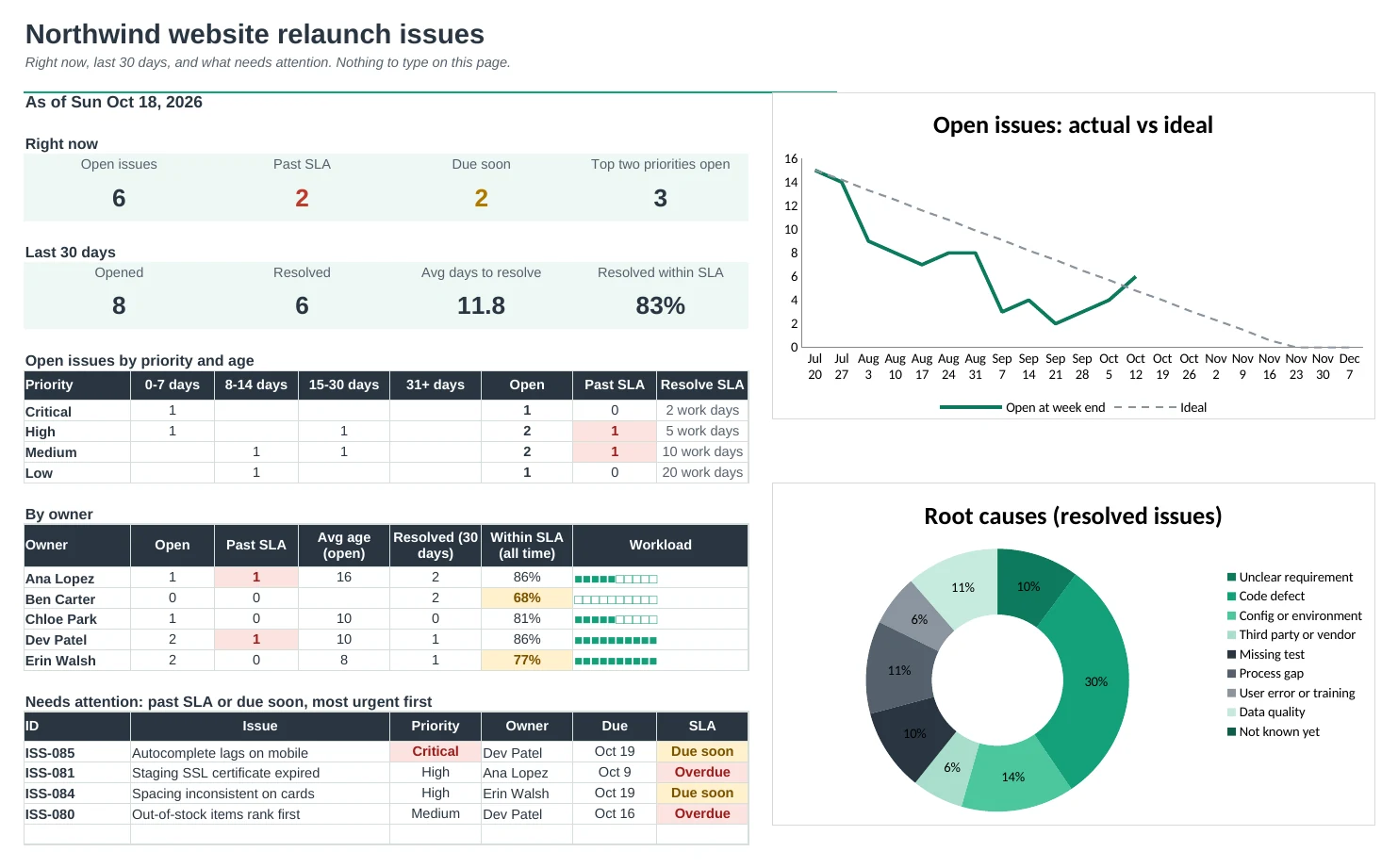
Log every issue once and see what's past its SLA, who's overloaded and whether the backlog is shrinking, with a weekly report ready to share.
Set your rules once
On Setup, give each priority a response and resolution target in working or calendar days, set your status workflow and list your areas, people and root causes. Every dropdown follows.
Due dates work themselves out
Pick a priority and the issue gets a respond-by and due date. The SLA column shows On track, Due soon or Overdue, then Met or Missed when it's resolved.
The urgent stuff comes first
The Dashboard lists everything past its SLA or due soon, most urgent priority first, with open issues by priority and age so nothing quietly rots.
See who's carrying what
By owner: open issues, past SLA, average age, resolved in the last 30 days and how often they hit the SLA, with a workload bar.
A weekly report ready to share
Pick any week. Weekly Report shows what was opened and resolved, SLA results and root causes, with a notes box for decisions. Print it or share it.
Watch the backlog burn down
Burn-down charts open issues week by week against a straight line to your clear-by date, plus opened vs resolved each week and the root causes behind them.
| Free | Pro |
|---|---|
| One target date per issue | SLA targets by priority, in working or calendar days |
| Days open | Age buckets, response and resolution SLA checks |
| Summary counts | Dashboard with charts and a needs-attention list |
| · | Status workflow you set |
| · | Workload and SLA results by owner |
| · | Weekly report for any week |
| · | Burn-down chart and root causes |
$19 one-time
6 tabs: Start Here, Dashboard, Issue Log, Weekly Report, Burn-down and Setup. You get two copies: one filled in with a sample website project so you can see it working, and a blank one ready for your own issues.
Get Issue Log Pro for $19- Instant download after checkout
- Works in Google Sheets and Excel
- Yours to keep and reuse every year