
Free risk log template
List what could go wrong, score how likely it is and how bad it would be, and the log rates each risk High, Medium or Low. Give every risk an owner and an action, and the sheet flags overdue actions, shows how much each action lowers the score, and maps your open risks on a 5 by 5 heat map.
| ID | Risk | Category | Owner | Likelihood (1-5) | Impact (1-5) | Score | Rating | Response plan | Action due | Status | Likelihood after | Impact after | Score after | Review flag |
|---|---|---|---|---|---|---|---|---|---|---|---|---|---|---|
| R-01 | Contractor finishes the build-out late and opening slips | Schedule | Jen Walsh | 4 | 4 | 16 | High | Weekly site walk with the contractor. Late penalty written into the contract. | Nov 13, 2026 | In progress | 3 | 3 | 9 | Due in 2 weeks |
| R-02 | Build-out costs run over budget | Budget | Marcus Hale | 3 | 4 | 12 | Medium | Keep a 10% contingency. Approve every change order in writing first. | Nov 20, 2026 | Open | 2 | 3 | 6 | Due in 2 weeks |
| R-03 | Health inspection fails on the first visit | Compliance | Jen Walsh | 2 | 5 | 10 | Medium | Book a pre-inspection walk-through with a food safety consultant. | Dec 1, 2026 | Open | 1 | 5 | 5 | On track |
| R-04 | Espresso machine delivery delayed by a supplier backorder | Suppliers | Jen Walsh | 3 | 3 | 9 | Medium | Confirm the ship date. Ask the supplier about a loaner machine. | Nov 2, 2026 | Open | 2 | 2 | 4 | Action overdue |
| R-05 | Can't hire enough baristas before opening day | People | Alicia Moreno | 4 | 4 | 16 | High | Post jobs 6 weeks out. $200 referral bonus for staff. | Nov 9, 2026 | In progress | 3 | 3 | 9 | Due in 2 weeks |
| R-06 | New staff quit during the training weeks | People | Alicia Moreno | 2 | 3 | 6 | Low | Pay for training shifts. Pair each new hire with a lead. | Nov 27, 2026 | Open | 2 | 2 | 4 | On track |
| R-07 | Point-of-sale system not set up in time | Equipment and tech | Devon Price | 2 | 4 | 8 | Medium | Install and test 2 weeks before opening. Keep a card reader as backup. | Nov 30, 2026 | Open | 1 | 3 | 3 | On track |
| R-08 | Internet not installed by opening day | Equipment and tech | Devon Price | 3 | 4 | 12 | Medium | Booked the install early. Phone hotspot as backup. | Oct 30, 2026 | Closed | 1 | 2 | 2 | Closed |
| R-09 | Customers slip at the new entrance in winter | Safety | Marcus Hale | 3 | 3 | 9 | Medium | Heavy-duty mats and an ice-melt contract with the landlord. | Nov 27, 2026 | Open | 1 | 3 | 3 | On track |
| R-10 | Grand opening clashes with road work on Main St | Schedule | Marcus Hale | 2 | 3 | 6 | Low | Checked the city road work calendar. No work planned that week. | Oct 23, 2026 | Closed | 1 | 3 | 3 | Closed |
| R-11 | Sales are slower than forecast for the first 3 months | Budget | Marcus Hale | 3 | 5 | 15 | High | Keep 3 months of rent in reserve. Plan opening promos and a loyalty card. | Dec 15, 2026 | Open | 2 | 4 | 8 | On track |
| R-12 | Sign permit not approved before opening | Compliance | Jen Walsh | 3 | 2 | 6 | Low | Applied early. Temporary banner as a backup. | Nov 5, 2026 | In progress | 1 | 2 | 2 | Action overdue |
| R-13 | Walk-in cooler fails and stock spoils | Equipment and tech | Devon Price | 2 | 4 | 8 | Medium | Service contract plus a temperature alarm that texts the manager. | Dec 4, 2026 | Open | 1 | 3 | 3 | On track |
| R-14 | Key supplier raises milk and bean prices | Suppliers | Alicia Moreno | 3 | 3 | 9 | Medium | Get a quote from a second supplier. Review menu prices in January. | Jan 15, 2027 | Open | 3 | 2 | 6 | On track |
| Likelihood | Impact 1 | Impact 2 | Impact 3 | Impact 4 | Impact 5 | Open risks |
|---|---|---|---|---|---|---|
| 5 Almost certain | 0 | 0 | 0 | 0 | 0 | 0 |
| 4 Likely | 0 | 0 | 0 | 2 | 0 | 2 |
| 3 Possible | 0 | 1 | 3 | 1 | 1 | 6 |
| 2 Unlikely | 0 | 0 | 1 | 2 | 1 | 4 |
| 1 Rare | 0 | 0 | 0 | 0 | 0 | 0 |
| Total | 0 | 1 | 4 | 5 | 2 | 12 |
| Item | Value |
|---|---|
| Today's date | Nov 6, 2026 |
| High rating at or above | 15 |
| Medium rating at or above | 8 |
| Risks logged | 14 |
| Open risks | 12 |
| Closed risks | 2 |
| Open and rated High | 3 |
| Open and rated Medium | 7 |
| Open and rated Low | 2 |
| Actions overdue | 2 |
| Actions due in 2 weeks | 3 |
| Total open score now | 124 |
| Total open score after actions | 62 |
| Open risks by category | |
| Schedule | 1 |
| Budget | 2 |
| People | 2 |
| Suppliers | 2 |
| Compliance | 2 |
| Equipment and tech | 2 |
| Safety | 1 |
| Score | Likelihood | Impact |
|---|---|---|
| 1 | Rare: very unlikely to happen | Minor: barely noticed, fixed in a day |
| 2 | Unlikely: could happen, but wouldn't be expected | Small: a short delay or a cost that's easy to absorb |
| 3 | Possible: about as likely as not | Moderate: a noticeable delay or cost that needs a plan |
| 4 | Likely: would not be a surprise | Major: a big delay, cost or hit to your reputation |
| 5 | Almost certain: expected to happen | Severe: stops the project or causes serious harm |
What's inside
- Score each risk from 1 to 5 for likelihood and impact, and the sheet multiplies them into a score out of 25
- Ratings of High, Medium or Low from cut-offs you set on the Summary tab
- An owner, response plan and action date for every risk, with overdue actions flagged
- Likelihood and impact after your action, so you can see how much each plan lowers the risk
- A 5 by 5 heat map that counts your open risks in each square
- A scoring guide with plain-English meanings for each level, and a summary by rating and category
How to use it
Make your copy
Click "Make a copy" to save the log to your Google Drive, or download the Excel file. The sample is a small business opening a new café, so delete those rows when you're ready.
Set the date and cut-offs
On the Summary tab, type =TODAY() in the first value so overdue actions stay current. The next two values set the scores that count as High and Medium. Change them if your team uses different bands.
List your risks
Write each risk as something that could happen, like "Supplier delivers late". Add a category and the person who owns it.
Score them
Give each risk a likelihood and an impact from 1 to 5. The Scoring Guide tab explains each level. Score and Rating fill in by themselves.
Plan a response
For each risk, write what you'll do and when. Then score the likelihood and impact you expect after that action is done.
Review it regularly
Go through the log every week or two. Update the scores, set Status to Closed when a risk is gone, and check the heat map's top right corner first.
Tips
Work the top right first
Risks with high likelihood and high impact sit in the top right of the heat map. That's where your time goes first.
One owner per risk
"The team" never gets round to it. Put one name on each risk, even if several people help.
Write risks as cause and effect
"Supplier backorder delays the espresso machine" tells you what to watch and what it hurts. "Equipment" doesn't.
Keep closed risks
Don't delete a risk when it's over. Set Status to Closed. Next project, it's a ready-made list of what to watch for.
Questions
What's the difference between a risk log and a risk register?
Most people use the two names for the same thing: a list of risks with a score, an owner and a plan. This template works as either.
How is the risk score worked out?
Likelihood times impact, each scored 1 to 5, so scores run from 1 to 25. By default 15 or more is High, 8 to 14 is Medium and anything lower is Low. You can change both cut-offs on the Summary tab.
What's the difference between a risk and an issue?
A risk might happen. An issue is already happening. When a risk turns into a real problem, close it here and track it in an issue log instead.
How does the heat map work?
It counts open risks by their likelihood and impact scores. The rows are likelihood from 5 down to 1 and the columns are impact from 1 to 5. Closed risks drop off the map.
Can I use different statuses?
Yes. The sheet only treats Closed as special. Anything else, like Open, In progress or Watching, counts as an open risk.
Is it free, and does it work in Excel?
Yes. Copy it to Google Drive or download the .xlsx file. The formulas and heat map work the same in Excel.
Pro version
Risk Log Pro
Score your risks, give each one an owner and actions, and the log keeps the review dates, trend, heat map and report up to date.
Set it up once
Set your High and Medium cut-offs, how often each rating gets reviewed, your categories and people on Setup. Reword the scoring guide so each number means something real for you.
Reviews that keep their history
Each re-score is a row on Reviews. The register always shows the latest score and an arrow for whether the risk got better or worse since the last review.
Review dates set themselves
The next review date comes from the rating: High risks every 30 days, Medium 60, Low 90, or whatever you choose. Overdue reviews are flagged.
Actions with owners and dates
Give a risk as many actions as it needs. Overdue actions show up on the register, the dashboard and the report, and the next open action is shown beside each risk.
See where you stand
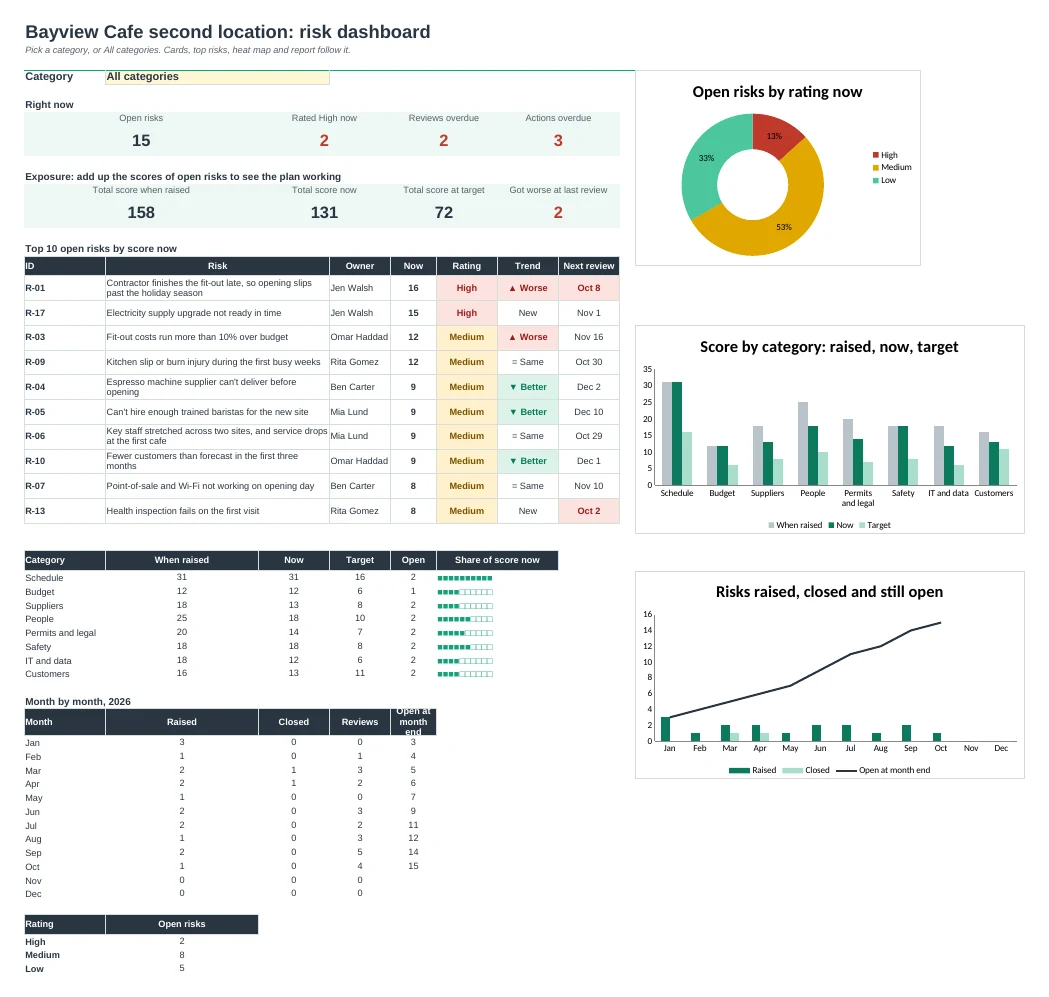
The Dashboard shows open and High risks, overdue reviews and actions, the total score now against when raised and at target, and the top 10 risks. Filter it all by category.
Heat maps and a report to share
Two 5 by 5 heat maps show where open risks sit now and where your plans take them. Report lists open risks highest first on one printable page.
| Free | Pro |
|---|---|
| Score now and after your action | Score when raised, now and at target |
| One heat map | Two heat maps: now and target, filtered by category |
| One action date per risk | As many actions as you need, each with an owner |
| · | Review log with a better or worse arrow |
| · | Next review dates worked out from the rating |
| · | Dashboard with top 10 risks and three charts |
| · | Printable risk report with decisions and sign-off |
| · | Setup tab for cut-offs, review days, categories and people |
$19 one-time
8 tabs: Start Here, Dashboard, Register, Reviews, Actions, Heat Map, Report and Setup. You get two copies: one filled in with a sample project so you can see it working, and a blank one ready for your own risks.
Get Risk Log Pro for $19- Instant download after checkout
- Works in Google Sheets and Excel
- Yours to keep and reuse every year