
Free decision log template
Write down each decision your team makes: what the question was, the options you looked at, what you chose and why. Add a review date and the log tells you which decisions are due a second look, so three months from now nobody has to ask "why did we do it this way?"
Pro Want weighted option scoring, review reminders and a printable record for each decision? See Decision Log Pro →| ID | Date | Area | Decision needed | Options considered | Decision | Why | Decided by | Consulted | Impact | Status | Review on | Review flag | Days to review |
|---|---|---|---|---|---|---|---|---|---|---|---|---|---|
| D-01 | Jul 14, 2026 | Operations | Which shipping carrier do we use for US orders? | USPS Ground Advantage; UPS Ground; a 3PL | USPS Ground Advantage for orders under 2 lb, UPS for the rest | Cheapest for our small parcels. UPS is faster for heavy boxes. | Nina Brooks | Carlos, Mei | High | Decided | Oct 14, 2026 | Review now | -23 |
| D-02 | Jul 28, 2026 | Pricing | Do we offer free shipping? | Never; always; over a minimum order | Free shipping on orders over $50 | Average order is $38. A $50 bar should lift basket size. | Nina Brooks | Mei | High | Decided | Nov 1, 2026 | Review now | -5 |
| D-03 | Aug 4, 2026 | Tools | Which email marketing tool do we use? | Mailchimp; Klaviyo; Shopify Email | Klaviyo | Better product-based flows. Free up to our list size. | Mei Tanaka | Nina | Medium | Decided | Feb 1, 2027 | Later | 87 |
| D-04 | Aug 18, 2026 | Product | Do we add a gift-wrap option? | No; free wrap; paid wrap at $4 | Paid gift wrap at $4, holiday season only | Customers asked for it. Paid keeps packing time covered. | Carlos Diaz | Nina, packing team | Low | Decided | Jan 15, 2027 | Later | 70 |
| D-05 | Aug 25, 2026 | People | How do we cover the holiday rush? | Overtime; two seasonal packers; a 3PL for December | Hire two seasonal packers, Nov 15 to Jan 5 | Overtime burned people out last year. A 3PL costs more per order. | Nina Brooks | Carlos | Medium | Decided | Jan 10, 2027 | Later | 65 |
| D-06 | Sep 8, 2026 | Marketing | Do we keep running Facebook ads? | Keep; pause; move budget to influencer posts | Pause Facebook ads for 60 days and test 3 influencer posts | Cost per sale doubled since June. | Mei Tanaka | Nina | Medium | Decided | Nov 7, 2026 | Review soon | 1 |
| D-07 | Sep 15, 2026 | Product | Do we stock the 16 oz candle size? | Yes; no; pre-orders only | Pre-orders only for the first batch | Tests demand without tying up cash in stock. | Carlos Diaz | Mei | Medium | Replaced | No review | ||
| D-08 | Sep 29, 2026 | Pricing | Do we raise prices on the 8 oz candles? | Hold at $22; $24; $25 | Raise to $24 on October 1 | Wax and jar costs went up 11%. $24 keeps us under the main competitor. | Nina Brooks | Carlos, Mei | High | Decided | Dec 31, 2026 | Later | 55 |
| D-09 | Oct 6, 2026 | Product | Do we stock the 16 oz candle size? (second look) | Pre-orders only; stock 200 units | Stock 200 units | Pre-orders sold out in 4 days. Replaces D-07. | Carlos Diaz | Nina | Medium | Decided | Dec 1, 2026 | Review soon | 25 |
| D-10 | Oct 13, 2026 | Operations | Which returns policy do we use? | 14 days; 30 days; 30 days with free return labels | 30 days, customer pays return shipping | Matches most shops our size. Free labels cost too much. | Nina Brooks | Carlos | Medium | Decided | Apr 13, 2027 | Later | 158 |
| D-11 | Oct 27, 2026 | Tools | Do we move bookkeeping to an accountant? | Keep doing it in-house; hire a bookkeeper; accountant monthly | Hire a part-time bookkeeper from January | Month-end takes Nina 2 days. A bookkeeper is cheaper than her time. | Nina Brooks | Our accountant | Medium | Decided | Mar 31, 2027 | Later | 145 |
| D-12 | Nov 3, 2026 | Marketing | Do we run a Black Friday sale? | No sale; 20% off sitewide; free gift over $60 | Waiting on margin numbers | Need to know margin after the price change first. | Mei Tanaka | Nina, Carlos | High | Proposed | Nov 10, 2026 | Needs a decision | 4 |
| D-13 | Nov 4, 2026 | Operations | Do we offer local pickup? | No; pickup from the studio on Saturdays | Waiting on the landlord's answer | Saves shipping for local buyers. Studio lease may not allow it. | Nina Brooks | Carlos | Low | Proposed | Nov 20, 2026 | Needs a decision | 14 |
| Item | Count |
|---|---|
| Today's date | Nov 6, 2026 |
| Decisions logged | 13 |
| Decided | 10 |
| Still to decide (Proposed) | 2 |
| Reversed or replaced | 1 |
| Due for review now | 2 |
| Review in the next 30 days | 2 |
| High-impact decisions | 4 |
| Decisions by area | |
| Pricing | 2 |
| Product | 3 |
| Operations | 3 |
| Marketing | 2 |
| People | 1 |
| Tools | 2 |
| Decisions by month | |
| July 2026 | 2 |
| August 2026 | 3 |
| September 2026 | 3 |
| October 2026 | 3 |
| November 2026 | 2 |
What's inside
- One row per decision: the question, the options, what you chose, why, who decided and who was consulted
- Status for each decision: Proposed, Decided, Reversed or Replaced
- A review date with a flag that says Needs a decision, Review now, Review soon or Later
- Days until each review, counted from the date on the Summary tab
- A summary with open questions, reviews due, and decisions by area and month
- Works in Google Sheets and Excel, with room for 30 decisions
How to use it
Download your copy
Click "Free download" to save the .xlsx file. It opens in Excel, or in Google Sheets: open a blank sheet (sheets.new) and choose File, then Import, then Upload. The sample is a small online candle shop, so delete those rows when you're ready.
Set today's date
On the Summary tab, the first value is the date the log counts from. Type =TODAY() there so the review flags stay current.
Log the question first
When a decision comes up, add a row with the question and set Status to Proposed. Fill in the options as you talk them through.
Record the decision and the reason
Once it's made, write what you chose and why in one or two sentences. Add who decided, who was consulted, and set Status to Decided.
Pick a review date
Give each decision a date to check it's still right. Big or uncertain calls get a short one, like 60 days. Settled ones can wait a year.
Never delete, just reverse
If you change your mind, set the old row to Reversed or Replaced and log the new decision as its own row. Mention the old ID in the Why column.
Tips
Write the why for a stranger
Six months from now you'll have forgotten the details. Write the reason so someone new to the team would understand it.
Log small decisions too
Big decisions get remembered. It's the small ones, like a supplier or a policy tweak, that cause "who decided this?" moments later.
Review in your team meeting
Filter the Review flag column to Review now and spend five minutes on those. Keep, change or reverse each one.
Link to the details
If there's a longer write-up, paste the link into the Why column. The log stays short and the detail is one click away.
Questions
What is a decision log?
A running list of the decisions a team or project has made, with the reason and who made each one. It saves you re-arguing old decisions and helps new people catch up fast.
What should a decision log include?
The date, the question, the options you looked at, the decision, the reason, who decided and who was consulted. A status and a review date help you keep it current. This template has all of these.
Is a decision log the same as a decision register?
Yes. Projects and boards often call it a decision register. It's the same list, and this template works for either.
What's the difference between a decision log and a meeting minutes template?
Minutes record everything said in one meeting. A decision log keeps only the decisions, across every meeting, in one place you can search and sort.
How does the review flag work?
It compares each Review on date with the date on the Summary tab. Dates that have passed show Review now, and dates in the next 30 days show Review soon. Proposed rows always show Needs a decision.
Is it free, and does it work in Excel?
Yes. Download the .xlsx file and open it in Excel or Google Sheets. The formulas work the same in Excel.
Pro version
Decision Log Pro
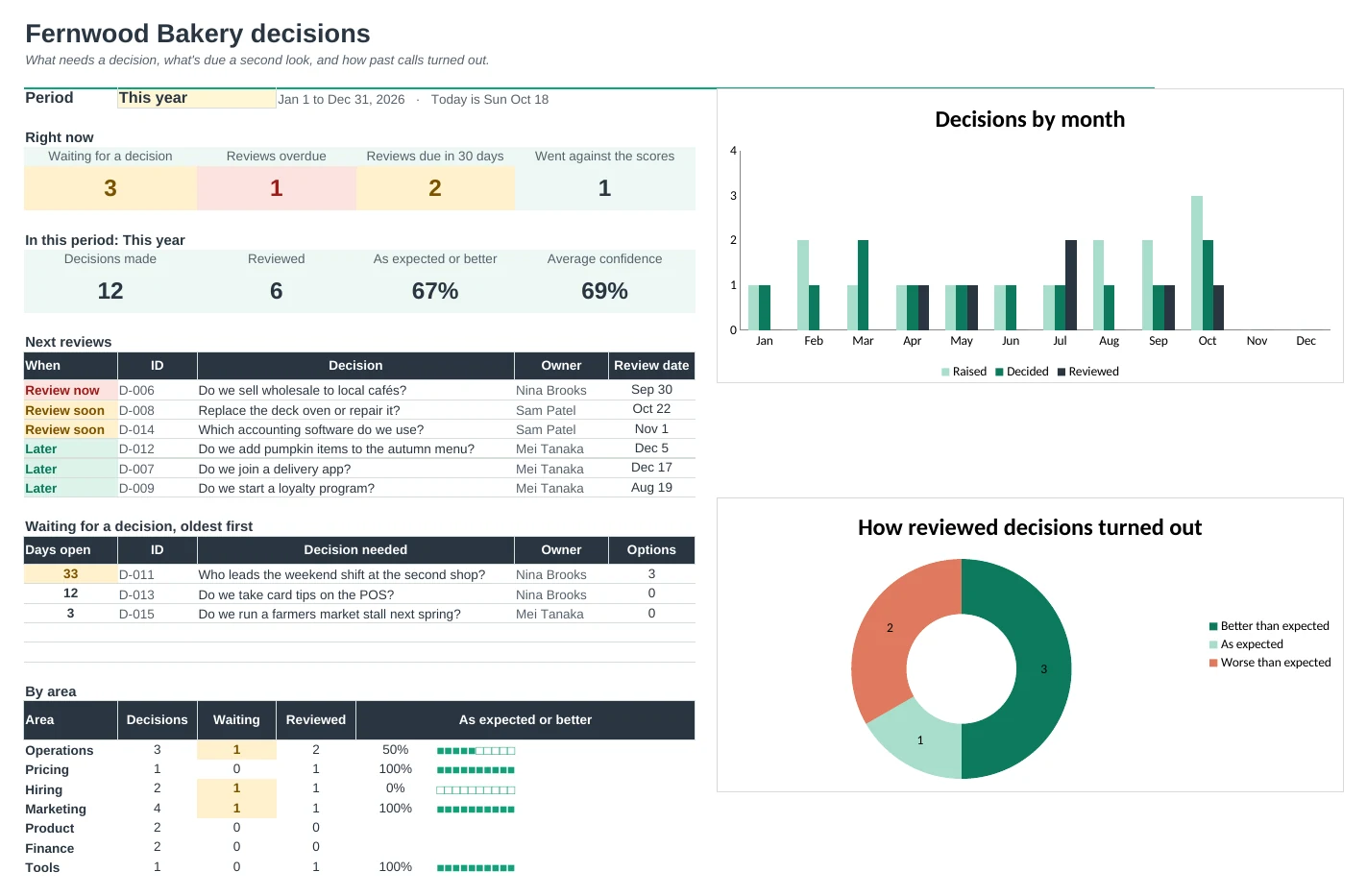
Log each decision with its options scored side by side, then come back on the review date and see how it really turned out.
Score the options properly
List what matters for a decision, weight each point 1 to 5 and score every option. The weighted score and rank work themselves out, and the log flags it when you choose against the scores.
Never forget a review
Leave the review date blank and it's set from the decision's impact: 3, 6 or 12 months by default. Reviews due soon and overdue light up on the Dashboard.
See what really happened
Write what you expect and how sure you are when you decide. At review time, record the outcome and whether it was a sound call, so you can tell bad luck from a bad decision.
Learn how good your calls are
Calibration compares how sure you felt with how often things went as expected, and a skill-or-luck table sorts your outcomes. Patterns show up after a few months.
Print a one-page record
Pick any decision and Decision Record lays out the question, the scored options with pros and cons, the choice, the reasons and the outcome on one page.
Set it up once
Areas, people and review times live on Setup. Every dropdown follows them, and the first five characters (D-001) link everything, so editing a question never breaks a thing.
| Free | Pro |
|---|---|
| One log with a review flag | Log, scoring, reviews and a dashboard |
| Options typed as one line of text | Options with pros, cons, cost and weighted scores |
| · | Flags choices that went against the scores |
| Review date you type | Review date set from impact, or typed |
| · | Outcome, sound call and lesson for every decision |
| · | Calibration: confidence vs what happened |
| Summary by area and month | Dashboard with charts and a period picker |
| · | Printable one-page decision record |
$19 one-time
8 tabs: Start Here, Dashboard, Decisions, Options, Criteria, Decision Record, Reviews and Setup. You get two copies: one filled in with a sample small business so you can see it working, and a blank one ready for your own decisions.
Get Decision Log Pro for $19- Instant download after checkout
- Works in Google Sheets and Excel
- Yours to keep and reuse every year