
Free daily medication chart and log
List each medication once with its dose and times, then tick a box every time a dose is taken or given. The chart counts missed doses for each medication and each day, and warns you when a refill is coming up. It's handy for yourself, or for a family sharing care.
| Medication | Dose | Times per day | Times | How to take | What it's for | Prescribed by | Refill due | Days to refill | Refill status | On chart |
|---|---|---|---|---|---|---|---|---|---|---|
| Levothyroxine | 50 mcg | 1 | 6:30 AM | Empty stomach, water only | Thyroid | Dr. Patel | Oct 23, 2026 | 5 | Refill soon | Yes |
| Omeprazole | 20 mg | 1 | 7:30 AM | Before breakfast | Heartburn | Dr. Patel | Nov 14, 2026 | 27 | OK | Yes |
| Lisinopril | 10 mg | 1 | 8:00 AM | With or without food | Blood pressure | Dr. Patel | Nov 2, 2026 | 15 | OK | Yes |
| Metformin | 500 mg | 2 | 8:00 AM, 6:00 PM | With breakfast and dinner | Blood sugar | Dr. Nguyen | Oct 21, 2026 | 3 | Refill soon | Yes |
| Vitamin D3 | 1,000 IU | 1 | 8:00 AM | With breakfast | Supplement | Self | Dec 1, 2026 | 44 | OK | Yes |
| Atorvastatin | 20 mg | 1 | 9:30 PM | At bedtime | Cholesterol | Dr. Patel | Oct 15, 2026 | -3 | Overdue | Yes |
| Medication | Dose | Time | Mon | Tue | Wed | Thu | Fri | Sat | Sun | Taken | Missed | Notes |
|---|---|---|---|---|---|---|---|---|---|---|---|---|
| Levothyroxine | 50 mcg | 6:30 AM | 7 | 0 | ||||||||
| Omeprazole | 20 mg | 7:30 AM | 6 | 1 | Sat: forgot, ate first | |||||||
| Lisinopril | 10 mg | 8:00 AM | 7 | 0 | ||||||||
| Metformin | 500 mg | 8:00 AM | 7 | 0 | ||||||||
| Vitamin D3 | 1,000 IU | 8:00 AM | 6 | 1 | ||||||||
| Metformin | 500 mg | 6:00 PM | 6 | 1 | Wed: out late, skipped dinner dose | |||||||
| Atorvastatin | 20 mg | 9:30 PM | 6 | 1 | Sat: fell asleep early |
| Day | Date | Doses due | Taken | Missed | Status |
|---|---|---|---|---|---|
| Monday | Oct 12, 2026 | 7 | 7 | 0 | All taken |
| Tuesday | Oct 13, 2026 | 7 | 7 | 0 | All taken |
| Wednesday | Oct 14, 2026 | 7 | 6 | 1 | 1 missed |
| Thursday | Oct 15, 2026 | 7 | 6 | 1 | 1 missed |
| Friday | Oct 16, 2026 | 7 | 7 | 0 | All taken |
| Saturday | Oct 17, 2026 | 7 | 5 | 2 | 2 missed |
| Sunday | Oct 18, 2026 | 7 | 7 | 0 | All taken |
| Item | Value |
|---|---|
| Today | Oct 18, 2026 |
| Week starting (Monday) | Oct 12, 2026 |
| Days so far this week | 7 |
| Doses per day | 7 |
| Doses due so far | 49 |
| Doses taken | 45 |
| Doses missed | 4 |
| Taken as scheduled | 91.8% |
| Refills due in 7 days or overdue | 3 |
What's inside
- A medication list with dose, times, how to take it, what it's for and who prescribed it
- A weekly chart with one row per dose time and a checkbox for each day
- Missed doses counted for every medication and every day of the week
- Refill dates with days left and a "Refill soon" flag a week ahead
- A check that each medication has the right number of rows on the chart
- Easy to print or share, and works in Google Sheets and Excel
How to use it
Make your copy
Click "Make a copy" to save the log to your Google Drive, or download the Excel file. Clear the sample medications first.
List the medications
On the Medications tab, copy each one exactly from the pharmacy label: name, dose, how many times a day and when. Add the refill date from the label or the pharmacy app.
Build the chart
On the Daily Chart tab, add one row per dose time. A pill taken twice a day gets two rows. The On chart column on the Medications tab tells you if one is missing.
Tick each dose
Tick the box for the day when the dose is taken or given. Leave it empty if it was missed, and add a note saying why.
Set the dates
On the Summary tab, type the Monday the week started and today's date. To keep Today current, replace it with =TODAY(). Missed counts only include days that have happened.
Start a new week
Right-click the Daily Chart tab, choose Duplicate, rename it, untick the boxes and update the week start on the Summary tab.
Tips
Copy straight from the label
Use the exact name and strength on the bottle. It avoids mix-ups when two medications sound alike or come in different strengths.
Bring it to appointments
Print the Medications tab, or show it on your phone. Doctors and pharmacists often ask for a full list, including vitamins and over-the-counter medicines.
Ask before you catch up a missed dose
Some medications shouldn't be doubled up. Your pharmacist can tell you what to do when a dose is missed, so you don't have to guess.
Share it when several people help
If family members take turns giving medications, share the sheet with them. Everyone can see what's already been given today.
Questions
How do I make a medication chart?
Copy this template, list each medication on the Medications tab, then add one row per dose time on the Daily Chart. Tick a box each time a dose is taken. The missed counts and refill dates work themselves out.
Can I print the medication chart?
Yes. Go to File > Print in Google Sheets and pick the Daily Chart tab, or download the Excel file and print it. Many people print a blank week and tick it by hand.
How does it count missed doses?
It works out how many days of the week have passed from the dates on the Summary tab, then subtracts the doses you ticked. Future days aren't counted as missed.
Can I use it for someone I care for?
Yes. It works the same for a parent, a child or a partner. Use the Notes column to record who gave the dose or anything unusual.
Is this medical advice?
No. It's a record of what was prescribed and what was taken. Your doctor or pharmacist should set the doses and times, and answer questions about missed doses.
Is it free?
Yes. Copy it to your Google Drive or download the Excel file. No sign-up, and nobody else can see your list unless you share it.
Pro version
Medication Log Pro
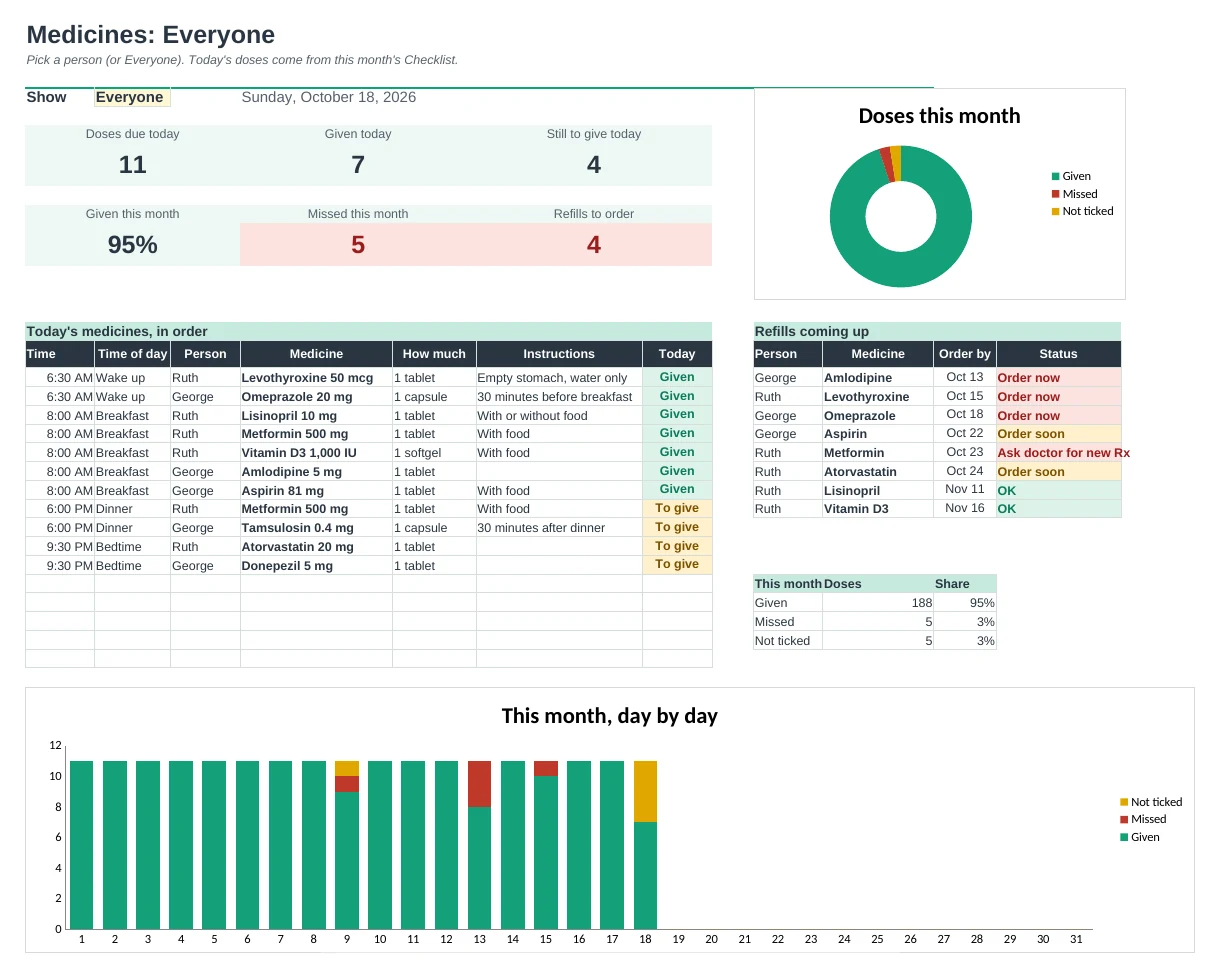
One medicine list for the whole family that builds the daily checklist, the fridge schedule, refill reminders and the list for the doctor.
List each medicine once
Type the name, strength, how much and time of day on Medications. The checklist, schedule, doctor list and refills all follow it.
See what's been given today
Tick each dose on the monthly checklist. The Dashboard lists today's medicines in time order and shows what's given, still to give or missed.
Never run out
Add the pills per fill and the date you picked it up. It works out when each one runs out and flags Order soon, Order now, or when you need a new prescription.
A big schedule for the fridge
Schedule prints one person's medicines by time of day, with allergies in red and the doctor and pharmacy numbers.
A list for every appointment
Doctor List prints every current medicine once with when it's taken, what it's for and who prescribed it, plus recently stopped ones.
Made for caregivers
Up to 6 people in one file. Share it with family so everyone sees the same list and the same ticks. Works in Google Sheets and Excel.
| Free | Pro |
|---|---|
| One medicine list | One list for up to 6 people |
| Weekly tick chart | Monthly checklist with due, given and missed |
| Refill due date you type | Refill dates worked out from pills on hand |
| · | Dashboard: today's doses in time order |
| · | Printable fridge schedule by time of day |
| · | Printable medication list for the doctor |
| · | Stopped medicines kept on record |
$19 one-time
8 tabs: Start Here, Dashboard, Medications, Checklist, Refills, Schedule, Doctor List and Setup. You get two copies: one filled in with a sample family so you can see it working, and a blank one ready for your own. It's a record, not medical advice: ask your pharmacist or doctor about doses.
Get Medication Log Pro for $19- Instant download after checkout
- Works in Google Sheets and Excel
- Yours to keep and reuse every year