
Free caregiver daily checklist and care log
One place for everyone who helps care for a parent or loved one. Each day gets a line for medications, meals, fluids, mood, activity and a note for whoever comes next, and the log flags days that need a closer look. A daily task list and a care info sheet keep family and paid helpers on the same page.
| Date | Caregiver | Morning meds | Midday meds | Evening meds | Meds given | Breakfast | Lunch | Dinner | Fluids (cups) | Mood | Activity | Bathroom OK | Slept | Check | Notes for next caregiver |
|---|---|---|---|---|---|---|---|---|---|---|---|---|---|---|---|
| Oct 12, 2026 | Anna | 3 | All | Most | Half | 7 | Good | Walk to the mailbox | Good | OK | Ate well. Asked about the garden club. | ||||
| Oct 13, 2026 | Rosa (aide) | 3 | Most | Half | Most | 6 | Okay | Chair exercises | Fair | OK | Knee sore in the afternoon. Ice helped. | ||||
| Oct 14, 2026 | Rosa (aide) | 2 | Half | Little | Most | 5 | Low | Watched TV | Poor | Missed meds | Refused noon pills, said stomach upset. Called Dr. Lee's nurse line, told to watch it. | ||||
| Oct 15, 2026 | Mark | 3 | All | Most | All | 6 | Good | Card games with Mark | Good | OK | Back to normal. Stomach fine. | ||||
| Oct 16, 2026 | Rosa (aide) | 3 | Most | Most | Half | 6 | Okay | Short walk outside | Fair | Bathroom issue | Constipated, extra water and prunes. Watch tomorrow. | ||||
| Oct 17, 2026 | Anna | 3 | All | All | Most | 8 | Good | Church, lunch with Anna | Good | OK | Good day. Bathroom fine again. | ||||
| Oct 18, 2026 | Mark | 2 | Most | Half | Half | 5 | Confused | Rested most of the day | Fair | Missed meds | Confused about the day after nap. Evening pills not given yet, check at 9 PM. |
| Time | Task | Category | Done | Initials | Notes |
|---|---|---|---|---|---|
| 7:30 AM | Help with washing and dressing | Personal care | MR | ||
| 8:00 AM | Morning medications with breakfast | Medications | MR | ||
| 8:00 AM | Breakfast | Meals | MR | Oatmeal and toast | |
| 8:30 AM | Check blood sugar and write it down | Health | MR | 118 | |
| 9:30 AM | Morning walk or chair exercises | Activity | MR | ||
| 10:30 AM | Water or tea | Meals | MR | ||
| 12:00 PM | Lunch | Meals | MR | ||
| 12:00 PM | Midday medications | Medications | MR | ||
| 1:00 PM | Rest or nap | Rest | MR | ||
| 3:00 PM | Snack and a drink | Meals | MR | ||
| 3:30 PM | Call or visit with family or a friend | Social | Aunt Linda to call back | ||
| 5:30 PM | Dinner | Meals | |||
| 6:00 PM | Evening medications | Medications | |||
| 7:00 PM | Check skin, feet and any sore spots | Health | |||
| 8:30 PM | Help getting ready for bed | Personal care | |||
| 9:00 PM | Lock doors, night light on, walker by the bed | Safety |
| Item | Details |
|---|---|
| Name | Margaret (Peggy) Russo |
| Date of birth | March 4, 1941 |
| Primary doctor | Dr. Helen Lee, (614) 555-0142 |
| After-hours nurse line | (614) 555-0199 |
| Pharmacy | Main Street Pharmacy, (614) 555-0168 |
| Allergies | Penicillin, shellfish |
| Conditions to know about | Type 2 diabetes, high blood pressure, arthritis in knees |
| Diet | Low sugar. Soft foods are easier. Likes tea, not coffee. |
| Mobility | Uses a walker. Needs a hand on stairs and in the shower. |
| Hearing and vision | Hearing aid in right ear. Reading glasses by the chair. |
| Where medications are kept | Weekly pill box on the kitchen counter. Refills in the hall closet. |
| Emergency contact | Anna Russo (daughter), (614) 555-0123 |
| Second contact | Mark Russo (son), (614) 555-0187 |
| Insurance | Medicare card and supplement card in the blue folder by the phone |
| Daily routine notes | Likes the radio on in the morning. Gets tired after 3 PM. |
| Item | Value |
|---|---|
| Fluid goal (cups a day) | 6 |
| Medication times per day | 3 |
| Days logged | 7 |
| Medication doses given | 19 |
| Medication doses missed | 2 |
| Days all medications given | 5 |
| Average fluids (cups) | 6.1 |
| Days below fluid goal | 2 |
| Days with low mood, upset or confused | 2 |
| Days with something flagged | 3 |
| Today's tasks done | 62.5% |
| Today's tasks left | 6 |
What's inside
- A daily care log: medications, meals, fluids, mood, activity, bathroom, sleep and notes
- A Check column that flags missed meds, low fluids, mood changes, bathroom issues or skipped meals
- A notes column written for the next caregiver, so handoffs don't depend on memory
- A daily task list with times, checkboxes and initials
- A care info sheet with doctors, pharmacy, allergies, routines and emergency contacts
- A weekly summary to share with family or bring to the doctor, in Google Sheets or Excel
How to use it
Make your copy
Click "Make a copy" to save it to your Google Drive, or download the Excel file. Delete the sample days and tasks first.
Fill in Care Info
Add your loved one's doctors, pharmacy, allergies, conditions, diet and emergency contacts. Anyone covering a shift can find them in seconds.
Set up the daily tasks
Change the Daily Tasks tab to match their real routine. Each morning, untick the boxes to start a fresh day.
Log each day
At the end of each shift, fill in the day's row on the Daily Log. Use simple words for meals (All, Most, Half, Little, None) and mood (Good, Okay, Low, Upset, Confused) so the flags work.
Write the handoff note
Before you leave, write what the next person needs to know: anything unusual, what's still to do, and any calls you made.
Share it with the care team
Click Share and add family members or the home aide. On the Summary tab, set the fluid goal and medication times their doctor recommends.
Tips
Write down what you saw, not what it means
"Ate half of lunch, said stomach hurt" is more useful to a doctor than "not feeling well". Specific notes help spot changes early.
Look at the week, not just today
One low day is normal. Three days of low fluids or a new pattern of confusion is worth a call to the doctor. The Summary tab makes that easy to see.
Pair it with a medication chart
This log tracks whether each round of meds was given. For a list of every pill, dose and refill date, use our medication log alongside it.
Keep a printed copy by the phone
Print the Care Info tab and keep it on the fridge. In an emergency, paramedics and visitors can see allergies and contacts at a glance.
Questions
What should a caregiver daily checklist include?
Medications given, meals and fluids, personal care, mood, activity, bathroom, sleep and anything unusual. A short note for the next caregiver is the part people most often forget.
Can several caregivers use the same sheet?
Yes. Share it with each person as an editor. Everyone sees the same log on their phone, and the Caregiver and Initials columns show who did what.
What does the Check column do?
It looks at each day and shows the first thing that needs attention: missed meds, fluids under your goal, low or confused mood, a bathroom issue or a skipped meal. If nothing stands out it shows OK.
How much fluid should my parent drink?
It depends on their health and medications, so ask their doctor. Type the number they give you on the Summary tab and the log flags days below it.
Can I print a blank caregiver checklist?
Yes. Delete the sample rows, then use File > Print in Google Sheets, or print from Excel. Many families keep a printed copy for helpers who don't use a phone.
Is it free?
Yes. Copy it to your Google Drive or download the Excel file. No sign-up, and the information stays in your own file.
Pro version
Family Caregiver Pro
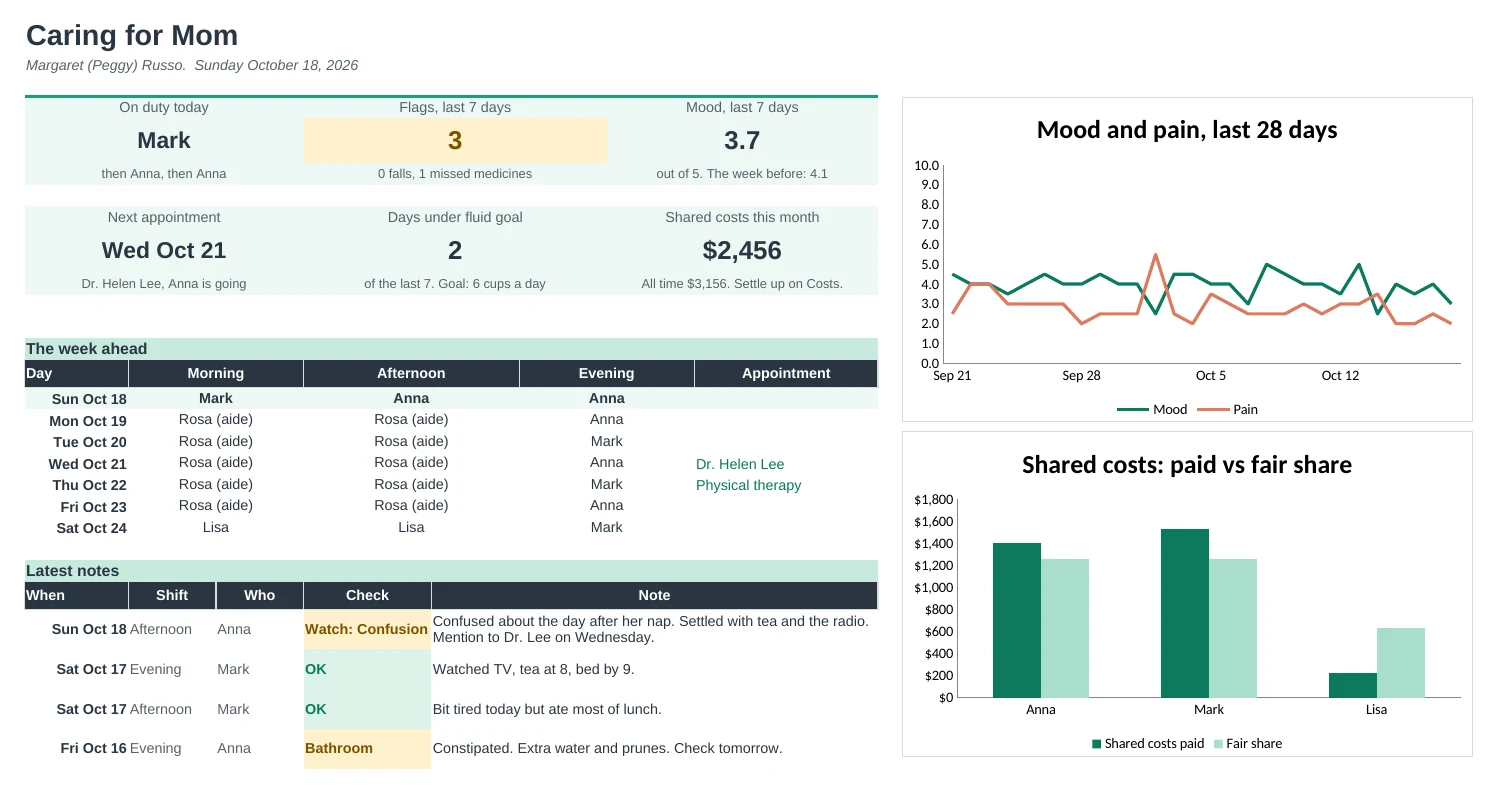
One shared file for everyone caring for a parent: who's on each shift, a short log for the next person, trends for the doctor and costs split fairly between siblings.
Everyone knows who's on
Set the normal week once: who covers mornings, afternoons and evenings. The schedule fills four weeks, and a swap typed on one line updates it.
Handovers that don't rely on memory
Each shift adds one line: medicines, meals, fluids, mood, pain and a note for the next person. The Handover page shows the latest notes, who's on and what to watch, ready to read or print.
Spot changes early
Trends shows four weeks of mood, pain, fluids and flags, day by day and week by week, with charts. Take it to appointments so the doctor sees the pattern, not just today.
Problems stand out
Each log line is checked for a fall, missed medicines, pain, low mood, bathroom trouble or not eating, and colored so the next caregiver sees it straight away.
Costs shared fairly
Log each cost and who paid. Using the shares you agree on, it shows who is owed and who owes, with shifts covered shown alongside so time counts too.
Appointments in hand
Who's taking them, questions to ask and what the doctor said. Past visits without notes are flagged, and the next one shows on the Dashboard.
| Free | Pro |
|---|---|
| Daily log, one line a day | A short log for every shift |
| · | Care team schedule with swaps |
| Check column | Checks with colors, plus a 7-day summary |
| Summary tab | Dashboard with the week ahead and charts |
| · | Four-week trends for the doctor |
| · | Printable handover sheet |
| · | Appointments with questions and next steps |
| · | Shared costs and who owes whom |
$19 one-time
11 tabs: Start Here, Dashboard, Daily Log, Handover, Schedule, Trends, Appointments, Medicines, Costs, Care Info and Setup. You get two copies: one filled in with a sample family so you can see it working, and a blank one ready for your own. It's a shared record, not medical advice: the flags point things out and your doctor, nurse or pharmacist decides what they mean.
Get Family Caregiver Pro for $19- Instant download after checkout
- Works in Google Sheets and Excel
- Yours to keep and reuse every year