
Free meal planner template for Google Sheets
Plan a week of breakfasts, lunches, dinners and snacks on one page. List the ingredients as you go, tick off what's already in the kitchen, and the sheet tells you how many items you still need and roughly what they'll cost.
| Day | Date | Breakfast | Lunch | Dinner | Snack | Prep notes |
|---|---|---|---|---|---|---|
| Mon | Nov 2, 2026 | Overnight oats | Leftovers | Sheet pan chicken fajitas | Apple and peanut butter | Make extra fajita filling for Tuesday's lunch |
| Tue | Nov 3, 2026 | Scrambled eggs and toast | Chicken fajita wrap | Spaghetti with meat sauce | Yogurt and granola | |
| Wed | Nov 4, 2026 | Overnight oats | Turkey sandwich | Leftovers | Carrots and hummus | Move the salmon to the fridge to thaw |
| Thu | Nov 5, 2026 | Scrambled eggs and toast | Turkey sandwich | Salmon, rice and broccoli | Cheese and crackers | Cook double rice for Friday |
| Fri | Nov 6, 2026 | Overnight oats | Leftovers | Homemade pizza | Popcorn | Pizza night: kids pick toppings |
| Sat | Nov 7, 2026 | Pancakes | Grilled cheese and tomato soup | Eating out | Fruit | |
| Sun | Nov 8, 2026 | Pancakes | Big salad | Slow cooker beef stew | Banana bread | Start the stew by 10am. Freeze half. |
| Ingredient | For | Amount | Have it | Est. cost | Still to buy |
|---|---|---|---|---|---|
| Rolled oats | Overnight oats | 1 bag | $4.49 | $0.00 | |
| Milk | Oats, pancakes | 1 gallon | $4.29 | $4.29 | |
| Greek yogurt | Oats, snacks | 32 oz tub | $5.99 | $5.99 | |
| Berries | Overnight oats | 2 packs | $7.00 | $7.00 | |
| Eggs | Eggs, pancakes | 1 dozen | $3.99 | $3.99 | |
| Bread | Toast, sandwiches | 1 loaf | $3.49 | $3.49 | |
| Chicken breasts | Fajitas | 2 lb | $9.98 | $9.98 | |
| Bell peppers and onion | Fajitas | 3 peppers, 1 onion | $4.50 | $4.50 | |
| Tortillas | Fajitas, wraps | 1 pack | $3.29 | $0.00 | |
| Spaghetti | Spaghetti | 1 lb box | $1.79 | $0.00 | |
| Ground beef | Spaghetti | 1 lb | $5.99 | $5.99 | |
| Pasta sauce | Spaghetti | 1 jar | $3.49 | $3.49 | |
| Sliced turkey | Sandwiches | 1 lb | $7.99 | $7.99 | |
| Salmon fillets | Salmon dinner | 4 fillets | $14.99 | $14.99 | |
| Rice | Salmon dinner | 2 lb bag | $2.99 | $0.00 | |
| Broccoli | Salmon dinner | 2 heads | $3.50 | $3.50 | |
| Pizza dough | Pizza night | 1 ball | $2.99 | $2.99 | |
| Mozzarella | Pizza night | 8 oz | $3.99 | $3.99 | |
| Stew beef | Beef stew | 2 lb | $13.98 | $13.98 | |
| Potatoes and carrots | Beef stew | 3 lb of each | $6.98 | $6.98 | |
| Salad greens | Big salad | 1 box | $4.99 | $4.99 | |
| Hummus | Snacks | 1 tub | $3.99 | $3.99 |
| Meal | Meal type | Prep time (min) | Main ingredients | On the plan |
|---|---|---|---|---|
| Overnight oats | Breakfast | 5 | Oats, milk, yogurt, berries | 3 |
| Scrambled eggs and toast | Breakfast | 10 | Eggs, bread, butter | 2 |
| Pancakes | Breakfast | 20 | Flour, eggs, milk | 2 |
| Turkey sandwich | Lunch | 5 | Bread, sliced turkey, cheese | 2 |
| Grilled cheese and tomato soup | Lunch | 15 | Bread, cheddar, canned soup | 1 |
| Big salad | Lunch | 15 | Greens, chickpeas, feta, dressing | 1 |
| Sheet pan chicken fajitas | Dinner | 35 | Chicken, peppers, onion, tortillas | 1 |
| Spaghetti with meat sauce | Dinner | 30 | Spaghetti, ground beef, pasta sauce | 1 |
| Salmon, rice and broccoli | Dinner | 25 | Salmon, rice, broccoli | 1 |
| Homemade pizza | Dinner | 40 | Pizza dough, sauce, mozzarella | 1 |
| Slow cooker beef stew | Dinner | 20 | Stew beef, potatoes, carrots | 1 |
| Turkey chili | Dinner | 45 | Ground turkey, beans, tomatoes | 0 |
| Chicken stir fry | Dinner | 25 | Chicken, mixed veg, rice, soy sauce | 0 |
| Tacos | Dinner | 25 | Ground beef, taco shells, lettuce, salsa | 0 |
| Item | Value |
|---|---|
| Meals planned | 21 |
| Home-cooked dinners | 5 |
| Leftover meals | 3 |
| Nights eating out | 1 |
| Ingredients to buy | 18 |
| Estimated shopping cost | $112.12 |
| Value of what you already have | $12.56 |
What's inside
- A full week of breakfast, lunch, dinner and snacks, with the dates filled in from one start date
- A shopping list that splits what you already have from what you still need to buy
- An estimated shopping total that drops as you tick off items already in the kitchen
- A Meal Ideas tab for your go-to meals, showing how many times each one is on this week's plan
- A week summary: meals planned, home-cooked dinners, leftovers and nights out
- Works in Google Sheets and Excel
How to use it
Make your copy
Click "Make a copy" to save the planner to your own Google Drive. Prefer Excel? Download the .xlsx file instead.
Set the start date
Type the first day of your week in the Date column on the Meal Plan tab. The other six dates and day names fill in by themselves.
Fill in your go-to meals
Replace the Meal Ideas list with meals your household actually eats. When you plan a week, pick from here first so you're not starting from a blank page.
Plan the week
Start with dinners, since they take the most work. Then add breakfasts, lunches and snacks. Type Leftovers or Eating out where that's the plan.
Build the shopping list
Go meal by meal and add each ingredient to the Shopping List tab. Check your fridge and pantry, and tick Have it for anything you already own.
Shop from the list
Everything without a tick is what you need to buy. The Week Summary tab shows how many items that is and roughly what it will cost.
Tips
Plan around one shop
Pick dinners that share ingredients. Fajita chicken becomes Tuesday's wrap, and Thursday's rice comes back on Friday. Less waste, shorter list.
Leave one night open
Plans slip. A Leftovers night or an easy freezer meal keeps the week on track when something comes up.
Type meal names the same way
The On the plan count only matches exact names. If the Meal Ideas tab says Turkey chili, use Turkey chili on the plan too.
Copy the tab for next week
Right-click the Meal Plan tab and choose Duplicate. Change the start date and swap in new meals. Keep a few good weeks and reuse them.
Questions
Is this meal planner template free?
Yes. Copy it to your Google Drive or download the Excel file. There's no sign-up.
Can I use it in Excel?
Yes. Download the .xlsx file. The dates, counts and shopping totals work the same in Excel.
How do I start the week on Sunday?
Type a Sunday date in the first Date cell. The rest of the week and the day names update to match.
Does it make the shopping list for me?
No. You add the ingredients yourself, meal by meal. The sheet then sorts out what's left to buy and adds up the cost.
Can I plan for a family?
Yes. Plan meals for everyone and write amounts for the whole household in the Amount column. Use Prep notes for things like packed lunches or who's cooking.
How do I add more ingredients?
Insert rows inside the Shopping List and copy the Still to buy formula down. The summary counts up to row 100.
Pro version
Meal Planner Pro
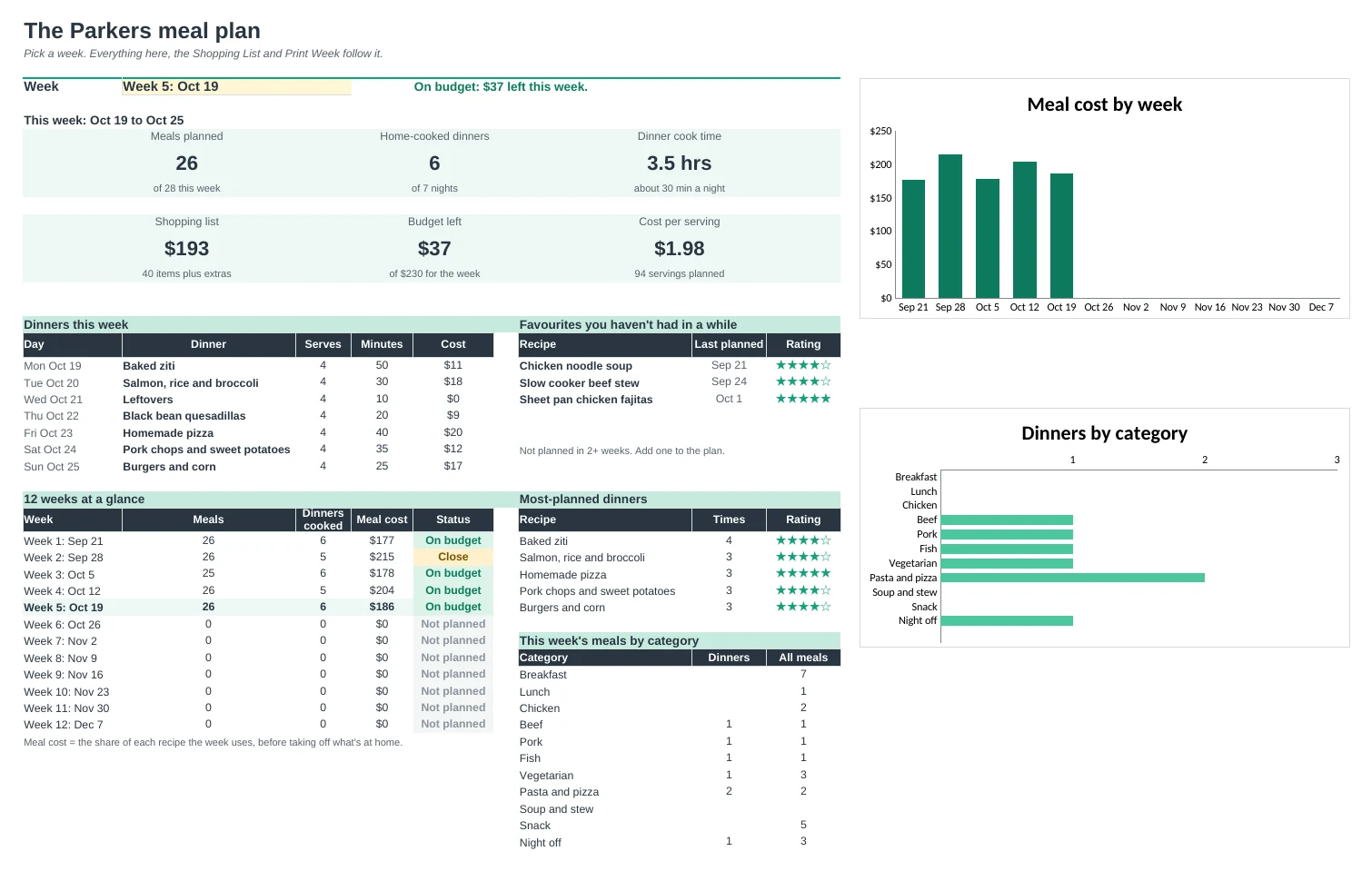
Keep your family's recipes in one place, plan the week from them, and get the shopping list with real amounts, sorted by store section.
Your recipes, ready to plan
Keep every recipe your family eats with servings, cook time, rating and where it came from. Each one shows its cost per batch and per serving.
A shopping list that adds itself up
Pick the week's meals and the list works out every ingredient: amounts times servings, added across recipes, minus what's already in the cupboard.
In the order you walk the store
The list is grouped by store section in your own walking order. Salt, oil and spices you always have stay off it.
Know what the week costs
Set a weekly food budget. The Dashboard shows the shopping total, what's left and the cost per serving, with a chart of every week.
Bring back the favourites
Mark family favourites. The Dashboard lists the ones you haven't had in a while and your most-planned dinners.
A week for the fridge
Print Week turns the plan into one clean page with every meal and note, ready to stick on the fridge.
| Free | Pro |
|---|---|
| One week of meals | 12 weeks, pick any week |
| Shopping list you type | Shopping list built from the recipes |
| Meal ideas list | Recipe library with cost, time and ratings |
| · | Amounts scaled to how many are eating |
| · | Sorted by store section, pantry staples skipped |
| · | Weekly budget and cost per serving |
| · | Favourites you haven't had in a while |
| · | Printable week for the fridge |
$19 one-time
9 tabs: Start Here, Dashboard, Plan, Shopping List, Print Week, Recipes, Recipe Ingredients, Ingredients and Setup. You get two copies: one filled in with a sample family's recipes and five weeks of meals so you can see it working, and a blank one with starter store sections, categories and units.
Get Meal Planner Pro for $19- Instant download after checkout
- Works in Google Sheets and Excel
- Yours to keep and reuse every year