
Free grocery list template for Google Sheets
Your list is grouped by store section, so you walk each aisle once. Add a quantity and a rough price, tick items off as they go in the cart, and the sheet keeps a running total of what's left to buy and how that compares to your budget.
| Got it | Item | Section | Qty | Price each | Est. cost | Left to buy | Notes |
|---|---|---|---|---|---|---|---|
| Bananas | Produce | 1 | $1.79 | $1.79 | $0.00 | One bunch | |
| Apples | Produce | 6 | $0.75 | $4.50 | $0.00 | ||
| Baby spinach | Produce | 1 | $3.99 | $3.99 | $0.00 | ||
| Onions, 3 lb bag | Produce | 1 | $3.49 | $3.49 | $0.00 | ||
| Garlic | Produce | 2 | $0.79 | $1.58 | $0.00 | ||
| Avocados | Produce | 3 | $1.25 | $3.75 | $3.75 | Ripe ones for Friday | |
| Lemons | Produce | 3 | $0.69 | $2.07 | $2.07 | ||
| Milk, 1 gallon | Dairy and eggs | 1 | $4.29 | $4.29 | $0.00 | ||
| Eggs, dozen | Dairy and eggs | 1 | $3.99 | $3.99 | $0.00 | ||
| Butter | Dairy and eggs | 1 | $4.99 | $4.99 | $4.99 | ||
| Cheddar block | Dairy and eggs | 1 | $4.49 | $4.49 | $4.49 | ||
| Greek yogurt | Dairy and eggs | 2 | $1.39 | $2.78 | $2.78 | Single cups for lunches | |
| Chicken thighs, 2 lb | Meat and seafood | 1 | $7.98 | $7.98 | $7.98 | ||
| Ground turkey | Meat and seafood | 1 | $5.49 | $5.49 | $5.49 | Check the date | |
| Bacon | Meat and seafood | 1 | $6.49 | $6.49 | $6.49 | Only if on sale | |
| Sandwich bread | Bakery | 1 | $3.49 | $3.49 | $3.49 | ||
| Bagels | Bakery | 1 | $3.99 | $3.99 | $3.99 | ||
| Coffee | Pantry | 1 | $9.99 | $9.99 | $9.99 | ||
| Peanut butter | Pantry | 1 | $3.79 | $3.79 | $3.79 | ||
| Pasta | Pantry | 2 | $1.49 | $2.98 | $2.98 | ||
| Canned tomatoes | Pantry | 2 | $1.29 | $2.58 | $2.58 | ||
| Rice, 2 lb | Pantry | 1 | $2.99 | $2.99 | $2.99 | ||
| Olive oil | Pantry | 1 | $8.99 | $8.99 | $8.99 | ||
| Frozen peas | Frozen | 1 | $1.99 | $1.99 | $1.99 | ||
| Frozen pizza | Frozen | 2 | $5.99 | $11.98 | $11.98 | Backup dinner | |
| Paper towels | Household | 1 | $11.99 | $11.99 | $11.99 | ||
| Dish soap | Household | 1 | $3.49 | $3.49 | $3.49 | ||
| Trash bags | Household | 1 | $8.99 | $8.99 | $8.99 | Tall kitchen size |
| Section | Items | Still to get | Est. cost | Left to buy |
|---|---|---|---|---|
| Produce | 7 | 2 | $21.17 | $5.82 |
| Dairy and eggs | 5 | 3 | $20.54 | $12.26 |
| Meat and seafood | 3 | 3 | $19.96 | $19.96 |
| Bakery | 2 | 2 | $7.48 | $7.48 |
| Pantry | 6 | 6 | $31.32 | $31.32 |
| Frozen | 2 | 2 | $13.97 | $13.97 |
| Household | 3 | 3 | $24.47 | $24.47 |
| Total | 28 | 21 | $138.91 | $115.28 |
| Already in the cart | $23.63 | |||
| Trip budget | $175.00 | |||
| Budget left if you buy it all | $36.09 |
What's inside
- Items grouped by store section, in the order most stores are laid out
- A Got it checkbox for each item, easy to tap on your phone in the store
- Quantity times price for every line, plus a running total of what's left to buy
- A By Section tab showing how many items are left in each aisle and what they cost
- A trip budget, so you know before the checkout whether the list fits
- Works in Google Sheets and Excel
How to use it
Make your copy
Click "Make a copy" to save the list to your own Google Drive. You can also download the Excel version.
Clear the sample list
Untick the Got it boxes and swap the sample items for your own. Keep the items you buy most weeks so next time you only edit a few lines.
Pick a section for each item
Type a section name that matches one on the By Section tab, like Produce or Pantry. Then sort the list by the Section column so each aisle's items sit together.
Add rough prices
Enter a quantity and an everyday price from your last receipt. Close is good enough. The totals are there to warn you, not to match the till to the cent.
Set your budget
On the By Section tab, change the Trip budget to what you plan to spend. Budget left shows whether the full list fits.
Shop and tick
Open the sheet in the Google Sheets app at the store. Tick Got it as items go in the cart. Left to buy drops as you go.
Tips
Keep a master list
Leave everything you buy regularly on the list and untick it all before each trip. Then just skim it and delete what you don't need this week.
Match the list to your store
Put the sections in the order you walk your store. If frozen is by the checkout, keep it near the bottom so cold things go in the cart last.
Use Notes for the details
Brand, size, "only if on sale" or "ask the deli to slice thin". It saves a phone call home from aisle 6.
Share it with your household
Use Share in Google Sheets so everyone can add to the same list. Whoever goes to the store sees the latest version.
Questions
Is this grocery list template free?
Yes. Copy it to your Google Drive or download the Excel file. There's no sign-up.
Can I use it on my phone in the store?
Yes. Open your copy in the Google Sheets app. Tapping a Got it box ticks it, and the totals update straight away.
How do I add a new store section?
Type the new section name next to your items, then add a row with the same name on the By Section tab and copy the formulas from the row above. Keep it inside the list so the Total row adds it.
Why doesn't my item show up on the By Section tab?
The section name has to match exactly. Check for typos or extra spaces in the Section column.
Can I share the list with my partner?
Yes. Click Share in Google Sheets and add their email. You'll both see changes as soon as they're made.
Does it work in Excel?
Yes. Download the .xlsx file. The Got it cells take TRUE or FALSE from a drop-down, and all the totals work the same.
Pro version
Grocery List Pro
Keep one master list of what you buy, tick what you need, and shop in aisle order while it tracks prices and spending.
Never retype your list
Add everything you usually buy once, with its section, store, size and typical price. Before each trip, just put an x next to what's running low.
Shop in aisle order
This Trip sorts your ticked items by store and section in the order you walk the store. Pick one store or see them all.
A running total in the store
See the estimated total against your trip budget, and how much is already in the cart as you tick things off.
Spot price rises
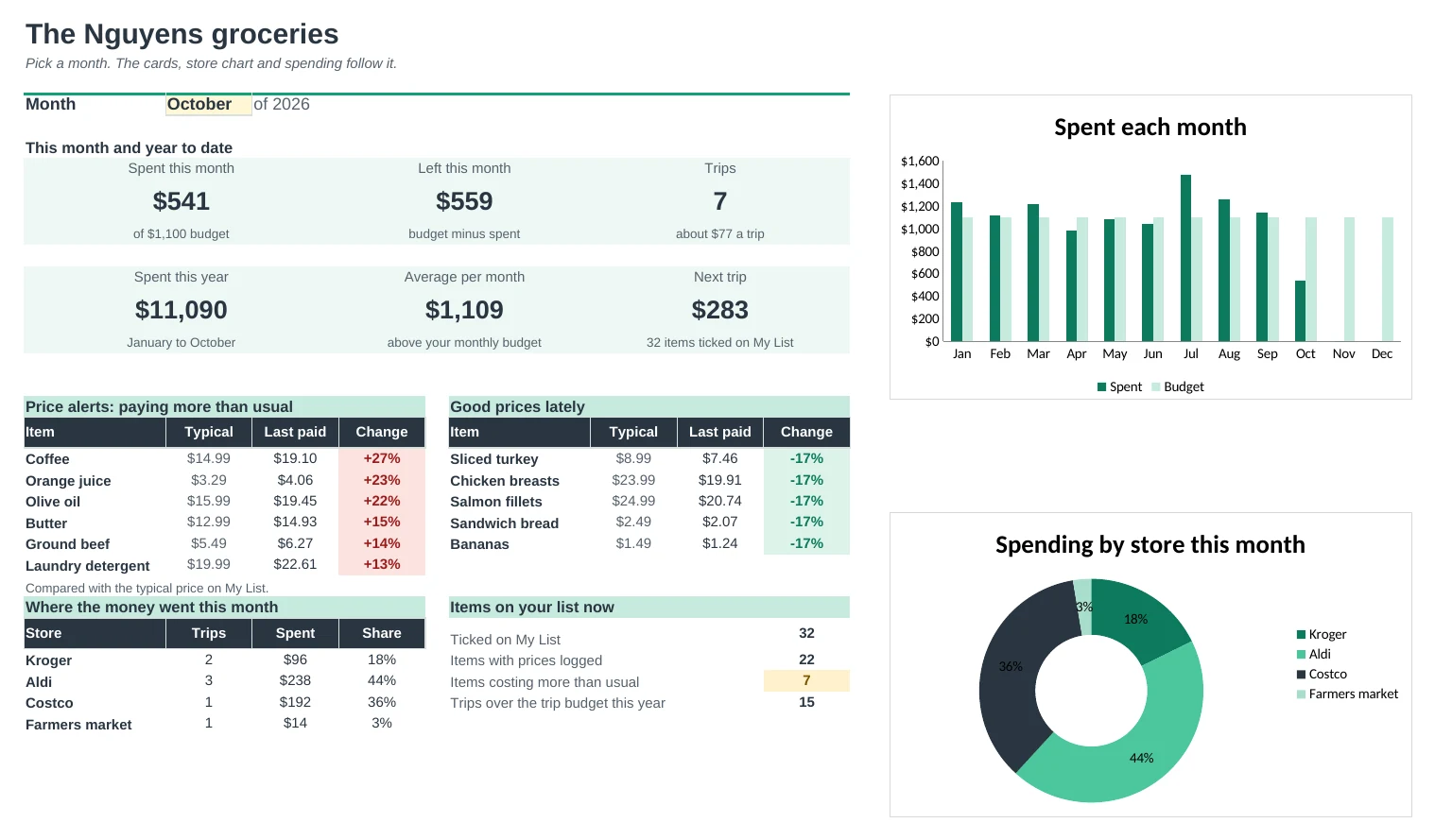
Log what you paid for the items you care about. Your list flags anything costing more than usual and shows the lowest price and where you got it.
Find the cheapest store
Price Check shows an item's price history on a chart, the average and lowest at each store, and what counts as a good price.
See where the money goes
Type each trip's receipt total. The Dashboard and Spending tabs show spend per trip, per month and per store against your budget.
| Free | Pro |
|---|---|
| One list to clear each week | Master list you keep; tick what you need |
| Grouped by section | Sorted by store, then your aisle order |
| Running total | Running total against a trip budget |
| · | Price log with price-rise alerts |
| · | Price history chart and cheapest store |
| · | Spending per trip, month and store |
| · | Dashboard with monthly budget |
$19 one-time
9 tabs: Start Here, Dashboard, My List, This Trip, Trips, Prices, Price Check, Spending and Setup. You get two copies: one filled in with a sample family's list, trips and prices so you can see it working, and a blank one with a starter list of common items and store sections.
Get Grocery List Pro for $19- Instant download after checkout
- Works in Google Sheets and Excel
- Yours to keep and reuse every year