
Free sign-out sheet template for equipment and keys
When someone borrows a laptop, a key or a tool, they add one row: what they took, their name, when they took it and when it's due back. Tick Returned when it comes back. The sheet flags what's overdue or due today, and an equipment list shows which items are on the shelf and which are signed out.
Pro Want an overdue chase list, item history and borrower records? See Equipment Sign-Out Pro →| Item | Tag or ID | Borrowed by | Phone or dept | Date out | Time out | Due back | Returned | Date returned | Condition or notes | Status | Days out |
|---|---|---|---|---|---|---|---|---|---|---|---|
| Projector | AV-01 | Karen Liu | Sales | Oct 26, 2026 | 9:00 AM | Oct 27, 2026 | Oct 27, 2026 | Good, remote included | Returned | 1 | |
| Company van keys | VAN-1 | Mike Russo | Facilities | Oct 26, 2026 | 7:30 AM | Oct 26, 2026 | Oct 26, 2026 | Fuel half full | Returned | 0 | |
| Laptop (loaner) | LT-03 | Jasmine Ortiz | (555) 013-2290 | Oct 27, 2026 | 10:15 AM | Nov 3, 2026 | Nov 4, 2026 | Charger missing, found in her bag next day | Returned late | 8 | |
| Storage room key | KEY-04 | Paul Grant | Events | Oct 28, 2026 | 1:00 PM | Oct 28, 2026 | Oct 28, 2026 | Returned | 0 | ||
| DSLR camera kit | CAM-1 | Olivia Chen | Marketing | Oct 29, 2026 | 11:30 AM | Nov 2, 2026 | Nov 2, 2026 | Good, 2 batteries returned | Returned | 4 | |
| Folding tables (6) | TBL-6 | Paul Grant | Events | Oct 30, 2026 | 3:00 PM | Nov 2, 2026 | Nov 3, 2026 | One table leg bent | Returned late | 4 | |
| Cordless drill | TL-02 | Mike Russo | Facilities | Nov 2, 2026 | 8:00 AM | Nov 4, 2026 | Overdue | 4 | |||
| Laptop (loaner) | LT-01 | Sam Rivera | New hire, IT | Nov 2, 2026 | 9:30 AM | Nov 13, 2026 | Until his own laptop arrives | Out | 4 | ||
| Conference speakerphone | AV-04 | Karen Liu | Sales | Nov 3, 2026 | 2:00 PM | Nov 5, 2026 | Overdue | 3 | |||
| Company van keys | VAN-1 | Andre Wilson | Delivery | Nov 4, 2026 | 7:45 AM | Nov 4, 2026 | Nov 4, 2026 | Fuel topped up | Returned | 0 | |
| Master key | KEY-01 | Ruth Adams | Office manager | Nov 5, 2026 | 4:30 PM | Nov 6, 2026 | For the alarm company visit | Due today | 1 | ||
| Ladder (8 ft) | TL-05 | Mike Russo | Facilities | Nov 5, 2026 | 10:00 AM | Nov 6, 2026 | Due today | 1 | |||
| Projector | AV-01 | Dev Patel | Training | Nov 6, 2026 | 8:45 AM | Nov 6, 2026 | Room B training | Due today | 0 | ||
| iPad | TAB-2 | Olivia Chen | Marketing | Nov 6, 2026 | 9:10 AM | Nov 10, 2026 | Trade show booth | Out | 0 | ||
| DSLR camera kit | CAM-1 | Olivia Chen | Marketing | Nov 6, 2026 | 9:10 AM | Nov 10, 2026 | Trade show booth | Out | 0 | ||
| Item | Tag or ID | Kept in | Times borrowed | Out now | Availability |
|---|---|---|---|---|---|
| Projector | AV-01 | IT closet | 2 | 1 | Signed out |
| Conference speakerphone | AV-04 | IT closet | 1 | 1 | Overdue |
| Laptop (loaner) | LT-01 | IT closet | 1 | 1 | Signed out |
| Laptop (loaner) | LT-03 | IT closet | 1 | 0 | Available |
| iPad | TAB-2 | IT closet | 1 | 1 | Signed out |
| DSLR camera kit | CAM-1 | Marketing cabinet | 2 | 1 | Signed out |
| Company van keys | VAN-1 | Key box, front desk | 2 | 0 | Available |
| Master key | KEY-01 | Key box, front desk | 1 | 1 | Signed out |
| Storage room key | KEY-04 | Key box, front desk | 1 | 0 | Available |
| Cordless drill | TL-02 | Maintenance room | 1 | 1 | Overdue |
| Ladder (8 ft) | TL-05 | Maintenance room | 1 | 1 | Signed out |
| Folding tables (6) | TBL-6 | Storage room | 1 | 0 | Available |
| Item | Count |
|---|---|
| Today's date | Nov 6, 2026 |
| Sign-outs logged | 15 |
| Out right now | 8 |
| Overdue | 2 |
| Due back today | 3 |
| Returned | 7 |
| Returned late | 2 |
| Items on the equipment list | 12 |
| Items available now | 4 |
What's inside
- One row per sign-out with item, tag, borrower, contact, date and time out, due date and a Returned checkbox
- Status works itself out: Out, Due today, Overdue, Returned or Returned late
- Days out for every item, counted from the date on the Summary tab
- An equipment list that shows each item as Available, Signed out or Overdue, plus how often it's borrowed
- A summary with what's out right now, what's overdue and what's due back today
- Room for 50 sign-outs, and works in Google Sheets and Excel
How to use it
Download your copy
Click "Free download" to save the .xlsx file. It opens in Excel, or in Google Sheets: open a blank sheet (sheets.new) and choose File, then Import, then Upload. Delete the sample rows when you're ready.
List your equipment
On the Equipment List tab, add each item you lend out with a short tag like KEY-01 or LT-03. Put the same tag on a sticker on the item.
Set today's date
On the Summary tab, the first value is the date the sheet counts from. Type =TODAY() there so Overdue and Days out stay current.
Sign items out
Each time something goes out, add a row with the item, its tag, who took it, how to reach them, the date and time out and when it's due back.
Check items back in
When it comes back, tick Returned, type the date and note its condition. The status changes to Returned, or Returned late if it was past due.
Chase what's overdue
Check the Summary tab each morning. Filter the Status column to Overdue to see who to call.
Tips
Tag everything
Two loaner laptops look the same. A tag on each item, matching the Tag or ID column, means you always know which one is out.
Note condition both ways
Write any scratches or missing parts when it goes out, not just when it comes back. It saves arguments later.
Keep it by the key box
Open the sheet on a tablet at the desk where the keys and kit live, so signing out takes ten seconds.
Add a deposit column if you need it
For tools or gear lent to the public, add a column for a deposit or ID held. Return the deposit when you tick Returned.
Questions
What is a sign-out sheet?
A list of who borrowed what and when it's due back. Offices, schools, workshops and clubs use them for keys, laptops, tools, radios and AV gear.
Is this the same as a sign-in sheet?
No. A sign-in sheet records visitors arriving and leaving. A sign-out sheet tracks items people borrow. If you need a visitor log, use our sign-in sheet template.
Can I use it as a key log?
Yes. List each key on the Equipment List tab with its own tag, like KEY-01 for the master key, and sign keys out the same way as any other item.
How does the sheet know something is overdue?
It compares each Due back date with the date on the Summary tab. If the item isn't ticked Returned and the date has passed, it shows Overdue. Type =TODAY() in that Summary cell to keep it current.
How do I add more items or rows?
Add items in the empty rows on the Equipment List tab and copy the formulas from the row above. For more than 50 sign-outs, insert rows above the last one, copy the Status and Days out formulas down, and stretch the ranges in the other tabs.
Is it free, and does it work in Excel?
Yes. Download the .xlsx file and open it in Excel or Google Sheets. In Excel the Returned column uses a TRUE or FALSE dropdown instead of a checkbox.
Pro version
Equipment Sign-Out Pro
The sign-out sheet that shows what's on the shelf, who has everything else, and who to chase, with the message written for you.
Know where everything is
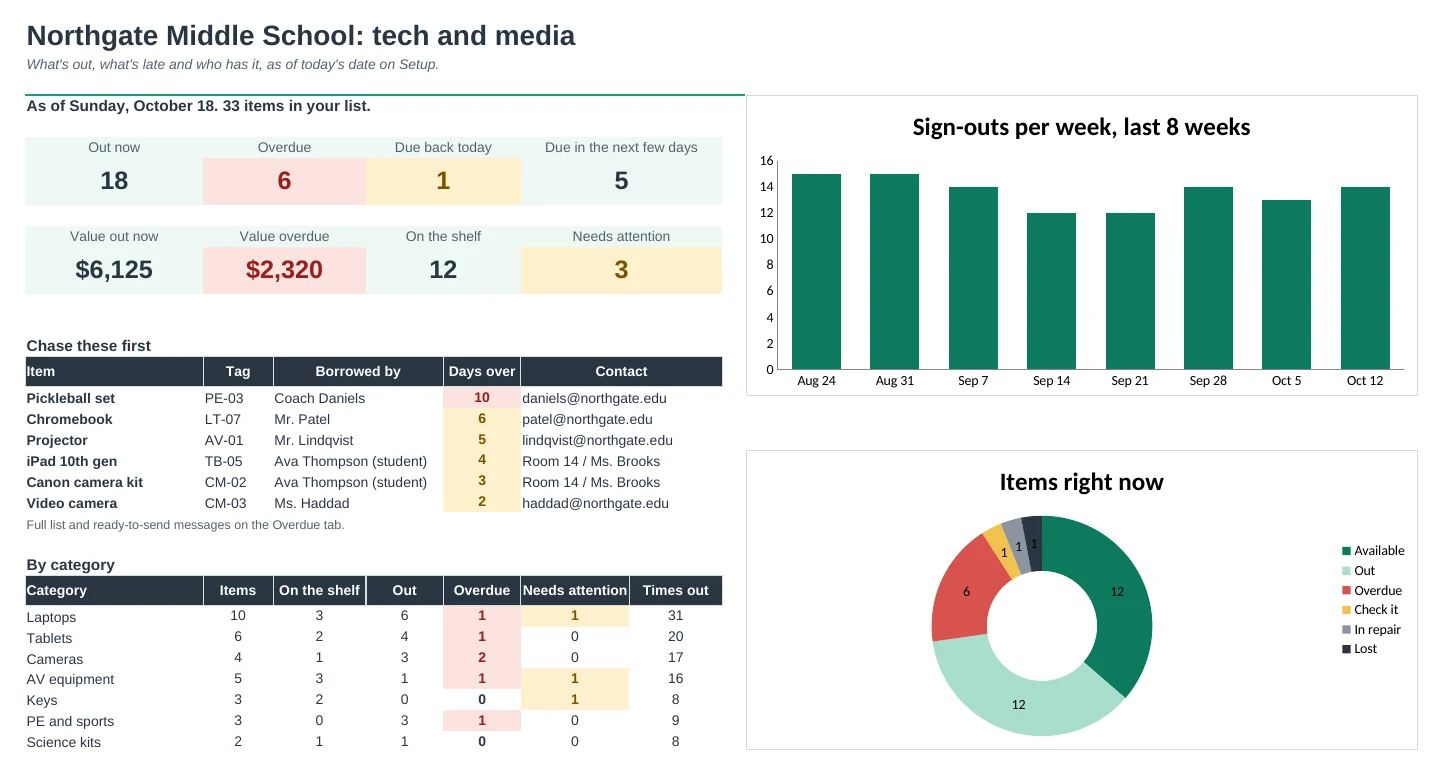
Each item shows as Available, Out, Overdue, Check it, In repair or Lost, with who has it and when it's due back.
Chase late items without the awkwardness
Overdue lists everything past due, longest first, with the borrower's contact and a polite message ready to paste. Things due today or soon get a friendly heads-up message too.
Sign things out in seconds
Pick the tag and the borrower from dropdowns and type the date. Leave the due date blank and it uses the usual loan length for that kind of item.
Find out who had it last
Item History shows every loan of one item, newest first, with the condition it went out and came back in.
See who's reliable
Borrowers shows what each person has now, late returns, their on-time rate and anything that came back damaged.
The numbers that matter
The Dashboard shows what's out, overdue and due soon, the value of what's out, items needing attention, and sign-outs per week.
| Free | Pro |
|---|---|
| Sign-out log with a Returned checkbox | Sign-out log with dropdowns and condition in and out |
| Status: Out, Due today, Overdue, Returned | Status plus Due soon, Returned late and Lost |
| Equipment list with availability | Items tab with who has it, due date, times out and problem returns |
| Summary tab | Dashboard with charts and value out |
| · | Overdue chase list with ready-to-send messages |
| · | Loan length per category, so due dates fill in |
| · | Item history and borrower records |
| · | Printable paper sign-out sheet |
$19 one-time
9 tabs: Start Here, Dashboard, Sign-Outs, Overdue, Items, Item History, Borrowers, Paper Sheet and Setup. You get two copies: one filled in with a sample school tech and media room so you can see it working, and a blank one ready for your own equipment.
Get Equipment Sign-Out Pro for $19- Instant download after checkout
- Works in Google Sheets and Excel
- Yours to keep and reuse every year