
Free sign-in sheet template
Keep a clear record of who came in, who they came to see and when they left. Use it on a tablet at the front desk, or print it on a clipboard and type it up later. A second tab counts visitors for each day and shows who hasn't signed out yet.
| Date | Name | Company or group | Email or phone | Here to see | Reason for visit | Time in | Time out | Hours |
|---|---|---|---|---|---|---|---|---|
| Nov 2, 2026 | Maria Lopez | Brightline HVAC | (555) 214-8890 | Facilities | Furnace service | 8:05 AM | 10:40 AM | 2.58 |
| Nov 2, 2026 | James Carter | jcarter@email.com | Dana Kim | Job interview | 9:30 AM | 10:25 AM | 0.92 | |
| Nov 2, 2026 | Priya Shah | Northwind Supply | priya@northwind.com | Tom Reyes | Sales meeting | 11:00 AM | 11:50 AM | 0.83 |
| Nov 2, 2026 | Kevin O'Brien | FedEx | Front desk | Delivery | 1:15 PM | 1:20 PM | 0.08 | |
| Nov 3, 2026 | Linda Nguyen | City Fire Dept. | (555) 330-1200 | Facilities | Fire inspection | 9:00 AM | 10:15 AM | 1.25 |
| Nov 3, 2026 | Marcus Bell | marcus.bell@email.com | Dana Kim | Job interview | 10:30 AM | 11:30 AM | 1 | |
| Nov 3, 2026 | Sarah Thompson | Thompson Catering | (555) 772-0154 | Office manager | Lunch setup | 11:45 AM | 12:30 PM | 0.75 |
| Nov 3, 2026 | Ahmed Hassan | Clearview IT | ahmed@clearviewit.com | Tom Reyes | Network repair | 2:00 PM | 4:45 PM | 2.75 |
| Nov 4, 2026 | Emily Rossi | Rossi & Lane CPA | emily@rossilane.com | Finance team | Quarterly review | 9:15 AM | 11:00 AM | 1.75 |
| Nov 4, 2026 | David Park | (555) 901-4471 | Front desk | Dropping off forms | 10:05 AM | 10:15 AM | 0.17 | |
| Nov 4, 2026 | Grace Miller | Brightline HVAC | (555) 214-8890 | Facilities | Follow-up repair | 1:30 PM |
| Date | Visitors | Still signed in | Visit hours |
|---|---|---|---|
| Nov 2, 2026 | 4 | 0 | 4.41 |
| Nov 3, 2026 | 4 | 0 | 5.75 |
| Nov 4, 2026 | 3 | 1 | 1.92 |
| Nov 5, 2026 | 0 | 0 | 0 |
| Nov 6, 2026 | 0 | 0 | 0 |
| Total | 11 | 1 | 12.08 |
What's inside
- Columns for date, name, company, contact, who they're visiting, reason, time in and time out
- Visit length in hours, worked out as soon as someone signs out
- A Daily Count tab with visitors per day, total visit hours and anyone still signed in
- Prints cleanly on letter paper with the header row on every page
- Works for offices, schools, clinics, job sites, meetings and events
- Works in Google Sheets and Excel
How to use it
Make your copy
Click "Make a copy" to save the sheet to your Google Drive, or download the Excel file. Delete the sample visitors when you're ready.
Pick your columns
Rename any column to fit your place. A school might change "Here to see" to "Student". A job site might change "Reason for visit" to "Safety briefing done".
Set it out at the desk
Open the sheet on a tablet or laptop at the entrance. Visitors fill in one row each when they arrive and add the time out when they leave.
Copy the Hours formula down
When you run past the sample rows, select the last Hours cell and drag it down so new rows get the visit length too.
Add your dates to Daily Count
Type each date you want counted in the Date column of the Daily Count tab. Visitors, still signed in and visit hours fill in by themselves.
Tips
Print it for a clipboard
Clear the sample rows, then go to File > Print. Choose letter size, set Scale to "Fit to width" and turn on "Show gridlines" under Formatting so people get lines to write on. Under Headers and footers, keep "Repeat frozen rows" on so every page has column titles.
Type times as 9:30 AM
Google Sheets and Excel both read "9:30 AM" or "13:15" as a time. Typing "930" won't work, and the Hours column needs real times to do the math.
Check before you lock up
The Still signed in column on Daily Count shows anyone with no time out. It's a quick check at closing time, or during a fire drill.
Keep personal details private
If visitors use a shared screen, they can see earlier rows. Hide old rows, or start a fresh tab each week so contact details aren't on show.
Questions
Is this sign-in sheet template free?
Yes. Copy it to your Google Drive or download the Excel file. There's no sign-up and no watermark.
How do I print a sign-in sheet from Google Sheets?
Delete the sample rows, go to File > Print, set Scale to "Fit to width" and turn on "Show gridlines". Landscape with "Fit to width" gets all nine columns on letter paper.
Can visitors sign in on a tablet?
Yes. Open your copy in the Google Sheets app on the tablet and have each visitor fill in the next empty row. Turn off autocorrect if names keep getting changed.
How do I count visitors per day?
Use the Daily Count tab. Type a date in the Date column and it counts every row on the sign-in tab with that date, plus total visit hours and anyone still signed in.
Can I use it for a meeting or event sign-in?
Yes. Rename "Here to see" to something like "Session" and delete Time out if you don't need it. The Daily Count tab still works with just the Date column filled in.
Does it work in Excel?
Yes. Download the .xlsx file. The Hours and Daily Count formulas work the same way in Excel.
Pro version
Visitor Sign-In Pro
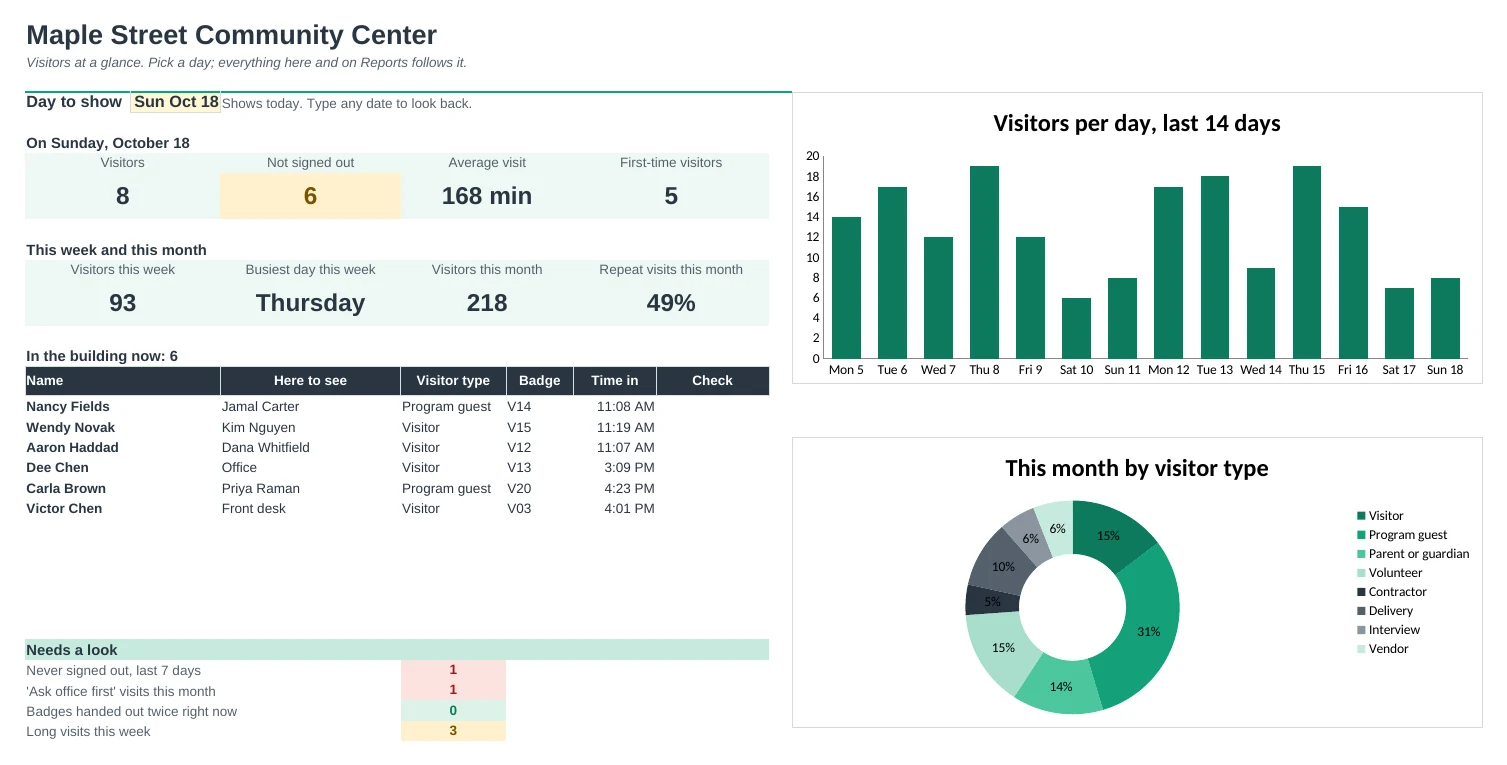
The visitor log that knows who is still in the building, prints badges, and counts your visitors by day, week and month.
Know who's inside right now
Who's In lists everyone signed in today who hasn't left, with an 'Accounted for' column. Print it for a fire drill or before you lock up.
Print visitor badges
Type a sign-in number and print six badges per page with the name, company, who they're seeing, the date and badge number.
Sign people in quickly
Pick the visitor type, the person they're here to see and a badge from dropdowns you set up once. The rest of the row fills itself in.
Spot problems at a glance
Names on your 'check with the office first' list, a badge handed to two people at once, long visits and people who never signed out are flagged in red or amber.
Get your numbers without counting
The Dashboard shows today, this week and this month. Reports breaks the week down by day and visitor type and counts visits for each person on your staff.
Know your regulars
Visitors lists everyone once with how many times they've come, first and last visit and total hours, so you can greet regulars and keep contact details current.
| Free | Pro |
|---|---|
| Sign-in log | Sign-in log with dropdowns from one Setup tab |
| Visit length in hours | Visit length, plus In building and Never signed out statuses |
| Daily count tab | Dashboard with charts, weekly and monthly reports |
| · | Printable roll call of who's in the building |
| · | Printable visitor badges, six per page |
| · | Visitor list with repeat visits and regulars |
| · | Watch list, double-badge and long-visit flags |
| · | Printable paper sign-in sheet for the clipboard |
$19 one-time
9 tabs: Start Here, Dashboard, Sign-In Log, Who's In, Reports, Visitors, Badges, Paper Sheet and Setup. You get two copies: one filled in with a sample community center so you can see it working, and a blank one ready for your own visitors.
Get Visitor Sign-In Pro for $19- Instant download after checkout
- Works in Google Sheets and Excel
- Yours to keep and reuse every year