
Free inventory template for Google Sheets
List what you keep in stock, then log each delivery, sale or use on the Stock Moves tab. The sheet works out what's on hand, what it's worth and flags anything that has dropped to its reorder level, so you restock before you run out.
| SKU | Item | Category | Location | Starting qty | Received | Used or sold | In stock | Reorder at | Reorder? | Unit cost | Stock value | Supplier |
|---|---|---|---|---|---|---|---|---|---|---|---|---|
| CND-001 | Lavender candle, 8 oz | Candles | Shelf A1 | 24 | 12 | 10 | 26 | 10 | OK | $6.50 | $169.00 | Made in-house |
| CND-002 | Cedar and smoke candle, 8 oz | Candles | Shelf A1 | 18 | 0 | 9 | 9 | 10 | Reorder | $6.50 | $58.50 | Made in-house |
| CND-003 | Vanilla bean candle, 4 oz | Candles | Shelf A2 | 30 | 0 | 11 | 19 | 12 | OK | $3.75 | $71.25 | Made in-house |
| SOP-001 | Oatmeal honey soap bar | Soap | Shelf B1 | 40 | 0 | 9 | 31 | 15 | OK | $2.10 | $65.10 | Made in-house |
| SOP-002 | Peppermint soap bar | Soap | Shelf B1 | 35 | 0 | 7 | 28 | 15 | OK | $2.10 | $58.80 | Made in-house |
| SOP-003 | Charcoal soap bar | Soap | Shelf B2 | 12 | 0 | 3 | 9 | 10 | Reorder | $2.40 | $21.60 | Made in-house |
| SUP-001 | Soy wax (lb) | Supplies | Bin 1 | 50 | 25 | 8 | 67 | 20 | OK | $2.20 | $147.40 | Wax and wick supplier |
| SUP-002 | Cotton wicks | Supplies | Bin 2 | 150 | 0 | 12 | 138 | 50 | OK | $0.09 | $12.42 | Wax and wick supplier |
| SUP-003 | Lavender fragrance oil, 16 oz | Supplies | Bin 3 | 3 | 0 | 1 | 2 | 2 | Reorder | $24.00 | $48.00 | Fragrance supplier |
| SUP-004 | Glass jars, 8 oz | Supplies | Bin 4 | 60 | 0 | 12 | 48 | 24 | OK | $1.15 | $55.20 | Packaging wholesaler |
| SUP-005 | Melt and pour soap base, 2 lb | Supplies | Bin 5 | 8 | 0 | 0 | 8 | 4 | OK | $11.50 | $92.00 | Soap supplier |
| PKG-001 | Kraft gift boxes | Packaging | Drawer 1 | 80 | 0 | 18 | 62 | 30 | OK | $0.45 | $27.90 | Packaging wholesaler |
| PKG-002 | Product labels, roll of 250 | Packaging | Drawer 1 | 2 | 0 | 1 | 1 | 1 | Reorder | $18.00 | $18.00 | Print shop |
| PKG-003 | Padded mailers | Packaging | Drawer 2 | 100 | 0 | 9 | 91 | 40 | OK | $0.32 | $29.12 | Packaging wholesaler |
| Date | SKU | Item | In | Out | Note |
|---|---|---|---|---|---|
| Oct 3, 2026 | CND-001 | Lavender candle, 8 oz | 6 | Farmers market | |
| Oct 3, 2026 | SOP-001 | Oatmeal honey soap bar | 9 | Farmers market | |
| Oct 3, 2026 | SOP-002 | Peppermint soap bar | 7 | Farmers market | |
| Oct 5, 2026 | CND-002 | Cedar and smoke candle, 8 oz | 5 | Online orders | |
| Oct 5, 2026 | PKG-003 | Padded mailers | 5 | Online orders | |
| Oct 6, 2026 | SUP-001 | Soy wax (lb) | 25 | Wax delivery | |
| Oct 7, 2026 | CND-001 | Lavender candle, 8 oz | 12 | Poured a batch | |
| Oct 7, 2026 | SUP-001 | Soy wax (lb) | 8 | Used for lavender batch | |
| Oct 7, 2026 | SUP-002 | Cotton wicks | 12 | Used for lavender batch | |
| Oct 7, 2026 | SUP-003 | Lavender fragrance oil, 16 oz | 1 | Used for lavender batch | |
| Oct 7, 2026 | SUP-004 | Glass jars, 8 oz | 12 | Used for lavender batch | |
| Oct 10, 2026 | CND-002 | Cedar and smoke candle, 8 oz | 4 | Craft fair | |
| Oct 10, 2026 | CND-003 | Vanilla bean candle, 4 oz | 11 | Craft fair | |
| Oct 10, 2026 | SOP-003 | Charcoal soap bar | 3 | Craft fair | |
| Oct 10, 2026 | PKG-001 | Kraft gift boxes | 18 | Gift boxes for the fair | |
| Oct 14, 2026 | PKG-002 | Product labels, roll of 250 | 1 | Roll used up | |
| Oct 16, 2026 | CND-001 | Lavender candle, 8 oz | 4 | Online orders | |
| Oct 16, 2026 | PKG-003 | Padded mailers | 4 | Online orders |
| Category | Items | Units in stock | Stock value | To reorder |
|---|---|---|---|---|
| Candles | 3 | 54 | $298.75 | 1 |
| Soap | 3 | 68 | $145.50 | 1 |
| Supplies | 5 | 263 | $355.02 | 1 |
| Packaging | 3 | 154 | $75.02 | 1 |
| Total | 14 | 539 | $874.29 | 4 |
What's inside
- One row per item with SKU, category, location, unit cost and supplier
- A Stock Moves log for deliveries, sales and use, so stock levels add up from real records
- In stock worked out for you: starting quantity plus received minus used or sold
- A Reorder flag when an item drops to the reorder level you set
- Stock value per item and a summary by category with a count of items to reorder
- Works in Google Sheets and Excel
How to use it
Make your copy
Click "Make a copy" to save the template to your own Google Drive. An Excel download is there too.
List your items
On the Items tab, give each item a short, unique SKU, a name, a category and where it's kept. Delete the sample rows and copy the formula columns down for each new item.
Count what you have
Do one stock count and type the numbers into Starting qty. That's your baseline. Everything after it goes on the Stock Moves tab.
Set reorder levels
For each item, enter the stock level where you want to reorder. Pick a number that covers the time it takes a new order to arrive.
Log every move
When stock comes in or goes out, add a row to Stock Moves with the date, SKU and amount. The item name fills in from the SKU, and In stock updates on the Items tab.
Check what to reorder
Sort or filter the Items tab by Reorder? to see everything that's running low. The Summary tab shows the count and stock value by category.
Tips
Keep SKUs short and simple
A category prefix and a number, like CND-001, is easy to type and hard to mix up. Never reuse a SKU for a different item.
Log moves in batches
You don't need to log every single sale as it happens. Adding a day's or a market's totals in one row works just as well.
Recount now and then
Once a month or so, count a few items by hand. If the count is off, add an In or Out row with a note like "Recount" to correct it.
Use unit cost, not sale price
Stock value is meant to show what your stock cost you. For items you make, use your cost to make one.
Questions
Is this inventory template free?
Yes. Copy it to your Google Drive or download the Excel file. There's no sign-up.
Can I use it for a home inventory?
Yes. Use it for a pantry, cleaning supplies or craft materials. Set reorder levels for the things you don't want to run out of.
How does the Reorder flag work?
When In stock is at or below the number in Reorder at, the Reorder? column says Reorder. Otherwise it says OK.
Why does a Stock Moves row say Check the SKU?
The SKU on that row doesn't match any SKU on the Items tab. Fix the typo or add the item first.
Does it work in Excel?
Yes. Download the .xlsx file. The stock totals, value and reorder flags use formulas that work the same in Excel.
How many items and moves can it hold?
The formulas look at up to 500 items and 1,000 stock moves. You can raise those limits by editing the ranges in the formulas.
Pro version
Inventory Pro
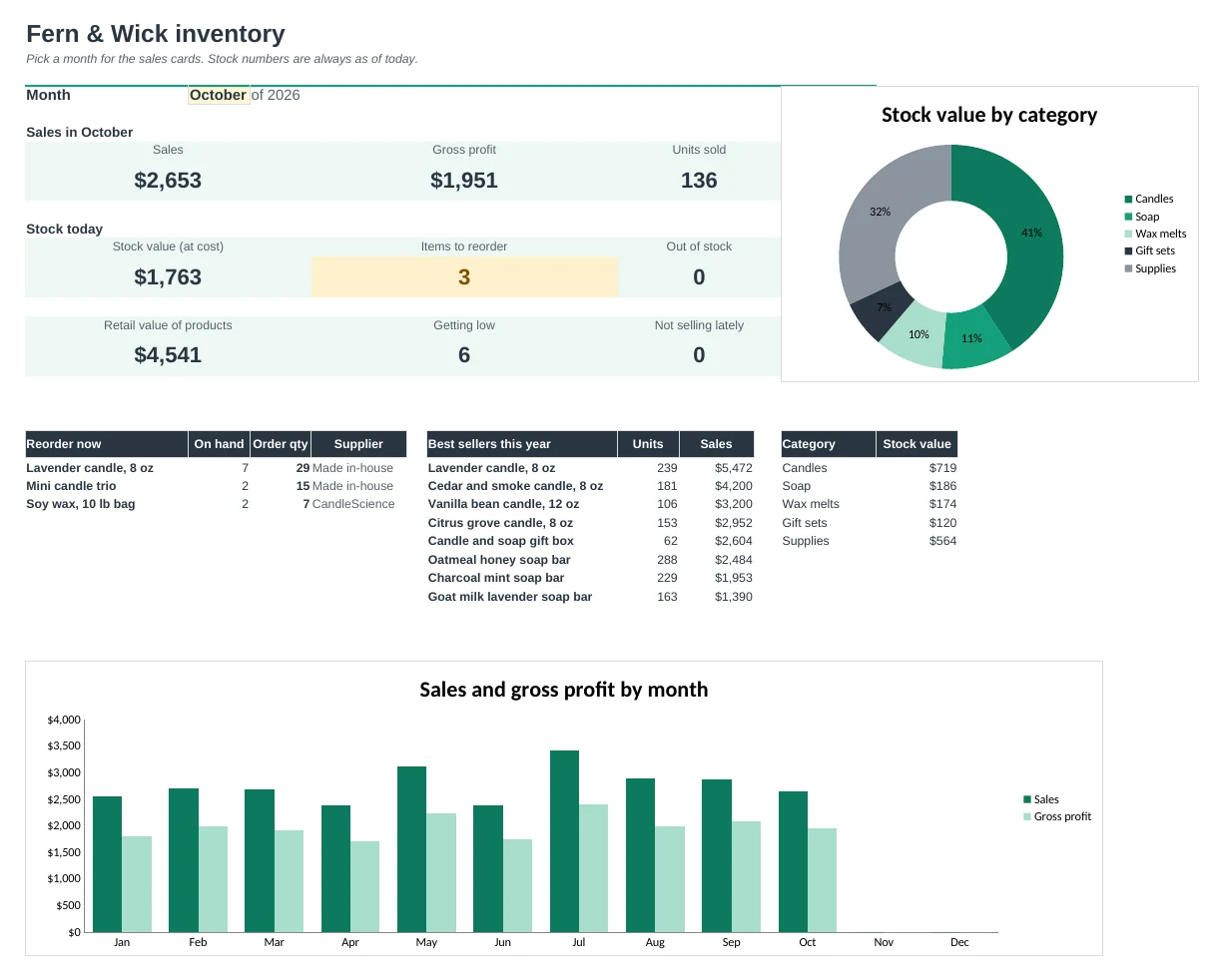
Stock, reorders, suppliers and best sellers for small shops and makers, all worked out from one stock log.
Log stock in one place
Every delivery, batch made, sale and use is one row on the Stock Log. On hand, stock value and sales update from it.
Reorder before you run out
Items turn red at their reorder point and amber when getting low. The Reorder tab lists what to order, how many, from whom and what it will cost.
Smarter reorder points
A suggested reorder point is worked out from your recent sales and each supplier's lead time, so busy items get reordered sooner.
Built for makers
Log a finished batch as Made and the supplies it took as Used in making, so finished goods and materials both stay right.
Know your best sellers
Sales ranks your items by sales, with units, profit and margin, plus month-by-month totals and sales by channel.
Suppliers in one list
Contacts, lead times and minimum orders, with what you'd order from each supplier today and whether it meets their minimum.
| Free | Pro |
|---|---|
| Item list with stock on hand | Item list with status, margin and days of stock left |
| Stock moves log | Stock log with seven move types and sale prices |
| Reorder flag | Reorder list with quantities, costs and suppliers |
| Stock value by category | Dashboard with charts and a pick-a-month view |
| · | Suggested reorder points from recent sales |
| · | Best sellers, profit and sales by channel |
| · | Supplier list with order totals and minimums |
| · | Supplies used in making |
$19 one-time
8 tabs: Start Here, Dashboard, Stock Log, Items, Reorder, Sales, Suppliers and Setup. You get two copies: one filled in with a sample candle and soap shop so you can see it working, and a blank one ready for your own items.
Get Inventory Pro for $19- Instant download after checkout
- Works in Google Sheets and Excel
- Yours to keep and reuse every year