
Free work log template
At the end of each task, add one line: the date, the project, what you did and how long it took. The log totals your hours by project for each week, splits billable from non-billable time, and the summary shows this week's hours at a glance. It's the record you wish you had when someone asks what you've been working on.
Pro Want billable value, unbilled time and a weekly report for each client? See Work Log Pro →| Date | Day | Project | Task | Hours | Billable | Status | Notes |
|---|---|---|---|---|---|---|---|
| Oct 12, 2026 | Mon | Harbor Bakery website | Kickoff call and site map | 2 | Done | Owner wants online cake orders | |
| Oct 12, 2026 | Mon | Admin and email | Invoices and inbox | 1 | Done | ||
| Oct 13, 2026 | Tue | Harbor Bakery website | Homepage wireframe | 4.5 | Done | ||
| Oct 14, 2026 | Wed | Lakeside Yoga rebrand | Logo sketches, round 1 | 5 | Done | 12 sketches, 3 picked to develop | |
| Oct 15, 2026 | Thu | Harbor Bakery website | Menu page wireframe | 3 | Done | ||
| Oct 15, 2026 | Thu | Pine St Realty ads | Facebook ad set, 4 sizes | 2.5 | Done | Open house Oct 24 | |
| Oct 16, 2026 | Fri | Lakeside Yoga rebrand | Logo refinement | 3.5 | Done | ||
| Oct 16, 2026 | Fri | Admin and email | Quote for new client | 1 | Done | ||
| Oct 19, 2026 | Mon | Harbor Bakery website | Visual design, homepage | 6 | Done | ||
| Oct 20, 2026 | Tue | Harbor Bakery website | Visual design, menu and order pages | 5 | Done | ||
| Oct 20, 2026 | Tue | Admin and email | Bookkeeping and inbox | 1.5 | Done | ||
| Oct 21, 2026 | Wed | Lakeside Yoga rebrand | Color palette and fonts | 3 | Done | Client picked the sage green | |
| Oct 21, 2026 | Wed | Pine St Realty ads | Ad edits after feedback | 1.5 | Done | ||
| Oct 22, 2026 | Thu | Lakeside Yoga rebrand | Business card and class flyer | 4 | Done | ||
| Oct 23, 2026 | Fri | Harbor Bakery website | Client review call | 1 | Done | Changes to the order form | |
| Oct 23, 2026 | Fri | Harbor Bakery website | Revisions to order form | 2.5 | Done | ||
| Oct 26, 2026 | Mon | Harbor Bakery website | Build homepage | 6.5 | Done | ||
| Oct 27, 2026 | Tue | Harbor Bakery website | Build menu and order pages | 5.5 | Done | ||
| Oct 27, 2026 | Tue | Admin and email | Inbox and portfolio update | 1 | Done | ||
| Oct 28, 2026 | Wed | Lakeside Yoga rebrand | Signage files for the printer | 3 | Done | ||
| Oct 28, 2026 | Wed | Pine St Realty ads | Instagram ads for two listings | 3 | Done | ||
| Oct 29, 2026 | Thu | Harbor Bakery website | Connect online payments | 4 | Blocked | Waiting on the bakery's Stripe login | |
| Oct 30, 2026 | Fri | Lakeside Yoga rebrand | Brand guide PDF | 5 | Done | ||
| Nov 2, 2026 | Mon | Harbor Bakery website | Mobile layout fixes | 4 | Done | ||
| Nov 2, 2026 | Mon | Admin and email | Month-end invoices | 2 | Done | Sent October invoices | |
| Nov 3, 2026 | Tue | Harbor Bakery website | Connect online payments | 3 | Done | Login came through Monday | |
| Nov 3, 2026 | Tue | Pine St Realty ads | Holiday ad concepts | 2 | In progress | ||
| Nov 4, 2026 | Wed | Lakeside Yoga rebrand | Website banner and social images | 4.5 | Done | ||
| Nov 5, 2026 | Thu | Harbor Bakery website | Test orders and launch checklist | 5 | In progress | Launch set for Nov 9 | |
| Nov 5, 2026 | Thu | Admin and email | Inbox | 0.5 | Done | ||
| Nov 6, 2026 | Fri | Pine St Realty ads | Holiday ad concepts | 3 | In progress | Send to client Monday | |
| Nov 6, 2026 | Fri | Harbor Bakery website | Train owner on updating the menu | 1.5 | Done | ||
| Project | Week 1 | Week 2 | Week 3 | Week 4 | Total |
|---|---|---|---|---|---|
| Week starting | Oct 12, 2026 | Oct 19, 2026 | Oct 26, 2026 | Nov 2, 2026 | |
| Harbor Bakery website | 9.50 | 14.50 | 16.00 | 13.50 | 53.50 |
| Lakeside Yoga rebrand | 8.50 | 7.00 | 8.00 | 4.50 | 28.00 |
| Pine St Realty ads | 2.50 | 1.50 | 3.00 | 5.00 | 12.00 |
| Admin and email | 2.00 | 1.50 | 1.00 | 2.50 | 7.00 |
| All projects | 22.50 | 24.50 | 28.00 | 25.50 | 100.50 |
| Billable hours | 20.50 | 23.00 | 27.00 | 23.00 | 93.50 |
| Billable share | 91.1% | 93.9% | 96.4% | 90.2% | 93% |
| Item | Value |
|---|---|
| Today's date | Nov 6, 2026 |
| This week starts (Monday) | Nov 2, 2026 |
| Hours this week | 25.50 |
| Hours today | 4.50 |
| Total hours logged | 100.50 |
| Billable hours | 93.50 |
| Billable share | 93% |
| Entries logged | 32 |
| Tasks in progress | 3 |
| Tasks blocked | 1 |
What's inside
- One line per task with date, project, what you did, hours, a billable checkbox, status and notes
- The day of the week fills in from the date
- Hours by project for four weeks, with totals, billable hours and billable share for each week
- A summary with hours today, hours this week, total and billable hours, and tasks in progress or blocked
- Enter hours directly, so it works for tasks spread across a day, not just one start and end time
- Room for 60 entries, and works in Google Sheets and Excel
How to use it
Download your copy
Click "Free download" to save the .xlsx file. It opens in Excel, or in Google Sheets: open a blank sheet (sheets.new) and choose File, then Import, then Upload. The sample is four weeks of a freelance designer's work, so delete those rows when you're ready.
Name your projects
On the Weekly Hours tab, type your project or client names in the Project column. Use the exact same names in the log so the hours add up.
Set the first week
Type the Monday your log starts on in the first Week starting cell. The other three weeks follow on by themselves.
Log as you go
Add a line when you finish a task, or at the end of the day: date, project, task, hours and whether it's billable. Use quarter hours like 1.25 if you like.
Set today's date
On the Summary tab, type =TODAY() in the first value so Hours today and Hours this week stay current.
Check your week
On Friday, look at the Weekly Hours tab. It shows where your time went and how much of it you can bill.
Tips
Log before you switch tasks
It takes ten seconds while you remember. At the end of the week it takes an hour of guessing.
Write tasks a client would understand
"Build menu and order pages" reads well on an invoice or in a status update. "Stuff for bakery" doesn't.
Mark what's blocked
Set Status to Blocked and say why in Notes. It's an easy list to send when you need something from a client.
Roll on to the next month
Duplicate the file or the tabs each month, then change the first Week starting date and clear the log rows.
Questions
What is a work log?
A daily record of what you worked on and how long it took. People use one for client billing, performance reviews, status updates or just to see where their time goes.
How is this different from a timesheet?
A timesheet tracks start and end times to work out pay. A work log tracks tasks and projects. If you need to clock hours for payroll, use our timesheet template instead.
Can I use it as a daily log or logbook?
Yes. Log one line per task or one line per day. Rename the Project column to something like Area or Site if that fits your work better.
How do I track more than four projects?
Insert a row on the Weekly Hours tab above All projects, type the project name and copy the formulas from the row above. Then check the All projects row includes it.
Does it work for billing clients?
It gives you billable hours by project and week, which you can copy into an invoice. It doesn't work out pay or rates, so multiply by your rate in your invoice.
Is it free, and does it work in Excel?
Yes. Download the .xlsx file and open it in Excel or Google Sheets. In Excel the Billable column uses a TRUE or FALSE dropdown instead of a checkbox.
Pro version
Work Log Pro
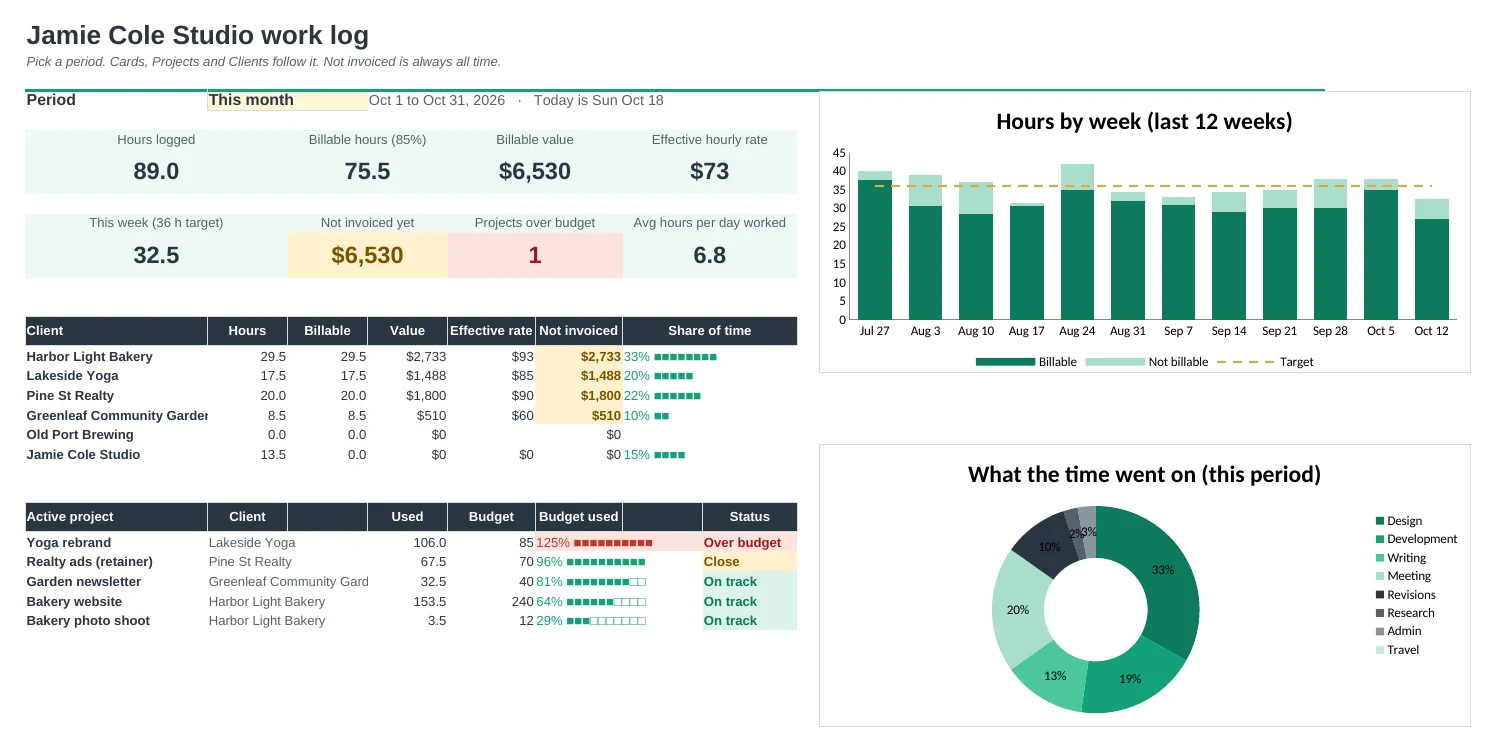
Log what you worked on and for how long, and see billable hours, value and what you haven't invoiced for every client and project, with a weekly report to send.
Pick a project, the rest fills in
Choose the project from a dropdown and the client, hourly rate and billable setting come from Setup. Type the hours, or a start and end time.
See what your time is worth
For any period: hours logged, billable share, billable value and your effective hourly rate, the real number once admin and unbilled time are counted.
Never forget to invoice
Type the invoice number when you bill. Not invoiced shows what's still owed to you, per client and per project.
Catch projects running over
Give a project a budget in hours. Projects shows how much is used, with Over budget and Close flags before it's too late.
A weekly report ready to send
Pick a client and a week. The report lists every entry with hours and value, totals per project and a notes box. Print it or save it as a PDF.
Every week at a glance
Weeks shows hours per day for the whole year, billable share, value and whether you hit your weekly target.
| Free | Pro |
|---|---|
| Date, project, task and hours | Pick a project; client, rate and value fill in |
| Billable tick box | Billable by project, with a per-row override |
| Hours by project for 4 weeks | Dashboard for any period, with charts |
| · | Hourly rates per client and project |
| · | Not invoiced amounts per client and project |
| · | Project budgets with Over / Close / On track |
| · | Printable weekly report per client |
| · | Whole-year week view against your target |
$19 one-time
8 tabs: Start Here, Dashboard, Work Log, Weekly Report, Projects, Clients, Weeks and Setup. You get two copies: one filled in with a sample studio's work so you can see it working, and a blank one ready for your own.
Get Work Log Pro for $19- Instant download after checkout
- Works in Google Sheets and Excel
- Yours to keep and reuse every year