
Free monthly calendar template for Google Sheets
Pick a month and the grid fills in the right dates for you. Add your events to a simple list and they show up on the right day, so you can switch months without retyping anything. It fits on one landscape page when printed, and works in Excel too.
| Sunday | Monday | Tuesday | Wednesday | Thursday | Friday | Saturday |
|---|---|---|---|---|---|---|
| November 2026 | ||||||
| 1 | 2 | 3 | 4 | 5 | 6 | 7 |
| Clocks go back 1 hour | Election day | Book club 7pm | Soccer 10am | |||
| Pay rent | Mia's birthday party 2pm | |||||
| 8 | 9 | 10 | 11 | 12 | 13 | 14 |
| Veterans Day | Dentist 3:30 | Soccer 10am | ||||
| 15 | 16 | 17 | 18 | 19 | 20 | 21 |
| Parent-teacher night | Payday | Soccer final 9am | ||||
| 22 | 23 | 24 | 25 | 26 | 27 | 28 |
| Order the turkey | Thanksgiving at Mom's | |||||
| Bring pumpkin pie (+1 more) | ||||||
| 29 | 30 | |||||
| Car insurance due | ||||||
| Key (automatic) | Date | Event |
|---|---|---|
| 463,271 | Nov 1, 2026 | Clocks go back 1 hour |
| 463,272 | Nov 1, 2026 | Pay rent |
| 463,291 | Nov 3, 2026 | Election day |
| 463,311 | Nov 5, 2026 | Book club 7pm |
| 463,331 | Nov 7, 2026 | Soccer 10am |
| 463,332 | Nov 7, 2026 | Mia's birthday party 2pm |
| 463,371 | Nov 11, 2026 | Veterans Day |
| 463,381 | Nov 12, 2026 | Dentist 3:30 |
| 463,401 | Nov 14, 2026 | Soccer 10am |
| 463,441 | Nov 18, 2026 | Parent-teacher night |
| 463,461 | Nov 20, 2026 | Payday |
| 463,471 | Nov 21, 2026 | Soccer final 9am |
| 463,501 | Nov 24, 2026 | Order the turkey |
| 463,521 | Nov 26, 2026 | Thanksgiving at Mom's |
| 463,522 | Nov 26, 2026 | Bring pumpkin pie |
| 463,523 | Nov 26, 2026 | Call Grandpa |
| 463,561 | Nov 30, 2026 | Car insurance due |
| 463,571 | Dec 1, 2026 | Pay rent |
| 463,601 | Dec 4, 2026 | Office holiday party |
| Setting | Value |
|---|---|
| Month to show (type any date in it) | Nov 1, 2026 |
| First day of that month | Nov 1, 2026 |
| Grid starts on (the Sunday before) | Nov 1, 2026 |
| Events this month | 17 |
What's inside
- Change one date and every day of the month moves into place, for any month and year
- Events live in their own list and appear on the right day, so switching months never loses them
- Two events show under each day, with a note like (+1 more) when there are extra
- Six week rows, so even long months that start late in the week fit
- Sunday to Saturday layout that prints neatly on one landscape page
- Works in Google Sheets and Excel
How to use it
Make your copy
Click "Make a copy" to save the calendar to your Google Drive. Prefer Excel? Download the .xlsx file instead.
Pick your month
Open the Settings tab and type any date in the month you want, like 1/1/2027. The Calendar tab redraws straight away.
Add your events
On the Events tab, type a date and a short note on each row. Keep it brief, like "Dentist 3:30", so it fits under the day.
Clear the sample events
Delete the sample dates and events in the Date and Event columns. Leave the Key column alone; its formula is what places each event on the calendar.
Print or share it
Go to File, then Print, and pick landscape with "Fit to width". Or use Share to give your family view access.
Tips
Keep the whole year in one list
Add events for any month to the Events tab. Only the ones in the month you're viewing show up, so you can plan ahead without clutter.
Save a month before you move on
The grid always shows the month picked in Settings. To keep a record of a finished month, use File, then Download, then PDF before you switch.
Add more rows for a busy year
The Events tab has room for 60 events. For more, insert rows above the last one and copy the Key formula down, then widen the ranges in the Calendar formulas.
Use short labels
Times and first names are enough: "Soccer 10am" reads better than a full sentence when the cell is narrow.
Questions
How do I change the month?
Type any date in that month into the first value on the Settings tab. The Calendar tab works out the rest, including which day of the week the month starts on.
Can I start the week on Monday?
Not in this version. The grid runs Sunday to Saturday, the usual layout for wall calendars in the US and Canada. If you think in Monday weeks, our weekly schedule runs Monday to Sunday.
Why isn't my event showing?
Check that the date on the Events tab is a real date (it should line up to the right) and that it falls in the month you picked. The Key column also needs its formula on that row.
How many events can one day hold?
Two show on the calendar. If a day has more, the second line adds a note like (+2 more), and the full list is on the Events tab.
Does it work in Excel?
Yes. Download the .xlsx file. The formulas are the same in Excel, so changing the month works there too.
Is it really free?
Yes. Copy it to your Google Drive or download the Excel file. There's no sign-up.
Pro version
Calendar Pro
A family calendar for the whole year: type each event once, set how it repeats, and all 12 months fill themselves in.
Type each event once
Add an event to one list with a date, a category and who it's for. It lands on the right day of the right month tab, sorted by time.
Repeats that work themselves out
Weekly practice, every other week bin day, the 2nd Wednesday book club, the 1st of the month bills. Add an end date and the repeat stops when the season does.
Birthdays and holidays every year
Type a birth date once and it comes back every year with the age next to it. US holidays are already in, including the ones that move, like Thanksgiving.
Colour by category
Each event gets a coloured flag for its category: family, kids, school, appointments and more. Rename the categories to suit your house.
See what's coming up
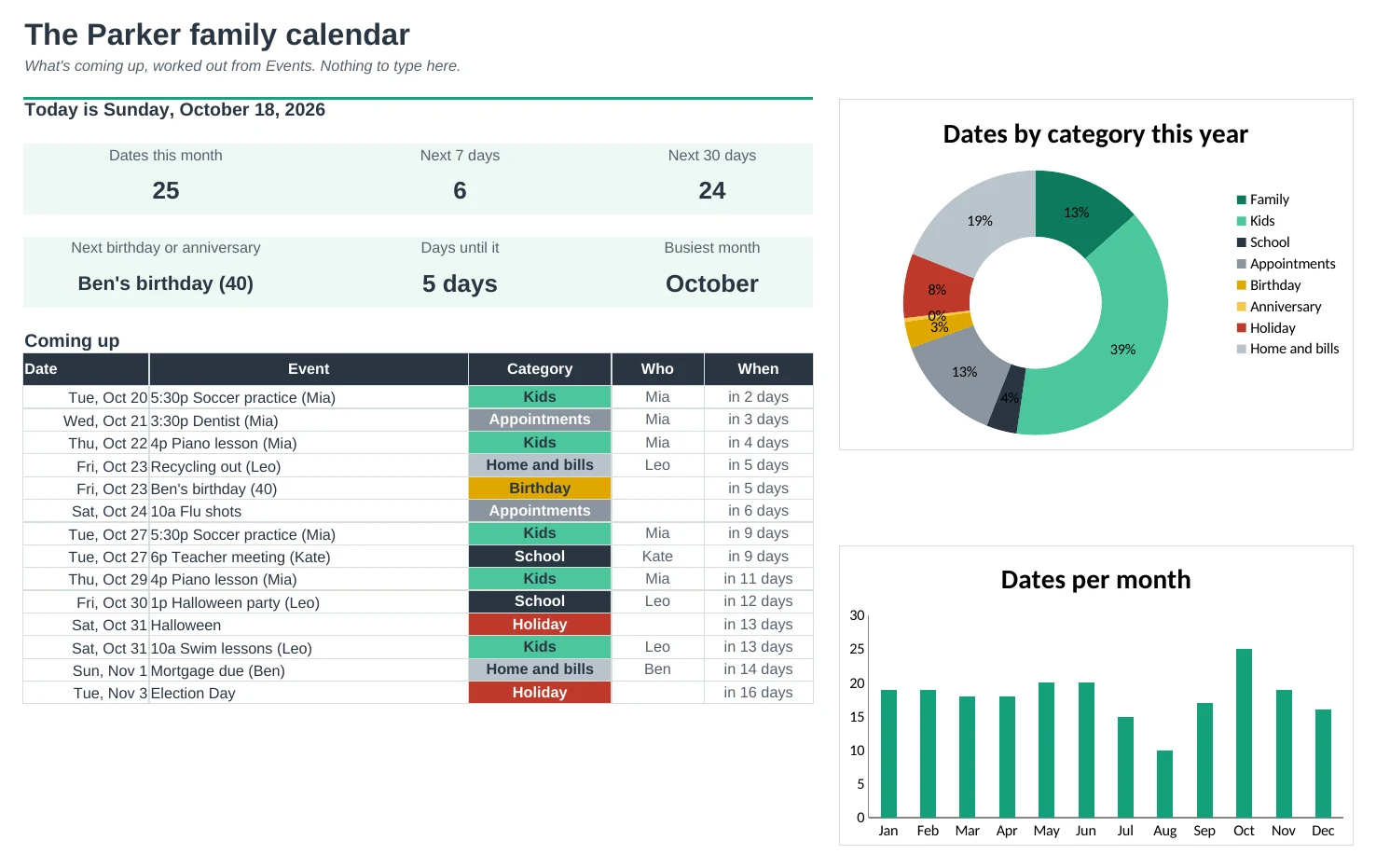
The Dashboard lists the next 14 dates with 'Tomorrow' and 'in 5 days', counts the week and the month, and tells you whose birthday is next.
Print any month
Every month tab fits one landscape page, with a colour key at the bottom. Change the year in one cell and every repeating event moves to its new dates.
| Free | Pro |
|---|---|
| One month at a time | All 12 months, plus a year overview |
| Two events per day | Four per day, in time order, then '+ 2 more' |
| Retype events that repeat | Weekly, every 2 weeks, monthly and yearly repeats |
| Sunday start | Sunday or Monday start |
| · | Categories with colour flags on every event |
| · | Birthdays with ages and anniversaries with years |
| · | US holidays already filled in |
| · | Dashboard with a coming-up list and charts |
$19 one-time
18 tabs: Start Here, Dashboard, Events, one tab for each month (Jan to Dec), Year, Setup and All Dates. You get two copies: one filled in with a sample family so you can see it working, and a blank one with the US holidays and starter categories ready for your own events.
Get Calendar Pro for $19- Instant download after checkout
- Works in Google Sheets and Excel
- Yours to keep and reuse every year