
Free attendance template for Google Sheets
Mark each student P, A, L or E for every class date. The sheet counts the days, works out each student's attendance rate, flags anyone below the level you set and totals up every day. It works for a class, a club, a team or a Sunday school.
Pro Want a full year of dates, monthly reports and chronic absence flags? See Attendance Pro →| Student | Oct 1 | Oct 2 | Oct 5 | Oct 6 | Oct 7 | Oct 8 | Oct 9 | Oct 12 | Oct 13 | Oct 14 | Oct 15 | Oct 16 | Present | Late | Absent | Excused | Rate | Flag |
|---|---|---|---|---|---|---|---|---|---|---|---|---|---|---|---|---|---|---|
| Aiden Bell | P | P | P | P | P | P | P | P | P | P | P | P | 12 | 0 | 0 | 0 | 100% | |
| Brianna Cole | P | P | L | P | P | P | P | P | L | P | P | P | 10 | 2 | 0 | 0 | 100% | |
| Carlos Mendez | P | A | P | P | P | P | E | P | P | P | P | P | 10 | 0 | 1 | 1 | 83.3% | Check in |
| Destiny Ross | P | P | P | P | A | A | P | P | P | A | P | P | 9 | 0 | 3 | 0 | 75% | Check in |
| Ethan Walsh | P | P | P | P | P | P | P | P | P | P | L | P | 11 | 1 | 0 | 0 | 100% | |
| Fatima Ali | P | P | P | P | P | P | P | P | P | P | P | P | 12 | 0 | 0 | 0 | 100% | |
| Grace Kim | L | L | P | P | L | P | P | L | P | P | L | P | 7 | 5 | 0 | 0 | 100% | |
| Henry Owens | P | P | P | E | E | P | P | P | P | P | P | P | 10 | 0 | 0 | 2 | 83.3% | Check in |
| Isabella Reyes | P | P | P | P | P | P | P | P | P | P | P | P | 12 | 0 | 0 | 0 | 100% | |
| Jordan Price | A | A | P | L | P | A | P | P | A | P | P | A | 6 | 1 | 5 | 0 | 58.3% | Check in |
| Kayla Stewart | P | P | P | P | P | P | P | A | P | P | P | P | 11 | 0 | 1 | 0 | 91.7% | |
| Lucas Grant | P | P | P | P | P | P | L | P | P | P | P | P | 11 | 1 | 0 | 0 | 100% | |
| Mia Thompson | P | P | P | P | P | P | P | P | P | P | P | P | 12 | 0 | 0 | 0 | 100% | |
| Noah Rivera | P | P | P | P | P | P | L | P | P | 8 | 1 | 0 | 0 | 100% | ||||
| Olivia Chen | P | P | P | P | P | P | P | P | A | P | P | P | 11 | 0 | 1 | 0 | 91.7% |
| Date | Present | Late | Absent | Excused | Not marked | Rate |
|---|---|---|---|---|---|---|
| Oct 1, 2026 | 12 | 1 | 1 | 0 | 1 | 92.9% |
| Oct 2, 2026 | 11 | 1 | 2 | 0 | 1 | 85.7% |
| Oct 5, 2026 | 13 | 1 | 0 | 0 | 1 | 100% |
| Oct 6, 2026 | 13 | 1 | 0 | 1 | 0 | 93.3% |
| Oct 7, 2026 | 12 | 1 | 1 | 1 | 0 | 86.7% |
| Oct 8, 2026 | 13 | 0 | 2 | 0 | 0 | 86.7% |
| Oct 9, 2026 | 13 | 1 | 0 | 1 | 0 | 93.3% |
| Oct 12, 2026 | 13 | 1 | 1 | 0 | 0 | 93.3% |
| Oct 13, 2026 | 12 | 1 | 2 | 0 | 0 | 86.7% |
| Oct 14, 2026 | 13 | 1 | 1 | 0 | 0 | 93.3% |
| Oct 15, 2026 | 13 | 2 | 0 | 0 | 0 | 100% |
| Oct 16, 2026 | 14 | 0 | 1 | 0 | 0 | 93.3% |
| All days | 152 | 11 | 11 | 3 | 3 | 92.1% |
| Item | Value |
|---|---|
| Students | 15 |
| Days in this sheet | 12 |
| Overall attendance rate | 92.1% |
| Students with perfect attendance | 9 |
| Students flagged to check in | 4 |
| Total absences | 11 |
| Total lates | 11 |
| Lowest student rate | 58.3% |
| Code or setting | Value | What it means |
|---|---|---|
| Flag students below | 90% | A student whose rate drops under this gets "Check in" |
| Present | P | In class. Counts toward the rate. |
| Late | L | Arrived late. Counts as there. |
| Absent | A | Not there. Counts against the rate. |
| Excused | E | Excused absence. Counts against the rate, tracked on its own. |
| Blank | Not marked, not enrolled yet, or no class. Left out of the rate. |
What's inside
- One row per student and one column per date, with simple P, A, L and E codes
- Present, late, absent and excused counts for every student, plus an attendance rate
- A Check in flag for anyone below the rate you choose (90% to start)
- A By Day tab with how many were there, late or out on each date
- Blank cells are left out, so a student who joins mid-term isn't marked down for days before they arrived
- Works in Google Sheets and Excel
How to use it
Download your copy
Click "Free download" to save the .xlsx file. It opens in Excel, or in Google Sheets: open a blank sheet (sheets.new) and choose File, then Import, then Upload.
Add your roster
Type your students or members in the Student column of the Attendance tab. Delete the sample names and codes.
Set your dates
Rename the date headers across the top to your class dates. Type the same dates in the Date column of the By Day tab so the daily totals line up.
Mark attendance each session
Type P for present, L for late, A for absent or E for excused under the day's date. Leave a cell blank if there was no class or the student wasn't enrolled yet.
Check the rates and flags
Each student's rate and flag update as you type. Set your own flag level at the top of the Key tab, and see the whole group on the Summary tab.
Tips
Fill a whole column at once
If most of the class is there, type P in the first cell, copy it down the column, then change the few who weren't.
Add dates inside the grid
Insert new date columns between the first and last date so the counts still include them. Or start a fresh tab each month with Duplicate.
Decide how late and excused count
The rate counts late as there and excused as missed. If your school counts excused absences differently, change the Rate formula to match.
Use the flag early
Many schools watch for students who miss 10% or more of the days. The Check in flag spots that pattern while there's still time to talk to the family.
Questions
Is this attendance template free?
Yes. Download the .xlsx file and open it in Excel or Google Sheets. There's no sign-up.
How is the attendance rate worked out?
It's days present plus days late, divided by every day that has a code. Blank days are left out. Excused absences count as days missed but are tracked in their own column.
Can I use different codes?
Yes, but the counting formulas look for P, L, A and E. If you want new codes, add a column and a COUNTIF formula for each one, and update the Key tab.
Can I track more than 12 dates?
Yes. Insert extra date columns between the first and last date, or duplicate the tab for each month. The counts pick up any column inside the date range.
Does it work for clubs, teams or volunteers?
Yes. Anything that meets on set dates works. Use the Student column for names and the codes for who showed up.
Can my students see this sheet?
Only if you share it. Your file is private until you choose to share it.
Pro version
Attendance Pro
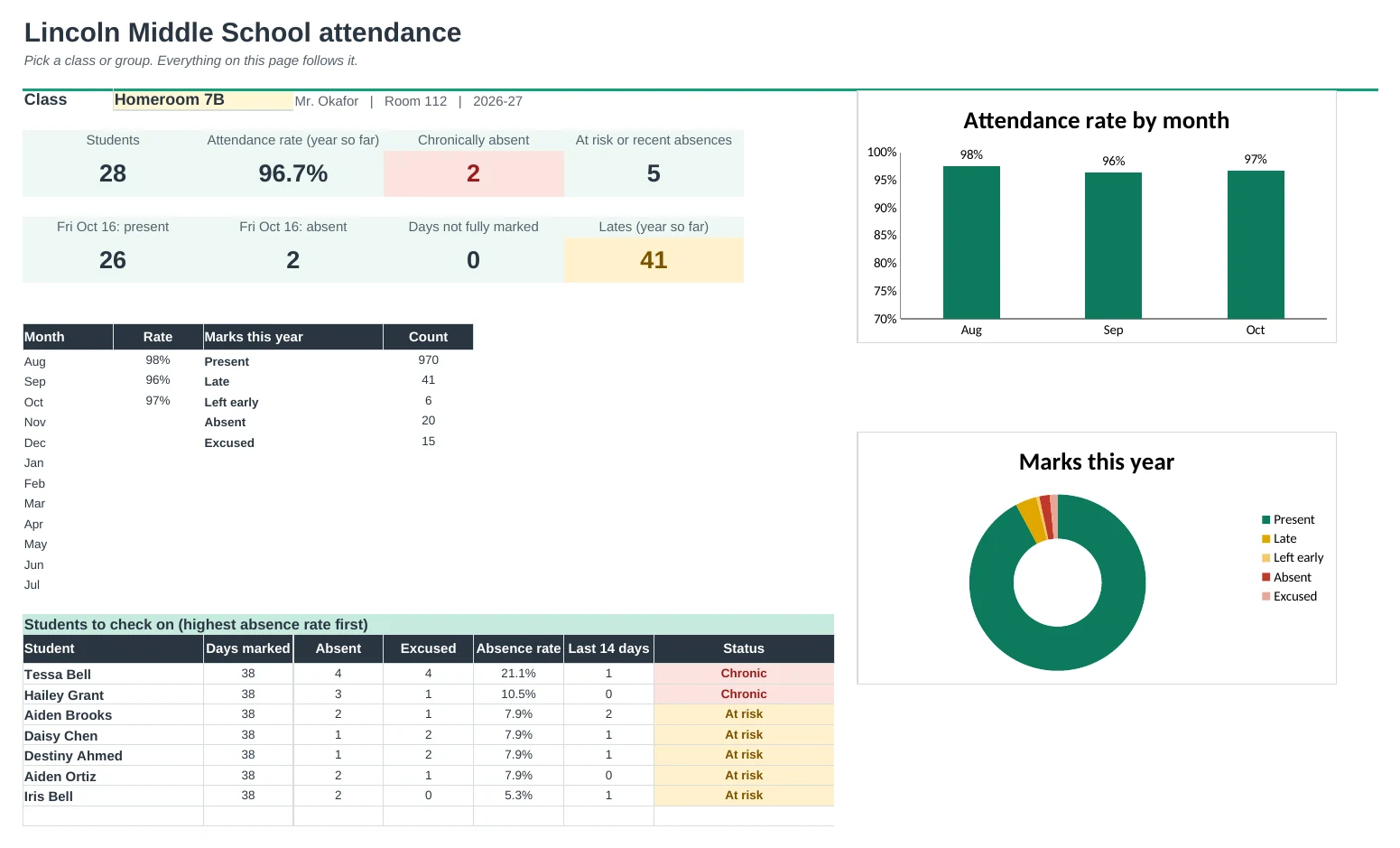
A full-year attendance register for up to four classes or groups, with dates that fill themselves in and chronic absence flags.
Dates fill themselves in
Type the first and last day, your days off and the weekdays each group meets. Every register lays out the whole year for you, skipping weekends, holidays and days you don't meet.
Your codes, counted right
Use P, L, A, E or your school's own codes, and choose what each one counts as: present, late, left early, absent, excused or not counted.
Spot chronic absence early
Each student gets an attendance rate and an absence rate. Students missing 10% or more are flagged, with an at-risk line, recent absences and too many lates flagged too. You set the lines.
Monthly and term summaries
See every class by month and by term on one page, with a chart. The Dashboard shows the last class, the monthly trend and who to check on.
Print what you need
Print a register for any month, a one-page report for a student with every absence and late date, or a weekly sign-in roster for a sub or a field trip.
For classes, clubs and tutoring
Four registers of up to 36 people each. Rename them for homeroom, a club that meets Tuesdays and Thursdays, or Saturday tutoring.
| Free | Pro |
|---|---|
| One class | Up to 4 classes or groups |
| Dates typed by hand | A full year of dates, filled in for you |
| P, A, L, E | Up to 8 codes you choose and define |
| Rate and a check-in flag | Chronic, at-risk, recent absence and late flags |
| · | Dashboard with charts and a students-to-check-on list |
| · | Monthly and term summaries for every class |
| · | Printable monthly register and student report |
| · | Printable weekly sign-in roster |
$19 one-time
11 tabs: Start Here, Dashboard, four class registers, Monthly, Summary, Student Report, Roster and Setup. You get two copies: one filled in with a sample school's classes so you can see it working, and a blank one ready for your own.
Get Attendance Pro for $19- Instant download after checkout
- Works in Google Sheets and Excel
- Yours to keep and reuse every year