
Free gradebook template for Google Sheets
Type each student's scores into one grid and the gradebook works out their homework, quiz, test and project averages, a weighted final grade and a letter grade. Blank scores are left out, zeros count, and a class summary shows who needs help.
Pro Want several classes, drop-lowest and printable progress reports? See Gradebook Pro →| Student | HW 1 | HW 2 | Quiz 1 | HW 3 | Test 1 | HW 4 | Quiz 2 | Project | HW 5 | Test 2 | Homework | Quizzes | Tests | Projects | Final | Letter |
|---|---|---|---|---|---|---|---|---|---|---|---|---|---|---|---|---|
| Category | Homework | Homework | Quizzes | Homework | Tests | Homework | Quizzes | Projects | Homework | Tests | Homework | Quizzes | Tests | Projects | ||
| Out of | 10 | 10 | 20 | 10 | 100 | 10 | 20 | 50 | 10 | 100 | 20% | 20% | 40% | 20% | 100% | |
| Aaliyah Brooks | 10 | 9 | 19 | 10 | 94 | 10 | 18 | 47 | 9 | 96% | 92.5% | 94% | 94% | 94.1% | A | |
| Ben Carter | 8 | 7 | 15 | 9 | 81 | 8 | 16 | 42 | 0 | 64% | 77.5% | 81% | 84% | 77.5% | C+ | |
| Camila Diaz | 10 | 10 | 20 | 9 | 97 | 10 | 19 | 49 | 10 | 98% | 97.5% | 97% | 98% | 97.5% | A+ | |
| Daniel Evans | 6 | 0 | 12 | 7 | 68 | 0 | 13 | 35 | 6 | 38% | 62.5% | 68% | 70% | 61.3% | D- | |
| Ella Foster | 9 | 9 | 17 | 10 | 88 | 9 | 17 | 45 | 9 | 92% | 85% | 88% | 90% | 88.6% | B+ | |
| Gabriel Hughes | 7 | 8 | 14 | 74 | 8 | 15 | 38 | 7 | 75% | 72.5% | 74% | 76% | 74.3% | C | ||
| Hannah Kim | 10 | 10 | 18 | 10 | 91 | 9 | 20 | 50 | 10 | 98% | 95% | 91% | 100% | 95% | A | |
| Isaiah Lopez | 9 | 8 | 16 | 8 | 79 | 9 | 14 | 40 | 8 | 84% | 75% | 79% | 80% | 79.4% | C+ | |
| Jasmine Moore | 5 | 6 | 11 | 0 | 62 | 5 | 12 | 30 | 0 | 32% | 57.5% | 62% | 60% | 54.7% | F | |
| Liam Nguyen | 10 | 9 | 18 | 9 | 85 | 10 | 18 | 44 | 9 | 94% | 90% | 85% | 88% | 88.4% | B+ | |
| Maya Patel | 10 | 10 | 19 | 10 | 99 | 10 | 20 | 48 | 10 | 100% | 97.5% | 99% | 96% | 98.3% | A+ | |
| Owen Turner | 8 | 9 | 16 | 8 | 9 | 15 | 41 | 8 | 84% | 77.5% | 82% | 81.2% | B- | |||
| Class average | 8.5 | 7.9 | 16.3 | 8.2 | 83.5 | 8.1 | 16.4 | 42.4 | 7.2 | 79.6% | 81.7% | 83.5% | 84.8% | 82.5% | B- |
| Category | Weight | Assignments | Points | Class average |
|---|---|---|---|---|
| Homework | 20% | 5 | 50 | 79.6% |
| Quizzes | 20% | 2 | 40 | 81.7% |
| Tests | 40% | 2 | 200 | 83.5% |
| Projects | 20% | 1 | 50 | 84.8% |
| Total | 100% | 10 | 340 |
| From | Letter |
|---|---|
| 0% | F |
| 60% | D- |
| 63% | D |
| 67% | D+ |
| 70% | C- |
| 73% | C |
| 77% | C+ |
| 80% | B- |
| 83% | B |
| 87% | B+ |
| 90% | A- |
| 93% | A |
| 97% | A+ |
| Item | Value |
|---|---|
| Students | 12 |
| Class average | 82.5% |
| Highest final grade | 98.3% |
| Lowest final grade | 54.7% |
| Students below 70% | 2 |
| Zeros (missing work) | 5 |
| Scores left blank | 14 |
| A range (90% and up) | 4 |
| B range (80% to 89%) | 3 |
| C range (70% to 79%) | 3 |
| D range (60% to 69%) | 1 |
| F (below 60%) | 1 |
What's inside
- Students down the side, assignments across the top, with a category and point value for each assignment
- Weighted categories you set yourself, like homework 20% and tests 40%
- A weighted final grade and a letter grade with plus and minus for every student
- Blank scores are skipped and zeros count, so excused work and missing work are handled differently
- A class average under every assignment and a class summary with the grade spread
- Works in Google Sheets and Excel
How to use it
Download your copy
Click "Free download" to save the .xlsx file. It opens in Excel, or in Google Sheets: open a blank sheet (sheets.new) and choose File, then Import, then Upload.
Set your categories and weights
On the Categories tab, name your grading categories and give each one a weight. The weights should add up to 100%. The Total row checks this for you.
Add your students and assignments
Type your class list in the Student column of the Grades tab. Rename the assignment columns across the top, then fill in the Category and Out of rows under each one.
Enter scores as you grade
Type the points each student earned. Leave a cell blank for excused work or work you haven't graded yet. Type 0 for missing work.
Check the grades and summary
The category columns, Final and Letter update as you type. The Class Summary tab shows the class average, the grade spread and how many students are below 70%.
Tips
Match your grading scale
The Grade Scale tab uses a common scale (93% for an A, 90% for an A-, and so on). Change the numbers to match your school's policy. Keep them sorted from lowest to highest.
Blank and zero mean different things
A blank score doesn't count at all. A zero counts against the student. Use blanks for excused work so nobody is punished for an absence.
Add assignments inside the grid
Insert new assignment columns between the first and last assignment so every formula still picks them up. Then copy the category formulas across if you add a new category.
One tab per class or term
Right-click the Grades tab and choose Duplicate for each class period or grading period. Point the copy's Category and Out of rows at your new assignments.
Questions
Is this gradebook template free?
Yes. Download the .xlsx file and open it in Excel or Google Sheets. There's no sign-up and no account needed.
How are weighted grades worked out?
Each category average is the points earned divided by the points possible in that category. The final grade multiplies each category average by its weight and adds them up. If a category has no scores yet, it's left out and the other weights are scaled up to match.
Can I change the categories or weights?
Yes. Rename the categories and change the weights on the Categories tab. Use the same category names in the Category row of the Grades tab so the scores land in the right place.
How do I record excused or missing work?
Leave the score blank for excused work and it won't count. Type 0 for missing work and it counts as zero points. The Class Summary tab counts both.
Can I use it for points-based grading with no weights?
Yes. Put everything in one category with a weight of 100%, and the final grade becomes total points earned divided by total points possible.
Is student data safe in this template?
Your copy lives in your own Google Drive or on your computer, and we never see it. Follow your school's rules on where student records can be stored.
Pro version
Gradebook Pro
A gradebook for up to four classes that works out weighted grades, drops the lowest scores and prints a progress report for each student.
Set it up once
Name your classes, categories and weights on one Setup tab. Each class gets its own weights, drop-lowest rules and grading scale, and every tab follows.
Fast score entry
Type the score, or a quick code: M for missing, EX for excused, L85 for late. Missing counts as zero, excused is left out, and late work can take a penalty you set.
Drop the lowest score
Choose how many low scores to drop in each category, per class. The gradebook picks them out for each student and shows which ones were dropped.
Letters or standards
Use a letter scale you can edit to match your school, or a 1 to 4 standards scale. Tag assignments with standards and see mastery for each student.
See who needs help
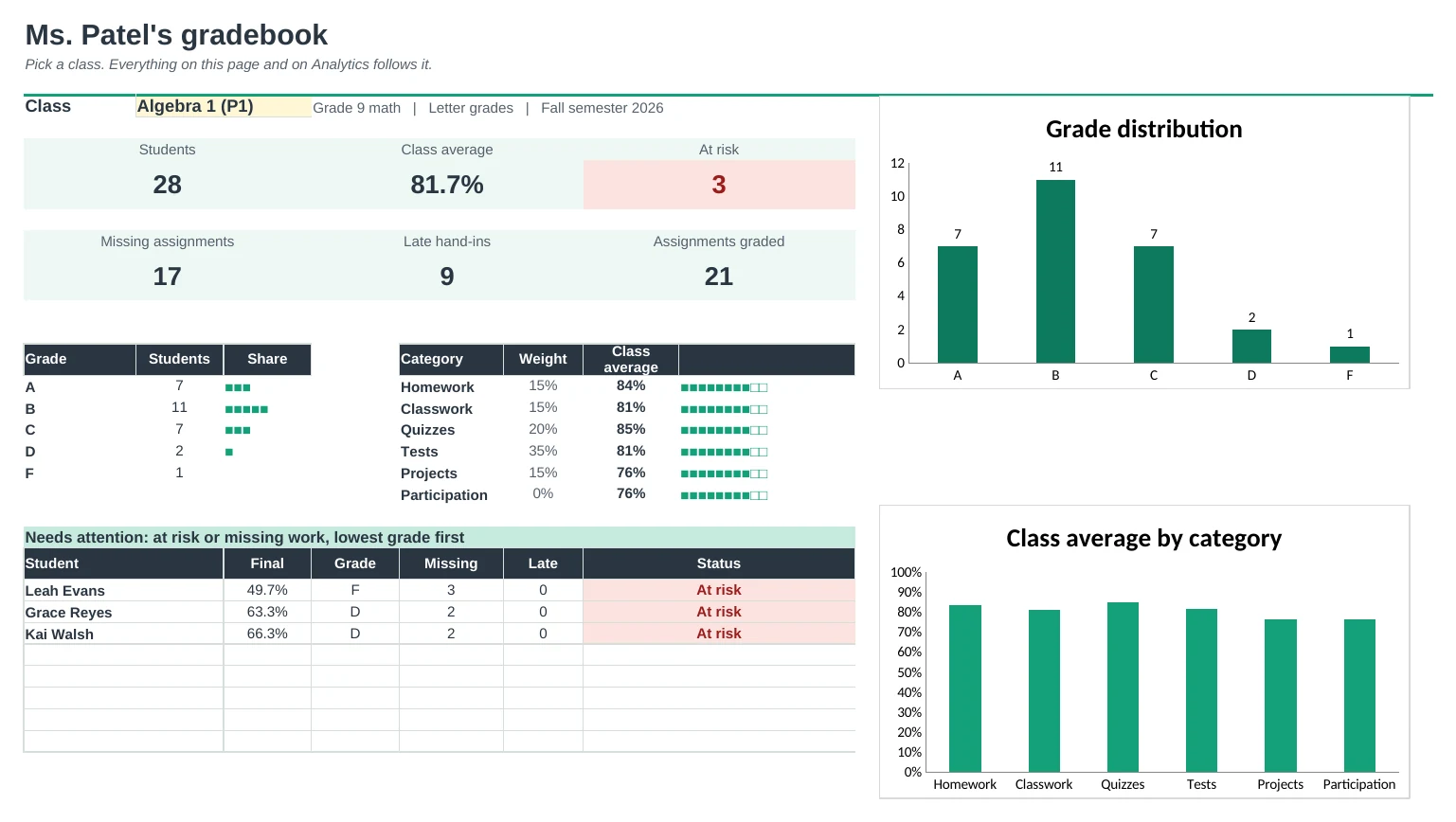
The Dashboard shows each class average, the grade spread, category averages and a list of students at risk or with missing work. Analytics shows how every assignment went.
Print progress reports
Pick a student and print one page for parents or a conference: current grade, category averages, standards, every assignment with missing and late notes, and your comment.
| Free | Pro |
|---|---|
| One class | Up to 4 classes, each with its own weights |
| Fixed categories | 6 categories you name, weights per class |
| Letter grade | Letter scale you can edit, or a 1 to 4 standards scale |
| · | Drop the lowest scores per category |
| · | Quick codes for missing, excused and late (with an optional penalty) |
| · | Dashboard with charts and a needs-attention list |
| · | Assignment analytics: average, high, low, missing |
| · | Printable progress report for each student |
$19 one-time
9 tabs: Start Here, Dashboard, four class gradebooks, Progress Report, Analytics and Setup. You get two copies: one filled in with a sample teacher's four classes so you can see it working, and a blank one ready for your own.
Get Gradebook Pro for $19- Instant download after checkout
- Works in Google Sheets and Excel
- Yours to keep and reuse every year