
Free bingo card template for Google Sheets
Type your own words into the list and the sheet builds a 5x5 bingo card with a FREE space in the middle. Change the card number and you get a different card, so every guest can have their own. A caller list mixes up the words for whoever runs the game.
Pro Want 40 different cards with a caller list and a winner checker? See Bingo Card Maker Pro →| B | I | N | G | O |
|---|---|---|---|---|
| Hat | Stroller | Onesie | Bib | Burp cloth |
| Board book | Baby wipes | Diaper | Night light | Sippy cup |
| Bouncer | Footie pajamas | FREE | Baby carrier | Car seat |
| Play mat | Diaper bag | Thermometer | Bottle | Swaddle |
| Baby lotion | Rattle | High chair | Bottle brush | Socks |
| Card number | 1 | Change to get a new card | ||
| Words in list | 36 |
| Word or phrase |
|---|
| Diaper |
| Bottle |
| Pacifier |
| Onesie |
| Rattle |
| Stroller |
| Crib |
| Car seat |
| Bib |
| Blanket |
| Teddy bear |
| Lullaby |
| Baby monitor |
| Booties |
| Burp cloth |
| Swaddle |
| Bath tub |
| Baby wipes |
| Mobile |
| Sippy cup |
| Teether |
| High chair |
| Diaper bag |
| Bouncer |
| Board book |
| Night light |
| Footie pajamas |
| Baby lotion |
| Socks |
| Hat |
| Play mat |
| Sleep sack |
| Baby carrier |
| Changing pad |
| Bottle brush |
| Thermometer |
| Call | Word or phrase | Called |
|---|---|---|
| Shuffle number | 1 | |
| 1 | Bath tub | |
| 2 | Baby carrier | |
| 3 | Night light | |
| 4 | Burp cloth | |
| 5 | Onesie | |
| 6 | Diaper | |
| 7 | Sleep sack | |
| 8 | Mobile | |
| 9 | Stroller | |
| 10 | Socks | |
| 11 | Teddy bear | |
| 12 | Blanket | |
| 13 | Footie pajamas | |
| 14 | Lullaby | |
| 15 | Bottle | |
| 16 | Bib | |
| 17 | Play mat | |
| 18 | Swaddle | |
| 19 | Baby monitor | |
| 20 | Baby wipes | |
| 21 | Car seat | |
| 22 | Diaper bag | |
| 23 | Rattle | |
| 24 | High chair | |
| 25 | Bouncer | |
| 26 | Pacifier | |
| 27 | Teether | |
| 28 | Baby lotion | |
| 29 | Booties | |
| 30 | Hat | |
| 31 | Board book | |
| 32 | Bottle brush | |
| 33 | Crib | |
| 34 | Changing pad | |
| 35 | Thermometer | |
| 36 | Sippy cup |
What's inside
- A 5x5 bingo card with a FREE center square, built from your own word list
- Change the card number to get a different card, with words in different spots
- Room for 50 words or phrases, and a warning if you have fewer than 24
- A Caller tab that lists every word in a mixed-up order, with a Called checkbox
- Comes with a baby shower word list you can swap for any theme
- Works in Google Sheets and Excel, no add-ons or scripts
How to use it
Download your copy
Click "Free download" to save the .xlsx file. It opens in Excel, or in Google Sheets: open a blank sheet (sheets.new) and choose File, then Import, then Upload.
Type your words
On the Word List tab, replace the sample words with your own. One word or short phrase per row. You need at least 24, and 30 or more makes cards that differ more.
Print the first card
Go to the Card tab and print it. In Google Sheets choose File, then Print, select the card cells and set it to fit the page.
Change the card number and print again
Type 2 in the Card number cell. The card reshuffles. Print it, then try 3, 4 and so on until you have one card per player.
Run the game from the Caller tab
Read the words in order from the Caller tab and tick Called as you go. Change the Shuffle number for a new calling order next game. When someone shouts bingo, check their card against the ticked words.
Tips
Use more words than squares
With exactly 24 words every card has the same words in different spots. With 36 or more, each card gets a different mix, and games last longer.
Keep phrases short
Two or three words fit a square best. Long phrases wrap and get hard to read when printed.
Write down the card numbers
Jot the card number on each printed card. If someone needs a replacement, type that number back in and print it again.
Pick any theme
Swap the baby shower words for a bridal shower, a birthday, a classroom vocabulary list, a road trip or holiday party. The card and caller list update on their own.
Questions
Is this bingo card template free?
Yes. Download the .xlsx file and open it in Excel or Google Sheets. There's no sign-up.
How do I make different bingo cards?
Change the Card number on the Card tab. Each number gives a different card from the same word list. Print one, change the number, print the next.
Can I use my own words?
Yes. Type anything you like on the Word List tab: words, short phrases, names or vocabulary. The card uses whatever is in the list.
How many words do I need?
At least 24, because the card has 24 squares plus the FREE space. More words mean cards that differ more from each other. The list has room for 50.
Will two cards ever be the same?
Each card number gives its own layout, so cards with different numbers don't match. With a short word list, cards share many of the same words in new spots.
Does it work for classroom bingo?
Yes. Put spelling words, vocabulary or math answers in the list and print a card for each student. The Caller tab gives you the order to call them in.
Pro version
Bingo Card Maker Pro
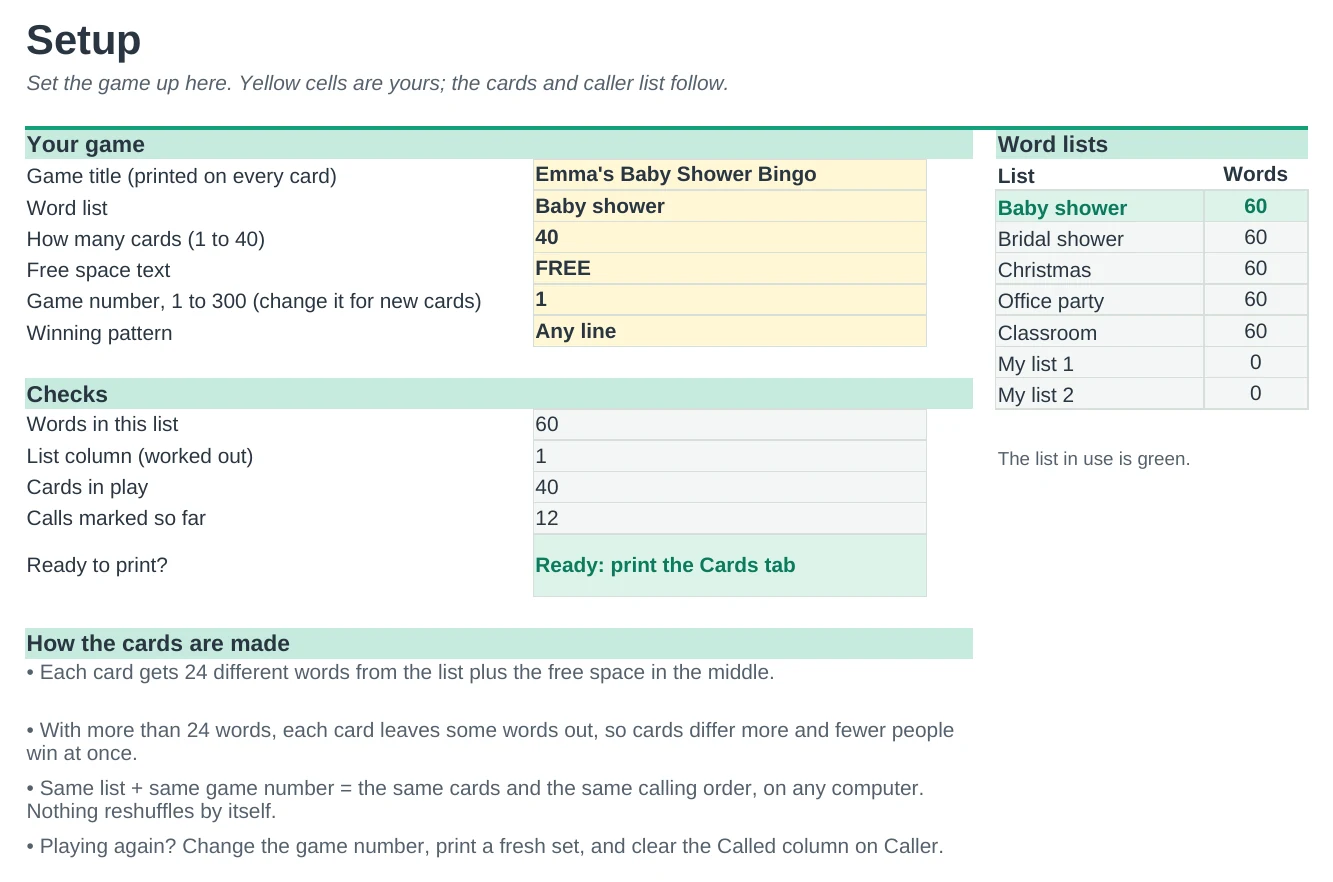
Print up to 40 different word bingo cards for a shower, party or classroom, then call the game and check winners in the same file.
Ready-made word lists
Baby shower, bridal shower, Christmas, office party and classroom lists of 60 words each are ready to go. Or type your own words in two spare lists.
Up to 40 different cards
Every card is numbered and no two are the same. Each one uses 24 words from your list, so with a longer list fewer guests win at once.
Cards that stay put
The cards are dealt from a game number, not a random function, so they never reshuffle after you print. Change the number when you want a fresh set.
Print and play
Two big cards per landscape page with your title on each one, and a FREE space you can rename.
Call the game from one tab
Read the words in order, type x next to each one, and called words turn green. The top of the page shows the last word called and which cards have bingo.
Check a winner in seconds
Type the card number someone holds up and the called squares light up, with a clear BINGO! or not. Pick any line, four corners or blackout as the winning pattern.
| Free | Pro |
|---|---|
| One card at a time | Up to 40 numbered cards, two per page |
| Type your own words | Five ready word lists plus two of your own |
| Caller list | Caller list that marks called words and shows the last call |
| · | Winners tab: check any card, see every card's status |
| · | Any line, four corners or blackout |
| · | Cards never reshuffle after printing |
| · | Duplicate and too-long word warnings |
$19 one-time
7 tabs: Start Here, Setup, Cards, Caller, Winners, Word Lists and Shuffle. You get two copies: one set up as a sample baby shower game with the first winner found, and a blank one ready for your own game.
Get Bingo Card Maker Pro for $19- Instant download after checkout
- Works in Google Sheets and Excel
- Yours to keep and reuse every year