
Free sign-up sheet template for Google Sheets
Share one link and let people put their own names down. Each time slot shows how many spots are filled and how many are still open, and the potluck tab keeps track of who's bringing what so you don't end up with six desserts and no mains.
| Date | Start | End | Job | Spots | Volunteer 1 | Volunteer 2 | Volunteer 3 | Volunteer 4 | Filled | Spots left | Status |
|---|---|---|---|---|---|---|---|---|---|---|---|
| Nov 14, 2026 | 8:00 AM | 10:00 AM | Setup: tables and tents | 4 | Rachel Kim | Tom Alvarez | Jen Walsh | 3 | 1 | 1 open | |
| Nov 14, 2026 | 10:00 AM | 12:00 PM | Bake sale table | 3 | Monica Patel | Lisa Grant | 2 | 1 | 1 open | ||
| Nov 14, 2026 | 10:00 AM | 12:00 PM | Ticket booth | 2 | Chris Duffy | Angela Ross | 2 | 0 | Full | ||
| Nov 14, 2026 | 12:00 PM | 2:00 PM | Bake sale table | 3 | Erin Cole | 1 | 2 | 2 open | |||
| Nov 14, 2026 | 12:00 PM | 2:00 PM | Face painting | 2 | Hannah Lee | Sofia Ortiz | 2 | 0 | Full | ||
| Nov 14, 2026 | 12:00 PM | 2:00 PM | Games and prizes | 4 | Mike Sullivan | Dan Brooks | Keisha Moore | 3 | 1 | 1 open | |
| Nov 14, 2026 | 2:00 PM | 4:00 PM | Ticket booth | 2 | 0 | 2 | 2 open | ||||
| Nov 14, 2026 | 4:00 PM | 6:00 PM | Cleanup crew | 4 | Rachel Kim | Paul Nguyen | 2 | 2 | 2 open |
| Name | Bringing | Category | Serves | Allergy notes |
|---|---|---|---|---|
| Linda Park | Baked ziti | Main dish | 12 | Contains dairy, gluten |
| The Johnson family | Pulled pork sliders | Main dish | 20 | |
| Amy Chen | Mac and cheese | Side | 15 | Contains dairy, gluten |
| Robert Diaz | Cornbread | Side | 16 | Contains eggs |
| Megan Fox | Garden salad | Salad | 12 | Vegan, dressing on the side |
| Tasha Green | Apple pie | Dessert | 8 | Contains gluten |
| Greg Hall | Brownies | Dessert | 24 | Nut free |
| Nina Rossi | Lemonade, 2 gallons | Drinks | 30 | |
| Sam Wright | Plates, cups and napkins | Supplies | 50 |
| What | Needed | Signed up | Still needed |
|---|---|---|---|
| Volunteer spots | 24 | 15 | 9 |
| Time slots (full) | 8 | 2 | 6 |
| Main dish | 4 | 2 | 2 |
| Side | 4 | 2 | 2 |
| Salad | 2 | 1 | 1 |
| Dessert | 4 | 2 | 2 |
| Drinks | 3 | 1 | 2 |
| Supplies | 2 | 1 | 1 |
What's inside
- Time slots with the number of people each job needs and a spot for each name
- Filled, spots left and a Full or "2 open" status worked out for every slot
- A potluck tab for who's bringing what, how many it serves and allergy notes
- A summary that shows open volunteer spots and which dish categories still need someone
- Made for sharing: anyone with the link can add their name from a phone
- Works in Google Sheets and Excel
How to use it
Make your copy
Click "Make a copy" to save the sheet to your Google Drive. If you only need one kind of sign-up, see the FAQ below on removing the other.
Set up your slots
Replace the sample jobs with yours. Type the date, start and end time, the job, and how many people it needs in Spots. Clear the sample names.
Set your potluck targets
On the Summary tab, change the categories and the Needed numbers. A category on the Potluck tab has to match the Summary spelling to be counted.
Share it
Click Share, change General access to "Anyone with the link" and set it to Editor. Paste the link in your group chat, email or newsletter.
Watch it fill up
Check Spots left and the Summary tab before the event. Send a reminder for the slots that still say "open".
Tips
Lock the formulas
When anyone can edit, someone will type over a formula by accident. Select the Filled, Spots left and Status columns, right-click, choose "Protect range" and limit editing to yourself.
Need more than four people?
Insert a new column between Volunteer 2 and Volunteer 3. Filled counts every name between Volunteer 1 and the last volunteer column, so the new one is picked up.
Don't ask for phone numbers here
Everyone with the link sees everything on the sheet. Collect phone numbers and emails privately, with a form or a reply email, and keep just names on the sign-up.
Check version history if something vanishes
If a name gets deleted, go to File > Version history > See version history to see who changed what and restore it.
Questions
How do I let people add their names?
Click Share, set General access to "Anyone with the link" with Editor access, and send the link. People can add their name from the Google Sheets app or a phone browser, no account needed to view.
Do people need a Google account to sign up?
Usually not. With the link set to Editor, people can add their name without signing in, and they show up as an anonymous visitor. Some work and school accounts don't allow this, so test the link in a private browser window first.
Can I use this for just volunteers or just a potluck?
Yes. For volunteers only, delete the Potluck tab and the dish rows on the Summary tab. For a potluck only, delete the Volunteer Shifts tab and the first two Summary rows. The rest keeps working.
How do I stop people changing the formulas?
Use Data > Protect sheets and ranges. Protect the Filled, Spots left and Status columns and the Summary tab so only you can edit them.
Can I print it?
Yes. Go to File > Print, choose landscape and "Fit to width", and turn on gridlines. A printed copy on a table works well for sign-ups in person.
Is this sign-up sheet free?
Yes. Copy it to Google Drive or download the Excel file. No sign-up, no ads in the sheet.
Pro version
Volunteer Sign-Up Pro
The volunteer sign-up sheet that keeps a waitlist, tells you who to remind and writes the reminder for you.
See what still needs people
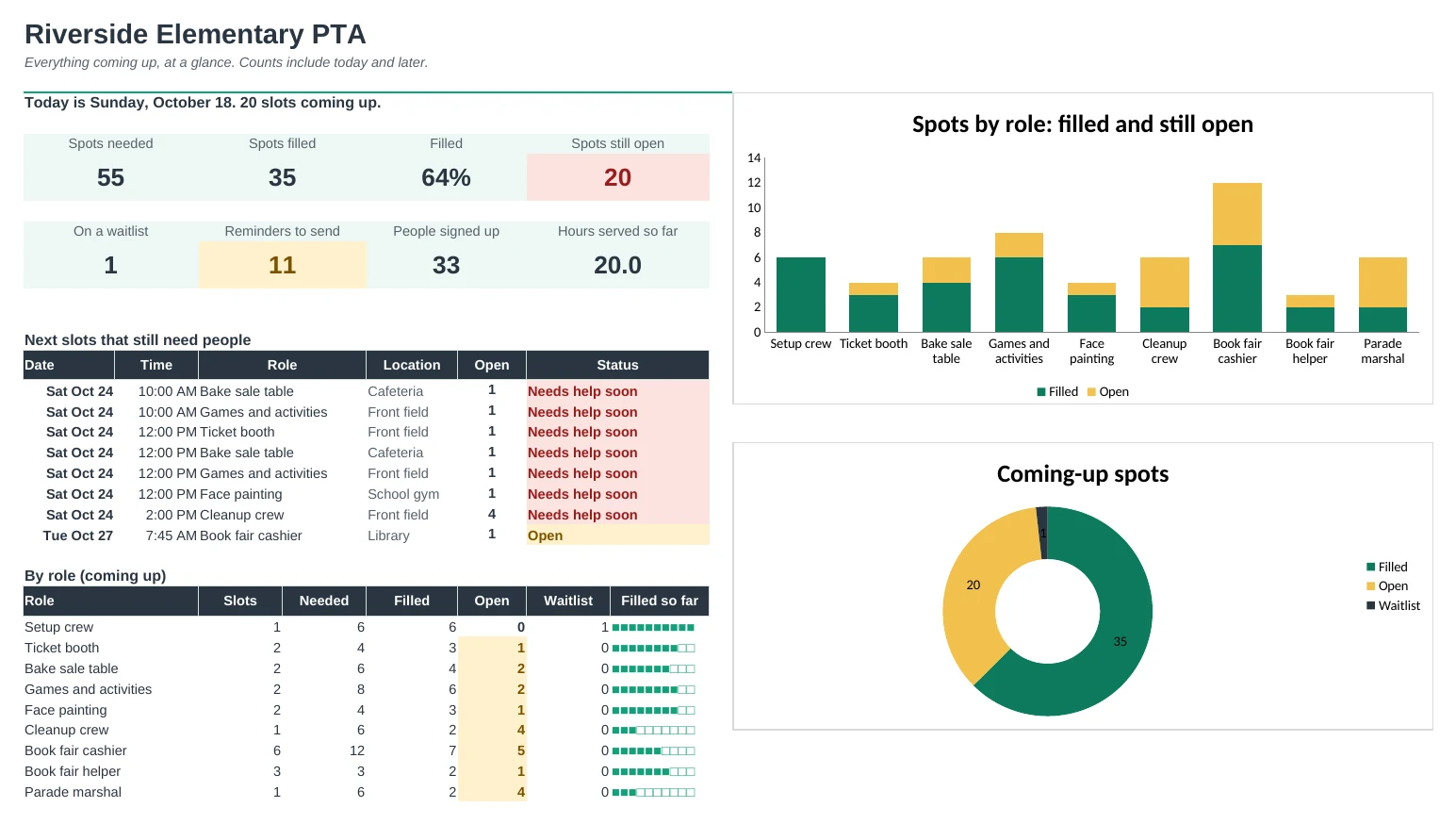
Every slot shows filled, open and waitlist counts, and slots coming up soon with open spots turn red. The Dashboard lists the next ones to fill.
A waitlist that moves on its own
When a slot is full, new names go on a waitlist. If someone cancels, the first person waiting moves into the spot automatically.
Reminders written for you
Reminders lists everyone whose slot is coming up and hasn't been reminded, with a friendly message ready to paste into a text or email.
Ask for help in one click
Open slots come with a ready-made 'can you help?' message with the job, date and time, soonest first.
Run the day smoothly
Print the Day Roster for your check-in table, then mark who showed up. Volunteer hours add up per person, handy for students who need service hours.
A paper copy that's already filled in
The Printable Sheet lists upcoming slots with names already signed up and empty boxes for the rest. Pin it up at school, church or the club.
| Free | Pro |
|---|---|
| Volunteer shifts with 4 name boxes | Unlimited sign-ups per slot, one row per person |
| Spots left per slot | Filled, open, waitlist and status per slot |
| Potluck tab | Any kind of slot, including potluck dishes |
| Summary tab | Dashboard with charts and the next slots to fill |
| · | Automatic waitlist that moves up when someone cancels |
| · | Reminder list with messages ready to send |
| · | Printable day roster and printable sign-up sheet |
| · | Contact list with hours served and no-shows |
$19 one-time
9 tabs: Start Here, Dashboard, Slots, Sign-Ups, Reminders, Day Roster, People, Printable Sheet and Setup. You get two copies: one filled in with a sample school PTA so you can see it working, and a blank one ready for your own event.
Get Volunteer Sign-Up Pro for $19- Instant download after checkout
- Works in Google Sheets and Excel
- Yours to keep and reuse every year