
Free event planning checklist template
Type your event date and every task gets a due date, counted back in weeks from the big day. The checklist flags what's overdue or due in the next two weeks, the budget fills in from your vendor list, and a day-of schedule keeps the team on time. It fits fundraisers, parties, reunions, conferences and community events.
Pro Want the version with a guest list, a money goal and a run of show that times itself? See Event Planner Pro →| Item | Value |
|---|---|
| Event | Hope House Winter Benefit Dinner |
| Event date | Jan 30, 2027 |
| Today (replace with =TODAY()) | Oct 18, 2026 |
| Days to go | 104 |
| Budget | $13,500.00 |
| Expected guests | 150 |
| Booked with vendors | $12,160.00 |
| Paid so far | $2,550.00 |
| Left in budget | $1,340.00 |
| Cost per guest so far | $81.07 |
| Tasks done | 20% |
| Tasks overdue | 1 |
| Tasks due in the next 2 weeks | 1 |
| Vendors confirmed | 6 of 9 |
| Weeks before | Due by | Task | Area | Owner | Done | Status | Notes |
|---|---|---|---|---|---|---|---|
| 20 | Sep 12, 2026 | Set the goal, date and rough headcount | Planning | Jess | Done | ||
| 20 | Sep 12, 2026 | Set the total budget | Budget | Jess | Done | ||
| 18 | Sep 26, 2026 | Book the venue | Venue | Jess | Done | Deposit paid | |
| 16 | Oct 10, 2026 | Recruit a planning team and split up jobs | People | Jess | Done | ||
| 16 | Oct 10, 2026 | Book the caterer | Food | Omar | Done | ||
| 15 | Oct 17, 2026 | Get event insurance and any permits | Admin | Jess | Overdue | Venue needs certificate 30 days out | |
| 14 | Oct 24, 2026 | Book AV, music or a speaker | Program | Omar | Next 2 weeks | ||
| 14 | Oct 24, 2026 | Start finding sponsors | Money | Priya | Done | ||
| 12 | Nov 7, 2026 | Send save the dates | Guests | Priya | Later | ||
| 12 | Nov 7, 2026 | Set up ticketing or RSVPs | Guests | Priya | Later | ||
| 10 | Nov 21, 2026 | Order rentals: tables, chairs, linens | Venue | Omar | Later | ||
| 10 | Nov 21, 2026 | Collect auction items or prizes | Program | Dana | Later | ||
| 8 | Dec 5, 2026 | Send invitations | Guests | Priya | Later | ||
| 8 | Dec 5, 2026 | Design signs, programs and name tags | Printing | Dana | Later | ||
| 8 | Dec 5, 2026 | Promote on social media and email | Marketing | Priya | Later | ||
| 6 | Dec 19, 2026 | Book photographer | Program | Omar | Later | ||
| 6 | Dec 19, 2026 | Plan decor and order supplies | Decor | Dana | Later | ||
| 4 | Jan 2, 2027 | Write the run of show | Program | Jess | Later | ||
| 4 | Jan 2, 2027 | Recruit volunteers and assign shifts | People | Dana | Later | ||
| 3 | Jan 9, 2027 | Send printing to the printer | Printing | Dana | Later | ||
| 2 | Jan 16, 2027 | Give the caterer a final headcount | Food | Omar | Later | ||
| 2 | Jan 16, 2027 | Confirm every vendor's arrival time | Vendors | Omar | Later | ||
| 2 | Jan 16, 2027 | Seating chart, if seated | Guests | Priya | Later | ||
| 1 | Jan 23, 2027 | Send reminders to guests and volunteers | Guests | Priya | Later | ||
| 1 | Jan 23, 2027 | Pack the event day kit: tape, scissors, chargers, cash box | Day of | Dana | Later | ||
| 1 | Jan 23, 2027 | Walk through the venue with the team | Venue | Jess | Later | ||
| 0 | Jan 30, 2027 | Set up, check in vendors, run the event | Day of | Jess | Later | ||
| -1 | Feb 6, 2027 | Pay final balances | Budget | Jess | Later | ||
| -1 | Feb 6, 2027 | Send thank-yous to guests, sponsors and volunteers | Guests | Priya | Later | ||
| -2 | Feb 13, 2027 | Team debrief: what worked and what to change | Planning | Jess | Later |
| Category | Planned | Booked | Paid so far | Left | Status |
|---|---|---|---|---|---|
| Venue | $2,500.00 | $2,400.00 | $600.00 | $100.00 | Within budget |
| Catering | $5,000.00 | $5,250.00 | $1,000.00 | -$250.00 | Over |
| Drinks | $1,200.00 | $1,300.00 | $0.00 | -$100.00 | Over |
| Rentals | $1,000.00 | $950.00 | $200.00 | $50.00 | Within budget |
| AV and music | $900.00 | $800.00 | $0.00 | $100.00 | Within budget |
| Decor | $500.00 | $420.00 | $420.00 | $80.00 | Within budget |
| Printing | $300.00 | $260.00 | $0.00 | $40.00 | Within budget |
| Photography | $600.00 | $600.00 | $150.00 | $0.00 | Within budget |
| Marketing | $250.00 | $0.00 | $0.00 | $250.00 | Nothing booked |
| Permits and insurance | $200.00 | $180.00 | $180.00 | $20.00 | Within budget |
| Prizes and gifts | $300.00 | $0.00 | $0.00 | $300.00 | Nothing booked |
| Contingency | $750.00 | $0.00 | $0.00 | $750.00 | Nothing booked |
| Total | $13,500.00 | $12,160.00 | $2,550.00 | $1,340.00 | Within budget |
| Category | Vendor | Contact | Phone | What they provide | Cost | Deposit paid | Paid in full | Paid so far | Balance | Confirmed | Arrives |
|---|---|---|---|---|---|---|---|---|---|---|---|
| Venue | Lakeview Community Hall | Karen Wills | (608) 555-0114 | Hall, kitchen, 8 hours | $2,400.00 | $600.00 | $600.00 | $1,800.00 | 3:00 PM | ||
| Catering | Two Forks Catering | Omar Diaz | (608) 555-0152 | Buffet dinner for 150 | $5,250.00 | $1,000.00 | $1,000.00 | $4,250.00 | 3:30 PM | ||
| Drinks | Corner Cellar | Sam Reyes | (608) 555-0177 | Wine, beer and soft drinks | $1,300.00 | $0.00 | $0.00 | $1,300.00 | 4:00 PM | ||
| Rentals | Main Street Rentals | Tina Hall | (608) 555-0131 | Tables, chairs, linens | $950.00 | $200.00 | $200.00 | $750.00 | 10:00 AM | ||
| AV and music | Bright Sound AV | Leo Park | (608) 555-0190 | Mic, speakers, projector | $800.00 | $0.00 | $0.00 | $800.00 | 2:00 PM | ||
| Decor | Online order | Centerpieces and lights | $420.00 | $420.00 | $420.00 | $0.00 | |||||
| Printing | QuickPrint | (608) 555-0108 | Programs, signs, name tags | $260.00 | $0.00 | $0.00 | $260.00 | ||||
| Photography | Ana Cruz Photo | Ana Cruz | (608) 555-0165 | 3 hours of coverage | $600.00 | $150.00 | $150.00 | $450.00 | 5:30 PM | ||
| Permits and insurance | Event Shield | Online | One-day liability policy | $180.00 | $180.00 | $180.00 | $0.00 |
| Time | What happens | Who | Where | Done |
|---|---|---|---|---|
| 10:00 AM | Rentals delivered and set up | Omar | Main hall | |
| 1:00 PM | Planning team arrives, decor goes up | Dana | Main hall | |
| 2:00 PM | AV setup and sound check | Leo (AV) | Stage | |
| 3:00 PM | Venue walk-through with the manager | Jess | Whole venue | |
| 3:30 PM | Caterer arrives and sets up | Omar | Kitchen | |
| 4:30 PM | Volunteers arrive, briefing | Dana | Lobby | |
| 5:00 PM | Check-in table opens | Priya | Lobby | |
| 5:30 PM | Doors open, drinks and photos | Jess | Main hall | |
| 6:15 PM | Welcome and thank-you to sponsors | Jess | Stage | |
| 6:30 PM | Dinner served | Omar | Main hall | |
| 7:30 PM | Program and raffle | Jess | Stage | |
| 8:30 PM | Event ends, guests leave | Everyone | Main hall | |
| 8:45 PM | Teardown and load out | Everyone | Whole venue | |
| 10:00 PM | Venue cleared, keys returned | Jess | Front desk |
What's inside
- A 30-task checklist from 20 weeks out to the team debrief, with due dates from your event date
- Status flags for Done, Overdue, Next 2 weeks and Later, plus an owner for every task
- A budget by category that fills in from your vendor list, with planned, booked, paid and left
- A vendor list with contacts, cost, deposits, balances, confirmations and arrival times
- A day-of schedule from setup to teardown
- An overview with days to go, money left, cost per guest and tasks overdue
How to use it
Download your copy
Click "Free download" to save the .xlsx file. It opens in Excel, or in Google Sheets: open a blank sheet (sheets.new) and choose File, then Import, then Upload.
Set the basics
On the Overview tab, type the event name, date, budget and expected guests. Replace the Today date with =TODAY() so the status flags stay current.
Shape the checklist
Delete tasks that don't fit your event and add your own. Change Weeks before on any task, and its Due by date moves with it. Use negative numbers for jobs after the event.
Give every task an owner
Put a name in the Owner column. Share the sheet with your team so everyone can tick off their own tasks.
Add vendors as you book
List each vendor with the cost and deposit. Use the same category names as the Budget tab, and the budget fills in.
Build the day-of schedule
Two weeks out, fill in the Day-of Schedule with times and owners. Print it for the team and every vendor.
Tips
Sort by Due by each week
Add a filter to the Checklist and show only Overdue and Next 2 weeks. That's your to-do list for the week.
Book the big three first
Venue, date and food decide almost everything else. Lock them in before you spend time on decor or printing.
Keep a contingency line
Last-minute rentals, extra ice or a parking fee always show up. Around 5 to 10% of the budget set aside keeps you out of trouble.
Confirm arrival times in writing
Two weeks out, email every vendor with the address, arrival time and an on-site contact. Note each one in the Arrives column.
Questions
What should an event planning checklist include?
The date and budget, venue, food and drinks, guests and invitations, vendors, program, people and volunteers, printing, permits and insurance, a day-of plan and a follow-up after the event. This template has all of them, each with a due date and owner.
How far ahead should I start planning an event?
For a mid-sized event, 3 to 6 months is common. The checklist starts at 20 weeks. If you have less time, lower the Weeks before numbers or do the early tasks first.
How do the due dates work?
Each task's due date is your event date minus the weeks before. Change the event date on the Overview tab and every due date moves with it.
Can my team use it together?
Yes. Click Share and add your team as editors. Each person can filter the Owner column to see their own tasks.
Does it work for a small party?
Yes. Delete the tasks you don't need, like sponsors or permits, and shorten the weeks. The budget and day-of schedule work the same for 20 people or 500.
Is it free?
Yes. Download the .xlsx file and open it in Excel or Google Sheets. No sign-up.
Pro version
Event Planner Pro
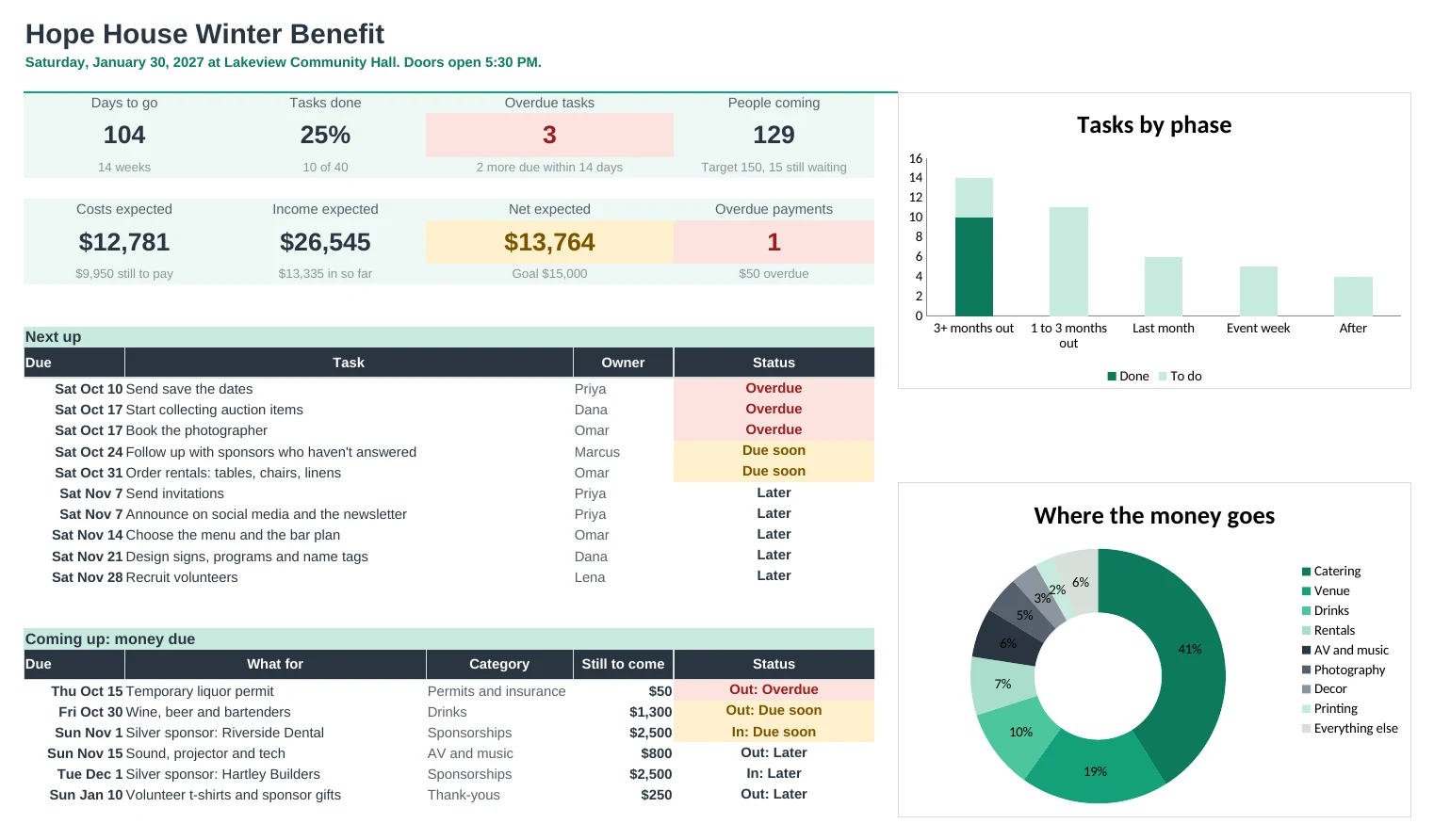
Type your event date once and every task, payment, guest and minute of the day falls into place, with the net against your money goal always in view.
A timeline that moves with the date
40 starter tasks from six months out to the thank-you notes, each dated from your event day and given an owner. Change the date and everything moves. Overdue and due-soon tasks stand out.
Costs and income in one place
Log every cost and every sponsor, donation, auction and raffle on one Money tab. The Budget shows planned vs expected vs paid for each category, and the net against your goal.
Ticket money counts itself
Guests tracks each invitation: party size, RSVP, tickets and what's been paid. Ticket income, the caterer's headcount and the special-meals count are worked out for you.
Know who owes you and who you owe
Every payment has a due date. The Dashboard lists the next money in and out, and flags anything overdue, from a vendor deposit to a sponsor's cheque.
A run of show that adds up
Type how long each item takes and the start times chain on their own. Pin a fixed time and it tells you about gaps and overlaps.
See who has what
Team shows each person's open and overdue tasks and their next job, so you know who to nudge before it becomes a problem.
| Free | Pro |
|---|---|
| Checklist dated from the event day | Timeline with owners, phases and a countdown |
| Budget for costs | Costs and income, net against your goal |
| Vendor list | Vendors with booked totals, balances and overdue flags |
| Day-of schedule | Run of show with chained times and overlap checks |
| · | Guest list with RSVPs, tickets and dietary needs |
| · | Tickets you need to reach your goal |
| · | Team tab: open and overdue tasks per person |
| · | Dashboard with charts and what's next |
$19 one-time
10 tabs: Start Here, Dashboard, Timeline, Money, Budget, Vendors, Guests, Run of Show, Team and Setup. You get two copies: one filled in with a sample fundraising dinner so you can see it working, and a blank one ready for your own event.
Get Event Planner Pro for $19- Instant download after checkout
- Works in Google Sheets and Excel
- Yours to keep and reuse every year