
Free wedding planner template for Google Sheets
Type your wedding date once and the checklist gives every task a due date, from booking the venue a year out to the morning of. The budget pulls from your vendor list, so you always know what's booked, what's paid and what you still owe.
| Wedding date | Total budget | Guests (estimate) | Estimated cost | Booked | Paid so far | Still owed | Budget not booked | Checklist done |
|---|---|---|---|---|---|---|---|---|
| Jun 12, 2027 | $35,000.00 | 120 | $33,000.00 | $26,700.00 | $7,500.00 | $19,200.00 | $8,300.00 | 24.2% |
| Months before | Due by | Task | Area | Who | Done | Notes |
|---|---|---|---|---|---|---|
| 12 | Jun 12, 2026 | Set your total budget | Budget | Both | ||
| 12 | Jun 12, 2026 | Draft a guest list and rough headcount | Guests | Both | ||
| 12 | Jun 12, 2026 | Pick a date and book the venue | Venue | Both | ||
| 11 | Jul 13, 2026 | Book the photographer | Vendors | Maya | ||
| 10 | Aug 12, 2026 | Book the caterer (if not with the venue) | Vendors | Daniel | ||
| 10 | Aug 12, 2026 | Choose your wedding party | People | Both | ||
| 9 | Sep 11, 2026 | Book the officiant | Vendors | Both | ||
| 9 | Sep 11, 2026 | Book a DJ or band | Vendors | Daniel | ||
| 9 | Sep 11, 2026 | Make a wedding website | Guests | Maya | ||
| 8 | Oct 12, 2026 | Shop for wedding dress or suit | Attire | Maya | ||
| 8 | Oct 12, 2026 | Reserve a hotel room block for guests | Guests | Daniel | ||
| 8 | Oct 12, 2026 | Send save the dates | Guests | Both | ||
| 7 | Nov 11, 2026 | Book the florist | Vendors | Maya | ||
| 6 | Dec 12, 2026 | Book hair and makeup | Vendors | Maya | ||
| 6 | Dec 12, 2026 | Order the cake | Vendors | Both | ||
| 6 | Dec 12, 2026 | Rent tables, chairs and linens | Vendors | Daniel | ||
| 5 | Jan 11, 2027 | Set up a gift registry | Guests | Both | ||
| 4 | Feb 10, 2027 | Book transportation | Vendors | Daniel | ||
| 4 | Feb 10, 2027 | Plan the rehearsal dinner | Events | Both | ||
| 4 | Feb 10, 2027 | Buy wedding rings | Attire | Both | ||
| 3 | Mar 13, 2027 | Order invitations | Guests | Maya | ||
| 3 | Mar 13, 2027 | First dress or suit fitting | Attire | Maya | ||
| 2 | Apr 12, 2027 | Mail invitations | Guests | Both | ||
| 2 | Apr 12, 2027 | Apply for the marriage license (check your state's timing) | Legal | Both | ||
| 2 | Apr 12, 2027 | Finalize the ceremony with your officiant | Ceremony | Both | ||
| 1 | May 13, 2027 | Give the final headcount to the caterer | Guests | Daniel | ||
| 1 | May 13, 2027 | Make the seating chart | Guests | Both | ||
| 1 | May 13, 2027 | Confirm times with every vendor | Vendors | Maya | ||
| 0.5 | May 28, 2027 | Write vows and toasts | Ceremony | Both | ||
| 0.5 | May 28, 2027 | Final fitting and pick up attire | Attire | Maya | ||
| 0.25 | Jun 4, 2027 | Pay final balances and prep vendor tips | Budget | Daniel | ||
| 0.25 | Jun 4, 2027 | Pack for the honeymoon | Honeymoon | Both | ||
| 0 | Jun 12, 2027 | Hand off the day-of timeline and rings | Day of | Both |
| Category | Estimated | Booked | Paid so far | Still owed | Under or over |
|---|---|---|---|---|---|
| Venue | $10,000.00 | $9,800.00 | $3,000.00 | $6,800.00 | $200.00 |
| Catering | $8,000.00 | $7,600.00 | $1,500.00 | $6,100.00 | $400.00 |
| Photography | $3,200.00 | $3,400.00 | $1,000.00 | $2,400.00 | -$200.00 |
| Music | $1,500.00 | $1,400.00 | $0.00 | $1,400.00 | $100.00 |
| Flowers | $2,000.00 | $2,200.00 | $0.00 | $2,200.00 | -$200.00 |
| Attire | $2,000.00 | $1,850.00 | $1,850.00 | $0.00 | $150.00 |
| Hair and makeup | $600.00 | $0.00 | $0.00 | $0.00 | |
| Cake | $600.00 | $0.00 | $0.00 | $0.00 | |
| Officiant | $400.00 | $450.00 | $150.00 | $300.00 | -$50.00 |
| Rings | $1,800.00 | $0.00 | $0.00 | $0.00 | |
| Invitations | $500.00 | $0.00 | $0.00 | $0.00 | |
| Rentals | $1,200.00 | $0.00 | $0.00 | $0.00 | |
| Transportation | $500.00 | $0.00 | $0.00 | $0.00 | |
| Other | $700.00 | $0.00 | $0.00 | $0.00 | |
| Total | $33,000.00 | $26,700.00 | $7,500.00 | $19,200.00 | $400.00 |
| Category | Company | Contact | Phone | Contract signed | Total cost | Deposit paid | Paid in full | Balance due | Balance due by | |
|---|---|---|---|---|---|---|---|---|---|---|
| Venue | Willow Creek Barn | Sara Holt | (503) 555-0110 | events@willowcreekbarn.com | $9,800.00 | $3,000.00 | $6,800.00 | May 12, 2027 | ||
| Catering | Harvest Table Catering | Mike Russo | (503) 555-0135 | mike@harvesttable.com | $7,600.00 | $1,500.00 | $6,100.00 | May 29, 2027 | ||
| Photography | Lena Ford Photo | Lena Ford | (971) 555-0177 | hello@lenafordphoto.com | $3,400.00 | $1,000.00 | $2,400.00 | May 29, 2027 | ||
| Attire | Bella Bridal | Jen Cole | (503) 555-0191 | jen@bellabridal.com | $1,850.00 | $1,850.00 | $0.00 | |||
| Officiant | Rev. Grace Lin | Grace Lin | (503) 555-0122 | gracelin@email.com | $450.00 | $150.00 | $300.00 | Jun 12, 2027 | ||
| Music | Spin City DJs | Andre Banks | (503) 555-0166 | book@spincitydjs.com | $1,400.00 | $0.00 | $1,400.00 | |||
| Flowers | Petal and Stem | Rosa Diaz | (503) 555-0104 | rosa@petalandstem.com | $2,200.00 | $0.00 | $2,200.00 |
What's inside
- A 33-task checklist from 12 months out to the wedding day, with due dates worked out from your date
- A budget by category with estimated, booked, paid so far and still owed
- A vendor list with contacts, contract status, deposits and balance due dates
- Budget totals that fill in from your vendors, so you only type each price once
- An overview with your date, total budget, money still owed and how much of the checklist is done
- Works in Google Sheets and Excel, and you can share it with your partner
How to use it
Make your copy
Click "Make a copy" to save the planner to your Google Drive, or download the Excel file.
Enter your date and budget
On the Overview tab, type your wedding date, total budget and a rough guest count. Every Due by date on the Checklist moves to match.
Make the checklist yours
Untick the sample tasks, delete what doesn't apply and add your own. Change Months before on any task and its due date updates.
Set your estimates
On the Budget tab, put what you expect to spend in each category. Make sure they add up to roughly your total budget.
Add vendors as you book
Each time you book someone, add them to Vendors with the total cost and deposit. Use the same category name as the Budget tab so it's counted there.
Tick off payments
Tick Paid in full when a vendor is settled. Paid so far and Still owed update on the Budget and Overview tabs.
Tips
Sort by Due by to see what's next
Select the checklist rows, then Data > Sort range by Due by. Or add a filter and hide rows where Done is ticked.
Leave room for extras
Taxes, service charges and tips add up fast. Keep the Other line at 5 to 10% of your budget so they don't push you over.
Put balance due dates in your calendar
Final payments often land in the last month, all at once. Copy each Balance due by date into your phone calendar with a reminder a week before.
Keep guests in a separate list
This planner covers tasks and money. For RSVPs, meal choices and seating, use our wedding guest list template alongside it.
Questions
How do I plan a wedding in Google Sheets?
Make a copy of this planner, enter your date and budget on the Overview tab, then work through the checklist. Add each vendor as you book them and the budget fills in.
How far ahead does the checklist start?
Twelve months out. If you have less time, change Months before on the early tasks or do the first few months' tasks in your first few weeks.
What if my wedding is less than a year away?
Some due dates will already be past. Sort by Due by and work from the top. Booking the venue, caterer and photographer first matters most.
How does the budget know what I've paid?
From the Vendors tab. If Paid in full is ticked it counts the total cost, otherwise it counts the deposit. Categories with no vendor yet show nothing booked.
Can my partner use it too?
Yes. Click Share and add them as an editor. Use the Who column on the checklist to split up tasks.
Is this wedding planner free?
Yes. Copy it to your Google Drive or download the Excel file. No sign-up.
Pro version
Wedding Planner Pro
Your whole wedding in one workbook: a dated timeline, vendors, every payment and the budget, all kept in step with each other.
A timeline that moves with your date
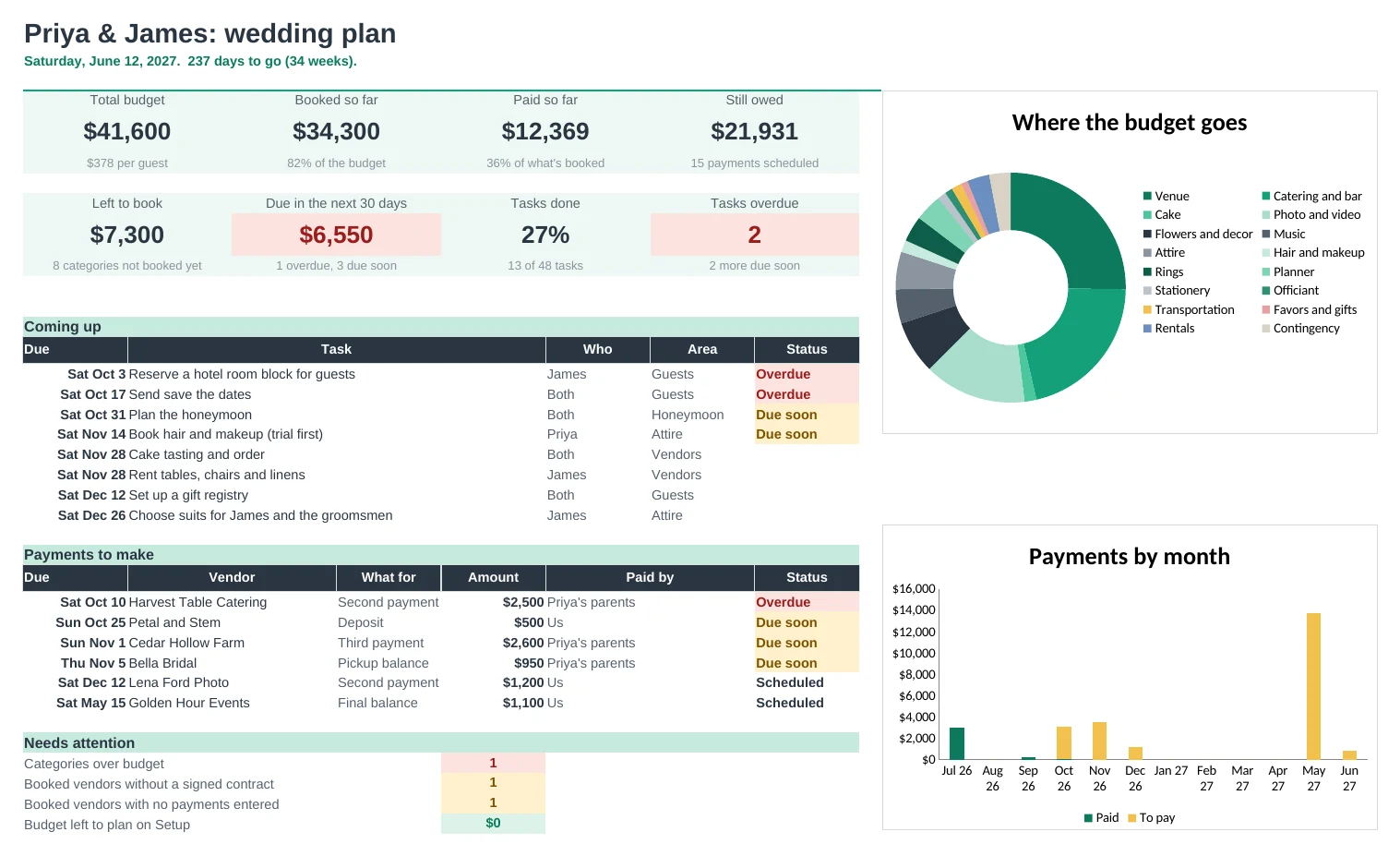
Type the wedding date once and 48 tasks get due dates, from booking the venue to the thank-you notes. Overdue and due-soon tasks are flagged.
Know what's booked, paid and still owed
Book a vendor and add its payments. The Budget shows planned, booked, paid and still owed for every category, with anything over budget in red.
Never miss a deposit
Every deposit, instalment, final balance and tip has a due date. The Dashboard lists the next payments and flags anything overdue.
See who's paying for what
If parents are helping, list what each person is giving. You see what they've paid so far and what's still planned for them.
A starting point for your budget
Each category shows the typical share of a US wedding budget next to your plan, so you can see where you're spending more or less than most couples.
A day-of plan to hand over
Write the wedding-day schedule. Booked vendors' contacts and arrival times list themselves underneath, ready to print for your planner.
| Free | Pro |
|---|---|
| Checklist dated from your wedding day | Timeline with Overdue, This week and Due soon flags |
| Budget with estimated and booked | Budget with planned, booked, paid, still owed and status |
| Vendor list with balance due | Vendors with next payment, contract and status flags |
| · | Payments tab: every deposit, instalment and tip with due dates |
| · | Who's paying: pledged vs paid for each family |
| · | Payments by month chart |
| · | Day-of schedule with vendor contacts and arrival times |
| · | Dashboard with what's next and what needs attention |
$19 one-time
8 tabs: Start Here, Dashboard, Timeline, Budget, Vendors, Payments, Day-Of and Setup. You get two copies: one filled in with a sample wedding so you can see it working, and a blank one with the 48-task timeline and budget categories ready for your own plans.
Get Wedding Planner Pro for $19- Instant download after checkout
- Works in Google Sheets and Excel
- Yours to keep and reuse every year