
Free business expense spreadsheet template
Log every business expense with a category that matches the expense lines on Schedule C, and the sheet totals each category by quarter and for the year. It handles things you use partly for business, like your phone, and flags expenses that are missing a receipt. Built for freelancers and sole proprietors.
Pro Want mileage, home office and a year-end summary for your accountant too? See Business Expenses Pro →| Date | Paid to | What it was for | Category | Paid with | Amount | Business use | Business amount | Receipt | Quarter | Schedule C line |
|---|---|---|---|---|---|---|---|---|---|---|
| Jan 6, 2026 | Adobe | Photography plan, January | Other expenses | Business card | $19.99 | 100% | $19.99 | Q1 | Line 27a | |
| Jan 12, 2026 | Verizon | Phone bill, January | Utilities | Personal card | $84.00 | 60% | $50.40 | Q1 | Line 25 | |
| Jan 20, 2026 | Hiscox | Liability and gear insurance, yearly | Insurance (other than health) | Business card | $540.00 | 100% | $540.00 | Q1 | Line 15 | |
| Feb 3, 2026 | City of Austin | Business license renewal | Taxes and licenses | Business checking | $75.00 | 100% | $75.00 | Q1 | Line 23 | |
| Feb 14, 2026 | B&H Photo | Two 128 GB memory cards | Supplies | Business card | $89.98 | 100% | $89.98 | Q1 | Line 22 | |
| Mar 2, 2026 | Meta | Instagram ads, spring mini sessions | Advertising | Business card | $150.00 | 100% | $150.00 | Q1 | Line 8 | |
| Mar 18, 2026 | Lisa Chen CPA | 2025 tax return prep | Legal and professional services | Business checking | $650.00 | 100% | $650.00 | Q1 | Line 17 | |
| Apr 9, 2026 | Stripe | Card processing fees, March | Commissions and fees | Business checking | $62.40 | 100% | $62.40 | Q2 | Line 10 | |
| Apr 22, 2026 | LensRentals | 85mm lens for wedding weekend | Rent or lease: equipment | Business card | $74.00 | 100% | $74.00 | Q2 | Line 20a | |
| May 10, 2026 | Jordan Ellis | Second shooter, Garza wedding | Contract labor | Business checking | $400.00 | 100% | $400.00 | Q2 | Line 11 | |
| May 17, 2026 | Shell | Gas, drive to Fredericksburg wedding | Car and truck expenses | Business card | $58.30 | 100% | $58.30 | Q2 | Line 9 | |
| May 17, 2026 | Hill Country Grill | Lunch with wedding planner | Deductible meals | Business card | $46.80 | 100% | $46.80 | Q2 | Line 24b | |
| Jun 5, 2026 | Squarespace | Website, yearly | Advertising | Business card | $276.00 | 100% | $276.00 | Q2 | Line 8 | |
| Jun 21, 2026 | Canon | New camera body | Equipment | Business card | $2,499.00 | 100% | $2,499.00 | Q2 | Ask your accountant | |
| Jul 8, 2026 | Southwest | Flight to Denver for destination shoot | Travel | Business card | $318.60 | 100% | $318.60 | Q3 | Line 24a | |
| Jul 8, 2026 | Hampton Inn | Hotel, 2 nights, Denver shoot | Travel | Business card | $289.50 | 100% | $289.50 | Q3 | Line 24a | |
| Jul 30, 2026 | USPS | Mailing print orders | Office expense | Business card | $32.15 | 100% | $32.15 | Q3 | Line 18 | |
| Aug 14, 2026 | Stripe | Card processing fees, July | Commissions and fees | Business checking | $88.15 | 100% | $88.15 | Q3 | Line 10 | |
| Aug 27, 2026 | Spectrum | Internet, August | Utilities | Personal card | $70.00 | 50% | $35.00 | Q3 | Line 25 | |
| Sep 12, 2026 | Joann | Backdrop fabric and clamps | Supplies | Business card | $64.27 | 100% | $64.27 | Q3 | Line 22 | |
| Sep 29, 2026 | Jordan Ellis | Second shooter, Patel wedding | Contract labor | Business checking | $450.00 | 100% | $450.00 | Q3 | Line 11 | |
| Oct 4, 2026 | Canon Service | Sensor cleaning | Other expenses | Business card | $95.00 | 100% | $95.00 | Q4 | Line 27a | |
| Oct 11, 2026 | Meta | Instagram ads, holiday minis | Advertising | Business card | $120.00 | 100% | $120.00 | Q4 | Line 8 |
| Category | Schedule C line | Q1 (Jan-Mar) | Q2 (Apr-Jun) | Q3 (Jul-Sep) | Q4 (Oct-Dec) | Year total |
|---|---|---|---|---|---|---|
| Advertising | Line 8 | $150.00 | $276.00 | $0.00 | $120.00 | $546.00 |
| Car and truck expenses | Line 9 | $0.00 | $58.30 | $0.00 | $0.00 | $58.30 |
| Commissions and fees | Line 10 | $0.00 | $62.40 | $88.15 | $0.00 | $150.55 |
| Contract labor | Line 11 | $0.00 | $400.00 | $450.00 | $0.00 | $850.00 |
| Equipment | Ask your accountant | $0.00 | $2,499.00 | $0.00 | $0.00 | $2,499.00 |
| Insurance (other than health) | Line 15 | $540.00 | $0.00 | $0.00 | $0.00 | $540.00 |
| Legal and professional services | Line 17 | $650.00 | $0.00 | $0.00 | $0.00 | $650.00 |
| Office expense | Line 18 | $0.00 | $0.00 | $32.15 | $0.00 | $32.15 |
| Rent or lease: equipment | Line 20a | $0.00 | $74.00 | $0.00 | $0.00 | $74.00 |
| Supplies | Line 22 | $89.98 | $0.00 | $64.27 | $0.00 | $154.25 |
| Taxes and licenses | Line 23 | $75.00 | $0.00 | $0.00 | $0.00 | $75.00 |
| Travel | Line 24a | $0.00 | $0.00 | $608.10 | $0.00 | $608.10 |
| Deductible meals | Line 24b | $0.00 | $46.80 | $0.00 | $0.00 | $46.80 |
| Utilities | Line 25 | $50.40 | $0.00 | $35.00 | $0.00 | $85.40 |
| Other expenses | Line 27a | $19.99 | $0.00 | $0.00 | $95.00 | $114.99 |
| Total | $1,575.37 | $3,416.50 | $1,277.67 | $215.00 | $6,484.54 | |
| Missing a receipt | $0.00 | $58.30 | $32.15 | $0.00 | $90.45 | |
| Check: not in a category | $0.00 | $0.00 | $0.00 | $0.00 | $0.00 |
| Category | Schedule C line | What goes here | Year to date |
|---|---|---|---|
| Advertising | Line 8 | Ads, website hosting, business cards, directory listings | $546.00 |
| Car and truck expenses | Line 9 | Gas, repairs and parking for business driving, or track miles | $58.30 |
| Commissions and fees | Line 10 | Payment processing, booking platform and marketplace fees | $150.55 |
| Contract labor | Line 11 | Freelancers you pay, like a second shooter or editor | $850.00 |
| Equipment | Ask your accountant | Cameras, computers and gear that last more than a year | $2,499.00 |
| Insurance (other than health) | Line 15 | Business liability and equipment insurance | $540.00 |
| Legal and professional services | Line 17 | Accountant, lawyer, tax prep | $650.00 |
| Office expense | Line 18 | Postage, printer ink, small office items | $32.15 |
| Rent or lease: equipment | Line 20a | Rented lenses, lighting or other gear | $74.00 |
| Supplies | Line 22 | Props, memory cards, backdrops, things used up on jobs | $154.25 |
| Taxes and licenses | Line 23 | Business license, permits, state filing fees | $75.00 |
| Travel | Line 24a | Airfare, hotels and transport for out-of-town work | $608.10 |
| Deductible meals | Line 24b | Business meals (often only partly deductible) | $46.80 |
| Utilities | Line 25 | Business share of phone and internet | $85.40 |
| Other expenses | Line 27a | Software, subscriptions, education, anything else | $114.99 |
What's inside
- An expense log with date, who you paid, what it was for, category, how you paid and a receipt checkbox
- Categories named after the expense lines on IRS Schedule C, with the line number filled in for you
- A Business use column for mixed expenses, so only the business share of your phone or internet is counted
- Quarterly and yearly totals for every category, ready to hand to your accountant
- A missing receipts total each quarter, plus a check that catches expenses with a mistyped category
- Works in Google Sheets and Excel
How to use it
Download your copy
Click "Free download" to save the .xlsx file. It opens in Excel, or in Google Sheets: open a blank sheet (sheets.new) and choose File, then Import, then Upload.
Clear the sample expenses
Delete the sample rows on the Expenses tab, but keep the formulas in Business amount, Quarter and Schedule C line. Copy them down as you add rows.
Log each expense
Add the date, who you paid, what it was for, the category and the amount. Pick a category from the Categories tab and type it exactly the same way.
Set business use
Leave Business use at 100% for business-only costs. For things you also use personally, like your phone, enter the share that's business, such as 60%.
Tick the receipt box
Tick Receipt when you've saved the receipt somewhere safe. The Quarterly Totals tab shows how much is still missing one.
Review each quarter
At the end of each quarter, check the Quarterly Totals tab. The Check row should be $0.00. If it isn't, an expense has a category that's not on the list.
Tips
Keep business and personal apart
A separate bank account or card for the business makes this log quick to fill in, and it makes your records easier to explain if you're ever asked.
Log weekly, not in April
Ten minutes a week with your bank and card statements beats a weekend of digging through old emails at tax time.
Big purchases need a decision
Equipment that lasts more than a year may be deducted all at once or spread over several years. That's a choice to make with your accountant, so the template keeps it in its own category.
Track miles separately
If you use the standard mileage rate instead of actual car costs, keep a mileage log with dates, trips and miles. Ask your accountant which method suits you.
Questions
How do I track business expenses in a spreadsheet?
Give every expense its own row with the date, vendor, category and amount, and keep the receipt. This template adds the tax category, quarterly totals and a receipt check for you.
What expense categories should a small business use?
If you file Schedule C as a sole proprietor or single-member LLC, using its expense lines makes tax time easier. This template starts with the common ones. Add or rename categories on the Categories tab to fit your work.
Is this template tax advice?
No. The categories follow Schedule C labels to keep things organized, but what you can deduct depends on your situation. Check with an accountant or tax preparer before you file.
How do I handle my phone if I use it for work and personal?
Enter the full bill and set Business use to the share that's for work, like 60%. Only the business amount goes into the totals.
Why do quarterly totals matter?
Many self-employed people pay estimated tax each quarter. Knowing your expenses by quarter helps you or your accountant work out what to pay.
Is this business expense spreadsheet free?
Yes. Download the .xlsx file and open it in Excel or Google Sheets. No sign-up.
Pro version
Business Expenses Pro
Log business costs and trips in seconds, and get quarterly totals and a year-end summary ready for your accountant.
Quick to keep up
Date, who you paid, category and amount. That's all a line needs. Your phone, internet and other mixed-use costs use the business share you set once.
Mileage that fills itself in
Save the places you drive to often and the miles appear when you pick one. Round trips double, parking and tolls have their own column, and your rate per mile is a setting you control.
Home office, both ways
Type your office and home size and your home costs. The sheet works out the simplified and regular methods side by side so you can see which comes to more.
Quarterly totals
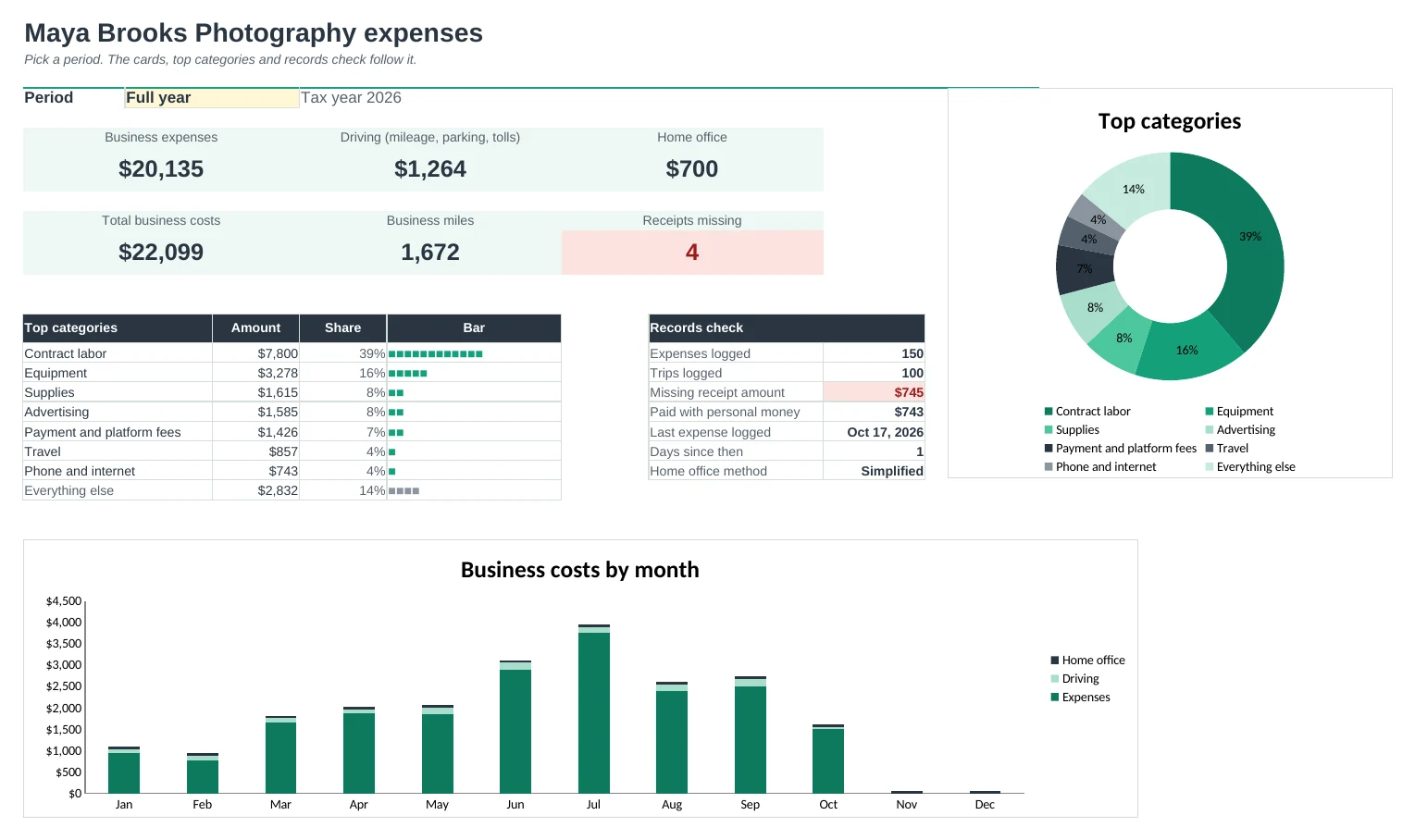
Every category for each quarter, plus driving and home office, and a month-by-month table. Handy when it's time to work out estimated tax payments.
A summary your accountant will like
Year-End Summary totals everything by tax-form line, with your vehicle miles, home office numbers, costs paid with personal money and a notes box.
No missing receipts
Anything over your receipt limit without a receipt is flagged and listed with how long ago it was, so you can track it down while you still can.
| Free | Pro |
|---|---|
| Expense log with tax categories | Expense log with tax categories and your own business % per category |
| Quarterly totals | Quarterly totals plus driving, home office and month by month |
| Receipt checkbox | Missing-receipt list with a limit you set |
| · | Mileage log with saved places and your own rate |
| · | Home office: simplified and regular methods compared |
| · | Year-end summary by tax-form line for your accountant |
| · | Dashboard with charts and a pick-a-quarter view |
| · | Tax-form lines you can rename for other countries |
$19 one-time
9 tabs: Start Here, Dashboard, Expenses, Mileage, Home Office, Quarterly, Year-End Summary, Receipts and Setup. You get two copies: one filled in with a sample photography business so you can see it working, and a blank one ready for your own expenses. It organises your records; it isn't tax advice, so check what you can deduct with an accountant.
Get Business Expenses Pro for $19- Instant download after checkout
- Works in Google Sheets and Excel
- Yours to keep and reuse every year