
Free invoice template for Google Sheets
Fill in your line items and the invoice works out the subtotal, discount, tax, total and balance due. Pick a client and their address and payment terms fill in, with the due date set for you. The invoice log keeps every invoice in one place and shows what's paid, what's late and by how many days.
| INVOICE | |||
|---|---|---|---|
| Maple Street Design Co. | Invoice no. | INV-1042 | |
| 48 Maple Street, Portland, ME 04101 | Invoice date | Oct 15, 2026 | |
| (207) 555-0148 | billing@maplestreetdesign.com | Terms (days) | 30 | |
| Due date | Nov 14, 2026 | ||
| Bill to | Balance due | $866.00 | |
| Harbor Light Bakery | |||
| Attn: Dana Ruiz | |||
| 210 Commercial St, Portland, ME 04101 | |||
| dana@harborlightbakery.com | |||
| Description | Qty | Rate | Amount |
| Menu board design, 3 boards | 1 | $450.00 | $450.00 |
| Bakery box label design | 1 | $300.00 | $300.00 |
| Label printing, rolls of 500 | 2 | $92.50 | $185.00 |
| Extra revision rounds (hours) | 3 | $65.00 | $195.00 |
| Delivery to shop | 1 | $25.00 | $25.00 |
| Subtotal | $1,155.00 | ||
| Discount | $55.00 | ||
| Tax rate | 6% | ||
| Tax | $66.00 | ||
| Total | $1,166.00 | ||
| Paid so far | $300.00 | ||
| Balance due | $866.00 | ||
| How to pay: Zelle or bank transfer to billing@maplestreetdesign.com, or mail a check payable to Maple Street Design Co. | |||
| Please put the invoice number on your payment. Thank you for your business! |
| Invoice no. | Client | Invoice date | Due date | Amount | Paid | Date paid | Balance | Status | Days overdue | Days to pay |
|---|---|---|---|---|---|---|---|---|---|---|
| INV-1031 | Harbor Light Bakery | Jul 8, 2026 | Aug 7, 2026 | $820.00 | $820.00 | Aug 2, 2026 | $0.00 | Paid | 0 | 25 |
| INV-1032 | Casco Bay Dental | Jul 15, 2026 | Jul 30, 2026 | $1,450.00 | $1,450.00 | Jul 29, 2026 | $0.00 | Paid | 0 | 14 |
| INV-1033 | Pine and Pine Realty | Jul 22, 2026 | Aug 21, 2026 | $600.00 | $600.00 | Aug 25, 2026 | $0.00 | Paid | 0 | 34 |
| INV-1034 | Northline Brewing | Aug 5, 2026 | Sep 4, 2026 | $2,250.00 | $1,000.00 | Sep 10, 2026 | $1,250.00 | Overdue | 44 | |
| INV-1035 | Harbor Light Bakery | Aug 12, 2026 | Sep 11, 2026 | $375.00 | $375.00 | Sep 8, 2026 | $0.00 | Paid | 0 | 27 |
| INV-1036 | Casco Bay Dental | Aug 26, 2026 | Sep 10, 2026 | $980.00 | $980.00 | Sep 12, 2026 | $0.00 | Paid | 0 | 17 |
| INV-1037 | Seaside Yoga Studio | Sep 2, 2026 | Sep 16, 2026 | $540.00 | $540.00 | Overdue | 32 | |||
| INV-1038 | Pine and Pine Realty | Sep 9, 2026 | Oct 9, 2026 | $1,200.00 | $1,200.00 | Oct 6, 2026 | $0.00 | Paid | 0 | 27 |
| INV-1039 | Northline Brewing | Sep 23, 2026 | Oct 23, 2026 | $1,675.00 | $1,675.00 | Unpaid | 0 | |||
| INV-1040 | Casco Bay Dental | Oct 1, 2026 | Oct 16, 2026 | $760.00 | $760.00 | Overdue | 2 | |||
| INV-1041 | Seaside Yoga Studio | Oct 7, 2026 | Oct 21, 2026 | $320.00 | $320.00 | Unpaid | 0 | |||
| INV-1042 | Harbor Light Bakery | Oct 15, 2026 | Nov 14, 2026 | $1,166.00 | $300.00 | Oct 15, 2026 | $866.00 | Partly paid | 0 | |
| Client | Contact | Billing address | Terms (days) | Invoiced | Paid | Outstanding | Overdue | |
|---|---|---|---|---|---|---|---|---|
| Harbor Light Bakery | Dana Ruiz | 210 Commercial St, Portland, ME 04101 | dana@harborlightbakery.com | 30 | $2,361.00 | $1,495.00 | $866.00 | $0.00 |
| Casco Bay Dental | Dr. Alan Choi | 95 Exchange St, Portland, ME 04101 | office@cascobaydental.com | 15 | $3,190.00 | $2,430.00 | $760.00 | $760.00 |
| Pine and Pine Realty | Megan Pine | 12 Main St, Yarmouth, ME 04096 | megan@pineandpine.com | 30 | $1,800.00 | $1,800.00 | $0.00 | $0.00 |
| Northline Brewing | Chris Okafor | 400 Fore St, Portland, ME 04101 | chris@northlinebrewing.com | 30 | $3,925.00 | $1,000.00 | $2,925.00 | $1,250.00 |
| Seaside Yoga Studio | Lena Morris | 7 Ocean Ave, Kennebunk, ME 04043 | hello@seasideyoga.com | 14 | $860.00 | $0.00 | $860.00 | $540.00 |
| Item | Amount |
|---|---|
| Today's date | Oct 18, 2026 |
| Invoices sent | 12 |
| Total invoiced | $12,136.00 |
| Total paid | $6,725.00 |
| Still owed to you | $5,411.00 |
| Overdue | $2,550.00 |
| Overdue invoices | 3 |
| Most days overdue | 44 |
| Coming due in the next 14 days | $1,995.00 |
| Average days to get paid | 24 |
What's inside
- A printable invoice with your details, the client's billing address, line items, discount, tax and balance due
- Type a client's name and their contact, address, email and payment terms fill in from your client list
- The due date is worked out from the invoice date and that client's terms
- An invoice log that marks each invoice Paid, Partly paid, Unpaid or Overdue, with days overdue
- A client list showing how much each client has been billed, has paid and still owes
- A summary of money owed to you, what's overdue, what's coming due soon and how long clients take to pay
How to use it
Make your copy
Click "Make a copy" to save the template to your Google Drive. Prefer Excel? Download the .xlsx file instead.
Put your business details at the top
On the Invoice tab, replace Maple Street Design Co., the address, phone and email with your own. Change the payment line near the bottom to how you like to be paid.
Add your clients
On the Clients tab, add each client with a contact name, billing address, email and payment terms in days (30 is common, 15 or 14 for faster payers).
Fill in the invoice
Give it a new invoice number and date, then type the client's name under Bill to exactly as it appears on the Clients tab. Add a line for each item with a quantity and rate. Set the discount, tax rate and anything already paid, like a deposit.
Send it as a PDF
In Google Sheets choose File > Download > PDF, or File > Email this file. In Excel use File > Save As and pick PDF. Then add the invoice to the Invoice Log so you can track it.
Keep the log up to date
When a client pays, fill in Paid and Date paid on the Invoice Log. On the Summary tab, replace the date in Today's date with =TODAY() so overdue days stay current.
Tips
Number invoices in order
Use one running sequence like INV-1043, INV-1044. It makes payments easy to match and looks professional. Never reuse a number.
Keep one tab per invoice if you like
Right-click the Invoice tab and choose Duplicate, then rename it with the invoice number. Every copy still looks up the same client list.
Chase late invoices early
Sort the Invoice Log by Days overdue. A friendly reminder a few days after the due date gets most invoices paid without any awkwardness.
Ask about sales tax
Sales tax rules depend on your state and what you sell. If you're not sure, ask an accountant, and set Tax rate to 0% if it doesn't apply.
Questions
Does Google Sheets have an invoice template?
Google Sheets has a basic one in its template gallery. This one adds a client list, automatic due dates and an invoice log that tracks paid and overdue invoices. Copy it to your Drive for free.
How do I make an invoice in Google Sheets?
Make a copy of this template, add your business details and your client, then list what you're billing for with a quantity and rate. The totals work themselves out. Download it as a PDF and send it.
How do I save the invoice as a PDF?
In Google Sheets, open the Invoice tab and choose File > Download > PDF. Under Export, pick Current sheet so only the invoice is included, not the log.
Can I use this invoice template in Excel?
Yes. Download the Excel file. The lookups, totals and overdue tracking all work in Excel too.
How is the due date worked out?
It's the invoice date plus the payment terms for that client on the Clients tab. If the client isn't on the list, it uses 30 days.
Is this invoice template free?
Yes. Copy it or download it with no sign-up, and use it for as many invoices as you like.
Pro version
Invoice Pro
Make, print and track every invoice in one workbook, with your clients and prices filled in for you and a clear list of who still owes you.
Invoices in a minute
Pick a client and the address, terms and due date fill in. Pick a product or service and its description and price fill in. The invoice number is worked out for you.
Every invoice kept
Nothing gets typed over. Each invoice is one row, so you can reprint any of them, and the Invoice tab prints a clean page for whichever one you pick.
Know who has paid
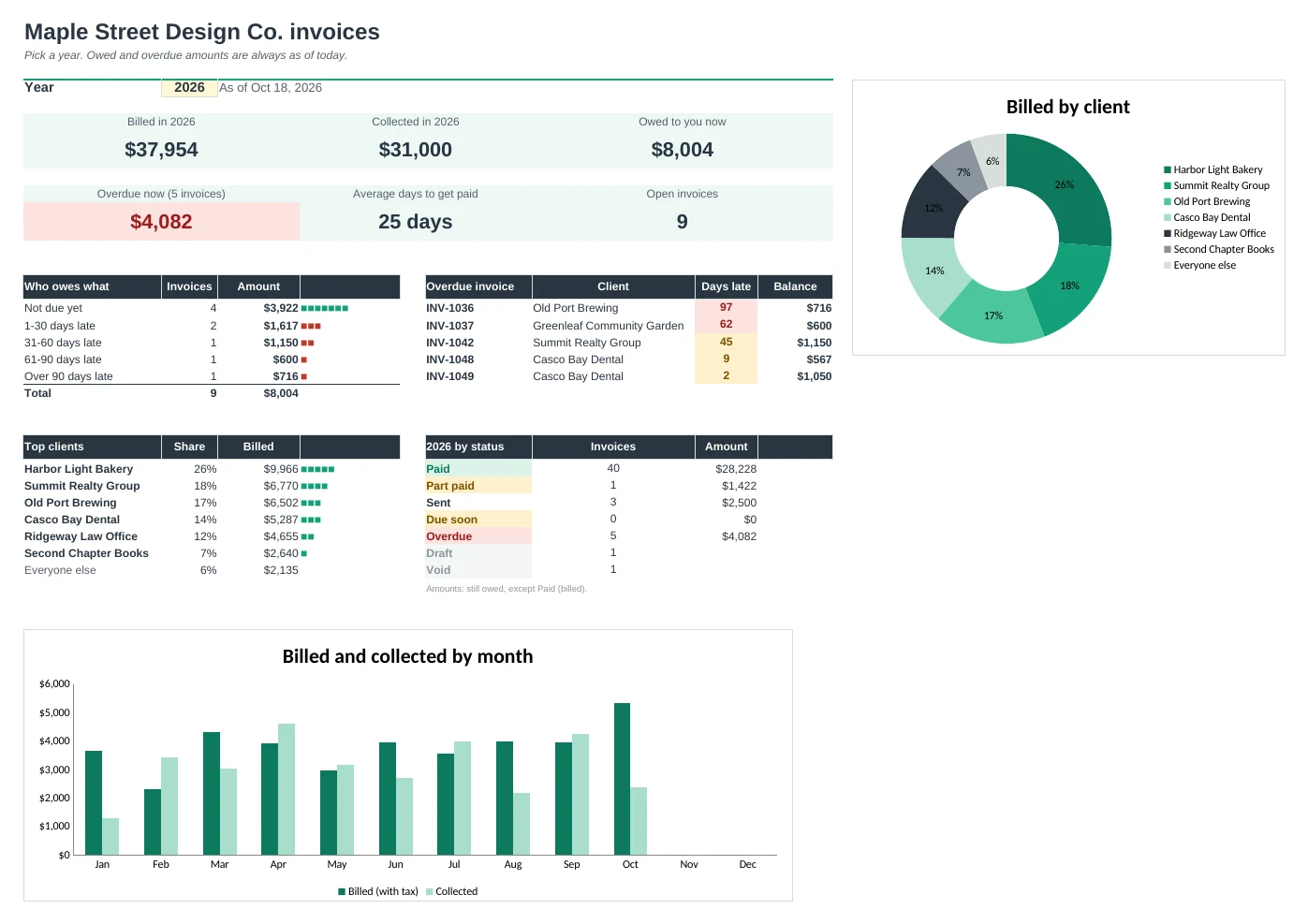
Log payments as they come in, including deposits and part payments. Each invoice shows Sent, Due soon, Part paid, Overdue or Paid, and how many days late it is.
See who owes what
The Aging tab sorts every unpaid amount by client into not due yet, 1-30, 31-60, 61-90 and over 90 days late, and a Statement tab prints everything one client owes.
Your year in numbers
The Dashboard shows what you billed and collected, your top clients and average days to get paid. Income breaks it down by month and by client.
Tax totals ready
Tax Summary adds up the sales tax on your invoices by month and by rate, plus what clients still owe. Your accountant decides how to report it.
| Free | Pro |
|---|---|
| One invoice at a time | Every invoice kept and reprintable |
| Type the invoice number | Invoice numbers and due dates worked out |
| Client list | Clients and products with dropdowns that fill prices |
| Invoice log with overdue flag | Payments log with deposits and part payments |
| · | Aging report: who owes what and how late |
| · | Printable client statement |
| · | Dashboard with charts, income by month and by client |
| · | Sales tax summary by month and by rate |
$19 one-time
13 tabs: Start Here, Dashboard, Invoice, Statement, Invoices, Line Items, Payments, Aging, Income, Tax Summary, Clients, Products and Setup. You get two copies: one filled in with a sample design studio so you can see it working, and a blank one ready for your own business.
Get Invoice Pro for $19- Instant download after checkout
- Works in Google Sheets and Excel
- Yours to keep and reuse every year