
Bookkeeping template for Google Sheets
Record every sale and every business expense in one ledger, and the profit and loss tab sorts it into categories month by month. You'll see your income, your costs and what you actually made each month. It's made for sole owners and side businesses that don't need full accounting software yet.
Pro Want bank reconciliation, sales tax and tax-form totals done for you? See Small Business Bookkeeping Pro →| Date | Description | Category | Type | Amount | Account |
|---|---|---|---|---|---|
| Jul 3, 2026 | Card sales, week of Jun 29 | Grooming services | Income | $1,240.00 | Business checking |
| Jul 8, 2026 | Shampoo and conditioner restock | Supplies | Expense | $186.45 | Business card |
| Jul 10, 2026 | Card sales, week of Jul 6 | Grooming services | Income | $1,385.00 | Business checking |
| Jul 15, 2026 | Van fuel | Vehicle and fuel | Expense | $142.30 | Business card |
| Jul 28, 2026 | Van insurance, monthly | Insurance | Expense | $168.00 | Business checking |
| Jul 31, 2026 | Shampoo and treats sold | Product sales | Income | $215.00 | Business checking |
| Jul 12, 2026 | Booking app, monthly | Software and subscriptions | Expense | $39.00 | Business card |
| Aug 5, 2026 | Card sales, two weeks | Grooming services | Income | $2,610.00 | Business checking |
| Aug 9, 2026 | Facebook ads | Advertising | Expense | $75.00 | Business card |
| Aug 12, 2026 | Booking app, monthly | Software and subscriptions | Expense | $39.00 | Business card |
| Aug 19, 2026 | Van fuel | Vehicle and fuel | Expense | $156.80 | Business card |
| Aug 22, 2026 | New cordless clippers | Equipment | Expense | $249.99 | Business card |
| Aug 28, 2026 | Van insurance, monthly | Insurance | Expense | $168.00 | Business checking |
| Aug 30, 2026 | Shampoo and treats sold | Product sales | Income | $180.00 | Business checking |
| Sep 4, 2026 | Card sales, two weeks | Grooming services | Income | $2,875.00 | Business checking |
| Sep 9, 2026 | Phone bill, business share | Phone and internet | Expense | $70.00 | Business checking |
| Sep 12, 2026 | Booking app, monthly | Software and subscriptions | Expense | $39.00 | Business card |
| Sep 16, 2026 | Van fuel | Vehicle and fuel | Expense | $149.10 | Business card |
| Sep 23, 2026 | Card reader fees, July to September | Card processing fees | Expense | $82.40 | Business checking |
| Sep 28, 2026 | Van insurance, monthly | Insurance | Expense | $168.00 | Business checking |
| Sep 29, 2026 | Shampoo and treats sold | Product sales | Income | $240.00 | Business checking |
| Category | Month 1 | Month 2 | Month 3 | Quarter total |
|---|---|---|---|---|
| Month | July 2026 | August 2026 | September 2026 | |
| Grooming services | $2,625.00 | $2,610.00 | $2,875.00 | $8,110.00 |
| Product sales | $215.00 | $180.00 | $240.00 | $635.00 |
| Total income | $2,840.00 | $2,790.00 | $3,115.00 | $8,745.00 |
| Supplies | $186.45 | $0.00 | $0.00 | $186.45 |
| Vehicle and fuel | $142.30 | $156.80 | $149.10 | $448.20 |
| Insurance | $168.00 | $168.00 | $168.00 | $504.00 |
| Advertising | $0.00 | $75.00 | $0.00 | $75.00 |
| Software and subscriptions | $39.00 | $39.00 | $39.00 | $117.00 |
| Equipment | $0.00 | $249.99 | $0.00 | $249.99 |
| Phone and internet | $0.00 | $0.00 | $70.00 | $70.00 |
| Card processing fees | $0.00 | $0.00 | $82.40 | $82.40 |
| Total expenses | $535.75 | $688.79 | $508.50 | $1,733.04 |
| Net profit | $2,304.25 | $2,101.21 | $2,606.50 | $7,011.96 |
| Profit margin | 81.1% | 75.3% | 83.7% | 80.2% |
| Check: not in a category | $0.00 | $0.00 | $0.00 | $0.00 |
| Category | Type | What goes here |
|---|---|---|
| Grooming services | Income | Appointments paid by card, cash or app |
| Product sales | Income | Shampoo, treats and accessories sold to clients |
| Supplies | Expense | Shampoo, towels, bows, cleaning products |
| Vehicle and fuel | Expense | Gas, oil changes and repairs for the van |
| Insurance | Expense | Business liability and vehicle insurance |
| Advertising | Expense | Online ads, flyers, business cards |
| Software and subscriptions | Expense | Booking app, website, accounting tools |
| Equipment | Expense | Clippers, dryers, tables |
| Phone and internet | Expense | Business share of your phone bill |
| Card processing fees | Expense | Fees taken by your card reader or payment app |
What's inside
- One ledger for money in and money out, with amounts always entered as positive numbers
- Pick a category and the Type column fills in Income or Expense for you
- A profit and loss report by month and for the quarter, with net profit and profit margin
- A check line that catches entries with a mistyped category, so nothing goes missing
- A category list with notes on what belongs where, ready to rename for your business
- Works in Google Sheets and Excel
How to use it
Download your copy
Click "Free download" to save the .xlsx file. It opens in Excel, or in Google Sheets: open a blank sheet (sheets.new) and choose File, then Import, then Upload.
Set up your categories
On the Categories tab, rename the sample categories to fit your business and mark each one Income or Expense. Then change the matching names in the first column of the Profit and Loss tab.
Record each transaction
On the Ledger tab, add a row for every deposit and every business purchase: date, description, category, amount and account. Enter all amounts as positive numbers. The Type column works out the rest.
Pick your quarter
On the Profit and Loss tab, type the first day of the quarter in the Month row. The next two months follow on their own.
Review it monthly
Once a month, match the ledger against your bank and card statements, then check the Profit and Loss tab. The check line should be zero.
Tips
Keep business money separate
A separate checking account and card for the business makes bookkeeping far easier. Every transaction on them belongs in the ledger.
Record deposits, not just invoices
Log money on the date it lands in your account. If your card reader takes fees, either record full sales as income and the fees as an expense (like the sample), or record only what lands in the bank. Pick one way and stick with it.
Fix Unknown right away
If the Type column says Unknown, the category doesn't match the Categories tab. Correct the spelling and it will show up on the profit and loss report.
Share it with your accountant
At tax time, share the sheet or send the Excel file. A clean ledger with categories saves them time, and saves you money.
Questions
Can I do my own bookkeeping in Google Sheets?
Yes, if your business is small and simple. A ledger of every transaction plus a monthly profit and loss summary covers what most sole owners need. This template has both.
What's the difference between this and a budget?
A budget plans what you'll spend. Bookkeeping records what your business actually earned and spent, so you know your profit and have records for taxes.
How do I see a different quarter?
Change the first date in the Month row of the Profit and Loss tab. The ledger can hold the whole year, and the report only counts the three months shown.
Is this bookkeeping template free?
Yes. Download the .xlsx file and open it in Excel or Google Sheets. No sign-up needed.
Does it handle sales tax or payroll?
No. It's a simple income and expense ledger. If you collect sales tax or pay employees, talk to an accountant or use accounting software.
Pro version
Small Business Bookkeeping Pro
Record every dollar in one ledger and get your profit, cash, bank reconciliation, sales tax and tax-form totals worked out for you.
Your own chart of accounts
Name your accounts, pick a type and the tax-form line each belongs on. Add or rename one and the ledger dropdown, Profit and Loss and Tax Lines all follow.
Balance your bank every month
Mark lines as cleared, type the statement balance and the Reconcile tab says Balanced or shows exactly what's still outstanding. A log keeps every statement you've checked.
Know where the cash went
See each bank, card and cash balance at every month end, and a simple walk from profit to cash that explains owner draws, loan payments and sales tax.
Sales tax under control
Type the tax inside each sale and see what you collected, what you paid and what's still owed for each period, with due-soon and overdue flags.
Ready for tax time
Tax Lines adds up the year by tax-form line (Schedule C to start, and you can rename them), with checks for unmapped accounts, equipment and contractors. Your accountant makes the final calls.
No missing receipts
Set a receipt limit and Receipts lists every purchase over it that still needs one, month by month.
| Free | Pro |
|---|---|
| Income and expense ledger | Ledger with bank account, sales tax, receipt and cleared columns |
| Category list | Chart of accounts with types and tax-form lines |
| Quarterly profit and loss | Profit and loss for every month, the year and the year to date |
| · | Bank reconciliation with an uncleared items list |
| · | Cash balances by account and a profit-to-cash check |
| · | Sales tax by period with due dates |
| · | Year totals by tax-form line |
| · | Missing receipts list |
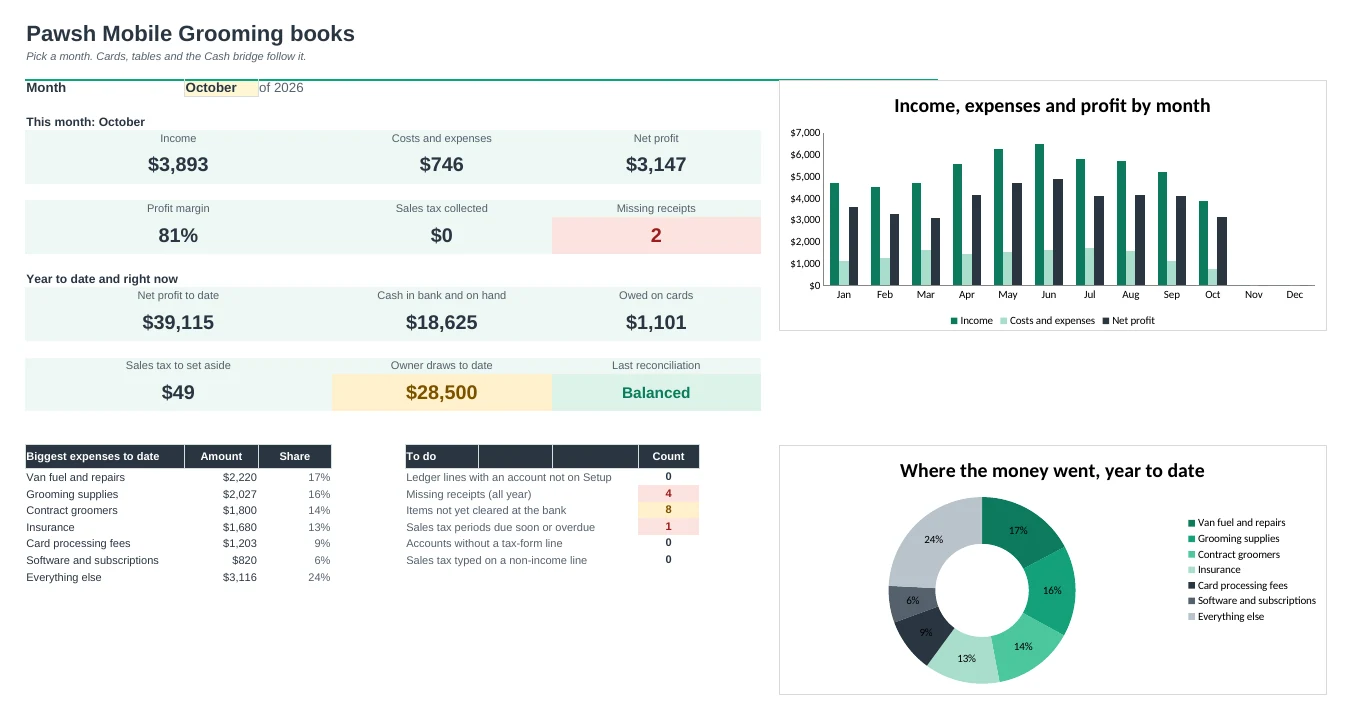
| · | Dashboard with charts and a to-do list |
$19 one-time
10 tabs: Start Here, Dashboard, Ledger, Profit and Loss, Cash, Reconcile, Sales Tax, Tax Lines, Receipts and Setup. You get two copies: one filled in with a sample small business so you can see it working, and a blank one ready for your own books.
Get Small Business Bookkeeping Pro for $19- Instant download after checkout
- Works in Google Sheets and Excel
- Yours to keep and reuse every year