
Free check register template for Google Sheets
Write down every check, card purchase, bill and deposit, and the balance updates on every line. Tick Cleared when an item shows up at the bank, and the Reconcile tab tells you if your register matches your statement to the penny.
Pro Want several accounts, a statement check and a heads-up before your balance runs low? See Check Register Pro →| Date | Check # or type | Description | Category | Payment | Deposit | Cleared | Balance |
|---|---|---|---|---|---|---|---|
| Oct 1, 2026 | Opening balance | Opening | $2,486.32 | $2,486.32 | |||
| Oct 1, 2026 | 1041 | Maple Court Apartments (rent) | Housing | $1,350.00 | $1,136.32 | ||
| Oct 2, 2026 | DEP | Paycheck, direct deposit | Income | $1,842.16 | $2,978.48 | ||
| Oct 3, 2026 | DEBIT | Kroger | Groceries | $126.48 | $2,852.00 | ||
| Oct 5, 2026 | AUTO | City water and sewer | Utilities | $64.20 | $2,787.80 | ||
| Oct 6, 2026 | 1042 | Lincoln Elementary PTA | Other | $25.00 | $2,762.80 | ||
| Oct 8, 2026 | DEBIT | Shell | Auto | $48.75 | $2,714.05 | ||
| Oct 10, 2026 | DEP | Mobile deposit, birthday check | Income | $100.00 | $2,814.05 | ||
| Oct 12, 2026 | AUTO | State Farm car insurance | Insurance | $142.00 | $2,672.05 | ||
| Oct 14, 2026 | DEBIT | Target | Shopping | $87.31 | $2,584.74 | ||
| Oct 15, 2026 | 1043 | Lakeside Dental | Medical | $60.00 | $2,524.74 | ||
| Oct 16, 2026 | DEP | Paycheck, direct deposit | Income | $1,842.16 | $4,366.90 | ||
| Oct 18, 2026 | DEBIT | Chipotle | Dining | $23.40 | $4,343.50 | ||
| Oct 20, 2026 | AUTO | Comcast internet | Utilities | $79.99 | $4,263.51 | ||
| Oct 22, 2026 | DEBIT | Kroger | Groceries | $142.10 | $4,121.41 | ||
| Oct 25, 2026 | 1044 | Mike's Lawn Care | Housing | $45.00 | $4,076.41 | ||
| Oct 28, 2026 | ATM | ATM withdrawal | Other | $60.00 | $4,016.41 | ||
| Oct 30, 2026 | DEP | Paycheck, direct deposit | Income | $1,842.16 | $5,858.57 |
| Item | Amount |
|---|---|
| Ending balance on your bank statement | $4,323.51 |
| Cleared deposits (ticked) | $6,270.64 |
| Cleared payments (ticked) | $1,947.13 |
| Cleared balance | $4,323.51 |
| Difference (should be $0.00) | $0.00 |
| Status | Balanced |
| Payments not cleared yet | $307.10 |
| Deposits not cleared yet | $1,842.16 |
| Items not cleared yet | 5 |
| Balance in your register | $5,858.57 |
| Cleared balance minus pending items | $5,858.57 |
| Category | Deposits | Payments | Entries | Share of spending |
|---|---|---|---|---|
| Income | $5,626.48 | $0.00 | 4 | 0% |
| Housing | $0.00 | $1,395.00 | 2 | 61.9% |
| Utilities | $0.00 | $144.19 | 2 | 6.4% |
| Groceries | $0.00 | $268.58 | 2 | 11.9% |
| Auto | $0.00 | $48.75 | 1 | 2.2% |
| Insurance | $0.00 | $142.00 | 1 | 6.3% |
| Dining | $0.00 | $23.40 | 1 | 1% |
| Shopping | $0.00 | $87.31 | 1 | 3.9% |
| Medical | $0.00 | $60.00 | 1 | 2.7% |
| Other | $0.00 | $85.00 | 2 | 3.8% |
| Total | $5,626.48 | $2,254.23 | 17 | 100% |
What's inside
- A running balance on every line, so you always know what's really in the account
- One column for payments and one for deposits, with the balance worked out for you
- A Cleared checkbox for each entry, just like the tick column in a paper checkbook
- A Reconcile tab that compares your cleared balance with your bank statement and shows the difference
- Lists what hasn't cleared yet: uncashed checks, pending card charges and deposits on the way
- Spending by category, plus room for 500 entries, in Google Sheets and Excel
How to use it
Download your copy
Click "Free download" to save the .xlsx file. It opens in Excel, or in Google Sheets: open a blank sheet (sheets.new) and choose File, then Import, then Upload.
Enter your starting balance
Clear the sample entries but keep the first row. Put today's date and your current bank balance in the Deposit column of that row. Tick it as cleared.
Record everything as it happens
Add a row for every check, debit card purchase, automatic bill, ATM withdrawal and deposit. Put money out in Payment and money in in Deposit. Copy the Balance formula down as you go.
Tick what has cleared
When an item shows up in your bank account, tick its Cleared box. Checks you wrote can take days or weeks to clear, so leave those unticked until they do.
Reconcile each month
When your statement arrives, type its ending balance at the top of the Reconcile tab. If the Status says Balanced, you're done. If not, it shows how much you're off by.
Tips
Use the Check # column for more than checks
Type DEBIT, AUTO, ATM or DEP for entries that aren't checks. It makes the register easy to scan and easy to filter.
Hunt down a difference
If you're off, compare each ticked row with the statement. Common causes are a missed bank fee, a typo in an amount or an item ticked before it really cleared.
Watch the not-cleared list
An old check that never cleared may have been lost. Check with the person you paid before the bank voids it.
Keep your categories short
Use the same category names as the By Category tab so your totals line up. Rename them there to match how you spend.
Questions
What is a check register?
It's a running list of every payment and deposit for a checking account, with the balance after each one. Banks used to include a paper one with every checkbook. This sheet is the same idea, but it does the math.
How do I balance my checkbook with this template?
Tick every item that appears on your bank statement, then type the statement's ending balance on the Reconcile tab. When the cleared balance matches the statement, the status says Balanced.
Why doesn't my register balance match my bank app?
Your bank only shows what has cleared. Your register also counts checks you've written and charges that are still pending. The Reconcile tab lists those so you can see the gap.
Can I use it for a savings account or credit card?
Yes. It works for any account where money goes in and out. For a credit card, treat charges as payments and your card payments as deposits.
Does it work in Excel?
Yes. Download the .xlsx file. The running balance, checkboxes and reconcile formulas all work in Excel.
Pro version
Check Register Pro
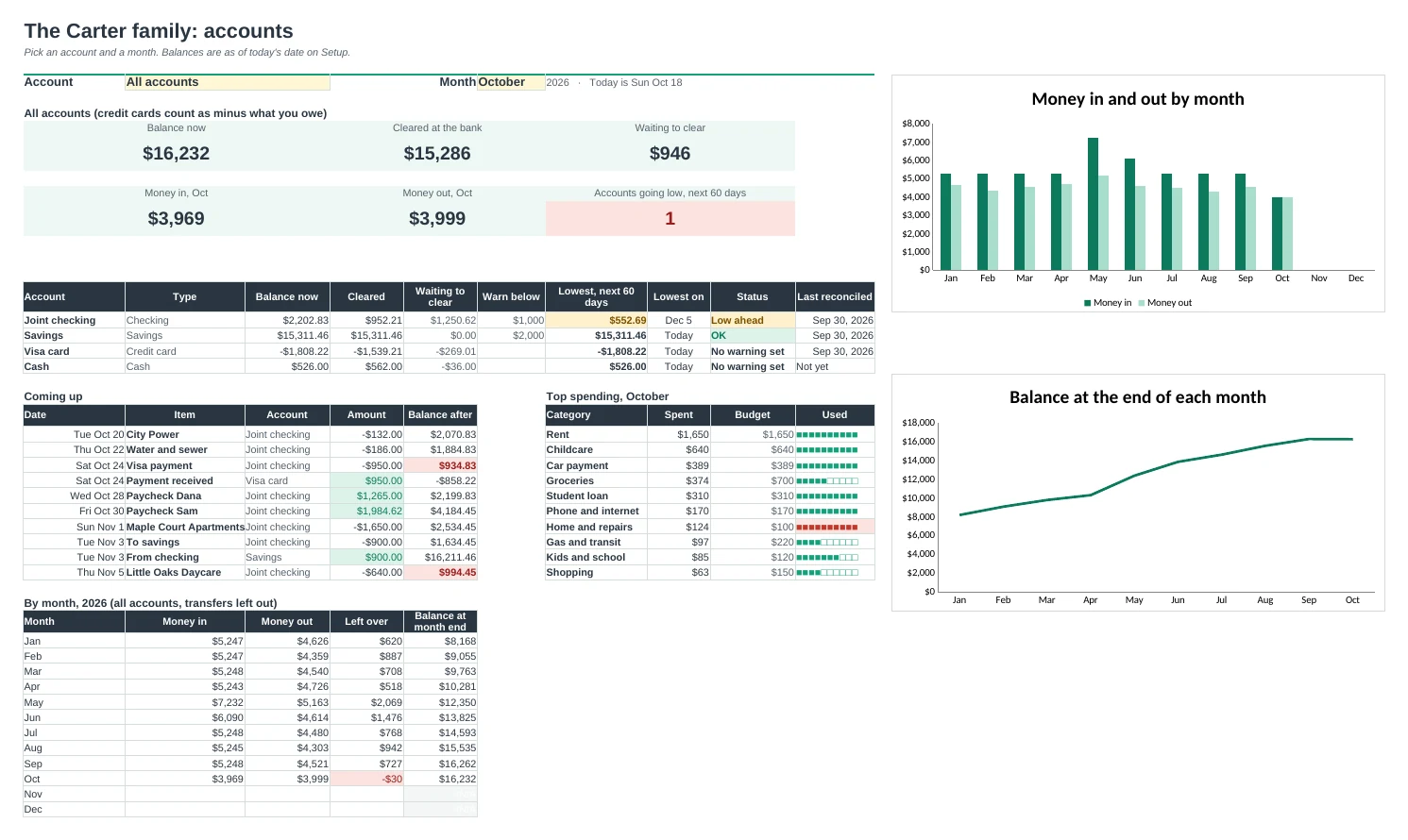
A check register for all your accounts that reconciles to the penny and warns you before a balance runs low.
All your accounts in one register
Checking, savings, credit cards and cash share one list. Pick the account on each line and its own running balance updates.
Reconcile in minutes
Type the statement's ending balance and the difference shows up right away, with every item still waiting to clear listed beside it and a hint on where to look.
See low balances coming
List your paychecks, rent, loan payments and transfers once. The sheet lays out the next 60 days in date order with the balance after each one, and warns you before an account dips below the level you set.
Know what's cleared and what isn't
Mark items C when they show at the bank and R once reconciled, like a paper checkbook. Balance now, cleared balance and what's still on its way sit side by side.
Spending by category, every month
Twelve months by category for one account or all of them, with optional monthly budgets and Over, Close and OK flags.
A Dashboard that opens first
Pick an account and a month: balances, money in and out, what's coming up, top spending and charts of the year so far.
| Free | Pro |
|---|---|
| One account | Up to 8 accounts in one register |
| Running balance | Running balance per account, with overdraft flags |
| Cleared checkbox | Cleared and reconciled marks, with uncleared items highlighted |
| Reconcile tab | Reconcile any account, with outstanding items and a log |
| Spending by category | Every category for all 12 months, with budgets |
| · | Scheduled bills and paychecks, 60 days ahead |
| · | Low-balance warnings for each account |
| · | Dashboard with charts and a pick-an-account view |
$19 one-time
7 tabs: Start Here, Dashboard, Register, Reconcile, Scheduled, Categories and Setup. You get two copies: one filled in with a sample family's year so you can see it working, and a blank one ready for your own accounts.
Get Check Register Pro for $19- Instant download after checkout
- Works in Google Sheets and Excel
- Yours to keep and reuse every year