
Expense tracker template for Google Sheets
Write down each purchase as it happens, with the date, what it was and a category. The Categories tab adds it all up for whichever month you pick and shows how much is left in each category's budget. It takes about ten seconds per purchase.
| Date | Description | Category | Paid with | Amount |
|---|---|---|---|---|
| Sep 28, 2026 | Costco run | Groceries | Credit card | $186.40 |
| Sep 30, 2026 | Netflix | Subscriptions | Credit card | $15.49 |
| Oct 1, 2026 | Electric bill | Home and utilities | Bank transfer | $92.17 |
| Oct 2, 2026 | Kroger | Groceries | Debit card | $74.32 |
| Oct 3, 2026 | Gas fill-up | Gas and transport | Credit card | $41.80 |
| Oct 4, 2026 | Chipotle lunch | Dining out | Credit card | $23.65 |
| Oct 6, 2026 | Pharmacy prescription | Health | Debit card | $12.00 |
| Oct 8, 2026 | Spotify | Subscriptions | Credit card | $11.99 |
| Oct 9, 2026 | Target (towels, detergent) | Shopping | Credit card | $48.27 |
| Oct 10, 2026 | Movie tickets | Entertainment | Credit card | $31.50 |
| Oct 11, 2026 | Trader Joe's | Groceries | Debit card | $58.90 |
| Oct 13, 2026 | Pizza night | Dining out | Cash | $36.00 |
| Oct 14, 2026 | Gas fill-up | Gas and transport | Credit card | $44.15 |
| Oct 15, 2026 | Internet bill | Home and utilities | Bank transfer | $65.00 |
| Oct 16, 2026 | Birthday gift for Sam | Other | Debit card | $40.00 |
| Category | Monthly budget | Spent | Left | Share of spending | Purchases |
|---|---|---|---|---|---|
| Month to show | October 2026 | ||||
| Groceries | $500.00 | $133.22 | $366.78 | 23% | 2 |
| Dining out | $150.00 | $59.65 | $90.35 | 10.3% | 2 |
| Gas and transport | $180.00 | $85.95 | $94.05 | 14.8% | 2 |
| Home and utilities | $250.00 | $157.17 | $92.83 | 27.1% | 2 |
| Health | $60.00 | $12.00 | $48.00 | 2.1% | 1 |
| Shopping | $120.00 | $48.27 | $71.73 | 8.3% | 1 |
| Entertainment | $80.00 | $31.50 | $48.50 | 5.4% | 1 |
| Subscriptions | $45.00 | $11.99 | $33.01 | 2.1% | 1 |
| Other | $75.00 | $40.00 | $35.00 | 6.9% | 1 |
| Total | $1,460.00 | $579.75 | $880.25 | 100% | 13 |
| Not in a category above | $0.00 | 0 |
What's inside
- A simple dated log: one row per purchase, nothing else to fill in
- Category totals for any month you choose, worked out from the log
- A budget for each category, with how much is left
- Share of spending and number of purchases per category, so you can spot the little things that add up
- A check line that catches purchases with a misspelled or missing category
- Works in Google Sheets and Excel
How to use it
Make your copy
Click "Make a copy" to save the tracker to your Google Drive. You can also download it as an Excel file.
Set your categories
On the Categories tab, rename the categories to suit you and set a monthly budget for each. Keep it to about ten.
Clear the sample rows
On the Expenses tab, delete the sample purchases. Keep the header row.
Log each purchase
Add a row for every purchase: date, a short description, the category and the amount. Type the category exactly as it's spelled on the Categories tab.
Pick a month
On the Categories tab, type any date into Month to show. The totals switch to that month, so the same log works all year.
Tips
Log it the same day
Use the Google Sheets app on your phone and add the purchase before you leave the store. Waiting until the weekend is how receipts get lost.
Watch the check line
If Not in a category above isn't zero, a purchase has a category that doesn't match the list. Fix the spelling and it moves to the right place.
Use Paid with to match your statements
When your card statement arrives, filter the log by card and check the two line up.
Look at Purchases, not just Spent
Twenty small coffee runs can cost more than one big shop. The count column makes those habits easy to see.
Questions
How do I track my expenses in Google Sheets?
Add one row per purchase with the date, a description, a category and the amount. A summary tab then adds up each category with SUMIFS. This template has both set up for you.
Can I keep a whole year in one sheet?
Yes. Keep adding rows to the Expenses tab. The Categories tab reads the whole column and only counts the month you pick.
How do I add a new category?
Insert a row on the Categories tab between the first and last category, type the name and copy the formulas down from the row above.
Is this expense tracker free?
Yes. Make a copy in Google Sheets or download the Excel file. No sign-up needed.
Can I use this for business expenses?
It works for simple tracking, but for a business you'll want income too. Try the bookkeeping template, or the expense report template if you need to be paid back by an employer.
Pro version
Expense Tracker Pro
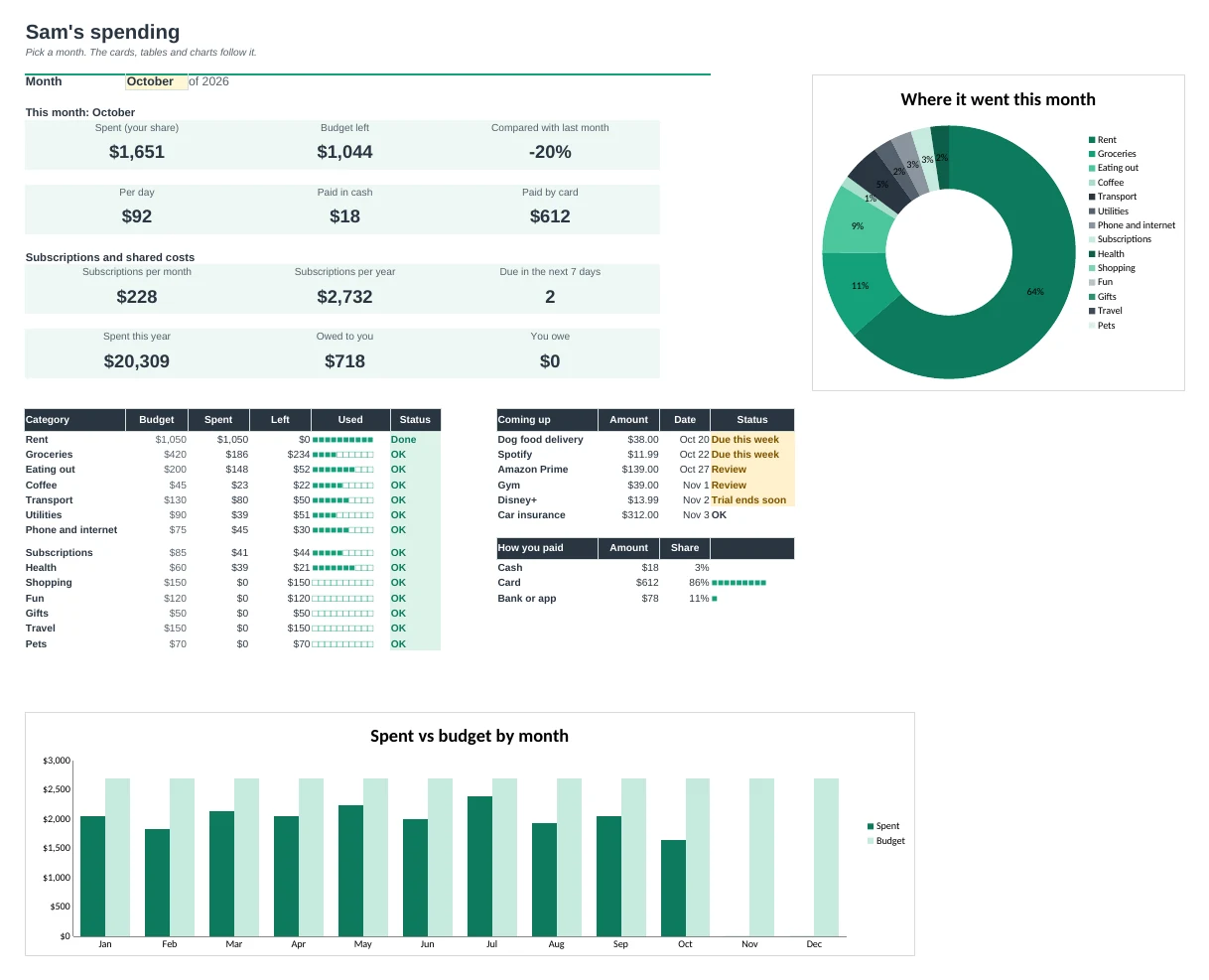
Log a purchase in ten seconds and see where your money goes, what your subscriptions really cost and who owes whom.
Ten seconds per purchase
Date, amount and category are all you need. How you paid and who paid fill in from your Setup defaults when you leave them empty.
Every subscription in one list
Add each subscription once. The next payment date works itself out, and free trials ending soon and payments due this week are flagged.
See what subscriptions really cost
Monthly and yearly totals for all of them, plus how much you'd save by cancelling the ones you've marked.
Split shared costs
Pick who you split with or who paid. Your spending counts only your share, and the Shared tab keeps a running balance of who owes whom.
Cash vs card
Every way you pay has a type, so you can see how much went on cash, cards and bank or app payments each month.
Spot changes early
Trends shows every category for all 12 months and flags any category running well above its usual level.
| Free | Pro |
|---|---|
| Expense log | Quick log: three fields, the rest fills in |
| Category totals for a month | Dashboard with charts, budget bars and month-on-month change |
| Monthly budget per category | Budget status: Over, Close, OK |
| · | Subscription list with next payment dates |
| · | Free trial and due-this-week flags |
| · | Shared costs and who owes whom |
| · | Cash vs card view |
| · | Trends: every category, every month |
$19 one-time
7 tabs: Start Here, Dashboard, Log, Subscriptions, Trends, Shared and Setup. You get two copies: one filled in with a sample year so you can see it working, and a blank one ready for your own numbers.
Get Expense Tracker Pro for $19- Instant download after checkout
- Works in Google Sheets and Excel
- Yours to keep and reuse every year