
Free printable chore chart with points and allowance
One chart for the whole family: each child's chores down the side, the days of the week across the top, and a tick for every job done. Ticks turn into points, points turn into allowance, and you can print the chart for the fridge or keep it on a tablet.
| Kid | Chore | Points | Mon | Tue | Wed | Thu | Fri | Sat | Sun | Times done | Points earned |
|---|---|---|---|---|---|---|---|---|---|---|---|
| Emma | Make bed | 1 | 6 | 6 | |||||||
| Emma | Feed the dog | 2 | 7 | 14 | |||||||
| Emma | Empty the dishwasher | 2 | 4 | 8 | |||||||
| Emma | Fold and put away laundry | 3 | 2 | 6 | |||||||
| Emma | Take out the recycling | 2 | 1 | 2 | |||||||
| Emma | Homework before screens | 1 | 5 | 5 | |||||||
| Jack | Make bed | 1 | 5 | 5 | |||||||
| Jack | Set the table for dinner | 1 | 6 | 6 | |||||||
| Jack | Tidy bedroom floor | 2 | 4 | 8 | |||||||
| Jack | Dirty clothes in the hamper | 1 | 7 | 7 | |||||||
| Jack | Water the plants | 1 | 2 | 2 | |||||||
| Lily | Brush teeth, morning and night | 1 | 7 | 7 | |||||||
| Lily | Put toys away | 1 | 5 | 5 | |||||||
| Lily | Clothes in the hamper | 1 | 5 | 5 | |||||||
| Lily | Help feed the dog | 1 | 3 | 3 | |||||||
| 0 | 0 | ||||||||||
| 0 | 0 | ||||||||||
| 0 | 0 | ||||||||||
| 0 | 0 | ||||||||||
| 0 | 0 | ||||||||||
| 0 | 0 |
| Kid | Age | Weekly goal (points) | Points this week | Progress | Goal met | Pay per point | Bonus for goal | Allowance this week | Still owed (log) |
|---|---|---|---|---|---|---|---|---|---|
| Emma | 11 | 40 | 41 | 100% | Yes | $0.10 | $2.00 | $6.10 | $0.00 |
| Jack | 8 | 35 | 28 | 80% | 7 to go | $0.10 | $1.00 | $2.80 | $3.10 |
| Lily | 5 | 20 | 20 | 100% | Yes | $0.10 | $1.00 | $3.00 | $3.40 |
| Total | 89 | $11.90 | $6.50 |
| Week of | Kid | Points | Allowance | Paid | Notes |
|---|---|---|---|---|---|
| Oct 19, 2026 | Emma | 48 | $6.80 | Paid in cash | |
| Oct 19, 2026 | Jack | 36 | $4.60 | ||
| Oct 19, 2026 | Lily | 22 | $3.20 | ||
| Oct 26, 2026 | Emma | 52 | $7.20 | Added to savings jar | |
| Oct 26, 2026 | Jack | 31 | $3.10 | ||
| Oct 26, 2026 | Lily | 24 | $3.40 |
| Chore | Ages (rough guide) | Suggested points | About how long (min) |
|---|---|---|---|
| Put toys away | 2 to 4 | 1 | 5 |
| Clothes in the hamper | 2 to 4 | 1 | 2 |
| Help feed a pet | 3 to 5 | 1 | 5 |
| Brush teeth, morning and night | 3 to 5 | 1 | 4 |
| Make bed | 4 to 6 | 1 | 3 |
| Set the table | 4 to 6 | 1 | 5 |
| Water the plants | 4 to 7 | 1 | 5 |
| Match socks | 4 to 7 | 1 | 10 |
| Clear own plate | 4 to 7 | 1 | 1 |
| Tidy bedroom floor | 6 to 9 | 2 | 10 |
| Empty the dishwasher | 6 to 10 | 2 | 10 |
| Feed the dog | 6 to 10 | 2 | 5 |
| Sweep the kitchen | 7 to 10 | 2 | 10 |
| Pack own school lunch | 8 to 12 | 2 | 10 |
| Fold and put away laundry | 8 to 12 | 3 | 15 |
| Take out the trash or recycling | 8 to 12 | 2 | 5 |
| Vacuum a room | 9 to 12 | 3 | 15 |
| Clean the bathroom sink | 9 to 12 | 2 | 10 |
| Load the dishwasher | 9 to 12 | 2 | 10 |
| Do own laundry | 12 and up | 4 | 45 |
| Mow the lawn | 12 and up | 5 | 45 |
| Cook a simple dinner | 12 and up | 5 | 45 |
What's inside
- A weekly grid with every child's chores and a tick box for each day, Monday to Sunday
- Points for each chore, so bigger jobs earn more than making the bed
- Allowance worked out for each child from their points, with an optional bonus for hitting a weekly goal
- A payday log that keeps a record of each week and shows what you still owe each child
- A list of chore ideas by age with suggested points, for when you're not sure what to hand out
- Prints on one page from Google Sheets, and works in Excel too
How to use it
Make your copy
Click "Make a copy" to save the chart to your Google Drive. You can also download it for Excel.
Add your kids
On the Kids and Allowance tab, type each child's name, a weekly points goal, what each point is worth and any bonus for reaching the goal. Leave Pay per point at zero if you don't pay allowance.
List their chores
On the Chore Chart tab, give each child a few chores and a point value for each. Use the exact same name as the Kids tab so their points add up. Borrow from Chore Ideas by Age if you're stuck.
Print it for the fridge
Click File, then Print. Choose Current sheet, Landscape and Fit to width. Tick boxes print as empty squares that kids can mark with a pen or a sticker.
Tick chores each day
Tick boxes on screen, or copy the week's paper ticks in on Sunday. Times done, points and allowance update as you go.
Pay day
Add a line to the Payday Log with each child's points and allowance. Tick Paid when the money is handed over, and clear the ticks for a new week.
Tips
Start small
Two or three chores per child is plenty at first. Add more once the routine sticks, so the chart feels doable rather than a punishment.
Keep a blank chart
Before the first week, right-click the Chore Chart tab and choose Duplicate. Each Sunday you can duplicate the blank one and start fresh, or just untick the boxes.
Use it as a responsibility chart
For little ones, list things like brushing teeth and putting shoes away, set Pay per point to zero and use the goal for a sticker or a treat instead of money.
Let kids see the numbers
Older kids like watching Points this week climb. Seeing "5 to go" on a Thursday does more than a reminder from you.
Questions
How do I make a printable chore chart?
Make a copy of this template, change the names and chores, then click File, then Print in Google Sheets. Choose Landscape and Fit to width so the whole week fits on one page.
How much allowance should a kid get?
It's up to your family. Some parents pay a set amount per point, others pay a flat amount once the weekly goal is met. This chart does both: set Pay per point, Bonus for goal, or just one of them.
What chores are right for each age?
The Chore Ideas by Age tab has a starting list, from putting toys away at 2 to 4 up to cooking a simple dinner at 12 and up. Every child is different, so treat the ages as a rough guide.
Can I use it without paying allowance?
Yes. Set Pay per point and Bonus for goal to zero. The chart still counts ticks and points, so you can use the goal for screen time, a trip or a treat.
Can I add another child?
Yes. Add a row on the Kids and Allowance tab above the Total row and copy the formulas down. Then add their chores on the Chore Chart with the same name.
Is the chore chart free?
Yes. Copy it to your Google Drive or download the Excel file. No sign-up.
Pro version
Family Chore Chart Pro
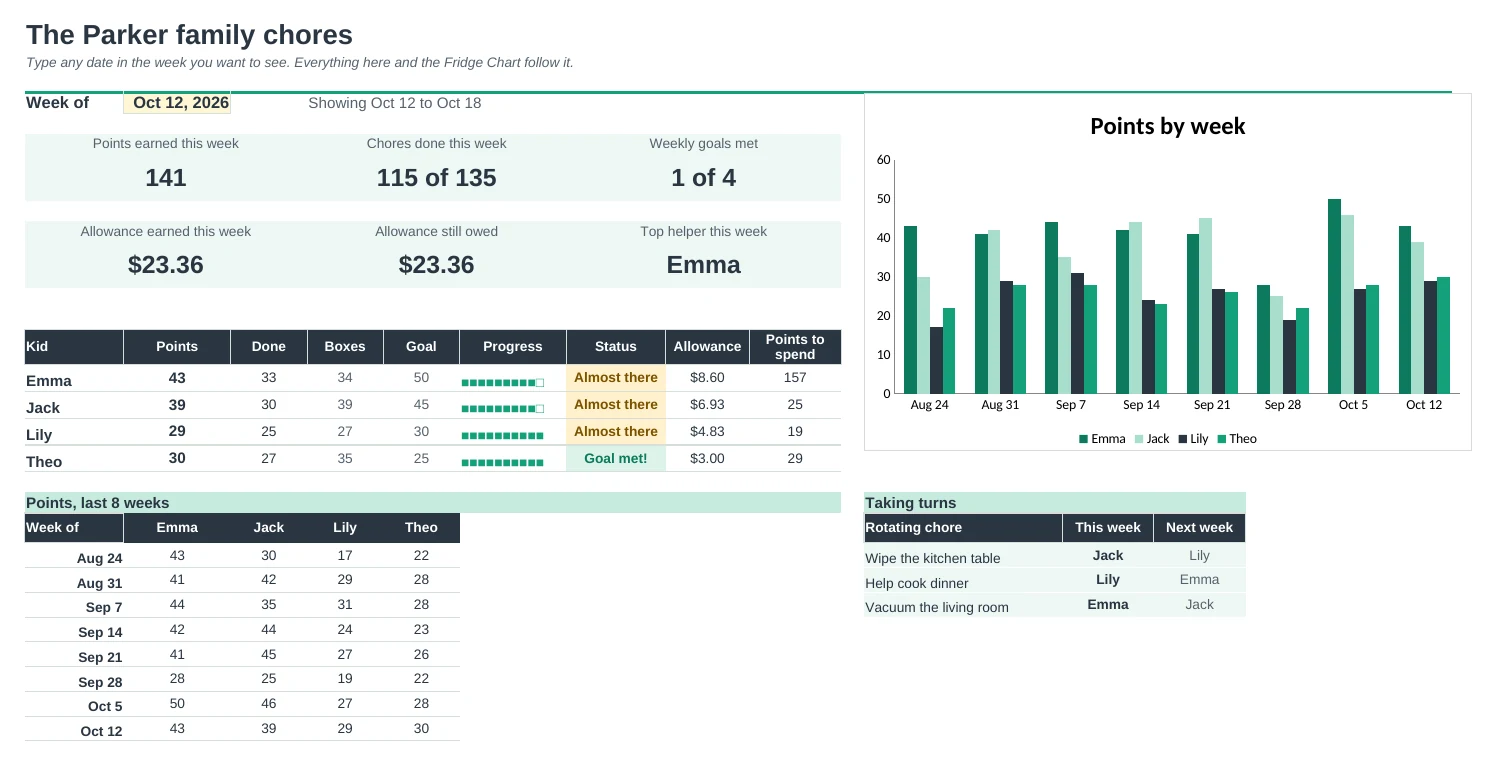
A printable weekly chore chart for every child, with chores that rotate fairly, points for a reward store and allowance worked out for you.
A fridge chart that prints itself
Pick a week and print. Each child gets their own coloured block with a box only on the days each chore is due, spare lines for extras, and the reward store along the bottom.
Shared chores take turns
Mark a chore as Rotate and it passes to the next child every Monday. The Dashboard shows who has what this week and next, so nobody is stuck with the bathroom.
Points they can spend
Kids earn points for every chore and spend them in your own reward store: screen time, choosing dinner, a day out. Each child sees how close they are to the reward they're saving for.
Allowance without the maths
Set a weekly goal and allowance for each child. Reach the goal and it's paid in full, or pay a share for a near miss. Payday shows what you owe, split into save, give and spend jars.
Set it up once
Kids, chores, days and rewards live on one Setup tab. Add a chore or a child and the chart, dropdowns and totals follow.
Chores that fit their age
A printable list of chore ideas in six age groups, from toddlers to teens, with suggested points to get you started.
| Free | Pro |
|---|---|
| One week at a time | Any week of the year, pick it on the Dashboard |
| Same chores every week | Chores for one child, everyone, or taking turns |
| Tick every day | Boxes only on the days a chore is due |
| Allowance from points | Allowance from a weekly goal, full or a share |
| · | Reward store with a saving-up progress bar |
| · | Payday log with save, give and spend jars |
| · | Dashboard with a chart of the last 8 weeks |
| · | Year view: every child, every week |
$19 one-time
9 tabs: Start Here, Dashboard, Fridge Chart, Chore Log, Rewards, Payday, Year, Chore Ideas and Setup. You get two copies: one filled in with a sample family of four kids so you can see it working, and a blank one ready for your own family.
Get Family Chore Chart Pro for $19- Instant download after checkout
- Works in Google Sheets and Excel
- Yours to keep and reuse every year