
Free household cleaning checklist template
A cleaning checklist that splits the house into rooms and the work into small jobs. Tick off daily and weekly tasks on a one-page chart you can print for the fridge, and let the sheet keep track of the monthly and seasonal jobs that are easy to forget.
| Room | Task | Times a week | Who | Mon | Tue | Wed | Thu | Fri | Sat | Sun | Done | To go |
|---|---|---|---|---|---|---|---|---|---|---|---|---|
| Kitchen | Wash dishes or run the dishwasher | 7 | Everyone | 3 | 4 | |||||||
| Kitchen | Wipe counters and stovetop | 7 | Jordan | 2 | 5 | |||||||
| Kitchen | Sweep the kitchen floor | 3 | Sam | 2 | 1 | |||||||
| Kitchen | Take out trash and recycling | 2 | Alex | 1 | 1 | |||||||
| Kitchen | Wipe microwave and fridge handles | 1 | Jordan | 0 | 1 | |||||||
| Kitchen | Mop the kitchen floor | 1 | Sam | 0 | 1 | |||||||
| Bathroom | Wipe sink, faucet and mirror | 3 | Alex | 2 | 1 | |||||||
| Bathroom | Clean the toilet | 1 | Alex | 1 | 0 | |||||||
| Bathroom | Scrub the shower or tub | 1 | Jordan | 0 | 1 | |||||||
| Bathroom | Swap in clean towels | 1 | Alex | 1 | 0 | |||||||
| Living room | 10-minute tidy | 7 | Everyone | 2 | 5 | |||||||
| Living room | Vacuum rugs and floors | 2 | Sam | 1 | 1 | |||||||
| Living room | Dust shelves and the TV stand | 1 | Jordan | 0 | 1 | |||||||
| Bedrooms | Make the beds | 7 | Everyone | 3 | 4 | |||||||
| Bedrooms | Change the sheets | 1 | Alex | 0 | 1 | |||||||
| Laundry | Wash, dry and put away a load | 3 | Jordan | 2 | 1 | |||||||
| Entry | Sort mail and clear the entry | 3 | Sam | 1 | 2 | |||||||
| Whole house | Water the plants | 1 | Sam | 0 | 1 | |||||||
| 0 | 0 | |||||||||||
| 0 | 0 | |||||||||||
| 0 | 0 | |||||||||||
| 0 | 0 | |||||||||||
| 0 | 0 | |||||||||||
| 0 | 0 |
| Room | Task | How often | Every (days) | Who | Minutes | Last done | Next due | Days left | Status |
|---|---|---|---|---|---|---|---|---|---|
| Kitchen | Clean out the fridge | Monthly | 30 | Jordan | 30 | Oct 6, 2026 | Nov 5, 2026 | 1 | This week |
| Kitchen | Clean the oven | Every 3 months | 91 | Alex | 60 | Jul 20, 2026 | Oct 19, 2026 | -16 | Overdue |
| Kitchen | Wipe cabinet fronts | Monthly | 30 | Sam | 20 | Oct 12, 2026 | Nov 11, 2026 | 7 | This week |
| Kitchen | Run a dishwasher cleaning cycle | Monthly | 30 | Jordan | 5 | Oct 1, 2026 | Oct 31, 2026 | -4 | Overdue |
| Kitchen | Descale the coffee maker | Every 3 months | 91 | Jordan | 15 | Sep 2, 2026 | Dec 2, 2026 | 28 | Later |
| Kitchen | Clear out the pantry | Every 3 months | 91 | Sam | 30 | Aug 20, 2026 | Nov 19, 2026 | 15 | Later |
| Bathroom | Wash the shower curtain and bath mats | Monthly | 30 | Alex | 15 | Oct 20, 2026 | Nov 19, 2026 | 15 | Later |
| Bathroom | Scrub the grout | Every 3 months | 91 | Alex | 45 | Not done yet | |||
| Living room | Vacuum the couch and under cushions | Monthly | 30 | Sam | 20 | Oct 18, 2026 | Nov 17, 2026 | 13 | Later |
| Living room | Wash windows (inside) | Every 3 months | 91 | Jordan | 45 | Aug 15, 2026 | Nov 14, 2026 | 10 | Later |
| Bedrooms | Rotate the mattresses | Twice a year | 182 | Alex | 20 | May 10, 2026 | Nov 8, 2026 | 4 | This week |
| Bedrooms | Wash pillows and comforters | Every 3 months | 91 | Jordan | 30 | Aug 1, 2026 | Oct 31, 2026 | -4 | Overdue |
| Laundry | Clean the washing machine | Monthly | 30 | Jordan | 15 | Oct 4, 2026 | Nov 3, 2026 | -1 | Overdue |
| Whole house | Dust ceiling fans and vents | Monthly | 30 | Sam | 25 | Oct 25, 2026 | Nov 24, 2026 | 20 | Later |
| Whole house | Wipe light switches and door handles | Every 2 weeks | 14 | Alex | 10 | Oct 24, 2026 | Nov 7, 2026 | 3 | This week |
| Whole house | Test smoke and CO alarms | Monthly | 30 | Alex | 10 | Oct 5, 2026 | Nov 4, 2026 | 0 | Due today |
| Whole house | Change the furnace or AC filter | Every 3 months | 91 | Jordan | 10 | Sep 15, 2026 | Dec 15, 2026 | 41 | Later |
| Whole house | Clean the gutters | Twice a year | 182 | Alex | 120 | Jun 1, 2026 | Nov 30, 2026 | 26 | Later |
| Whole house | Shampoo the carpets | Yearly | 365 | Jordan | 180 | Mar 14, 2026 | Mar 14, 2027 | 130 | Later |
| Item | Value |
|---|---|
| Today's date | Nov 4, 2026 |
| Week starting | Nov 2, 2026 |
| Weekly checks planned | 52 |
| Weekly checks done | 21 |
| Week progress | 40.4% |
| Weekly tasks finished | 2 |
| Deep-clean tasks overdue or never done | 5 |
| Deep-clean tasks due in 7 days | 5 |
| Minutes for overdue and this week | 245 |
| Checks left this week, by person | |
| Jordan | 9 |
| Alex | 3 |
| Sam | 6 |
| Everyone | 13 |
| How often | Every (days) |
|---|---|
| Weekly | 7 |
| Every 2 weeks | 14 |
| Monthly | 30 |
| Every 2 months | 61 |
| Every 3 months | 91 |
| Twice a year | 182 |
| Yearly | 365 |
What's inside
- A one-page weekly chart: every task by room, with a tick box for each day from Monday to Sunday
- Set how many times a week each task should happen, and the chart counts what's done and what's left
- A separate list for monthly, quarterly and yearly jobs that works out when each one is next due
- Deep-clean tasks flag themselves as Overdue, Due today or This week, so nothing slides for a year
- A summary with this week's progress, checks left for each person and minutes needed to catch up
- Prints cleanly from Google Sheets, and works in Excel too
How to use it
Make your copy
Click "Make a copy" to save the checklist to your Google Drive. Prefer Excel? Download the .xlsx file instead.
Set the date
On the Summary tab, change Today's date. Type =TODAY() there and the deep-clean list will always count from the current day.
Make the weekly list yours
On the Weekly Checklist tab, change the rooms and tasks to fit your home. Set Times a week (7 for daily jobs, 1 for weekly ones) and put a name in Who.
Add your deep-clean jobs
On Monthly and Seasonal, pick How often from the names on the Frequencies tab and type the date you last did each job. Next due and Status fill in.
Print the weekly chart
Open the Weekly Checklist tab and click File, then Print. Choose Current sheet, Landscape and Fit to width. Tick boxes print as empty squares you can mark with a pen.
Tick things off
Tick boxes as you go, on screen or on paper. Done and To go update for each task, and the Summary shows how the week is going.
Tips
Keep a blank week
Before you tick anything, right-click the Weekly Checklist tab and choose Duplicate. Each new week, duplicate the blank one again so you start fresh.
Short jobs beat long ones
"Clean the kitchen" is hard to start. "Wipe the counters" takes two minutes. Small tasks are easier to fit in, which also helps if focus is hard for you.
Do the overdue ones first
Sort Monthly and Seasonal by Days left (Data, then Sort range). The most overdue jobs come to the top, and Minutes for overdue and this week on the Summary tells you how long they'll take.
Share the work
Use the Who column so everyone knows their jobs. Share the sheet with your household, or print one chart and stick it on the fridge.
Questions
How do I print a cleaning checklist from Google Sheets?
Open the tab you want, click File, then Print. Choose Current sheet, set the orientation to Landscape and the scale to Fit to width, then click Next. Tick boxes print as small squares.
What should be on a household cleaning checklist?
Split it by how often. Daily: dishes, counters, a quick tidy. Weekly: bathrooms, floors, sheets and dusting. Monthly or seasonal: inside the fridge and oven, windows, vents, filters and anything you only notice when it's bad.
How often should I do deep-cleaning tasks?
There's no single rule, so the template lets you choose. Pick a frequency for each job, and if it always looks bad by the time it's due, move it to a shorter one.
Can I use this as a cleaning schedule for a family or roommates?
Yes. Put each person's name in the Who column. The Summary shows how many checks each person has left this week. For kids with points and allowance, try our chore chart.
Does it work in Excel?
Yes. Download the .xlsx file. In Excel the tick boxes are TRUE or FALSE dropdowns, so for a paper chart, printing from Google Sheets looks better.
Is this cleaning checklist free?
Yes. Copy it to your Google Drive or download the Excel file. No sign-up.
Pro version
Cleaning Checklist Pro
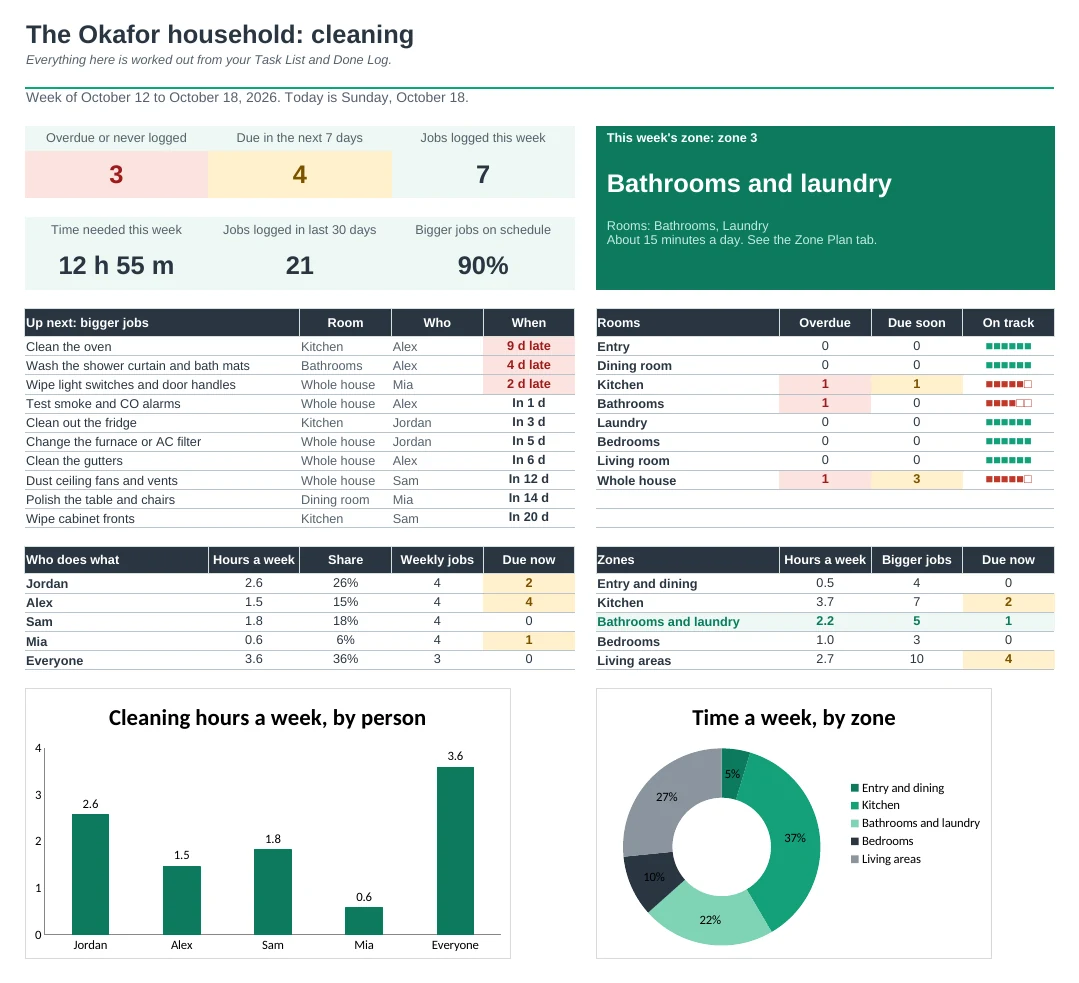
List your cleaning jobs once and get a printable weekly chart, a zone plan and due dates for every bigger job.
Set it up once
Add your rooms, the people who help and your jobs on one list, with how often and how long each takes. About 50 common jobs are already there to keep, change or delete.
A weekly chart for the fridge
Each week prints on one page: every job, a box on the days it's due, who does it, and the bigger jobs due that week. Kids can tick it with a pen.
Bigger jobs never slide
Log a job when it's done and the sheet works out when it's next due. The oven, the filters, the dryer vent and the gutters turn amber when due and red when overdue.
One zone a week
Each week of the month gets a zone, like the kitchen or the bedrooms. The Zone Plan prints the jobs for each zone and shows which week you're in.
See who does what
The Dashboard shows hours a week for each person, so the work can be shared fairly, plus what's overdue, what's due soon and the next ten jobs.
Plan the whole year
The Year Calendar shows every bigger job across the next 12 months, with jobs and hours per month, so you can spot a heavy month early.
| Free | Pro |
|---|---|
| Weekly checklist | Weekly chart with dates, built from your job list |
| Monthly and seasonal list | Deep-clean tracker that reads your Done Log |
| Summary tab | Dashboard with charts and the next ten jobs |
| · | Pick how often from a list, or add your own schedules |
| · | Zone plan, one zone each week of the month |
| · | 12-month calendar of bigger jobs |
| · | Hours a week for each person |
| · | About 50 starter jobs by room |
$19 one-time
9 tabs: Start Here, Dashboard, Weekly Chart, Zone Plan, Deep Clean, Done Log, Year Calendar, Task List and Setup. You get two copies: one filled in with a sample household so you can see it working, and a blank one with the starter job list ready for your own home.
Get Cleaning Checklist Pro for $19- Instant download after checkout
- Works in Google Sheets and Excel
- Yours to keep and reuse every year