
Free moving checklist template
Type your moving day once and every task gets a due date, from giving notice eight weeks out to chasing your deposit after. Number your boxes so you know what's in each one, keep a list of everyone who needs your new address, and record each room's condition when you move in and out.
| Weeks before move | Due by | Task | Area | Who | Done | Status |
|---|---|---|---|---|---|---|
| 8 | Sep 26, 2026 | Give notice to your landlord (check your lease for how much) | Home | Taylor | Done | |
| 8 | Sep 26, 2026 | Get quotes from three movers or truck rentals | Movers | Sam | Done | |
| 8 | Sep 26, 2026 | Set a moving budget | Money | Both | Done | |
| 8 | Sep 26, 2026 | Start decluttering, one room at a time | Packing | Both | Done | |
| 6 | Oct 10, 2026 | Book the movers or the rental truck | Movers | Sam | Done | |
| 6 | Oct 10, 2026 | Order boxes, tape, markers and bubble wrap | Packing | Sam | Done | |
| 6 | Oct 10, 2026 | Ask the school to transfer records | Family | Taylor | Overdue | |
| 6 | Oct 10, 2026 | Sell or donate what you're not taking | Packing | Both | Done | |
| 4 | Oct 24, 2026 | Schedule utility shutoff at the old place | Utilities | Taylor | Done | |
| 4 | Oct 24, 2026 | Set up power, water and gas at the new place | Utilities | Taylor | Done | |
| 4 | Oct 24, 2026 | Book internet install at the new place | Utilities | Sam | Overdue | |
| 4 | Oct 24, 2026 | Start packing the rooms you use least | Packing | Both | Done | |
| 4 | Oct 24, 2026 | Set up mail forwarding with USPS | Address | Taylor | Done | |
| 2 | Nov 7, 2026 | Confirm the movers' date, time and both addresses | Movers | Sam | This week | |
| 2 | Nov 7, 2026 | Arrange a sitter for kids and pets on moving day | Family | Taylor | This week | |
| 2 | Nov 7, 2026 | Refill prescriptions | Family | Taylor | This week | |
| 2 | Nov 7, 2026 | Start updating your address (see Address Changes) | Address | Both | This week | |
| 2 | Nov 7, 2026 | Measure big furniture and the new doorways | Home | Sam | Done | |
| 1 | Nov 14, 2026 | Pack a first-night box: sheets, towels, chargers, meds, snacks | Packing | Both | Later | |
| 1 | Nov 14, 2026 | Pack documents and valuables to carry yourself | Packing | Taylor | Later | |
| 1 | Nov 14, 2026 | Defrost and clean the freezer | Home | Sam | Later | |
| 1 | Nov 14, 2026 | Get cash for movers' tips and food | Money | Sam | Later | |
| 0 | Nov 21, 2026 | Take photos of every room before you leave (see Move-In Move-Out) | Home | Both | Later | |
| 0 | Nov 21, 2026 | Photograph the meter readings at both places | Utilities | Sam | Later | |
| 0 | Nov 21, 2026 | Hand over keys and garage remotes | Home | Taylor | Later | |
| -1 | Nov 28, 2026 | Unpack the kitchen and bedrooms first | Unpacking | Both | Later | |
| -1 | Nov 28, 2026 | Check every box arrived (see Boxes) | Unpacking | Sam | Later | |
| -1 | Nov 28, 2026 | Change or rekey the locks at the new place | Home | Sam | Later | |
| -2 | Dec 5, 2026 | Update your driver's license and car registration (deadlines vary by state) | Address | Both | Later | |
| -2 | Dec 5, 2026 | Register to vote at your new address | Address | Both | Later | |
| -4 | Dec 19, 2026 | Follow up on your security deposit | Money | Taylor | Later | |
| Box # | Room (new home) | What's inside | Fragile | Packed | Arrived | Unpacked | Notes |
|---|---|---|---|---|---|---|---|
| 1 | Kitchen | Plates and bowls | Wrapped in towels | ||||
| 2 | Kitchen | Glasses and mugs | |||||
| 3 | Kitchen | Pots and pans | |||||
| 4 | Kitchen | Small appliances | |||||
| 5 | Kitchen | Pantry food | |||||
| 6 | Living room | Books | |||||
| 7 | Living room | Picture frames and decor | |||||
| 8 | Living room | Board games and DVDs | |||||
| 9 | Main bedroom | Winter clothes | |||||
| 10 | Main bedroom | Shoes | |||||
| 11 | Main bedroom | Bedside lamps | |||||
| 12 | Kids' room | Toys | |||||
| 13 | Kids' room | Books and art supplies | |||||
| 14 | Bathroom | Towels and spare toiletries | |||||
| 15 | Office | Files and paperwork | |||||
| 16 | Office | Monitor and cables | Ride in the car | ||||
| 17 | Garage | Tools | |||||
| 18 | First night | Sheets, chargers, meds, snacks | |||||
| Who to tell | Type | How | Done | Date done | Notes |
|---|---|---|---|---|---|
| USPS mail forwarding | usps.com or the post office | Oct 24, 2026 | Forwarding starts Nov 20 | ||
| IRS (Form 8822) | Government | Mail the form | |||
| State DMV: license and registration | Government | Online or in person | Check your state's deadline | ||
| Voter registration | Government | vote.gov or county office | |||
| Employer and payroll | Work | HR portal | Oct 29, 2026 | ||
| Bank | Money | App | Oct 29, 2026 | ||
| Credit cards | Money | App | Two cards | ||
| Car insurance | Insurance | Phone | Rate may change with ZIP | ||
| Health insurance | Insurance | Website | |||
| Doctor, dentist and pharmacy | Health | Phone | |||
| Kids' school | Family | Office | Oct 30, 2026 | New school starts Nov 30 | |
| Phone carrier | Bills | App | |||
| Online shopping accounts | Shopping | Each website | Amazon, Target, pharmacy | ||
| Subscriptions and deliveries | Shopping | Each website | Meal kit, magazines | ||
| Vet | Pets | Phone | Also update the microchip | ||
| Friends and family | Personal | Text or card | |||
| Room | Item | Condition at move-in | Condition at move-out | Photos taken | Notes |
|---|---|---|---|---|---|
| Living room | Walls and paint | Good | Two small nail holes | ||
| Living room | Carpet | Stain by the door | Same stain, cleaned | Stain was there at move-in | |
| Living room | Windows and blinds | Good | Good | ||
| Kitchen | Fridge and freezer | Good | Cleaned and defrosted | ||
| Kitchen | Stove and oven | Good | |||
| Kitchen | Counters and cabinets | Chip on corner counter | Chip was there at move-in | ||
| Kitchen | Dishwasher and sink | Good | |||
| Bathroom | Toilet, tub and sink | Good | |||
| Bathroom | Fan, lights and mirror | Fan noisy | Reported to landlord in March | ||
| Main bedroom | Walls, closet and doors | Good | |||
| Kids' room | Walls and floor | Good | |||
| Whole home | Smoke alarms | Working | |||
| Whole home | Keys and garage remotes | 3 keys, 1 remote | |||
| Item | Value |
|---|---|
| Moving day | Nov 21, 2026 |
| Today's date | Nov 4, 2026 |
| Days until the move | 17 |
| Tasks done | 38.7% |
| Tasks overdue | 2 |
| Tasks due this week | 4 |
| Boxes | 18 |
| Boxes packed | 13 |
| Fragile boxes | 5 |
| Boxes arrived | 0 |
| Boxes unpacked | 0 |
| Address changes left | 12 |
| Boxes by room | |
| Kitchen | 5 |
| Living room | 3 |
| Main bedroom | 3 |
| Kids' room | 2 |
| Bathroom | 1 |
| Office | 2 |
| Garage | 1 |
| First night | 1 |
What's inside
- 31 moving tasks from eight weeks before to four weeks after, each dated from your moving day
- Status for every task: Done, Overdue, This week or Later
- A numbered box list with the room it goes to, what's inside, and fragile, packed, arrived and unpacked ticks
- An address change list covering mail forwarding, the IRS, the DMV, banks, insurance, school and more
- A move-in move-out walkthrough for each room, to help when it's time to get your deposit back
- A summary with days to go, tasks done, boxes by room and address changes left
How to use it
Make your copy
Click "Make a copy" to save the checklist to your Google Drive. There's an Excel download too.
Set your moving day
On the Summary tab, type your moving day. Change Today's date to =TODAY() so Status stays current. Every Due by date moves to match.
Trim the checklist
Delete tasks that don't apply, add your own, and change Weeks before move on any task. Use negative numbers for things to do after the move.
Number your boxes
Write a number on each box as you tape it, and add a row on the Boxes tab with the room and what's inside. Tick Arrived and Unpacked at the new place.
Work through address changes
Go down the Address Changes tab and tick each one off. Add your own banks, apps and subscriptions.
Walk through each room
Before you hand over the keys, fill in the move-out condition and take photos. Do the same at the new place on day one.
Tips
Print a box list for moving day
Open the Boxes tab, click File, then Print, and choose Fit to width. Tape a copy inside the new front door so helpers know where each box goes.
Put the room on the box side, not the top
Stacked boxes hide their tops. Write the number and room on two sides so you can read them in a stack.
Pack a first-night box last
Sheets, towels, phone chargers, medicine, toilet paper, snacks and a few tools. Mark it clearly and keep it in your car.
Take more photos than you think
Date-stamped photos of walls, floors and appliances at move-in and move-out are the easiest way to settle a deposit question later.
Questions
When should I start planning a move?
Eight weeks out gives you time to give notice, get quotes and declutter without a rush. If you have less time, sort the checklist by Due by and do the overdue tasks first.
Who do I need to tell when I move?
Start with mail forwarding, your employer, bank and insurance. Then government records like the IRS, the DMV and voter registration, and finally schools, doctors, subscriptions and friends. The Address Changes tab lists them all.
What is a move-in move-out checklist?
A room-by-room record of what the place looked like when you arrived and when you left. Landlords use them to decide on deposit deductions, so keeping your own, with photos, protects you.
How do I keep track of moving boxes?
Number every box, write the room it's going to on the side, and list what's inside on the Boxes tab. On moving day you can check off each number as it comes off the truck.
Can I print the moving checklist?
Yes. In Google Sheets, open a tab, click File, then Print, and choose Fit to width. Landscape works best for the Checklist and Boxes tabs.
Is this moving checklist free?
Yes. Copy it to your Google Drive or download the Excel file. No sign-up.
Pro version
Moving Planner Pro
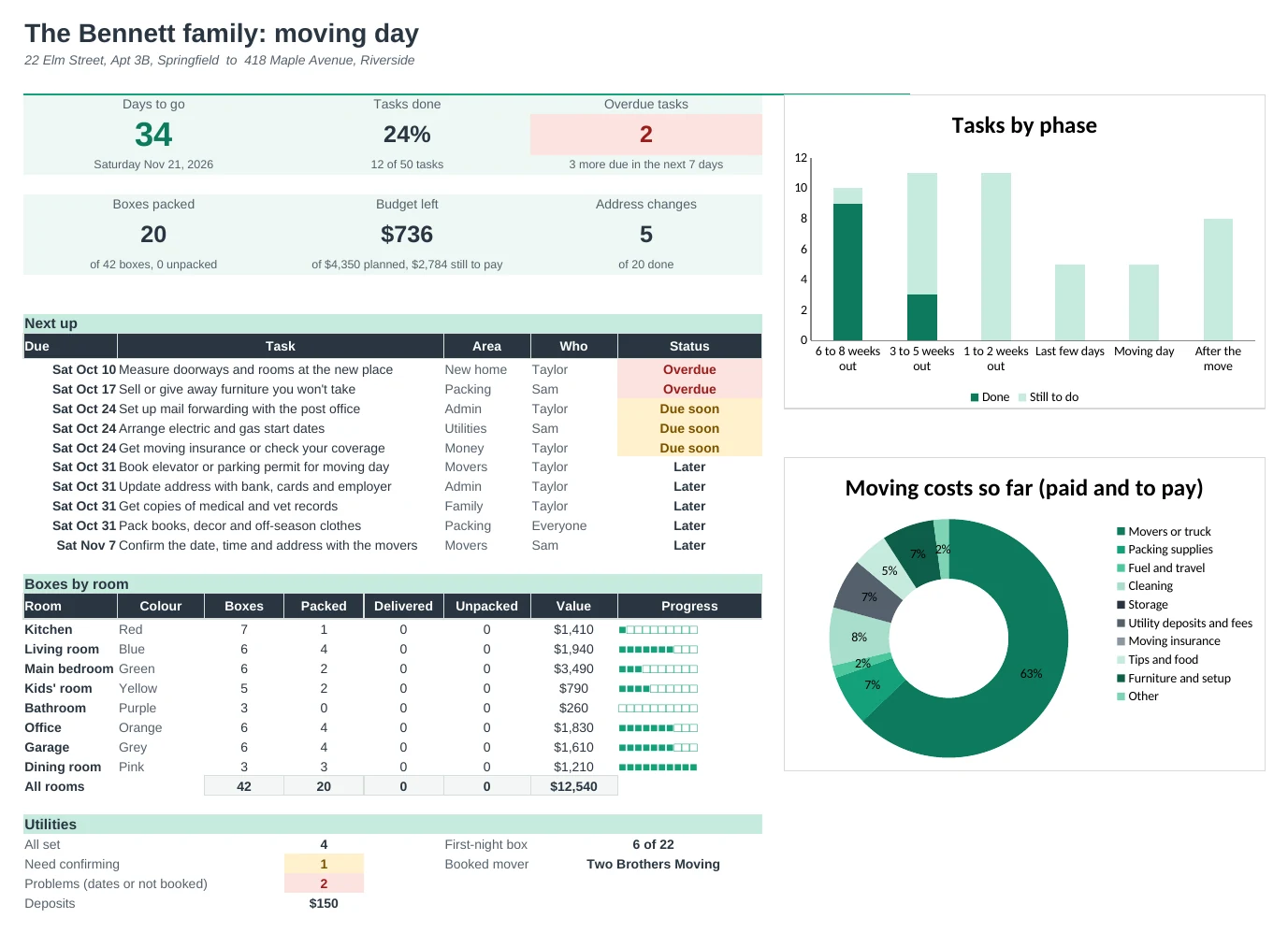
Type your move day once and every task gets a date, every box gets a number and a printable label, and the Dashboard counts down.
A countdown that keeps up
50 tasks from eight weeks before to a month after, each dated from your move day. Change the date and everything moves. Overdue and due-soon tasks stand out.
Never lose a box
Number every box with its room, contents, fragile and open-first flags. See each room's progress, from packed to unpacked, and the value of what's inside.
Labels you can print
Box Labels prints six big labels per page: room, box number of the total, what's inside, FRAGILE or OPEN FIRST, and your new address.
Compare movers properly
Put quotes side by side with extras, deposit and coverage. It shows the cheapest and flags quotes where the price can change on the day or the deposit looks large.
Stay on budget
Plan a budget by category and log every cost as paid or still to pay. You always see what's left.
Lights on when you arrive
Utilities checks each start and stop date against move day, so you know if power or internet would start late. Address Changes lists everyone who needs your new address.
| Free | Pro |
|---|---|
| Checklist dated from move day | Timeline with phases, people and a countdown |
| Box list | Numbered boxes with room progress and value |
| Address change list | Address changes with who does it |
| · | Printable box labels, six per page |
| · | Mover quotes compared with checks |
| · | Moving budget: paid and still to pay |
| · | Utilities checked against move day |
| · | First-night box checklist and Dashboard |
$19 one-time
11 tabs: Start Here, Dashboard, Timeline, Boxes, Box Labels, Budget, Quotes, Utilities, Address Changes, First Night and Setup. You get two copies: one filled in with a sample family's move so you can see it working, and a blank one ready for yours.
Get Moving Planner Pro for $19- Instant download after checkout
- Works in Google Sheets and Excel
- Yours to keep and reuse every year