
Free employee onboarding checklist template
Enter your new hire's start date and every task gets a due date, from sending the offer letter to the 90-day review. Each task has an owner, so HR, IT, the manager and the buddy all know what's theirs. Tick tasks off as they're done and the sheet shows what's overdue and how far along onboarding is.
Pro Hiring more than one person, or for different roles? See Employee Onboarding Pro →| Done | Phase | Task | Owner | Days from start | Due | Status | Notes |
|---|---|---|---|---|---|---|---|
| Before day 1 | Send offer letter and get it signed | HR | -21 | Oct 19, 2026 | Done | ||
| Before day 1 | Run background check, if your company uses one | HR | -14 | Oct 26, 2026 | Done | ||
| Before day 1 | Order laptop, monitor and headset | IT | -10 | Oct 30, 2026 | Done | Arrives Nov 4 | |
| Before day 1 | Send payroll forms (W-4, direct deposit) | HR | -7 | Nov 2, 2026 | Done | ||
| Before day 1 | Pick an onboarding buddy | Manager | -7 | Nov 2, 2026 | Done | Jamal | |
| Before day 1 | Send welcome email: start time, parking, dress code | Manager | -5 | Nov 4, 2026 | Done | ||
| Before day 1 | Create email, Slack and system accounts | IT | -3 | Nov 6, 2026 | Done | ||
| Before day 1 | Plan the first week's schedule | Manager | -3 | Nov 6, 2026 | Done | ||
| Day 1 | Welcome, office tour and introductions | Buddy | 0 | Nov 9, 2026 | Done | ||
| Day 1 | Complete Form I-9 and collect payroll forms | HR | 0 | Nov 9, 2026 | Done | Check I-9 deadlines with HR | |
| Day 1 | Set up laptop, passwords and sign-ins | IT | 0 | Nov 9, 2026 | Done | ||
| Day 1 | Team lunch | Manager | 0 | Nov 9, 2026 | Done | ||
| Day 1 | Go over the job description and 30-day goals | Manager | 0 | Nov 9, 2026 | Overdue | Rescheduled twice | |
| Week 1 | Shadow a teammate for a day | Buddy | 2 | Nov 11, 2026 | Done | ||
| Week 1 | Benefits walkthrough and enrollment dates | HR | 3 | Nov 12, 2026 | Done | ||
| Week 1 | Security and compliance training | New hire | 4 | Nov 13, 2026 | Overdue | ||
| Week 1 | Meet key people one-on-one | New hire | 5 | Nov 14, 2026 | Overdue | 4 of 6 done | |
| Week 1 | End-of-week check-in | Manager | 4 | Nov 13, 2026 | Done | ||
| Month 1 | Finish role-specific training | New hire | 9 | Nov 18, 2026 | Due soon | ||
| Month 1 | Deliver a first small project | New hire | 21 | Nov 30, 2026 | Upcoming | ||
| Month 1 | 30-day check-in with manager | Manager | 30 | Dec 9, 2026 | Upcoming | ||
| Month 1 | Ask the new hire for onboarding feedback | HR | 30 | Dec 9, 2026 | Upcoming | ||
| Months 2-3 | 60-day check-in | Manager | 60 | Jan 8, 2027 | Upcoming | ||
| Months 2-3 | Set goals for the next quarter | Manager | 80 | Jan 28, 2027 | Upcoming | ||
| Months 2-3 | 90-day review | Manager | 90 | Feb 7, 2027 | Upcoming |
| Detail | Value | Notes |
|---|---|---|
| Name | Alex Rivera | |
| Job title | Customer Success Specialist | |
| Department | Customer Success | |
| Manager | Karen Liu | |
| Onboarding buddy | Jamal Brooks | |
| Start date | Nov 9, 2026 | Every due date on the Checklist counts from this date |
| Today's date | Nov 16, 2026 | Type today's date, or =TODAY() to keep it current |
| Tasks done | 15 of 25 | |
| Progress | 60% | |
| Overdue tasks | 3 | |
| Day of onboarding | Day 8 | Day 1 is the start date |
| Phase or owner | Tasks | Done | Progress | Overdue | Due soon |
|---|---|---|---|---|---|
| Before day 1 | 8 | 8 | 100% | 0 | 0 |
| Day 1 | 5 | 4 | 80% | 1 | 0 |
| Week 1 | 5 | 3 | 60% | 2 | 0 |
| Month 1 | 4 | 0 | 0% | 0 | 1 |
| Months 2-3 | 3 | 0 | 0% | 0 | 0 |
| By owner | |||||
| HR | 6 | 5 | 83.3% | 0 | 0 |
| Manager | 10 | 5 | 50% | 1 | 0 |
| IT | 3 | 3 | 100% | 0 | 0 |
| Buddy | 2 | 2 | 100% | 0 | 0 |
| New hire | 4 | 0 | 0% | 2 | 1 |
| All tasks | 25 | 15 | 60% | 3 | 1 |
What's inside
- 25 ready-made onboarding tasks in five phases: before day 1, day 1, week 1, month 1 and months 2 to 3
- Due dates that work themselves out from the start date, so one sheet works for every new hire
- An owner on every task: HR, IT, manager, buddy or the new hire
- Statuses that flag overdue tasks and tasks due in the next 3 days
- A progress tab by phase and by owner, so you can see who is behind
- Works in Google Sheets and Excel
How to use it
Download your copy
Click "Free download" to save the .xlsx file. It opens in Excel, or in Google Sheets: open a blank sheet (sheets.new) and choose File, then Import, then Upload.
Fill in the new hire
On the New Hire tab, enter their name, role, manager, buddy and start date. Type today's date too, or enter =TODAY() so it stays current.
Fit the tasks to your company
Edit, add or delete tasks on the Checklist tab. Days from start sets each due date: -7 is a week before the start date, 0 is day 1 and 30 is a month in.
Share it with the owners
Share the sheet with HR, IT, the manager and the buddy. Each person can filter the Owner column to see their own tasks.
Tick tasks off
Check the Done box when a task is finished. Overdue tasks and tasks due soon show up in the Status column.
Check progress weekly
The Progress tab shows how much of each phase is done and who has overdue tasks. Use it in your weekly check-in.
Tips
Start before day 1
The days before someone starts matter most. A working laptop and a clear first-day plan make a better first impression than any welcome gift.
Keep a master copy
Keep one clean copy with your standard tasks and no dates. Copy it for each new hire so you never start from scratch.
Give every new hire a buddy
A buddy who isn't their manager gives them someone to ask the small questions. Add buddy tasks so it doesn't get forgotten.
Ask for feedback at 30 days
Ask what was missing or confusing, then fix the master checklist. Each hire gets a better start than the last.
Questions
What should be on an employee onboarding checklist?
Paperwork and accounts before day 1, a welcome and setup on day 1, training and introductions in week 1, a first project and check-in in month 1, and goal setting and a review around day 90. This template has tasks for each of these, and you can change any of them.
How long should onboarding last?
Many companies plan for about 90 days, which is how this checklist is laid out. Some roles need less, some much more. Change the Days from start numbers to fit.
Can I use it as a new hire checklist for HR?
Yes. Filter the Owner column to HR to get just the HR tasks, like the offer letter, payroll forms and benefits walkthrough.
Does this cover legal paperwork?
It includes common US tasks like Form I-9 and the W-4 as reminders, but it isn't legal advice. Rules and deadlines vary by state and role, so check what you need with HR or an employment lawyer.
Can I track several new hires at once?
The simplest way is one copy per person. You can also duplicate the Checklist and New Hire tabs inside one file, but then update the tab names in the formulas to match.
Can I use it in Excel?
Yes. Download the .xlsx file. The due dates, statuses and progress tab all work in Excel.
Pro version
Employee Onboarding Pro
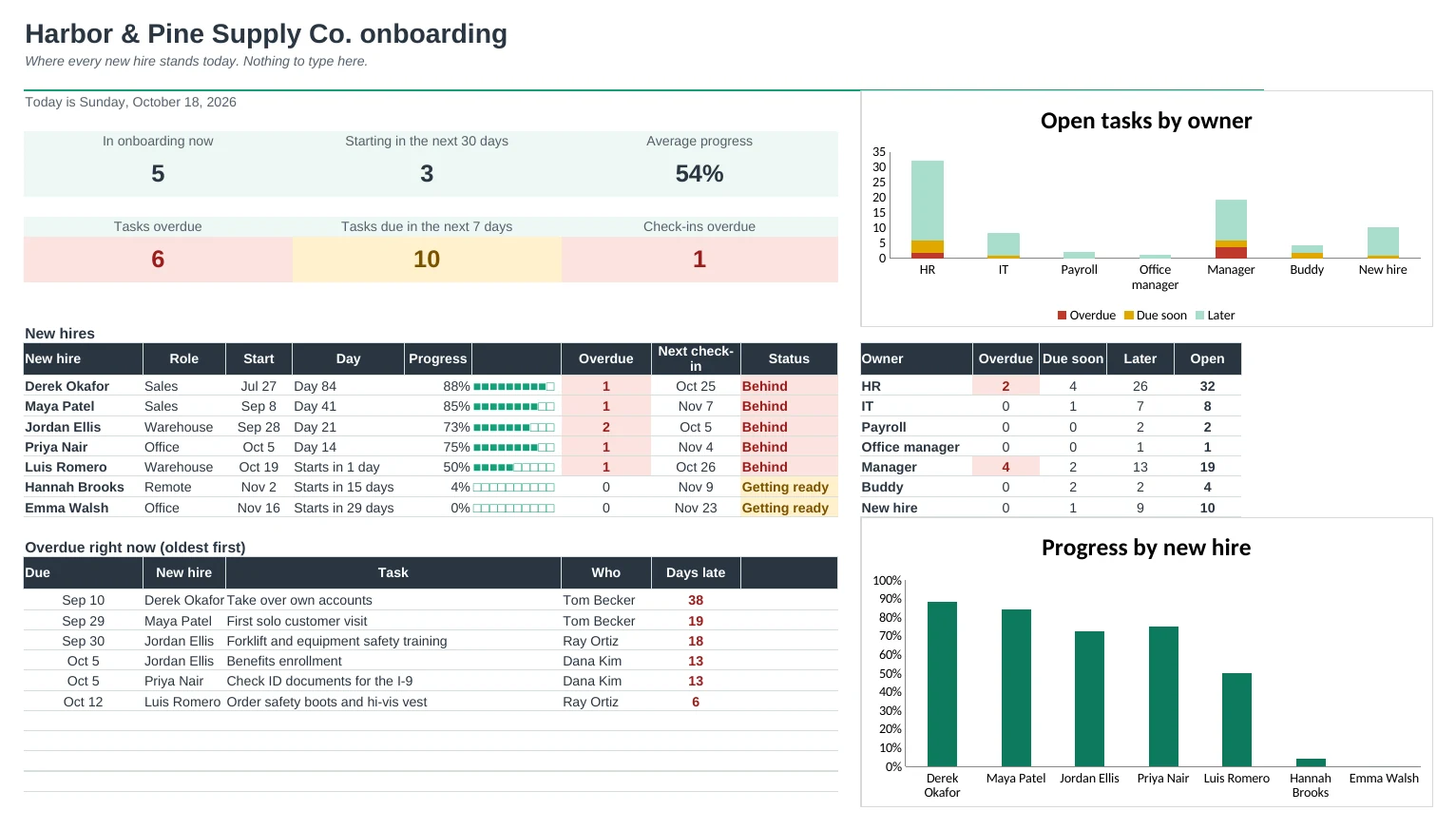
Keep one checklist per role, type each new hire's start date, and every task gets a date, an owner and a status.
A checklist for every role
List your onboarding tasks once and mark which roles need each one. A warehouse hire gets safety training, a remote hire gets a laptop shipped, and everyone gets the shared tasks.
Dates fill themselves in
Type a start date and every task gets a due date, from the offer letter weeks before day 1 to the 90-day review. Weekend dates can move to the Friday before.
Tick tasks off in one grid
The Tracker shows every task against every new hire. Type the date when a task is done. Overdue cells turn red, due soon turns amber, done turns green.
Everyone knows what's theirs
Pick HR, IT, a manager or a buddy on My Tasks and see their open tasks across all new hires, soonest first, with the person's name filled in.
30, 60 and 90 day check-ins
Check-in dates are worked out for each new hire. Record when you met and how it's going, and overdue check-ins show up on the Dashboard.
A welcome plan to hand over
Print a friendly plan for each new hire: where to go and when on day 1, their manager and buddy, their check-in dates and their first three months.
| Free | Pro |
|---|---|
| One new hire | Up to 20 new hires at once |
| One checklist for everyone | A checklist per role from one task library |
| Due dates from the start date | Due dates, with weekends moved to Friday |
| · | Tracker grid with overdue and due-soon colours |
| · | My Tasks: each owner's list across all new hires |
| · | 30, 60 and 90 day check-ins with notes |
| · | Printable welcome plan for each new hire |
| · | Dashboard with progress per hire and an overdue list |
$19 one-time
10 tabs: Start Here, Dashboard, New Hires, Tracker, All Tasks, My Tasks, Check-ins, Welcome Plan, Checklists and Setup. You get two copies: one filled in with a sample company onboarding seven people so you can see it working, and a blank one with a starter checklist ready for your own.
Get Employee Onboarding Pro for $19- Instant download after checkout
- Works in Google Sheets and Excel
- Yours to keep and reuse every year