
Expense report template
List what you spent on a work trip or project and this report works out what your employer owes you. It adds up each category, works out mileage, takes off anything paid on a company card and any cash advance, and flags items still missing a receipt.
| Item | Details |
|---|---|
| Employee | Jordan Lee |
| Department | Sales |
| Manager | Priya Shah |
| Business purpose | Client visits in Chicago |
| First expense | Oct 5, 2026 |
| Last expense | Oct 8, 2026 |
| Mileage rate per mile | $0.70 |
| Airfare | $348.20 |
| Lodging | $612.75 |
| Meals | $245.80 |
| Ground transport | $181.40 |
| Mileage | $26.60 |
| Supplies | $32.10 |
| Other | $8.00 |
| Total expenses | $1,454.85 |
| Paid on company card | $960.95 |
| Paid by employee | $493.90 |
| Less cash advance | $150.00 |
| Amount owed to employee | $343.90 |
| Items missing a receipt | 1 |
| Employee signature and date | |
| Approved by and date |
| Date | Description | Category | Paid with | Miles | Amount | Receipt |
|---|---|---|---|---|---|---|
| Oct 5, 2026 | Flight Boston to Chicago, round trip | Airfare | Company card | $348.20 | ||
| Oct 5, 2026 | Drive home to airport and back | Mileage | Personal car | 38 | $26.60 | |
| Oct 5, 2026 | Taxi, O'Hare to hotel | Ground transport | Personal card | $46.50 | ||
| Oct 5, 2026 | Client dinner, 2 people (Lakeside Foods) | Meals | Personal card | $118.40 | ||
| Oct 6, 2026 | Breakfast | Meals | Cash | $14.25 | ||
| Oct 6, 2026 | Rideshare to client office | Ground transport | Personal card | $18.90 | ||
| Oct 6, 2026 | Printing for client presentation | Supplies | Personal card | $32.10 | ||
| Oct 7, 2026 | Lunch | Meals | Personal card | $16.80 | ||
| Oct 7, 2026 | Team dinner, 4 people | Meals | Personal card | $96.35 | ||
| Oct 8, 2026 | Hotel, 3 nights | Lodging | Company card | $612.75 | ||
| Oct 8, 2026 | Taxi, hotel to O'Hare | Ground transport | Personal card | $44.00 | ||
| Oct 8, 2026 | Airport parking, 4 days | Ground transport | Personal card | $72.00 | ||
| Oct 8, 2026 | In-flight Wi-Fi | Other | Personal card | $8.00 |
What's inside
- Works out the amount owed to you after company card charges and any cash advance
- Mileage rows turn miles into dollars using the rate you set
- Totals for airfare, lodging, meals, ground transport, mileage, supplies and other
- Counts items that still need a receipt, before your manager has to ask
- Trip dates fill in from the expenses, plus lines for signature and approval
- Opens in Excel and Google Sheets with the same formulas
How to use it
Get your copy
Download the Excel file, or click "Make a copy" to save it to your Google Drive.
Fill in the report details
On the Report tab, add your name, department, manager and the reason for the expenses. Set the mileage rate to the one your company pays.
List each expense
On the Expenses tab, add a row per expense with the date, a description, the category and how you paid. Use the category names already on the Report tab so the totals pick them up.
Add mileage
For a drive, choose Mileage as the category, put the distance in Miles, and copy the Amount formula from the sample mileage row. It multiplies the miles by your rate.
Tick off receipts
Check the Receipt box as you attach each receipt. The Report tab shows how many are still missing.
Send it in
Check the Amount owed to employee line, sign, and send the report with your receipts. In Sheets you can use File, then Download, then PDF.
Tips
Write who was there
For meals with clients or coworkers, put the number of people and who they were in the description. Most expense policies ask for it.
Log company card charges too
They aren't owed to you, but listing them gives your manager the full cost of the trip. The report takes them off the amount owed.
Check your mileage rate
The 0.70 in the sample is only a placeholder. Many US employers use the IRS standard mileage rate for the year, so check what yours pays.
Snap receipts on the spot
Take a photo of each receipt as you get it and save them all to one folder. It makes the Receipt column quick to fill in.
Questions
What should an expense report include?
Your name, the business purpose, the dates, a line for each expense with date, description, category and amount, the total, and what's owed to you. Receipts usually go with it.
How do I add mileage to an expense report?
List each drive as its own row with the miles. Multiply the miles by your company's rate per mile. This template does the math once you set the rate.
Does this work in Excel?
Yes. Download the .xlsx file. It uses plain formulas that work the same in Excel and Google Sheets.
Is this expense report template free?
Yes, free to download or copy. No sign-up needed.
Can I use it for more than one trip?
Use one copy per report. Duplicate both tabs for each new trip, or keep a blank copy as your starting point.
Pro version
Expense Report Pro
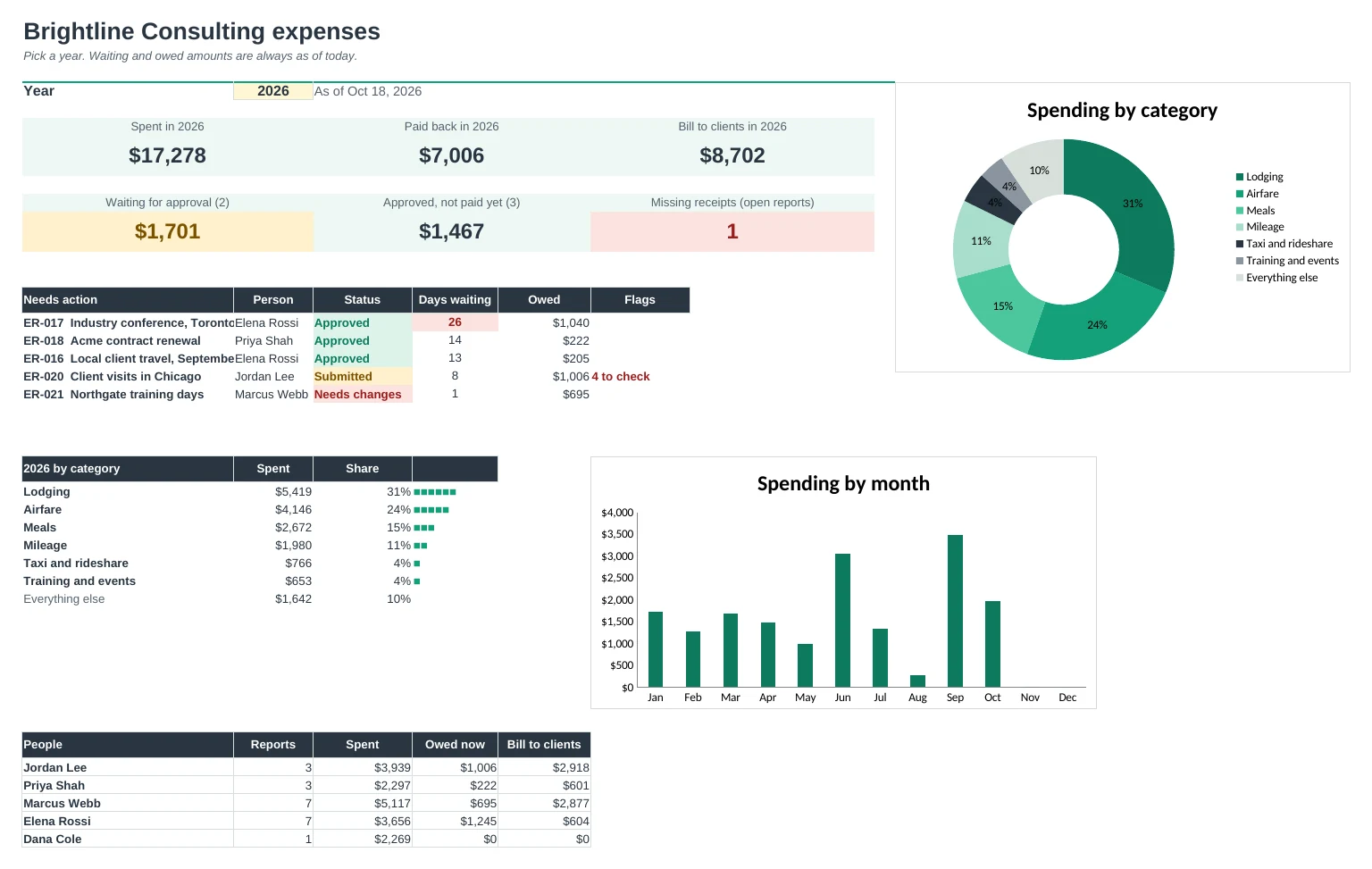
Every expense report in one workbook: log receipts and mileage once, print a clean report for approval, and see what's waiting and what's still owed.
Log receipts as you go
Add each receipt on one Expenses tab and each drive on Mileage, then pick the report it belongs to. The person and client fill in from the report.
A report ready to sign
Pick a report number and the Report tab prints every expense and drive, totals by category, company-card charges, the cash advance and what's owed, with signature lines.
Problems flagged before you submit
Missing receipts over your limit and anything over a daily limit, like meals over $90 a day, are marked in red so they get fixed first.
Approvals you can follow
Each report moves from Draft to Submitted, Approved and Paid, with dates. The Dashboard shows what's waiting and how long it has waited.
Trips abroad and mileage
Enter amounts in another currency and they're converted at the rate on Setup. Mileage uses your company's rate, with round trips doubled.
Bill clients and see the year
Mark expenses to bill back and see the total per client. Year shows spending by category and month, and by person.
| Free | Pro |
|---|---|
| One report at a time | Every report kept and reprintable |
| Category totals | Category totals plus a year by month |
| Mileage at one rate | Mileage log with round trips |
| Flags items missing a receipt | Receipt and daily-limit checks |
| · | Approval status and dates for each report |
| · | Foreign currency conversion |
| · | Expenses to bill back, by client |
| · | Dashboard: waiting, approved and unpaid, by person |
$19 one-time
8 tabs: Start Here, Dashboard, Report, Reports, Expenses, Mileage, Year and Setup. You get two copies: one filled in with a sample five-person consulting firm so you can see it working, and a blank one ready for your own expenses.
Get Expense Report Pro for $19- Instant download after checkout
- Works in Google Sheets and Excel
- Yours to keep and reuse every year