
Income tracker spreadsheet
Log each payment you get, from a paycheck to a freelance invoice to an Etsy payout. The sheet sorts it by month and by source, so you can see which side hustle is actually worth it. It also works out how much of your untaxed income to put aside for taxes.
| Date received | Source | Details | Amount | Set aside for tax |
|---|---|---|---|---|
| Jan 15, 2026 | Day job | Paycheck | $1,640.00 | $0.00 |
| Jan 22, 2026 | Freelance design | Logo for Harbor Coffee | $450.00 | $112.50 |
| Jan 30, 2026 | Day job | Paycheck | $1,640.00 | $0.00 |
| Jan 30, 2026 | Etsy shop | January payout | $286.40 | $71.60 |
| Feb 9, 2026 | Dog walking | Rover, 2 weeks | $210.00 | $52.50 |
| Feb 14, 2026 | Day job | Paycheck | $1,640.00 | $0.00 |
| Feb 20, 2026 | Freelance design | Menu redesign | $600.00 | $150.00 |
| Feb 27, 2026 | Day job | Paycheck | $1,640.00 | $0.00 |
| Feb 27, 2026 | Etsy shop | February payout | $341.75 | $85.44 |
| Mar 12, 2026 | Freelance design | Website banner set | $275.00 | $68.75 |
| Mar 15, 2026 | Day job | Paycheck | $1,640.00 | $0.00 |
| Mar 23, 2026 | Dog walking | Neighbor, 3 weeks | $180.00 | $45.00 |
| Mar 31, 2026 | Day job | Paycheck | $1,712.50 | $0.00 |
| Mar 31, 2026 | Etsy shop | March payout | $198.20 | $49.55 |
| Apr 3, 2026 | Freelance design | Wedding invitations | $520.00 | $130.00 |
| Month | Day job | Freelance design | Etsy shop | Dog walking | Total | Set aside for tax | Yours to keep |
|---|---|---|---|---|---|---|---|
| January 2026 | $3,280.00 | $450.00 | $286.40 | $0.00 | $4,016.40 | $184.10 | $3,832.30 |
| February 2026 | $3,280.00 | $600.00 | $341.75 | $210.00 | $4,431.75 | $287.94 | $4,143.81 |
| March 2026 | $3,352.50 | $275.00 | $198.20 | $180.00 | $4,005.70 | $163.30 | $3,842.40 |
| April 2026 | $0.00 | $520.00 | $0.00 | $0.00 | $520.00 | $130.00 | $390.00 |
| May 2026 | $0.00 | $0.00 | $0.00 | $0.00 | $0.00 | $0.00 | $0.00 |
| June 2026 | $0.00 | $0.00 | $0.00 | $0.00 | $0.00 | $0.00 | $0.00 |
| July 2026 | $0.00 | $0.00 | $0.00 | $0.00 | $0.00 | $0.00 | $0.00 |
| August 2026 | $0.00 | $0.00 | $0.00 | $0.00 | $0.00 | $0.00 | $0.00 |
| September 2026 | $0.00 | $0.00 | $0.00 | $0.00 | $0.00 | $0.00 | $0.00 |
| October 2026 | $0.00 | $0.00 | $0.00 | $0.00 | $0.00 | $0.00 | $0.00 |
| November 2026 | $0.00 | $0.00 | $0.00 | $0.00 | $0.00 | $0.00 | $0.00 |
| December 2026 | $0.00 | $0.00 | $0.00 | $0.00 | $0.00 | $0.00 | $0.00 |
| Year total | $9,912.50 | $1,845.00 | $826.35 | $390.00 | $12,973.85 | $765.34 | $12,208.51 |
| Source | Tax set-aside % | Total so far | Share of income | Payments | Set aside for tax |
|---|---|---|---|---|---|
| Day job | 0% | $9,912.50 | 76.4% | 6 | $0.00 |
| Freelance design | 25% | $1,845.00 | 14.2% | 4 | $461.25 |
| Etsy shop | 25% | $826.35 | 6.4% | 3 | $206.59 |
| Dog walking | 25% | $390.00 | 3% | 2 | $97.50 |
| Total | $12,973.85 | 100% | 15 | $765.34 |
What's inside
- One log for every kind of income: paychecks, freelance work, online sales, cash jobs
- A month-by-month view for the whole year, with a column for each source
- A tax set-aside for each source, so side income doesn't turn into a surprise bill
- Totals per source with its share of your income and number of payments
- Works in Google Sheets and Excel
How to use it
Make your copy
Click "Make a copy" to put the tracker in your Google Drive, or download the Excel file.
Name your sources
On the Sources tab, list up to four income sources and the share of each to put aside for taxes. Use 0% for a job that already takes tax out of your pay.
Match the column headers
On the By Month tab, rename the four source columns so they match the names on the Sources tab exactly. That's how the sheet knows which column is which.
Log every payment
On the Income Log tab, add a row each time money comes in: the date it arrived, the source and the amount. Delete the sample rows first.
Set the year
Change the first month on the By Month tab to January of your year. The other months follow on their own.
Tips
Log the date the money arrived
Use the day it hit your account, not the day you sent the invoice. That way the totals match your bank statements.
Move the tax money on payday
Each time you log side income, move the Set aside for tax amount to a separate savings account. Then estimated tax payments are already covered.
Check your tax rate
25% is a common starting point for self-employment income in the US, but the right number depends on your situation. Ask a tax professional if you're not sure.
Compare sources by effort
The Payments column shows how often each source pays. A side hustle with many small payments might be more work than it looks.
Questions
How do I track income from more than one job?
Log every payment in one list with a column for the source. Then total it by source and by month. This template does both for you.
Can I add a fifth income source?
Yes. Add it to the Sources tab inside the list, then insert a column on the By Month tab with the same name as its header and copy the formulas across. Update the Total column so it includes the new one.
How much of my side income should I save for taxes?
Many people in the US put aside 25% to 30% of self-employment income. Your real rate depends on your total income and deductions, so treat the default as a starting point.
Is this income tracker free?
Yes. Make a copy in Google Sheets or download it for Excel. No sign-up needed.
Does this track expenses too?
No, it's just income. To track spending, use the expense tracker. If you run a small business, the bookkeeping template keeps income and expenses together with a profit and loss summary.
Pro version
Income Tracker Pro
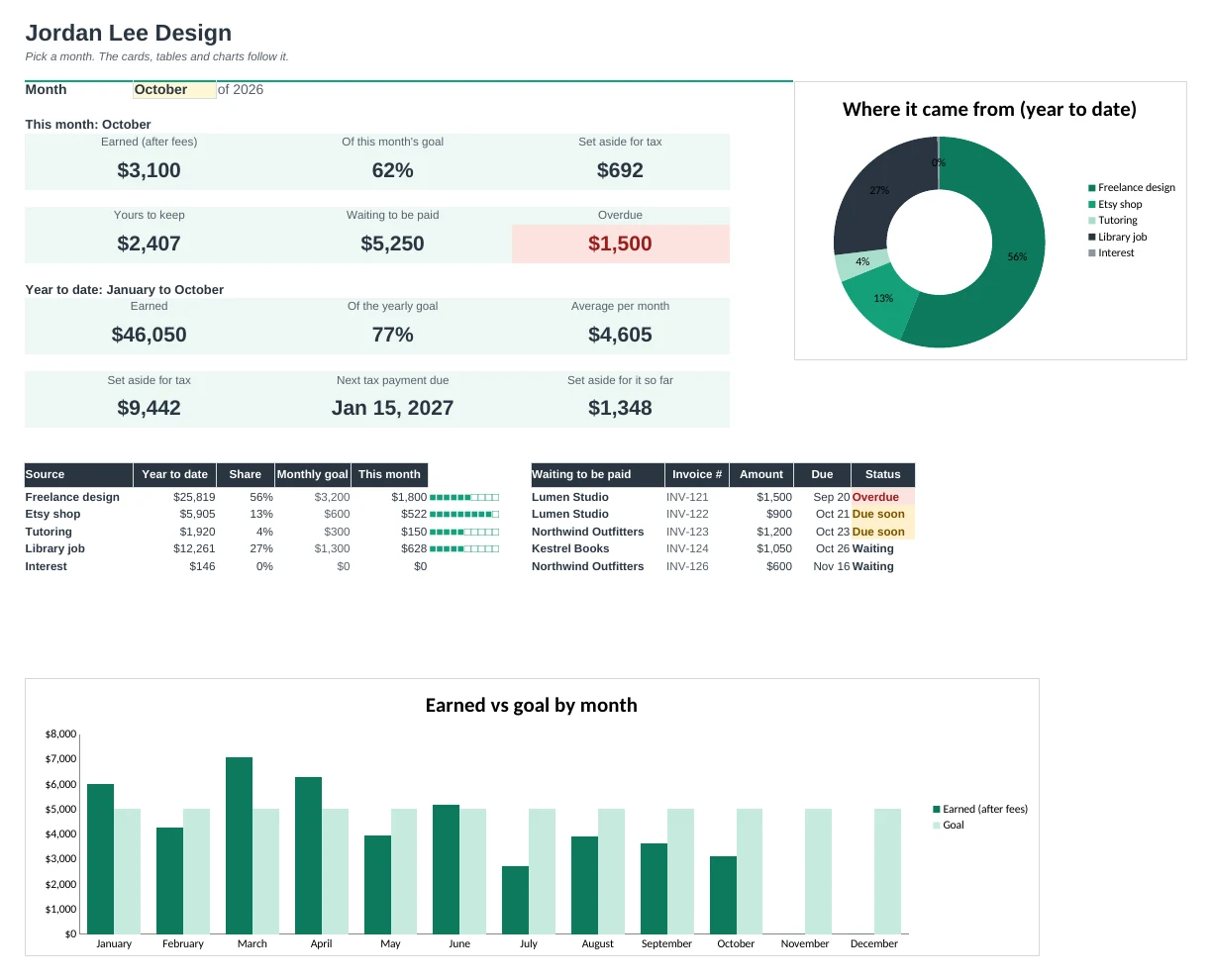
The income tracker for freelancers and side hustlers that follows every invoice, every payout and your tax money in one place.
One log for paychecks and invoices
Type each payment or invoice once. Paychecks and payouts count as paid straight away; invoices wait until you add the date paid.
See who still owes you
Unpaid invoices show Waiting, Due soon or Overdue, soonest first on the Dashboard. Clients shows who pays on time and who doesn't.
Know what to set aside for tax
Pick a set-aside percentage for each income source and every payment works out its share after fees. It's a planning aid; your accountant can confirm your rate.
Quarterly payments on one tab
Tax adds up your set-aside money for each estimated tax period, shows the due dates and tracks what you've paid. Change the dates to suit where you live.
Hit your goals
Set a monthly and yearly goal. Months shows each month against its goal, a running total and whether you're ahead or behind for the year.
See which work pays
Every source and client is added up for the month and the year, with a chart of where your income came from.
| Free | Pro |
|---|---|
| Income log | Income and invoice log with paid, due soon and overdue |
| Totals by month and source | Month view with goals, running total and year pace |
| Tax set-aside per source | Set-aside after fees, by quarter, with due dates |
| · | Dashboard with charts and a pick-a-month view |
| · | Client list with average days to pay |
| · | Unpaid invoices list, soonest due first |
| · | Payment fees tracked separately |
| · | Setup tab: sources, clients and terms in one place |
$19 one-time
7 tabs: Start Here, Dashboard, Income Log, Months, Clients, Tax and Setup. You get two copies: one filled in with a sample freelancer so you can see it working, and a blank one ready for your own numbers.
Get Income Tracker Pro for $19- Instant download after checkout
- Works in Google Sheets and Excel
- Yours to keep and reuse every year