
Free 2026 and 2027 yearly calendar for Google Sheets
See a whole year on one screen. Each month sits on its own row, and the days line up under the same weekday letters, so you can spot every Friday or every long weekend at a glance. There's a tab for 2026 and one for 2027, and you can switch either to any year.
| Month | Su | Mo | Tu | We | Th | Fr | Sa | Su | Mo | Tu | We | Th | Fr | Sa | Su | Mo | Tu | We | Th | Fr | Sa | Su | Mo | Tu | We | Th | Fr | Sa | Su | Mo | Tu | We | Th | Fr | Sa | Su | Mo | Weekdays | Notes |
|---|---|---|---|---|---|---|---|---|---|---|---|---|---|---|---|---|---|---|---|---|---|---|---|---|---|---|---|---|---|---|---|---|---|---|---|---|---|---|---|
| 2026 | Change the year in A2 and every month redraws | ||||||||||||||||||||||||||||||||||||||
| January 2026 | 1 | 2 | 3 | 4 | 5 | 6 | 7 | 8 | 9 | 10 | 11 | 12 | 13 | 14 | 15 | 16 | 17 | 18 | 19 | 20 | 21 | 22 | 23 | 24 | 25 | 26 | 27 | 28 | 29 | 30 | 31 | 22 | Jan 1 New Year's Day, Jan 19 Martin Luther King Jr. Day | ||||||
| February 2026 | 1 | 2 | 3 | 4 | 5 | 6 | 7 | 8 | 9 | 10 | 11 | 12 | 13 | 14 | 15 | 16 | 17 | 18 | 19 | 20 | 21 | 22 | 23 | 24 | 25 | 26 | 27 | 28 | 20 | Feb 14 Valentine's Day, Feb 16 Presidents' Day | |||||||||
| March 2026 | 1 | 2 | 3 | 4 | 5 | 6 | 7 | 8 | 9 | 10 | 11 | 12 | 13 | 14 | 15 | 16 | 17 | 18 | 19 | 20 | 21 | 22 | 23 | 24 | 25 | 26 | 27 | 28 | 29 | 30 | 31 | 22 | Mar 8 Clocks go forward | ||||||
| April 2026 | 1 | 2 | 3 | 4 | 5 | 6 | 7 | 8 | 9 | 10 | 11 | 12 | 13 | 14 | 15 | 16 | 17 | 18 | 19 | 20 | 21 | 22 | 23 | 24 | 25 | 26 | 27 | 28 | 29 | 30 | 22 | Apr 5 Easter Sunday | |||||||
| May 2026 | 1 | 2 | 3 | 4 | 5 | 6 | 7 | 8 | 9 | 10 | 11 | 12 | 13 | 14 | 15 | 16 | 17 | 18 | 19 | 20 | 21 | 22 | 23 | 24 | 25 | 26 | 27 | 28 | 29 | 30 | 31 | 21 | May 10 Mother's Day, May 25 Memorial Day | ||||||
| June 2026 | 1 | 2 | 3 | 4 | 5 | 6 | 7 | 8 | 9 | 10 | 11 | 12 | 13 | 14 | 15 | 16 | 17 | 18 | 19 | 20 | 21 | 22 | 23 | 24 | 25 | 26 | 27 | 28 | 29 | 30 | 22 | Jun 19 Juneteenth, Jun 21 Father's Day | |||||||
| July 2026 | 1 | 2 | 3 | 4 | 5 | 6 | 7 | 8 | 9 | 10 | 11 | 12 | 13 | 14 | 15 | 16 | 17 | 18 | 19 | 20 | 21 | 22 | 23 | 24 | 25 | 26 | 27 | 28 | 29 | 30 | 31 | 23 | Jul 4 Independence Day (observed Fri Jul 3) | ||||||
| August 2026 | 1 | 2 | 3 | 4 | 5 | 6 | 7 | 8 | 9 | 10 | 11 | 12 | 13 | 14 | 15 | 16 | 17 | 18 | 19 | 20 | 21 | 22 | 23 | 24 | 25 | 26 | 27 | 28 | 29 | 30 | 31 | 21 | |||||||
| September 2026 | 1 | 2 | 3 | 4 | 5 | 6 | 7 | 8 | 9 | 10 | 11 | 12 | 13 | 14 | 15 | 16 | 17 | 18 | 19 | 20 | 21 | 22 | 23 | 24 | 25 | 26 | 27 | 28 | 29 | 30 | 22 | Sep 7 Labor Day | |||||||
| October 2026 | 1 | 2 | 3 | 4 | 5 | 6 | 7 | 8 | 9 | 10 | 11 | 12 | 13 | 14 | 15 | 16 | 17 | 18 | 19 | 20 | 21 | 22 | 23 | 24 | 25 | 26 | 27 | 28 | 29 | 30 | 31 | 22 | Oct 12 Columbus Day / Indigenous Peoples' Day, Oct 31 Halloween | ||||||
| November 2026 | 1 | 2 | 3 | 4 | 5 | 6 | 7 | 8 | 9 | 10 | 11 | 12 | 13 | 14 | 15 | 16 | 17 | 18 | 19 | 20 | 21 | 22 | 23 | 24 | 25 | 26 | 27 | 28 | 29 | 30 | 21 | Nov 1 Clocks go back, Nov 11 Veterans Day, Nov 26 Thanksgiving | |||||||
| December 2026 | 1 | 2 | 3 | 4 | 5 | 6 | 7 | 8 | 9 | 10 | 11 | 12 | 13 | 14 | 15 | 16 | 17 | 18 | 19 | 20 | 21 | 22 | 23 | 24 | 25 | 26 | 27 | 28 | 29 | 30 | 31 | 23 | Dec 25 Christmas Day, Dec 31 New Year's Eve | ||||||
| Year total | 261 |
| Month | Su | Mo | Tu | We | Th | Fr | Sa | Su | Mo | Tu | We | Th | Fr | Sa | Su | Mo | Tu | We | Th | Fr | Sa | Su | Mo | Tu | We | Th | Fr | Sa | Su | Mo | Tu | We | Th | Fr | Sa | Su | Mo | Weekdays | Notes |
|---|---|---|---|---|---|---|---|---|---|---|---|---|---|---|---|---|---|---|---|---|---|---|---|---|---|---|---|---|---|---|---|---|---|---|---|---|---|---|---|
| 2027 | This year always follows the first tab, plus one | ||||||||||||||||||||||||||||||||||||||
| January 2027 | 1 | 2 | 3 | 4 | 5 | 6 | 7 | 8 | 9 | 10 | 11 | 12 | 13 | 14 | 15 | 16 | 17 | 18 | 19 | 20 | 21 | 22 | 23 | 24 | 25 | 26 | 27 | 28 | 29 | 30 | 31 | 21 | Jan 1 New Year's Day, Jan 18 Martin Luther King Jr. Day | ||||||
| February 2027 | 1 | 2 | 3 | 4 | 5 | 6 | 7 | 8 | 9 | 10 | 11 | 12 | 13 | 14 | 15 | 16 | 17 | 18 | 19 | 20 | 21 | 22 | 23 | 24 | 25 | 26 | 27 | 28 | 20 | Feb 14 Valentine's Day, Feb 15 Presidents' Day | |||||||||
| March 2027 | 1 | 2 | 3 | 4 | 5 | 6 | 7 | 8 | 9 | 10 | 11 | 12 | 13 | 14 | 15 | 16 | 17 | 18 | 19 | 20 | 21 | 22 | 23 | 24 | 25 | 26 | 27 | 28 | 29 | 30 | 31 | 23 | Mar 14 Clocks go forward, Mar 28 Easter Sunday | ||||||
| April 2027 | 1 | 2 | 3 | 4 | 5 | 6 | 7 | 8 | 9 | 10 | 11 | 12 | 13 | 14 | 15 | 16 | 17 | 18 | 19 | 20 | 21 | 22 | 23 | 24 | 25 | 26 | 27 | 28 | 29 | 30 | 22 | ||||||||
| May 2027 | 1 | 2 | 3 | 4 | 5 | 6 | 7 | 8 | 9 | 10 | 11 | 12 | 13 | 14 | 15 | 16 | 17 | 18 | 19 | 20 | 21 | 22 | 23 | 24 | 25 | 26 | 27 | 28 | 29 | 30 | 31 | 21 | May 9 Mother's Day, May 31 Memorial Day | ||||||
| June 2027 | 1 | 2 | 3 | 4 | 5 | 6 | 7 | 8 | 9 | 10 | 11 | 12 | 13 | 14 | 15 | 16 | 17 | 18 | 19 | 20 | 21 | 22 | 23 | 24 | 25 | 26 | 27 | 28 | 29 | 30 | 22 | Jun 19 Juneteenth (observed Fri Jun 18), Jun 20 Father's Day | |||||||
| July 2027 | 1 | 2 | 3 | 4 | 5 | 6 | 7 | 8 | 9 | 10 | 11 | 12 | 13 | 14 | 15 | 16 | 17 | 18 | 19 | 20 | 21 | 22 | 23 | 24 | 25 | 26 | 27 | 28 | 29 | 30 | 31 | 22 | Jul 4 Independence Day (observed Mon Jul 5) | ||||||
| August 2027 | 1 | 2 | 3 | 4 | 5 | 6 | 7 | 8 | 9 | 10 | 11 | 12 | 13 | 14 | 15 | 16 | 17 | 18 | 19 | 20 | 21 | 22 | 23 | 24 | 25 | 26 | 27 | 28 | 29 | 30 | 31 | 22 | |||||||
| September 2027 | 1 | 2 | 3 | 4 | 5 | 6 | 7 | 8 | 9 | 10 | 11 | 12 | 13 | 14 | 15 | 16 | 17 | 18 | 19 | 20 | 21 | 22 | 23 | 24 | 25 | 26 | 27 | 28 | 29 | 30 | 22 | Sep 6 Labor Day | |||||||
| October 2027 | 1 | 2 | 3 | 4 | 5 | 6 | 7 | 8 | 9 | 10 | 11 | 12 | 13 | 14 | 15 | 16 | 17 | 18 | 19 | 20 | 21 | 22 | 23 | 24 | 25 | 26 | 27 | 28 | 29 | 30 | 31 | 21 | Oct 11 Columbus Day / Indigenous Peoples' Day, Oct 31 Halloween | ||||||
| November 2027 | 1 | 2 | 3 | 4 | 5 | 6 | 7 | 8 | 9 | 10 | 11 | 12 | 13 | 14 | 15 | 16 | 17 | 18 | 19 | 20 | 21 | 22 | 23 | 24 | 25 | 26 | 27 | 28 | 29 | 30 | 22 | Nov 7 Clocks go back, Nov 11 Veterans Day, Nov 25 Thanksgiving | |||||||
| December 2027 | 1 | 2 | 3 | 4 | 5 | 6 | 7 | 8 | 9 | 10 | 11 | 12 | 13 | 14 | 15 | 16 | 17 | 18 | 19 | 20 | 21 | 22 | 23 | 24 | 25 | 26 | 27 | 28 | 29 | 30 | 31 | 23 | Dec 25 Christmas Day (observed Fri Dec 24), Dec 31 New Year's Eve | ||||||
| Year total | 261 |
What's inside
- A full year on one screen: 12 rows, one per month
- Days line up under weekday letters, so every column is the same day of the week
- Tabs for 2026 and 2027; the 2027 tab follows the 2026 tab's year automatically
- Type any year in one cell and the whole tab redraws
- A count of weekdays (Monday to Friday) in each month and for the year
- A notes column with the main US holidays and clock changes already filled in
How to use it
Make your copy
Click "Make a copy" to save it to your Google Drive. You can also download the Excel file.
Check the year
The year sits in cell A2 of the first tab. Type a different year there if you need one. The second tab is always the year after.
Mark your dates
Click any day and give it a fill color for vacations, school breaks or paydays. Add a short note in the Notes column for that month.
Fix up the notes
The sample notes list US holidays for 2026 and 2027. Add your birthdays and events, and update the notes if you switch to another year.
Print it
Go to File, then Print, choose landscape and "Fit to width". The whole year fits on one page.
Tips
Color code with a key
Pick three or four colors (time off, school breaks, travel, deadlines) and type the key in the Notes column of row 2 so everyone reads it the same way.
Plan around weekdays
The Weekdays column counts Monday to Friday in each month. It doesn't know about holidays, so subtract those yourself when planning work days.
Find long weekends fast
Look down the Fr and Mo columns next to your holiday notes. Any holiday on a Monday or Friday is a three-day weekend.
Rename the tabs if you change years
The tab names are just labels. If you set the first tab to 2028, right-click each tab and rename it so the names match.
Questions
Can I use this for a different year?
Yes. Type the year into cell A2 on the first tab and both tabs update. The second tab always shows the following year.
Why are some day cells blank?
Each row has 37 slots so every month can start under the right weekday. Slots before the 1st and after the last day of the month stay empty.
Does it include holidays?
The Notes column lists the main US holidays and clock changes for 2026 and 2027. They are typed in, so they won't change if you switch the year.
Can I add events to a day?
The day cells hold formulas, so it's best to color them and write the event in the Notes column. For day-by-day events, use our monthly calendar, which has an events list.
Will it print on one page?
Yes, in landscape with "Fit to width" turned on in the print settings.
Does it work in Excel?
Yes. Download the .xlsx file. The formulas work the same way, including changing the year.
Pro version
Yearly Calendar Pro
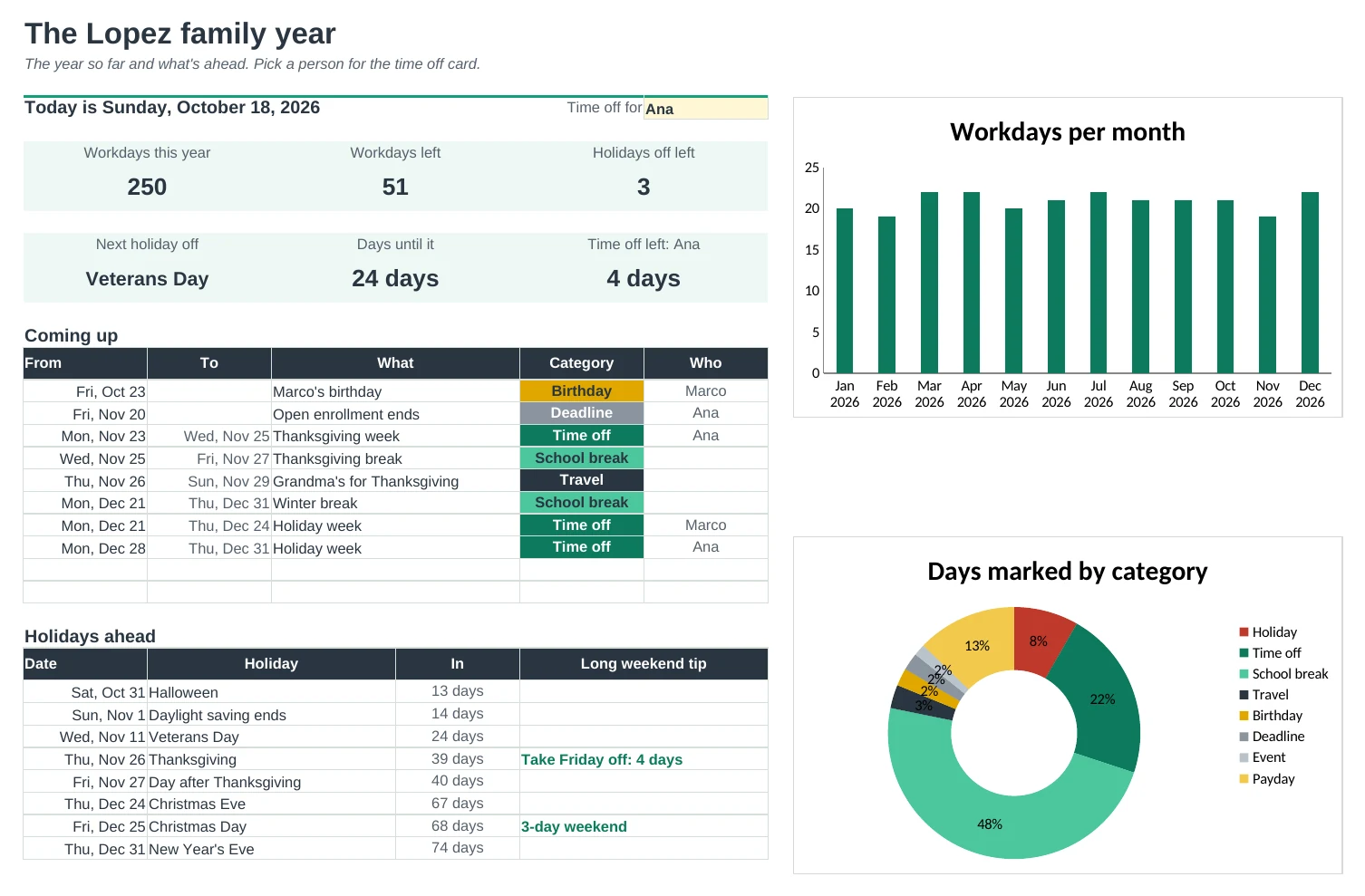
Plan the whole year on one page: holidays work themselves out, trips and breaks colour themselves, and time off adds itself up.
Holidays for any year, already worked out
US holidays fill in for the year you pick, including the ones that move, like Easter, Thanksgiving and Memorial Day. When one lands on a weekend, the day off moves to the Friday or Monday.
Trips and breaks colour themselves
Type a from and a to date for a vacation, school break or time off. Every day in between takes the category's colour on the planner and the wall calendar.
Time off that adds up
Give each person their days off a year. Time Off counts the workdays they've booked, skipping weekends and holidays, and shows what's left to plan.
Find the long weekends
Every holiday gets a tip: a 3-day weekend, or 'take Friday off: 4 days'. The Dashboard lists the next ones with how many days away they are.
Workdays and paydays counted
See workdays per month after holidays, and set how you're paid to mark every payday. Months with three paychecks are flagged.
A school year or a calendar year
Start the year in any month, like August for a school year, and pick Sunday or Monday weeks. Print the 12-month wall calendar on one page.
| Free | Pro |
|---|---|
| 2026 and 2027 tabs | Any year, starting in any month |
| Holidays typed in for two years | Holidays worked out for any year, with days off |
| Colour days by hand | Date ranges colour themselves by category |
| Weekdays per month | Workdays per month after holidays |
| · | Time off tracker for each person |
| · | Long weekend tips for every holiday |
| · | Paydays marked, 3-paycheck months flagged |
| · | Wall calendar: 12 months on one page |
| · | Dashboard with what's coming up |
$19 one-time
9 tabs: Start Here, Dashboard, Year Planner, Wall Calendar, Dates, Time Off, Holidays, Setup and Days. You get two copies: one filled in with a sample family so you can see it working, and a blank one with the holidays and categories ready for your own dates.
Get Yearly Calendar Pro for $19- Instant download after checkout
- Works in Google Sheets and Excel
- Yours to keep and reuse every year