
Free debt payoff template for Google Sheets
List your debts and how much extra you can pay each month. The sheet builds two full month-by-month payoff plans, snowball and avalanche, and shows when each debt is gone, when you're debt-free and how much interest each plan costs.
Pro Want to know exactly what to pay each debt this month and when you'll be debt-free? See Debt Payoff Pro →| Debt | Balance | APR | Minimum payment | Interest this month | Snowball order | Avalanche order |
|---|---|---|---|---|---|---|
| Store card | $1,900.00 | 25% | $60.00 | $39.57 | 2 | 1 |
| Visa card | $4,200.00 | 22.9% | $105.00 | $80.15 | 3 | 2 |
| Car loan | $9,800.00 | 6.9% | $285.00 | $56.35 | 4 | 3 |
| Student loan | $14,500.00 | 5.5% | $160.00 | $66.46 | 5 | 4 |
| Medical bill | $640.00 | 0% | $40.00 | $0.00 | 1 | 5 |
| Total | $31,040.00 | 9.4% | $650.00 | $242.53 | ||
| Extra payment each month | $300.00 | |||||
| First month of the plan | November 2026 | |||||
| Total paid toward debt each month | $950.00 |
| Month | Date | Debt 1 interest | Debt 1 payment | Debt 1 balance | Debt 2 interest | Debt 2 payment | Debt 2 balance | Debt 3 interest | Debt 3 payment | Debt 3 balance | Debt 4 interest | Debt 4 payment | Debt 4 balance | Debt 5 interest | Debt 5 payment | Debt 5 balance | Total paid | Total interest | Total balance |
|---|---|---|---|---|---|---|---|---|---|---|---|---|---|---|---|---|---|---|---|
| Start | Store card | Pay #2 | $1,900.00 | Visa card | Pay #3 | $4,200.00 | Car loan | Pay #4 | $9,800.00 | Student loan | Pay #5 | $14,500.00 | Medical bill | Pay #1 | $640.00 | $31,040.00 | |||
| 1 | November 2026 | $39.57 | $60.00 | $1,879.57 | $80.15 | $105.00 | $4,175.15 | $56.35 | $285.00 | $9,571.35 | $66.46 | $160.00 | $14,406.46 | $0.00 | $340.00 | $300.00 | $950.00 | $242.53 | $30,332.53 |
| 2 | December 2026 | $39.14 | $100.00 | $1,818.71 | $79.68 | $105.00 | $4,149.83 | $55.04 | $285.00 | $9,341.39 | $66.03 | $160.00 | $14,312.49 | $0.00 | $300.00 | $0.00 | $950.00 | $239.89 | $29,622.42 |
| 3 | January 2027 | $37.87 | $400.00 | $1,456.58 | $79.19 | $105.00 | $4,124.02 | $53.71 | $285.00 | $9,110.10 | $65.60 | $160.00 | $14,218.09 | $0.00 | $0.00 | $0.00 | $950.00 | $236.37 | $28,908.79 |
| 4 | February 2027 | $30.33 | $400.00 | $1,086.91 | $78.70 | $105.00 | $4,097.72 | $52.38 | $285.00 | $8,877.48 | $65.17 | $160.00 | $14,123.26 | $0.00 | $0.00 | $0.00 | $950.00 | $226.58 | $28,185.37 |
| 5 | March 2027 | $22.63 | $400.00 | $709.54 | $78.20 | $105.00 | $4,070.92 | $51.05 | $285.00 | $8,643.53 | $64.73 | $160.00 | $14,027.99 | $0.00 | $0.00 | $0.00 | $950.00 | $216.61 | $27,451.98 |
| 6 | April 2027 | $14.78 | $400.00 | $324.32 | $77.69 | $105.00 | $4,043.61 | $49.70 | $285.00 | $8,408.23 | $64.29 | $160.00 | $13,932.28 | $0.00 | $0.00 | $0.00 | $950.00 | $206.46 | $26,708.44 |
| 7 | May 2027 | $6.75 | $331.07 | $0.00 | $77.17 | $173.93 | $3,946.85 | $48.35 | $285.00 | $8,171.58 | $63.86 | $160.00 | $13,836.14 | $0.00 | $0.00 | $0.00 | $950.00 | $196.13 | $25,954.57 |
| 8 | June 2027 | $0.00 | $0.00 | $0.00 | $75.32 | $505.00 | $3,517.17 | $46.99 | $285.00 | $7,933.57 | $63.42 | $160.00 | $13,739.56 | $0.00 | $0.00 | $0.00 | $950.00 | $185.73 | $25,190.30 |
| 9 | July 2027 | $0.00 | $0.00 | $0.00 | $67.12 | $505.00 | $3,079.29 | $45.62 | $285.00 | $7,694.19 | $62.97 | $160.00 | $13,642.53 | $0.00 | $0.00 | $0.00 | $950.00 | $175.71 | $24,416.01 |
| 10 | August 2027 | $0.00 | $0.00 | $0.00 | $58.76 | $505.00 | $2,633.05 | $44.24 | $285.00 | $7,453.43 | $62.53 | $160.00 | $13,545.06 | $0.00 | $0.00 | $0.00 | $950.00 | $165.53 | $23,631.54 |
| 11 | September 2027 | $0.00 | $0.00 | $0.00 | $50.25 | $505.00 | $2,178.30 | $42.86 | $285.00 | $7,211.29 | $62.08 | $160.00 | $13,447.14 | $0.00 | $0.00 | $0.00 | $950.00 | $155.19 | $22,836.73 |
| 12 | October 2027 | $0.00 | $0.00 | $0.00 | $41.57 | $505.00 | $1,714.87 | $41.46 | $285.00 | $6,967.75 | $61.63 | $160.00 | $13,348.77 | $0.00 | $0.00 | $0.00 | $950.00 | $144.66 | $22,031.39 |
| 13 | November 2027 | $0.00 | $0.00 | $0.00 | $32.73 | $505.00 | $1,242.60 | $40.06 | $285.00 | $6,722.81 | $61.18 | $160.00 | $13,249.95 | $0.00 | $0.00 | $0.00 | $950.00 | $133.97 | $21,215.36 |
| 14 | December 2027 | $0.00 | $0.00 | $0.00 | $23.71 | $505.00 | $761.31 | $38.66 | $285.00 | $6,476.47 | $60.73 | $160.00 | $13,150.68 | $0.00 | $0.00 | $0.00 | $950.00 | $123.10 | $20,388.46 |
| 15 | January 2028 | $0.00 | $0.00 | $0.00 | $14.53 | $505.00 | $270.84 | $37.24 | $285.00 | $6,228.71 | $60.27 | $160.00 | $13,050.95 | $0.00 | $0.00 | $0.00 | $950.00 | $112.04 | $19,550.50 |
| 16 | February 2028 | $0.00 | $0.00 | $0.00 | $5.17 | $276.01 | $0.00 | $35.82 | $513.99 | $5,750.54 | $59.82 | $160.00 | $12,950.77 | $0.00 | $0.00 | $0.00 | $950.00 | $100.81 | $18,701.31 |
| 17 | March 2028 | $0.00 | $0.00 | $0.00 | $0.00 | $0.00 | $0.00 | $33.07 | $790.00 | $4,993.61 | $59.36 | $160.00 | $12,850.13 | $0.00 | $0.00 | $0.00 | $950.00 | $92.43 | $17,843.74 |
| 18 | April 2028 | $0.00 | $0.00 | $0.00 | $0.00 | $0.00 | $0.00 | $28.71 | $790.00 | $4,232.32 | $58.90 | $160.00 | $12,749.03 | $0.00 | $0.00 | $0.00 | $950.00 | $87.61 | $16,981.35 |
| 19 | May 2028 | $0.00 | $0.00 | $0.00 | $0.00 | $0.00 | $0.00 | $24.34 | $790.00 | $3,466.66 | $58.43 | $160.00 | $12,647.46 | $0.00 | $0.00 | $0.00 | $950.00 | $82.77 | $16,114.12 |
| 20 | June 2028 | $0.00 | $0.00 | $0.00 | $0.00 | $0.00 | $0.00 | $19.93 | $790.00 | $2,696.59 | $57.97 | $160.00 | $12,545.43 | $0.00 | $0.00 | $0.00 | $950.00 | $77.90 | $15,242.02 |
| 21 | July 2028 | $0.00 | $0.00 | $0.00 | $0.00 | $0.00 | $0.00 | $15.51 | $790.00 | $1,922.10 | $57.50 | $160.00 | $12,442.93 | $0.00 | $0.00 | $0.00 | $950.00 | $73.01 | $14,365.03 |
| 22 | August 2028 | $0.00 | $0.00 | $0.00 | $0.00 | $0.00 | $0.00 | $11.05 | $790.00 | $1,143.15 | $57.03 | $160.00 | $12,339.96 | $0.00 | $0.00 | $0.00 | $950.00 | $68.08 | $13,483.11 |
| 23 | September 2028 | $0.00 | $0.00 | $0.00 | $0.00 | $0.00 | $0.00 | $6.57 | $790.00 | $359.72 | $56.56 | $160.00 | $12,236.52 | $0.00 | $0.00 | $0.00 | $950.00 | $63.13 | $12,596.24 |
| 24 | October 2028 | $0.00 | $0.00 | $0.00 | $0.00 | $0.00 | $0.00 | $2.07 | $361.79 | $0.00 | $56.08 | $588.21 | $11,704.39 | $0.00 | $0.00 | $0.00 | $950.00 | $58.15 | $11,704.39 |
| 25 | November 2028 | $0.00 | $0.00 | $0.00 | $0.00 | $0.00 | $0.00 | $0.00 | $0.00 | $0.00 | $53.65 | $950.00 | $10,808.04 | $0.00 | $0.00 | $0.00 | $950.00 | $53.65 | $10,808.04 |
| 26 | December 2028 | $0.00 | $0.00 | $0.00 | $0.00 | $0.00 | $0.00 | $0.00 | $0.00 | $0.00 | $49.54 | $950.00 | $9,907.58 | $0.00 | $0.00 | $0.00 | $950.00 | $49.54 | $9,907.58 |
| 27 | January 2029 | $0.00 | $0.00 | $0.00 | $0.00 | $0.00 | $0.00 | $0.00 | $0.00 | $0.00 | $45.41 | $950.00 | $9,002.99 | $0.00 | $0.00 | $0.00 | $950.00 | $45.41 | $9,002.99 |
| 28 | February 2029 | $0.00 | $0.00 | $0.00 | $0.00 | $0.00 | $0.00 | $0.00 | $0.00 | $0.00 | $41.26 | $950.00 | $8,094.25 | $0.00 | $0.00 | $0.00 | $950.00 | $41.26 | $8,094.25 |
| 29 | March 2029 | $0.00 | $0.00 | $0.00 | $0.00 | $0.00 | $0.00 | $0.00 | $0.00 | $0.00 | $37.10 | $950.00 | $7,181.35 | $0.00 | $0.00 | $0.00 | $950.00 | $37.10 | $7,181.35 |
| 30 | April 2029 | $0.00 | $0.00 | $0.00 | $0.00 | $0.00 | $0.00 | $0.00 | $0.00 | $0.00 | $32.91 | $950.00 | $6,264.26 | $0.00 | $0.00 | $0.00 | $950.00 | $32.91 | $6,264.26 |
| 31 | May 2029 | $0.00 | $0.00 | $0.00 | $0.00 | $0.00 | $0.00 | $0.00 | $0.00 | $0.00 | $28.71 | $950.00 | $5,342.97 | $0.00 | $0.00 | $0.00 | $950.00 | $28.71 | $5,342.97 |
| 32 | June 2029 | $0.00 | $0.00 | $0.00 | $0.00 | $0.00 | $0.00 | $0.00 | $0.00 | $0.00 | $24.49 | $950.00 | $4,417.46 | $0.00 | $0.00 | $0.00 | $950.00 | $24.49 | $4,417.46 |
| 33 | July 2029 | $0.00 | $0.00 | $0.00 | $0.00 | $0.00 | $0.00 | $0.00 | $0.00 | $0.00 | $20.25 | $950.00 | $3,487.71 | $0.00 | $0.00 | $0.00 | $950.00 | $20.25 | $3,487.71 |
| 34 | August 2029 | $0.00 | $0.00 | $0.00 | $0.00 | $0.00 | $0.00 | $0.00 | $0.00 | $0.00 | $15.99 | $950.00 | $2,553.70 | $0.00 | $0.00 | $0.00 | $950.00 | $15.99 | $2,553.70 |
| 35 | September 2029 | $0.00 | $0.00 | $0.00 | $0.00 | $0.00 | $0.00 | $0.00 | $0.00 | $0.00 | $11.70 | $950.00 | $1,615.40 | $0.00 | $0.00 | $0.00 | $950.00 | $11.70 | $1,615.40 |
| 36 | October 2029 | $0.00 | $0.00 | $0.00 | $0.00 | $0.00 | $0.00 | $0.00 | $0.00 | $0.00 | $7.40 | $950.00 | $672.80 | $0.00 | $0.00 | $0.00 | $950.00 | $7.40 | $672.80 |
| 37 | November 2029 | $0.00 | $0.00 | $0.00 | $0.00 | $0.00 | $0.00 | $0.00 | $0.00 | $0.00 | $3.08 | $675.88 | $0.00 | $0.00 | $0.00 | $0.00 | $675.88 | $3.08 | $0.00 |
| 38 | December 2029 | $0.00 | $0.00 | $0.00 | $0.00 | $0.00 | $0.00 | $0.00 | $0.00 | $0.00 | $0.00 | $0.00 | $0.00 | $0.00 | $0.00 | $0.00 | $0.00 | $0.00 | $0.00 |
| 39 | January 2030 | $0.00 | $0.00 | $0.00 | $0.00 | $0.00 | $0.00 | $0.00 | $0.00 | $0.00 | $0.00 | $0.00 | $0.00 | $0.00 | $0.00 | $0.00 | $0.00 | $0.00 | $0.00 |
| 40 | February 2030 | $0.00 | $0.00 | $0.00 | $0.00 | $0.00 | $0.00 | $0.00 | $0.00 | $0.00 | $0.00 | $0.00 | $0.00 | $0.00 | $0.00 | $0.00 | $0.00 | $0.00 | $0.00 |
| 41 | March 2030 | $0.00 | $0.00 | $0.00 | $0.00 | $0.00 | $0.00 | $0.00 | $0.00 | $0.00 | $0.00 | $0.00 | $0.00 | $0.00 | $0.00 | $0.00 | $0.00 | $0.00 | $0.00 |
| 42 | April 2030 | $0.00 | $0.00 | $0.00 | $0.00 | $0.00 | $0.00 | $0.00 | $0.00 | $0.00 | $0.00 | $0.00 | $0.00 | $0.00 | $0.00 | $0.00 | $0.00 | $0.00 | $0.00 |
| 43 | May 2030 | $0.00 | $0.00 | $0.00 | $0.00 | $0.00 | $0.00 | $0.00 | $0.00 | $0.00 | $0.00 | $0.00 | $0.00 | $0.00 | $0.00 | $0.00 | $0.00 | $0.00 | $0.00 |
| 44 | June 2030 | $0.00 | $0.00 | $0.00 | $0.00 | $0.00 | $0.00 | $0.00 | $0.00 | $0.00 | $0.00 | $0.00 | $0.00 | $0.00 | $0.00 | $0.00 | $0.00 | $0.00 | $0.00 |
| 45 | July 2030 | $0.00 | $0.00 | $0.00 | $0.00 | $0.00 | $0.00 | $0.00 | $0.00 | $0.00 | $0.00 | $0.00 | $0.00 | $0.00 | $0.00 | $0.00 | $0.00 | $0.00 | $0.00 |
| 46 | August 2030 | $0.00 | $0.00 | $0.00 | $0.00 | $0.00 | $0.00 | $0.00 | $0.00 | $0.00 | $0.00 | $0.00 | $0.00 | $0.00 | $0.00 | $0.00 | $0.00 | $0.00 | $0.00 |
| 47 | September 2030 | $0.00 | $0.00 | $0.00 | $0.00 | $0.00 | $0.00 | $0.00 | $0.00 | $0.00 | $0.00 | $0.00 | $0.00 | $0.00 | $0.00 | $0.00 | $0.00 | $0.00 | $0.00 |
| 48 | October 2030 | $0.00 | $0.00 | $0.00 | $0.00 | $0.00 | $0.00 | $0.00 | $0.00 | $0.00 | $0.00 | $0.00 | $0.00 | $0.00 | $0.00 | $0.00 | $0.00 | $0.00 | $0.00 |
| 49 | November 2030 | $0.00 | $0.00 | $0.00 | $0.00 | $0.00 | $0.00 | $0.00 | $0.00 | $0.00 | $0.00 | $0.00 | $0.00 | $0.00 | $0.00 | $0.00 | $0.00 | $0.00 | $0.00 |
| 50 | December 2030 | $0.00 | $0.00 | $0.00 | $0.00 | $0.00 | $0.00 | $0.00 | $0.00 | $0.00 | $0.00 | $0.00 | $0.00 | $0.00 | $0.00 | $0.00 | $0.00 | $0.00 | $0.00 |
| 51 | January 2031 | $0.00 | $0.00 | $0.00 | $0.00 | $0.00 | $0.00 | $0.00 | $0.00 | $0.00 | $0.00 | $0.00 | $0.00 | $0.00 | $0.00 | $0.00 | $0.00 | $0.00 | $0.00 |
| 52 | February 2031 | $0.00 | $0.00 | $0.00 | $0.00 | $0.00 | $0.00 | $0.00 | $0.00 | $0.00 | $0.00 | $0.00 | $0.00 | $0.00 | $0.00 | $0.00 | $0.00 | $0.00 | $0.00 |
| 53 | March 2031 | $0.00 | $0.00 | $0.00 | $0.00 | $0.00 | $0.00 | $0.00 | $0.00 | $0.00 | $0.00 | $0.00 | $0.00 | $0.00 | $0.00 | $0.00 | $0.00 | $0.00 | $0.00 |
| 54 | April 2031 | $0.00 | $0.00 | $0.00 | $0.00 | $0.00 | $0.00 | $0.00 | $0.00 | $0.00 | $0.00 | $0.00 | $0.00 | $0.00 | $0.00 | $0.00 | $0.00 | $0.00 | $0.00 |
| 55 | May 2031 | $0.00 | $0.00 | $0.00 | $0.00 | $0.00 | $0.00 | $0.00 | $0.00 | $0.00 | $0.00 | $0.00 | $0.00 | $0.00 | $0.00 | $0.00 | $0.00 | $0.00 | $0.00 |
| 56 | June 2031 | $0.00 | $0.00 | $0.00 | $0.00 | $0.00 | $0.00 | $0.00 | $0.00 | $0.00 | $0.00 | $0.00 | $0.00 | $0.00 | $0.00 | $0.00 | $0.00 | $0.00 | $0.00 |
| 57 | July 2031 | $0.00 | $0.00 | $0.00 | $0.00 | $0.00 | $0.00 | $0.00 | $0.00 | $0.00 | $0.00 | $0.00 | $0.00 | $0.00 | $0.00 | $0.00 | $0.00 | $0.00 | $0.00 |
| 58 | August 2031 | $0.00 | $0.00 | $0.00 | $0.00 | $0.00 | $0.00 | $0.00 | $0.00 | $0.00 | $0.00 | $0.00 | $0.00 | $0.00 | $0.00 | $0.00 | $0.00 | $0.00 | $0.00 |
| 59 | September 2031 | $0.00 | $0.00 | $0.00 | $0.00 | $0.00 | $0.00 | $0.00 | $0.00 | $0.00 | $0.00 | $0.00 | $0.00 | $0.00 | $0.00 | $0.00 | $0.00 | $0.00 | $0.00 |
| 60 | October 2031 | $0.00 | $0.00 | $0.00 | $0.00 | $0.00 | $0.00 | $0.00 | $0.00 | $0.00 | $0.00 | $0.00 | $0.00 | $0.00 | $0.00 | $0.00 | $0.00 | $0.00 | $0.00 |
| Month | Date | Debt 1 interest | Debt 1 payment | Debt 1 balance | Debt 2 interest | Debt 2 payment | Debt 2 balance | Debt 3 interest | Debt 3 payment | Debt 3 balance | Debt 4 interest | Debt 4 payment | Debt 4 balance | Debt 5 interest | Debt 5 payment | Debt 5 balance | Total paid | Total interest | Total balance |
|---|---|---|---|---|---|---|---|---|---|---|---|---|---|---|---|---|---|---|---|
| Start | Store card | Pay #1 | $1,900.00 | Visa card | Pay #2 | $4,200.00 | Car loan | Pay #3 | $9,800.00 | Student loan | Pay #4 | $14,500.00 | Medical bill | Pay #5 | $640.00 | $31,040.00 | |||
| 1 | November 2026 | $39.57 | $360.00 | $1,579.57 | $80.15 | $105.00 | $4,175.15 | $56.35 | $285.00 | $9,571.35 | $66.46 | $160.00 | $14,406.46 | $0.00 | $40.00 | $600.00 | $950.00 | $242.53 | $30,332.53 |
| 2 | December 2026 | $32.89 | $360.00 | $1,252.46 | $79.68 | $105.00 | $4,149.83 | $55.04 | $285.00 | $9,341.39 | $66.03 | $160.00 | $14,312.49 | $0.00 | $40.00 | $560.00 | $950.00 | $233.64 | $29,616.17 |
| 3 | January 2027 | $26.08 | $360.00 | $918.54 | $79.19 | $105.00 | $4,124.02 | $53.71 | $285.00 | $9,110.10 | $65.60 | $160.00 | $14,218.09 | $0.00 | $40.00 | $520.00 | $950.00 | $224.58 | $28,890.75 |
| 4 | February 2027 | $19.13 | $360.00 | $577.67 | $78.70 | $105.00 | $4,097.72 | $52.38 | $285.00 | $8,877.48 | $65.17 | $160.00 | $14,123.26 | $0.00 | $40.00 | $480.00 | $950.00 | $215.38 | $28,156.13 |
| 5 | March 2027 | $12.03 | $360.00 | $229.70 | $78.20 | $105.00 | $4,070.92 | $51.05 | $285.00 | $8,643.53 | $64.73 | $160.00 | $14,027.99 | $0.00 | $40.00 | $440.00 | $950.00 | $206.01 | $27,412.14 |
| 6 | April 2027 | $4.78 | $234.48 | $0.00 | $77.69 | $230.52 | $3,918.09 | $49.70 | $285.00 | $8,408.23 | $64.29 | $160.00 | $13,932.28 | $0.00 | $40.00 | $400.00 | $950.00 | $196.46 | $26,658.60 |
| 7 | May 2027 | $0.00 | $0.00 | $0.00 | $74.77 | $465.00 | $3,527.86 | $48.35 | $285.00 | $8,171.58 | $63.86 | $160.00 | $13,836.14 | $0.00 | $40.00 | $360.00 | $950.00 | $186.98 | $25,895.58 |
| 8 | June 2027 | $0.00 | $0.00 | $0.00 | $67.32 | $465.00 | $3,130.18 | $46.99 | $285.00 | $7,933.57 | $63.42 | $160.00 | $13,739.56 | $0.00 | $40.00 | $320.00 | $950.00 | $177.73 | $25,123.31 |
| 9 | July 2027 | $0.00 | $0.00 | $0.00 | $59.73 | $465.00 | $2,724.91 | $45.62 | $285.00 | $7,694.19 | $62.97 | $160.00 | $13,642.53 | $0.00 | $40.00 | $280.00 | $950.00 | $168.32 | $24,341.63 |
| 10 | August 2027 | $0.00 | $0.00 | $0.00 | $52.00 | $465.00 | $2,311.91 | $44.24 | $285.00 | $7,453.43 | $62.53 | $160.00 | $13,545.06 | $0.00 | $40.00 | $240.00 | $950.00 | $158.77 | $23,550.40 |
| 11 | September 2027 | $0.00 | $0.00 | $0.00 | $44.12 | $465.00 | $1,891.03 | $42.86 | $285.00 | $7,211.29 | $62.08 | $160.00 | $13,447.14 | $0.00 | $40.00 | $200.00 | $950.00 | $149.06 | $22,749.46 |
| 12 | October 2027 | $0.00 | $0.00 | $0.00 | $36.09 | $465.00 | $1,462.12 | $41.46 | $285.00 | $6,967.75 | $61.63 | $160.00 | $13,348.77 | $0.00 | $40.00 | $160.00 | $950.00 | $139.18 | $21,938.64 |
| 13 | November 2027 | $0.00 | $0.00 | $0.00 | $27.90 | $465.00 | $1,025.02 | $40.06 | $285.00 | $6,722.81 | $61.18 | $160.00 | $13,249.95 | $0.00 | $40.00 | $120.00 | $950.00 | $129.14 | $21,117.78 |
| 14 | December 2027 | $0.00 | $0.00 | $0.00 | $19.56 | $465.00 | $579.58 | $38.66 | $285.00 | $6,476.47 | $60.73 | $160.00 | $13,150.68 | $0.00 | $40.00 | $80.00 | $950.00 | $118.95 | $20,286.73 |
| 15 | January 2028 | $0.00 | $0.00 | $0.00 | $11.06 | $465.00 | $125.64 | $37.24 | $285.00 | $6,228.71 | $60.27 | $160.00 | $13,050.95 | $0.00 | $40.00 | $40.00 | $950.00 | $108.57 | $19,445.30 |
| 16 | February 2028 | $0.00 | $0.00 | $0.00 | $2.40 | $128.04 | $0.00 | $35.82 | $621.96 | $5,642.57 | $59.82 | $160.00 | $12,950.77 | $0.00 | $40.00 | $0.00 | $950.00 | $98.04 | $18,593.34 |
| 17 | March 2028 | $0.00 | $0.00 | $0.00 | $0.00 | $0.00 | $0.00 | $32.44 | $790.00 | $4,885.01 | $59.36 | $160.00 | $12,850.13 | $0.00 | $0.00 | $0.00 | $950.00 | $91.80 | $17,735.14 |
| 18 | April 2028 | $0.00 | $0.00 | $0.00 | $0.00 | $0.00 | $0.00 | $28.09 | $790.00 | $4,123.10 | $58.90 | $160.00 | $12,749.03 | $0.00 | $0.00 | $0.00 | $950.00 | $86.99 | $16,872.13 |
| 19 | May 2028 | $0.00 | $0.00 | $0.00 | $0.00 | $0.00 | $0.00 | $23.71 | $790.00 | $3,356.81 | $58.43 | $160.00 | $12,647.46 | $0.00 | $0.00 | $0.00 | $950.00 | $82.14 | $16,004.27 |
| 20 | June 2028 | $0.00 | $0.00 | $0.00 | $0.00 | $0.00 | $0.00 | $19.30 | $790.00 | $2,586.11 | $57.97 | $160.00 | $12,545.43 | $0.00 | $0.00 | $0.00 | $950.00 | $77.27 | $15,131.54 |
| 21 | July 2028 | $0.00 | $0.00 | $0.00 | $0.00 | $0.00 | $0.00 | $14.87 | $790.00 | $1,810.98 | $57.50 | $160.00 | $12,442.93 | $0.00 | $0.00 | $0.00 | $950.00 | $72.37 | $14,253.91 |
| 22 | August 2028 | $0.00 | $0.00 | $0.00 | $0.00 | $0.00 | $0.00 | $10.41 | $790.00 | $1,031.39 | $57.03 | $160.00 | $12,339.96 | $0.00 | $0.00 | $0.00 | $950.00 | $67.44 | $13,371.35 |
| 23 | September 2028 | $0.00 | $0.00 | $0.00 | $0.00 | $0.00 | $0.00 | $5.93 | $790.00 | $247.32 | $56.56 | $160.00 | $12,236.52 | $0.00 | $0.00 | $0.00 | $950.00 | $62.49 | $12,483.84 |
| 24 | October 2028 | $0.00 | $0.00 | $0.00 | $0.00 | $0.00 | $0.00 | $1.42 | $248.74 | $0.00 | $56.08 | $701.26 | $11,591.34 | $0.00 | $0.00 | $0.00 | $950.00 | $57.50 | $11,591.34 |
| 25 | November 2028 | $0.00 | $0.00 | $0.00 | $0.00 | $0.00 | $0.00 | $0.00 | $0.00 | $0.00 | $53.13 | $950.00 | $10,694.47 | $0.00 | $0.00 | $0.00 | $950.00 | $53.13 | $10,694.47 |
| 26 | December 2028 | $0.00 | $0.00 | $0.00 | $0.00 | $0.00 | $0.00 | $0.00 | $0.00 | $0.00 | $49.02 | $950.00 | $9,793.49 | $0.00 | $0.00 | $0.00 | $950.00 | $49.02 | $9,793.49 |
| 27 | January 2029 | $0.00 | $0.00 | $0.00 | $0.00 | $0.00 | $0.00 | $0.00 | $0.00 | $0.00 | $44.89 | $950.00 | $8,888.38 | $0.00 | $0.00 | $0.00 | $950.00 | $44.89 | $8,888.38 |
| 28 | February 2029 | $0.00 | $0.00 | $0.00 | $0.00 | $0.00 | $0.00 | $0.00 | $0.00 | $0.00 | $40.74 | $950.00 | $7,979.12 | $0.00 | $0.00 | $0.00 | $950.00 | $40.74 | $7,979.12 |
| 29 | March 2029 | $0.00 | $0.00 | $0.00 | $0.00 | $0.00 | $0.00 | $0.00 | $0.00 | $0.00 | $36.57 | $950.00 | $7,065.69 | $0.00 | $0.00 | $0.00 | $950.00 | $36.57 | $7,065.69 |
| 30 | April 2029 | $0.00 | $0.00 | $0.00 | $0.00 | $0.00 | $0.00 | $0.00 | $0.00 | $0.00 | $32.38 | $950.00 | $6,148.07 | $0.00 | $0.00 | $0.00 | $950.00 | $32.38 | $6,148.07 |
| 31 | May 2029 | $0.00 | $0.00 | $0.00 | $0.00 | $0.00 | $0.00 | $0.00 | $0.00 | $0.00 | $28.18 | $950.00 | $5,226.25 | $0.00 | $0.00 | $0.00 | $950.00 | $28.18 | $5,226.25 |
| 32 | June 2029 | $0.00 | $0.00 | $0.00 | $0.00 | $0.00 | $0.00 | $0.00 | $0.00 | $0.00 | $23.95 | $950.00 | $4,300.20 | $0.00 | $0.00 | $0.00 | $950.00 | $23.95 | $4,300.20 |
| 33 | July 2029 | $0.00 | $0.00 | $0.00 | $0.00 | $0.00 | $0.00 | $0.00 | $0.00 | $0.00 | $19.71 | $950.00 | $3,369.91 | $0.00 | $0.00 | $0.00 | $950.00 | $19.71 | $3,369.91 |
| 34 | August 2029 | $0.00 | $0.00 | $0.00 | $0.00 | $0.00 | $0.00 | $0.00 | $0.00 | $0.00 | $15.45 | $950.00 | $2,435.36 | $0.00 | $0.00 | $0.00 | $950.00 | $15.45 | $2,435.36 |
| 35 | September 2029 | $0.00 | $0.00 | $0.00 | $0.00 | $0.00 | $0.00 | $0.00 | $0.00 | $0.00 | $11.16 | $950.00 | $1,496.52 | $0.00 | $0.00 | $0.00 | $950.00 | $11.16 | $1,496.52 |
| 36 | October 2029 | $0.00 | $0.00 | $0.00 | $0.00 | $0.00 | $0.00 | $0.00 | $0.00 | $0.00 | $6.86 | $950.00 | $553.38 | $0.00 | $0.00 | $0.00 | $950.00 | $6.86 | $553.38 |
| 37 | November 2029 | $0.00 | $0.00 | $0.00 | $0.00 | $0.00 | $0.00 | $0.00 | $0.00 | $0.00 | $2.54 | $555.92 | $0.00 | $0.00 | $0.00 | $0.00 | $555.92 | $2.54 | $0.00 |
| 38 | December 2029 | $0.00 | $0.00 | $0.00 | $0.00 | $0.00 | $0.00 | $0.00 | $0.00 | $0.00 | $0.00 | $0.00 | $0.00 | $0.00 | $0.00 | $0.00 | $0.00 | $0.00 | $0.00 |
| 39 | January 2030 | $0.00 | $0.00 | $0.00 | $0.00 | $0.00 | $0.00 | $0.00 | $0.00 | $0.00 | $0.00 | $0.00 | $0.00 | $0.00 | $0.00 | $0.00 | $0.00 | $0.00 | $0.00 |
| 40 | February 2030 | $0.00 | $0.00 | $0.00 | $0.00 | $0.00 | $0.00 | $0.00 | $0.00 | $0.00 | $0.00 | $0.00 | $0.00 | $0.00 | $0.00 | $0.00 | $0.00 | $0.00 | $0.00 |
| 41 | March 2030 | $0.00 | $0.00 | $0.00 | $0.00 | $0.00 | $0.00 | $0.00 | $0.00 | $0.00 | $0.00 | $0.00 | $0.00 | $0.00 | $0.00 | $0.00 | $0.00 | $0.00 | $0.00 |
| 42 | April 2030 | $0.00 | $0.00 | $0.00 | $0.00 | $0.00 | $0.00 | $0.00 | $0.00 | $0.00 | $0.00 | $0.00 | $0.00 | $0.00 | $0.00 | $0.00 | $0.00 | $0.00 | $0.00 |
| 43 | May 2030 | $0.00 | $0.00 | $0.00 | $0.00 | $0.00 | $0.00 | $0.00 | $0.00 | $0.00 | $0.00 | $0.00 | $0.00 | $0.00 | $0.00 | $0.00 | $0.00 | $0.00 | $0.00 |
| 44 | June 2030 | $0.00 | $0.00 | $0.00 | $0.00 | $0.00 | $0.00 | $0.00 | $0.00 | $0.00 | $0.00 | $0.00 | $0.00 | $0.00 | $0.00 | $0.00 | $0.00 | $0.00 | $0.00 |
| 45 | July 2030 | $0.00 | $0.00 | $0.00 | $0.00 | $0.00 | $0.00 | $0.00 | $0.00 | $0.00 | $0.00 | $0.00 | $0.00 | $0.00 | $0.00 | $0.00 | $0.00 | $0.00 | $0.00 |
| 46 | August 2030 | $0.00 | $0.00 | $0.00 | $0.00 | $0.00 | $0.00 | $0.00 | $0.00 | $0.00 | $0.00 | $0.00 | $0.00 | $0.00 | $0.00 | $0.00 | $0.00 | $0.00 | $0.00 |
| 47 | September 2030 | $0.00 | $0.00 | $0.00 | $0.00 | $0.00 | $0.00 | $0.00 | $0.00 | $0.00 | $0.00 | $0.00 | $0.00 | $0.00 | $0.00 | $0.00 | $0.00 | $0.00 | $0.00 |
| 48 | October 2030 | $0.00 | $0.00 | $0.00 | $0.00 | $0.00 | $0.00 | $0.00 | $0.00 | $0.00 | $0.00 | $0.00 | $0.00 | $0.00 | $0.00 | $0.00 | $0.00 | $0.00 | $0.00 |
| 49 | November 2030 | $0.00 | $0.00 | $0.00 | $0.00 | $0.00 | $0.00 | $0.00 | $0.00 | $0.00 | $0.00 | $0.00 | $0.00 | $0.00 | $0.00 | $0.00 | $0.00 | $0.00 | $0.00 |
| 50 | December 2030 | $0.00 | $0.00 | $0.00 | $0.00 | $0.00 | $0.00 | $0.00 | $0.00 | $0.00 | $0.00 | $0.00 | $0.00 | $0.00 | $0.00 | $0.00 | $0.00 | $0.00 | $0.00 |
| 51 | January 2031 | $0.00 | $0.00 | $0.00 | $0.00 | $0.00 | $0.00 | $0.00 | $0.00 | $0.00 | $0.00 | $0.00 | $0.00 | $0.00 | $0.00 | $0.00 | $0.00 | $0.00 | $0.00 |
| 52 | February 2031 | $0.00 | $0.00 | $0.00 | $0.00 | $0.00 | $0.00 | $0.00 | $0.00 | $0.00 | $0.00 | $0.00 | $0.00 | $0.00 | $0.00 | $0.00 | $0.00 | $0.00 | $0.00 |
| 53 | March 2031 | $0.00 | $0.00 | $0.00 | $0.00 | $0.00 | $0.00 | $0.00 | $0.00 | $0.00 | $0.00 | $0.00 | $0.00 | $0.00 | $0.00 | $0.00 | $0.00 | $0.00 | $0.00 |
| 54 | April 2031 | $0.00 | $0.00 | $0.00 | $0.00 | $0.00 | $0.00 | $0.00 | $0.00 | $0.00 | $0.00 | $0.00 | $0.00 | $0.00 | $0.00 | $0.00 | $0.00 | $0.00 | $0.00 |
| 55 | May 2031 | $0.00 | $0.00 | $0.00 | $0.00 | $0.00 | $0.00 | $0.00 | $0.00 | $0.00 | $0.00 | $0.00 | $0.00 | $0.00 | $0.00 | $0.00 | $0.00 | $0.00 | $0.00 |
| 56 | June 2031 | $0.00 | $0.00 | $0.00 | $0.00 | $0.00 | $0.00 | $0.00 | $0.00 | $0.00 | $0.00 | $0.00 | $0.00 | $0.00 | $0.00 | $0.00 | $0.00 | $0.00 | $0.00 |
| 57 | July 2031 | $0.00 | $0.00 | $0.00 | $0.00 | $0.00 | $0.00 | $0.00 | $0.00 | $0.00 | $0.00 | $0.00 | $0.00 | $0.00 | $0.00 | $0.00 | $0.00 | $0.00 | $0.00 |
| 58 | August 2031 | $0.00 | $0.00 | $0.00 | $0.00 | $0.00 | $0.00 | $0.00 | $0.00 | $0.00 | $0.00 | $0.00 | $0.00 | $0.00 | $0.00 | $0.00 | $0.00 | $0.00 | $0.00 |
| 59 | September 2031 | $0.00 | $0.00 | $0.00 | $0.00 | $0.00 | $0.00 | $0.00 | $0.00 | $0.00 | $0.00 | $0.00 | $0.00 | $0.00 | $0.00 | $0.00 | $0.00 | $0.00 | $0.00 |
| 60 | October 2031 | $0.00 | $0.00 | $0.00 | $0.00 | $0.00 | $0.00 | $0.00 | $0.00 | $0.00 | $0.00 | $0.00 | $0.00 | $0.00 | $0.00 | $0.00 | $0.00 | $0.00 | $0.00 |
| Item | Snowball | Avalanche | Avalanche saves |
|---|---|---|---|
| Paid toward debt each month | $950.00 | $950.00 | |
| Months to debt-free | 37 | 37 | 0 |
| Debt-free month | November 2029 | November 2029 | |
| Total interest | $3,835.88 | $3,715.92 | $119.96 |
| Total paid | $34,875.88 | $34,755.92 | $119.96 |
| First debt paid off | December 2026 | April 2027 | -4 |
| Store card paid off | May 2027 | April 2027 | 1 |
| Visa card paid off | February 2028 | February 2028 | 0 |
| Car loan paid off | October 2028 | October 2028 | 0 |
| Student loan paid off | November 2029 | November 2029 | 0 |
| Medical bill paid off | December 2026 | February 2028 | -14 |
| Store card interest | $191.07 | $134.48 | $56.59 |
| Visa card interest | $919.94 | $868.56 | $51.38 |
| Car loan interest | $880.78 | $875.70 | $5.08 |
| Student loan interest | $1,844.09 | $1,837.18 | $6.91 |
| Medical bill interest | $0.00 | $0.00 | $0.00 |
What's inside
- Two full payoff schedules side by side: snowball (smallest balance first) and avalanche (highest interest first)
- Every month shows the interest, payment and balance left on each debt, worked out by formulas
- When one debt is paid off, its payment rolls onto the next debt automatically
- The month each debt is paid off, your debt-free month and total interest for each plan
- Interest saved and months saved with avalanche, plus which plan gets you a first win sooner
- Room for 5 debts and 60 months, and works in Google Sheets and Excel
How to use it
Download your copy
Click "Free download" to save the .xlsx file. It opens in Excel, or in Google Sheets: open a blank sheet (sheets.new) and choose File, then Import, then Upload. Your numbers stay private.
List your debts
On the Debts tab, type each debt's name, current balance, APR and minimum payment from your latest statement. If you have fewer than 5 debts, set the extra rows to a balance of 0.
Set your extra payment
Below the debts, type how much extra you can pay on top of the minimums each month, and the first month of the plan. Even $50 extra makes a visible difference.
Compare the two plans
The Compare tab puts the two plans side by side: debt-free month, total interest, and the month each debt is paid off. The last column shows what avalanche saves, in dollars or months.
Follow the schedule
Open the Snowball or Avalanche tab and pay what the Payment columns say each month. The top row shows which debt is which and the order you'll pay them in.
Update every few months
Balances drift from the plan. Every few months, type your real balances on the Debts tab, set the first month to the next month, and the schedules redraw from there.
Tips
Pick the plan you'll stick with
Avalanche usually costs less interest. Snowball pays off a small debt sooner, and that early win keeps a lot of people going. The sheet shows you the real gap so you can decide.
Keep the total payment the same
The plan works because the total you pay each month never drops. When a debt is gone, don't spend its old payment. The sheet moves it to the next debt.
Check for 0% promo rates
If a card has a 0% intro rate, enter its real APR once the promo ends, or the avalanche order will put it last when it may need to be paid before the rate jumps.
Ask before you consolidate
A consolidation loan or balance transfer can help or hurt depending on fees and terms. This sheet can't judge that. Talk to a nonprofit credit counselor or a financial advisor first.
Questions
What's the difference between snowball and avalanche?
Both pay the minimum on every debt and put all your extra money on one debt at a time. Snowball picks the smallest balance first. Avalanche picks the highest interest rate first. Avalanche usually saves more interest, snowball usually gets the first debt gone sooner.
How does the sheet work out interest?
Each month it charges the balance times the APR divided by 12, rounded to the cent. Real card interest is usually charged daily, so your statements will differ a little. The plan is a close estimate, not a bank statement.
What happens when a debt is paid off?
Its minimum payment stays in your monthly total, so the freed-up money rolls onto the next debt in the order. That's what makes the payoff speed up over time.
What if I'm not debt-free in 60 months?
The Compare tab will say "Over 60". Select the last row on the Snowball and Avalanche tabs and copy it down for as many more months as you need, then widen the ranges in the Compare formulas to match.
Can I add more than 5 debts?
The schedules are built for 5. If you have more, combine small ones with similar rates into one row, or pay the smallest ones off first and then swap in the rest.
Is this template free?
Yes. Download the .xlsx file and open it in Excel or Google Sheets. There's no sign-up and no email needed.
Pro version
Debt Payoff Pro
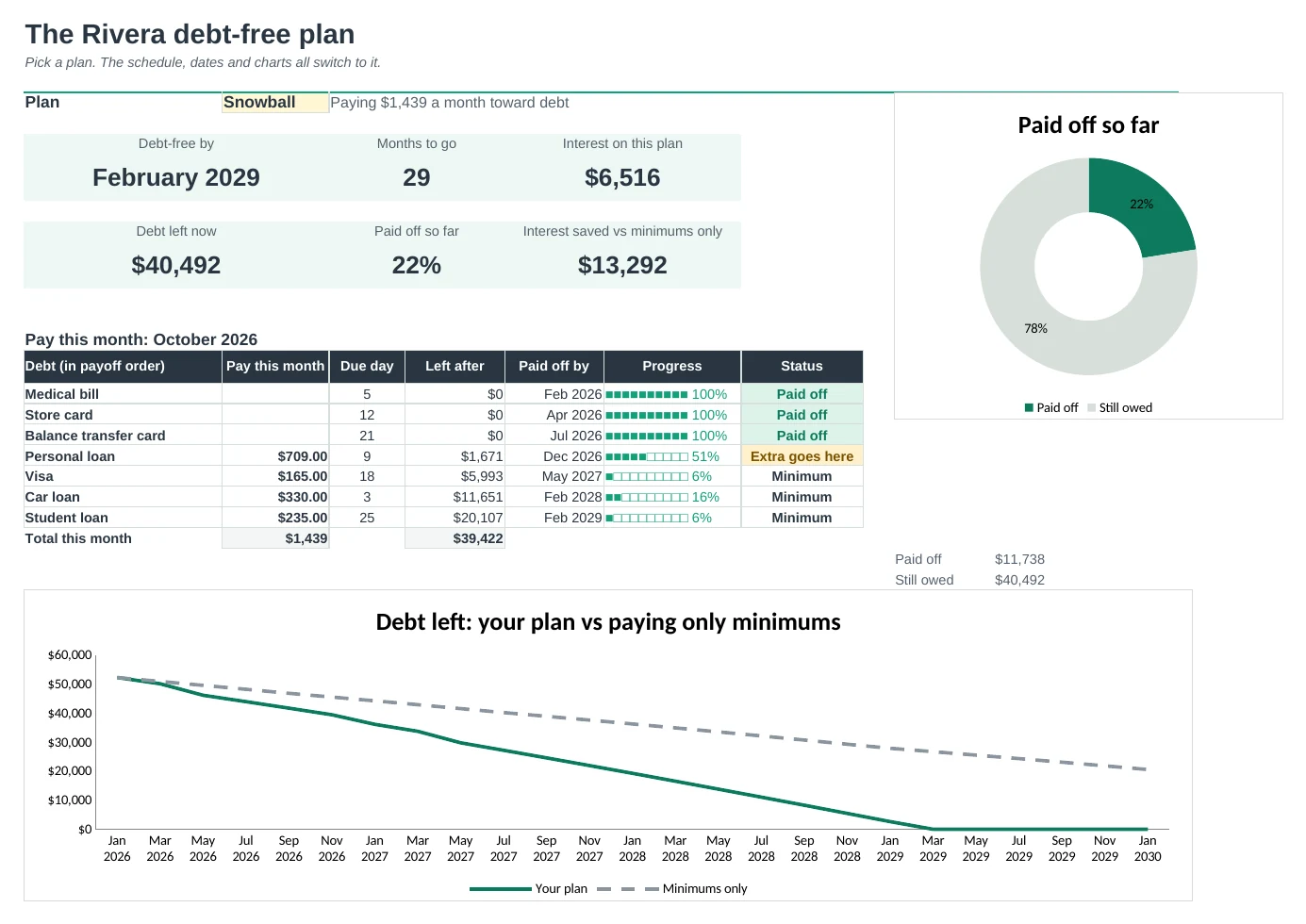
List your debts once and get a month-by-month plan: what to pay each debt, when each one is gone and the date you're debt-free.
Know what to pay this month
The Dashboard lists every debt in payoff order with the amount to pay this month and which one gets the extra. When a debt is paid off, its payment rolls into the next one.
Snowball, avalanche or your own order
Pick a plan from a dropdown. Compare shows all three side by side: debt-free date, total interest and when each debt is gone.
See what extra money does
Type an extra monthly amount to see how much sooner you'd finish and how much interest you'd save. Add one-off payments like a tax refund or bonus.
A full payoff schedule
Every month until you're debt-free: the payment and balance for each debt, interest, total left and a note when a debt is paid off.
Handles real-life debts
0% balance transfers switch to the normal rate when the promo ends, and a minimum payment that doesn't cover the interest is flagged in red.
Stay motivated
Check in once a month with your statement balances to see if you're ahead or behind. Milestones tick off each finish line and a 100-square chart fills in as you pay.
| Free | Pro |
|---|---|
| Snowball and avalanche plans | Snowball, avalanche and your own order |
| Payoff month for each debt | Payoff month plus a milestone list in date order |
| · | What to pay each debt this month |
| · | Extra-payment what-if and one-off payments |
| · | 0% promo rates and minimum payment warnings |
| · | Interest saved vs paying only the minimums |
| · | Monthly check-in: ahead or behind the plan |
| · | Charts and a printable colour-in tracker |
$19 one-time
7 tabs: Start Here, Dashboard, Plan, Compare, Check-in, Milestones and Debts. You get two copies: one filled in with a sample family's debts so you can see it working, and a blank one ready for your own.
Get Debt Payoff Pro for $19- Instant download after checkout
- Works in Google Sheets and Excel
- Yours to keep and reuse every year