
Free yearly budget template for Google Sheets
Plan the whole year in one grid, with every month side by side, so the expensive months like back to school, summer trips and the holidays don't catch you out. Fill in what really happened each month, and the sheet compares it with your plan and keeps a running total of what you've saved.
Pro Want the version that spreads your yearly bills across the plan for you? See Yearly Budget Pro →| Category | Type | Jan | Feb | Mar | Apr | May | Jun | Jul | Aug | Sep | Oct | Nov | Dec | Year total | Monthly average |
|---|---|---|---|---|---|---|---|---|---|---|---|---|---|---|---|
| Paychecks | Income | $7,800.00 | $5,200.00 | $5,200.00 | $5,200.00 | $5,200.00 | $5,200.00 | $7,800.00 | $5,200.00 | $5,200.00 | $5,200.00 | $5,200.00 | $5,200.00 | $67,600.00 | $5,633.33 |
| Side income and bonus | Income | $300.00 | $300.00 | $300.00 | $1,200.00 | $300.00 | $300.00 | $300.00 | $300.00 | $300.00 | $300.00 | $300.00 | $2,500.00 | $6,700.00 | $558.33 |
| Rent or mortgage | Expense | $1,650.00 | $1,650.00 | $1,650.00 | $1,650.00 | $1,650.00 | $1,650.00 | $1,650.00 | $1,650.00 | $1,650.00 | $1,650.00 | $1,650.00 | $1,650.00 | $19,800.00 | $1,650.00 |
| Utilities | Expense | $240.00 | $230.00 | $200.00 | $160.00 | $140.00 | $190.00 | $230.00 | $230.00 | $170.00 | $150.00 | $190.00 | $240.00 | $2,370.00 | $197.50 |
| Groceries | Expense | $620.00 | $600.00 | $620.00 | $620.00 | $640.00 | $640.00 | $660.00 | $660.00 | $620.00 | $620.00 | $700.00 | $760.00 | $7,760.00 | $646.67 |
| Car and gas | Expense | $310.00 | $310.00 | $310.00 | $310.00 | $310.00 | $310.00 | $310.00 | $310.00 | $310.00 | $310.00 | $310.00 | $310.00 | $3,720.00 | $310.00 |
| Insurance | Expense | $285.00 | $285.00 | $285.00 | $285.00 | $285.00 | $285.00 | $285.00 | $285.00 | $285.00 | $285.00 | $285.00 | $285.00 | $3,420.00 | $285.00 |
| Phone and internet | Expense | $145.00 | $145.00 | $145.00 | $145.00 | $145.00 | $145.00 | $145.00 | $145.00 | $145.00 | $145.00 | $145.00 | $145.00 | $1,740.00 | $145.00 |
| Subscriptions | Expense | $48.00 | $48.00 | $48.00 | $48.00 | $48.00 | $48.00 | $48.00 | $48.00 | $48.00 | $48.00 | $48.00 | $48.00 | $576.00 | $48.00 |
| Eating out | Expense | $180.00 | $180.00 | $180.00 | $180.00 | $180.00 | $180.00 | $180.00 | $180.00 | $180.00 | $180.00 | $180.00 | $180.00 | $2,160.00 | $180.00 |
| Kids and school | Expense | $120.00 | $120.00 | $120.00 | $120.00 | $120.00 | $150.00 | $300.00 | $550.00 | $150.00 | $120.00 | $120.00 | $120.00 | $2,110.00 | $175.83 |
| Medical | Expense | $90.00 | $90.00 | $90.00 | $90.00 | $90.00 | $90.00 | $90.00 | $90.00 | $90.00 | $90.00 | $90.00 | $90.00 | $1,080.00 | $90.00 |
| Home and car upkeep | Expense | $100.00 | $100.00 | $150.00 | $250.00 | $250.00 | $150.00 | $100.00 | $100.00 | $150.00 | $200.00 | $100.00 | $100.00 | $1,750.00 | $145.83 |
| Yearly bills | Expense | $0.00 | $0.00 | $180.00 | $0.00 | $0.00 | $0.00 | $0.00 | $0.00 | $240.00 | $0.00 | $0.00 | $139.00 | $559.00 | $46.58 |
| Vacation | Expense | $0.00 | $0.00 | $0.00 | $0.00 | $0.00 | $400.00 | $1,800.00 | $0.00 | $0.00 | $0.00 | $0.00 | $0.00 | $2,200.00 | $183.33 |
| Holidays and gifts | Expense | $0.00 | $50.00 | $0.00 | $0.00 | $80.00 | $0.00 | $0.00 | $0.00 | $0.00 | $100.00 | $450.00 | $900.00 | $1,580.00 | $131.67 |
| Savings | Expense | $600.00 | $600.00 | $600.00 | $600.00 | $600.00 | $600.00 | $600.00 | $600.00 | $600.00 | $600.00 | $600.00 | $600.00 | $7,200.00 | $600.00 |
| Total income | $8,100.00 | $5,500.00 | $5,500.00 | $6,400.00 | $5,500.00 | $5,500.00 | $8,100.00 | $5,500.00 | $5,500.00 | $5,500.00 | $5,500.00 | $7,700.00 | $74,300.00 | $6,191.67 | |
| Total spending | $4,388.00 | $4,408.00 | $4,578.00 | $4,458.00 | $4,538.00 | $4,838.00 | $6,398.00 | $4,848.00 | $4,638.00 | $4,498.00 | $4,868.00 | $5,567.00 | $58,025.00 | $4,835.42 | |
| Left over | $3,712.00 | $1,092.00 | $922.00 | $1,942.00 | $962.00 | $662.00 | $1,702.00 | $652.00 | $862.00 | $1,002.00 | $632.00 | $2,133.00 | $16,275.00 | $1,356.25 |
| Category | Type | Jan | Feb | Mar | Apr | May | Jun | Jul | Aug | Sep | Oct | Nov | Dec | Year total | Monthly average |
|---|---|---|---|---|---|---|---|---|---|---|---|---|---|---|---|
| Paychecks | Income | $7,800.00 | $5,200.00 | $5,200.00 | $5,200.00 | $5,200.00 | $5,200.00 | $7,800.00 | $5,200.00 | $5,200.00 | $52,000.00 | $5,777.78 | |||
| Side income and bonus | Income | $278.88 | $313.74 | $303.07 | $1,009.10 | $249.65 | $251.09 | $293.81 | $257.71 | $316.45 | $3,273.50 | $363.72 | |||
| Rent or mortgage | Expense | $1,650.00 | $1,650.00 | $1,650.00 | $1,650.00 | $1,650.00 | $1,650.00 | $1,650.00 | $1,650.00 | $1,650.00 | $14,850.00 | $1,650.00 | |||
| Utilities | Expense | $246.04 | $266.71 | $224.55 | $137.22 | $132.24 | $168.65 | $240.74 | $231.33 | $141.28 | $1,788.76 | $198.75 | |||
| Groceries | Expense | $659.83 | $560.37 | $608.35 | $686.90 | $581.49 | $648.06 | $713.24 | $771.80 | $603.27 | $5,833.31 | $648.15 | |||
| Car and gas | Expense | $271.10 | $259.58 | $339.96 | $350.79 | $332.36 | $318.65 | $350.61 | $308.09 | $262.18 | $2,793.32 | $310.37 | |||
| Insurance | Expense | $285.00 | $285.00 | $285.00 | $285.00 | $285.00 | $285.00 | $285.00 | $285.00 | $285.00 | $2,565.00 | $285.00 | |||
| Phone and internet | Expense | $145.00 | $145.00 | $145.00 | $145.00 | $145.00 | $145.00 | $145.00 | $145.00 | $145.00 | $1,305.00 | $145.00 | |||
| Subscriptions | Expense | $48.00 | $48.00 | $48.00 | $48.00 | $48.00 | $48.00 | $48.00 | $48.00 | $48.00 | $432.00 | $48.00 | |||
| Eating out | Expense | $192.49 | $199.57 | $173.61 | $148.83 | $156.19 | $153.03 | $154.47 | $175.16 | $152.52 | $1,505.87 | $167.32 | |||
| Kids and school | Expense | $124.44 | $135.98 | $109.92 | $116.20 | $137.68 | $130.91 | $271.11 | $566.22 | $122.73 | $1,715.19 | $190.58 | |||
| Medical | Expense | $86.16 | $105.82 | $91.21 | $93.03 | $104.62 | $103.92 | $85.91 | $77.96 | $73.22 | $821.85 | $91.32 | |||
| Home and car upkeep | Expense | $87.49 | $91.56 | $120.92 | $213.31 | $209.54 | $154.05 | $90.17 | $92.85 | $171.80 | $1,231.69 | $136.85 | |||
| Yearly bills | Expense | $0.00 | $0.00 | $177.70 | $0.00 | $0.00 | $0.00 | $0.00 | $0.00 | $201.83 | $379.53 | $42.17 | |||
| Vacation | Expense | $0.00 | $0.00 | $0.00 | $0.00 | $0.00 | $375.93 | $2,011.07 | $0.00 | $0.00 | $2,387.00 | $265.22 | |||
| Holidays and gifts | Expense | $0.00 | $44.12 | $0.00 | $0.00 | $78.69 | $0.00 | $0.00 | $0.00 | $0.00 | $122.81 | $13.65 | |||
| Savings | Expense | $600.00 | $600.00 | $600.00 | $600.00 | $600.00 | $600.00 | $600.00 | $600.00 | $600.00 | $5,400.00 | $600.00 | |||
| Total income | $8,078.88 | $5,513.74 | $5,503.07 | $6,209.10 | $5,449.65 | $5,451.09 | $8,093.81 | $5,457.71 | $5,516.45 | $0.00 | $0.00 | $0.00 | $55,273.50 | $6,141.50 | |
| Total spending | $4,395.55 | $4,391.71 | $4,574.22 | $4,474.28 | $4,460.81 | $4,781.20 | $6,645.32 | $4,951.41 | $4,456.83 | $0.00 | $0.00 | $0.00 | $43,131.33 | $4,792.37 | |
| Left over | $3,683.33 | $1,122.03 | $928.85 | $1,734.82 | $988.84 | $669.89 | $1,448.49 | $506.30 | $1,059.62 | $0.00 | $0.00 | $0.00 | $12,142.17 | $1,349.13 |
| Month | Planned income | Planned spending | Planned left over | Actual income | Actual spending | Actual left over | Better or worse than plan | Left over so far |
|---|---|---|---|---|---|---|---|---|
| Jan | $8,100.00 | $4,388.00 | $3,712.00 | $8,078.88 | $4,395.55 | $3,683.33 | -$28.67 | $3,683.33 |
| Feb | $5,500.00 | $4,408.00 | $1,092.00 | $5,513.74 | $4,391.71 | $1,122.03 | $30.03 | $4,805.36 |
| Mar | $5,500.00 | $4,578.00 | $922.00 | $5,503.07 | $4,574.22 | $928.85 | $6.85 | $5,734.21 |
| Apr | $6,400.00 | $4,458.00 | $1,942.00 | $6,209.10 | $4,474.28 | $1,734.82 | -$207.18 | $7,469.03 |
| May | $5,500.00 | $4,538.00 | $962.00 | $5,449.65 | $4,460.81 | $988.84 | $26.84 | $8,457.87 |
| Jun | $5,500.00 | $4,838.00 | $662.00 | $5,451.09 | $4,781.20 | $669.89 | $7.89 | $9,127.76 |
| Jul | $8,100.00 | $6,398.00 | $1,702.00 | $8,093.81 | $6,645.32 | $1,448.49 | -$253.51 | $10,576.25 |
| Aug | $5,500.00 | $4,848.00 | $652.00 | $5,457.71 | $4,951.41 | $506.30 | -$145.70 | $11,082.55 |
| Sep | $5,500.00 | $4,638.00 | $862.00 | $5,516.45 | $4,456.83 | $1,059.62 | $197.62 | $12,142.17 |
| Oct | $5,500.00 | $4,498.00 | $1,002.00 | $12,142.17 | ||||
| Nov | $5,500.00 | $4,868.00 | $632.00 | $12,142.17 | ||||
| Dec | $7,700.00 | $5,567.00 | $2,133.00 | $12,142.17 | ||||
| Year | $74,300.00 | $58,025.00 | $16,275.00 | $55,273.50 | $43,131.33 | $12,142.17 | -$365.83 | $12,142.17 |
| Category | Type | Planned for the year | Planned so far | Actual so far | Better or worse | Share of year used | Left in the plan |
|---|---|---|---|---|---|---|---|
| Paychecks | Income | $67,600.00 | $52,000.00 | $52,000.00 | $0.00 | 76.9% | $15,600.00 |
| Side income and bonus | Income | $6,700.00 | $3,600.00 | $3,273.50 | -$326.50 | 48.9% | $3,426.50 |
| Rent or mortgage | Expense | $19,800.00 | $14,850.00 | $14,850.00 | $0.00 | 75% | $4,950.00 |
| Utilities | Expense | $2,370.00 | $1,790.00 | $1,788.76 | $1.24 | 75.5% | $581.24 |
| Groceries | Expense | $7,760.00 | $5,680.00 | $5,833.31 | -$153.31 | 75.2% | $1,926.69 |
| Car and gas | Expense | $3,720.00 | $2,790.00 | $2,793.32 | -$3.32 | 75.1% | $926.68 |
| Insurance | Expense | $3,420.00 | $2,565.00 | $2,565.00 | $0.00 | 75% | $855.00 |
| Phone and internet | Expense | $1,740.00 | $1,305.00 | $1,305.00 | $0.00 | 75% | $435.00 |
| Subscriptions | Expense | $576.00 | $432.00 | $432.00 | $0.00 | 75% | $144.00 |
| Eating out | Expense | $2,160.00 | $1,620.00 | $1,505.87 | $114.13 | 69.7% | $654.13 |
| Kids and school | Expense | $2,110.00 | $1,750.00 | $1,715.19 | $34.81 | 81.3% | $394.81 |
| Medical | Expense | $1,080.00 | $810.00 | $821.85 | -$11.85 | 76.1% | $258.15 |
| Home and car upkeep | Expense | $1,750.00 | $1,350.00 | $1,231.69 | $118.31 | 70.4% | $518.31 |
| Yearly bills | Expense | $559.00 | $420.00 | $379.53 | $40.47 | 67.9% | $179.47 |
| Vacation | Expense | $2,200.00 | $2,200.00 | $2,387.00 | -$187.00 | 108.5% | -$187.00 |
| Holidays and gifts | Expense | $1,580.00 | $130.00 | $122.81 | $7.19 | 7.8% | $1,457.19 |
| Savings | Expense | $7,200.00 | $5,400.00 | $5,400.00 | $0.00 | 75% | $1,800.00 |
What's inside
- Twelve months side by side, with a year total and monthly average for every category
- Plan big one-off costs in the month they really happen, like car registration, back to school or holiday gifts
- A matching Actual tab to fill in as each month ends
- A month-by-month summary of planned vs actual, and a running total of money left over
- A category view showing what you planned so far, what you spent and what's left in the year's plan
- Works in Google Sheets and Excel
How to use it
Download your copy
Click "Free download" to save the .xlsx file. It opens in Excel, or in Google Sheets: open a blank sheet (sheets.new) and choose File, then Import, then Upload.
Set up your categories
On the Budget tab, rename the categories to fit your life and mark each one Income or Expense. Do the same on the Actual tab so both lists match row for row.
Plan the year
Fill in each month on the Budget tab. Start with steady bills, then add the lumpy ones in the month they land: insurance renewals, school costs, trips and gifts. Check the Left over row: if a month goes negative, move money from a cheaper month.
Fill in actuals each month
When a month ends, clear the sample numbers and type what you really earned and spent into that month's column on the Actual tab. Your bank app's monthly totals make this quick.
Check how you're doing
The Summary tab compares each month with the plan and shows your running total. The Categories tab shows which categories are running over the plan so far.
Tips
Spread the big bills
Add up your yearly bills and divide by 12. Moving that amount into savings every month means the big month is already covered when it arrives.
Plan for three-paycheck months
If you're paid every two weeks, two months a year have three paychecks. In the sample they're January and July. Plan them as income, then give that extra paycheck a job, like the summer trip.
Leave the plan alone
It's tempting to edit the plan to match what happened. Keep it as it was so the comparison stays honest, and make a better plan next year.
Questions
What's the difference between a yearly and a monthly budget?
A monthly budget plans one month at a time. A yearly budget lays out all 12 months at once, so costs that only come up once or twice a year are planned for instead of being a surprise.
Do I have to fill in actuals?
No. The Budget tab works on its own as an annual plan. The Actual, Summary and Categories tabs are there if you want to see how the year really went.
How do I start a new year?
Make a new copy of the template, or duplicate the file in your Drive and clear the Actual tab. Use this year's actuals to set next year's plan.
How does it know which months I've filled in?
A month counts as tracked once any number is typed in that month's column on the Actual tab. Months you haven't reached yet are left out of the comparisons.
Does it work in Excel?
Yes. Download the .xlsx file. Every total and comparison works the same in Excel.
Pro version
Yearly Budget Pro
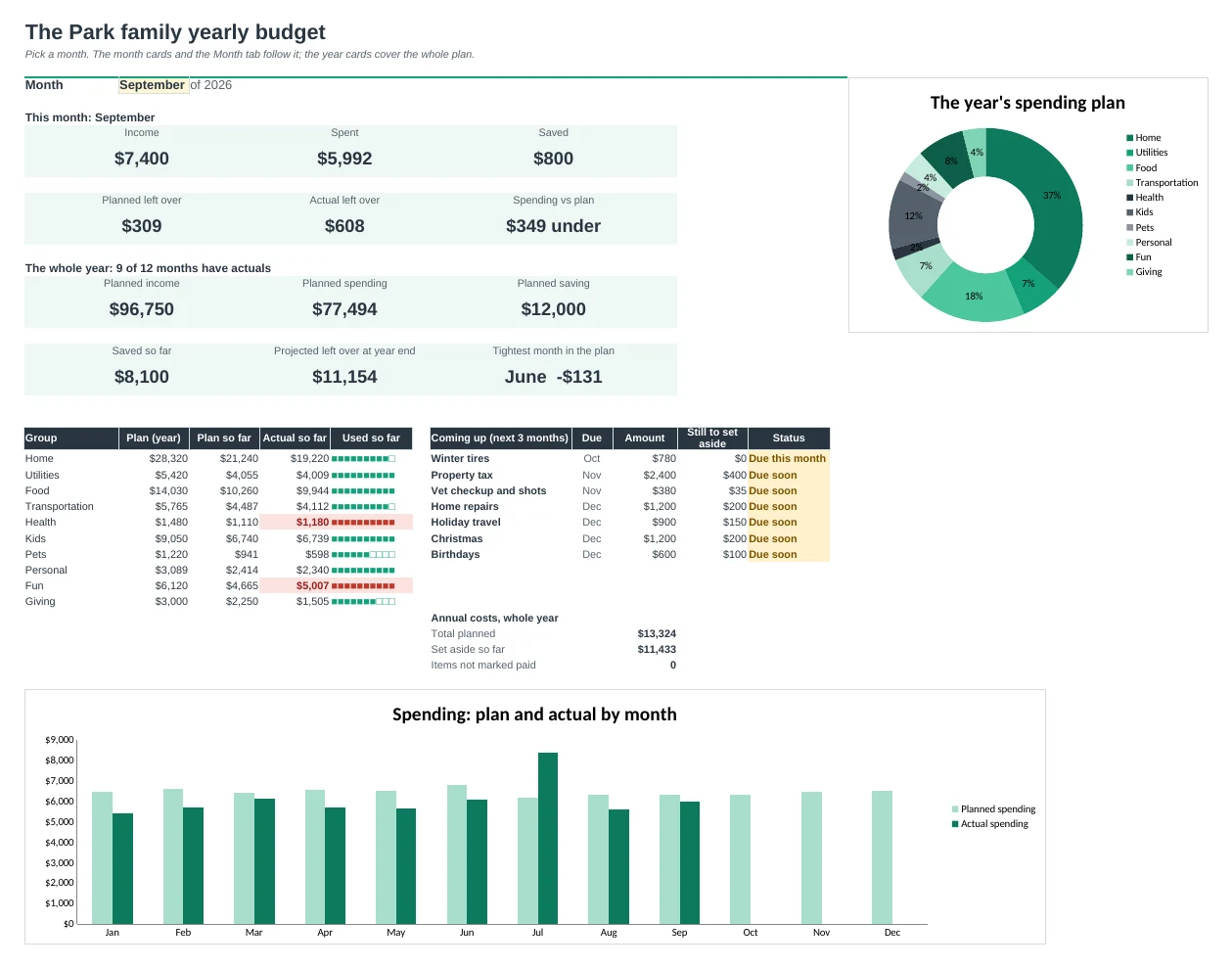
Plan all 12 months at once, with your yearly bills spread in for you, then type one total per category each month to see where the year is heading.
Plan the whole year in minutes
Type what a category usually costs once and all 12 months fill in. Type over any month that's different, like a third paycheck, summer camp or winter heating.
Yearly bills stop being a surprise
List car insurance, property tax, Christmas, trips and back to school once. Each one is spread into your plan, and you can see how much you should have set aside by now.
Spot the tight months early
The plan shows what's left over every month and turns red where money runs short, so you can move things around before it happens.
Check in without receipts
Once a month, type one total per category from your bank or card statement. No transaction lists to keep up.
Know where the year will end
Year Review compares every month with the plan and projects your year-end left over. Each category is marked on course, slightly over or heading over.
Set it up once
Categories, groups and settings live on one Setup tab. Rename or add a category and the plan, actuals, reports and dropdowns all follow.
| Free | Pro |
|---|---|
| 12 months side by side | 12 months side by side, filled from one every-month amount |
| Type every month by hand | Type over only the months that are different |
| · | Annual and irregular costs spread into the plan for you |
| · | Set aside so far and status for each yearly bill |
| Plan vs actual summary | Month and year-so-far comparison with on plan and over flags |
| · | Projected year-end left over |
| · | Dashboard with charts and what's due in the next 3 months |
| · | Setup tab: change categories once, everything follows |
$19 one-time
8 tabs: Start Here, Dashboard, Plan, Actuals, Annual Costs, Month, Year Review and Setup. You get two copies: one filled in with a sample family so you can see it working, and a blank one with starter categories ready for your own numbers.
Get Yearly Budget Pro for $19- Instant download after checkout
- Works in Google Sheets and Excel
- Yours to keep and reuse every year