
Weekly budget template for Google Sheets
If you're paid every week, a monthly budget never quite fits. This one plans one paycheck at a time and works out how much to set aside each week so rent and other monthly bills are ready when they're due. Track four weeks side by side and see how each week went.
Pro Paid weekly or every two weeks and want to know which bills each paycheck covers? See Weekly Budget Pro →| Bill | Due day | Monthly amount | Set aside each week |
|---|---|---|---|
| Rent | 1 | $1,100.00 | $253.85 |
| Car payment | 12 | $240.00 | $55.38 |
| Car insurance | 20 | $110.00 | $25.38 |
| Electric | 15 | $85.00 | $19.62 |
| Water and trash | 25 | $35.00 | $8.08 |
| Internet | 8 | $60.00 | $13.85 |
| Phone | 18 | $50.00 | $11.54 |
| Streaming | 22 | $25.00 | $5.77 |
| Total | $1,705.00 | $393.47 |
| Category | Type | Weekly plan | Week 1 | Week 2 | Week 3 | Week 4 | 4-week total | Vs plan |
|---|---|---|---|---|---|---|---|---|
| Paycheck | Income | $850.00 | $850.00 | $850.00 | $850.00 | $912.00 | $3,462.00 | $62.00 |
| Bills set-aside | Expense | $393.47 | $395.00 | $395.00 | $395.00 | $395.00 | $1,580.00 | -$6.12 |
| Groceries | Expense | $120.00 | $134.00 | $112.00 | $127.00 | $109.00 | $482.00 | -$2.00 |
| Gas | Expense | $45.00 | $48.00 | $41.00 | $52.00 | $44.00 | $185.00 | -$5.00 |
| Eating out | Expense | $35.00 | $22.00 | $61.00 | $35.00 | $18.00 | $136.00 | $4.00 |
| Household and personal | Expense | $25.00 | $18.00 | $32.00 | $9.00 | $27.00 | $86.00 | $14.00 |
| Fun | Expense | $30.00 | $15.00 | $40.00 | $25.00 | $30.00 | $110.00 | $10.00 |
| Savings | Expense | $75.00 | $75.00 | $75.00 | $75.00 | $100.00 | $325.00 | -$25.00 |
| Extra debt payment | Expense | $50.00 | $50.00 | $50.00 | $50.00 | $50.00 | $200.00 | $0.00 |
| Buffer for surprises | Expense | $20.00 | $0.00 | $14.00 | $6.00 | $31.00 | $51.00 | $29.00 |
| Total income | Total | $850.00 | $850.00 | $850.00 | $850.00 | $912.00 | $3,462.00 | $62.00 |
| Total spending | Total | $793.47 | $757.00 | $820.00 | $774.00 | $804.00 | $3,155.00 | $18.88 |
| Left over | Total | $56.53 | $93.00 | $30.00 | $76.00 | $108.00 | $307.00 | $80.88 |
What's inside
- Built around a weekly paycheck, not a calendar month
- Turns monthly bills into a fixed weekly set-aside, so rent never sneaks up on you
- Four weeks side by side with a total and a plan check for every category
- Left over for each week, so you can see a bad week before it becomes a bad month
- Works in Google Sheets and Excel
How to use it
Download your copy
Click "Free download" to save the .xlsx file. It opens in Excel, or in Google Sheets: open a blank sheet (sheets.new) and choose File, then Import, then Upload.
List your monthly bills
On the Monthly Bills tab, enter each bill you pay once a month and the day it's due. The sheet works out what to put aside from every paycheck.
Plan one week
On the Weekly Budget tab, fill in the Weekly plan column. Bills set-aside fills itself in from the bills tab. Start with your paycheck, then the set-aside, then everything else.
Fill in each week
At the end of each week, type what you actually earned and spent into that week's column. Your bank app's recent transactions make this quick.
Check the totals
Left over shows how each week went. In the Vs plan column, a positive number means you earned more or spent less than planned over the four weeks.
Tips
Move the set-aside right away
On payday, move the bills set-aside into a separate account. If it stays in checking, it tends to get spent.
Why the set-aside isn't a quarter of your bills
There are 52 weeks in a year, not 48. The sheet uses monthly bills times 12, divided by 52, so the money keeps up in months with five paydays.
Plan for a fifth payday
Four months a year have five Fridays. Put a fifth week's paycheck toward savings or debt and you'll barely notice it's gone.
Start a new block every four weeks
Duplicate the Weekly Budget tab, rename it with the start date, and clear the week columns.
Questions
How do I budget when I get paid weekly?
Plan each paycheck on its own. Take out a fixed amount for monthly bills first, then give the rest to groceries, gas, savings and everything else for that week.
How much should I set aside each week for rent?
Multiply your monthly rent by 12 and divide by 52. For $1,100 rent that's about $253.85 a week. The Monthly Bills tab does this for every bill.
My paycheck changes every week. Will this still work?
Yes. Plan with your lowest normal paycheck, then type the real amount into each week. Any extra shows up as a positive Left over.
Is this template free?
Yes. Download the .xlsx file and open it in Excel or Google Sheets. No sign-up needed.
Can I use it if I'm paid every two weeks?
You can, by treating each column as a pay period instead of a week. Change the set-aside formula on the Monthly Bills tab to divide by 26 instead of 52.
Pro version
Weekly Budget Pro
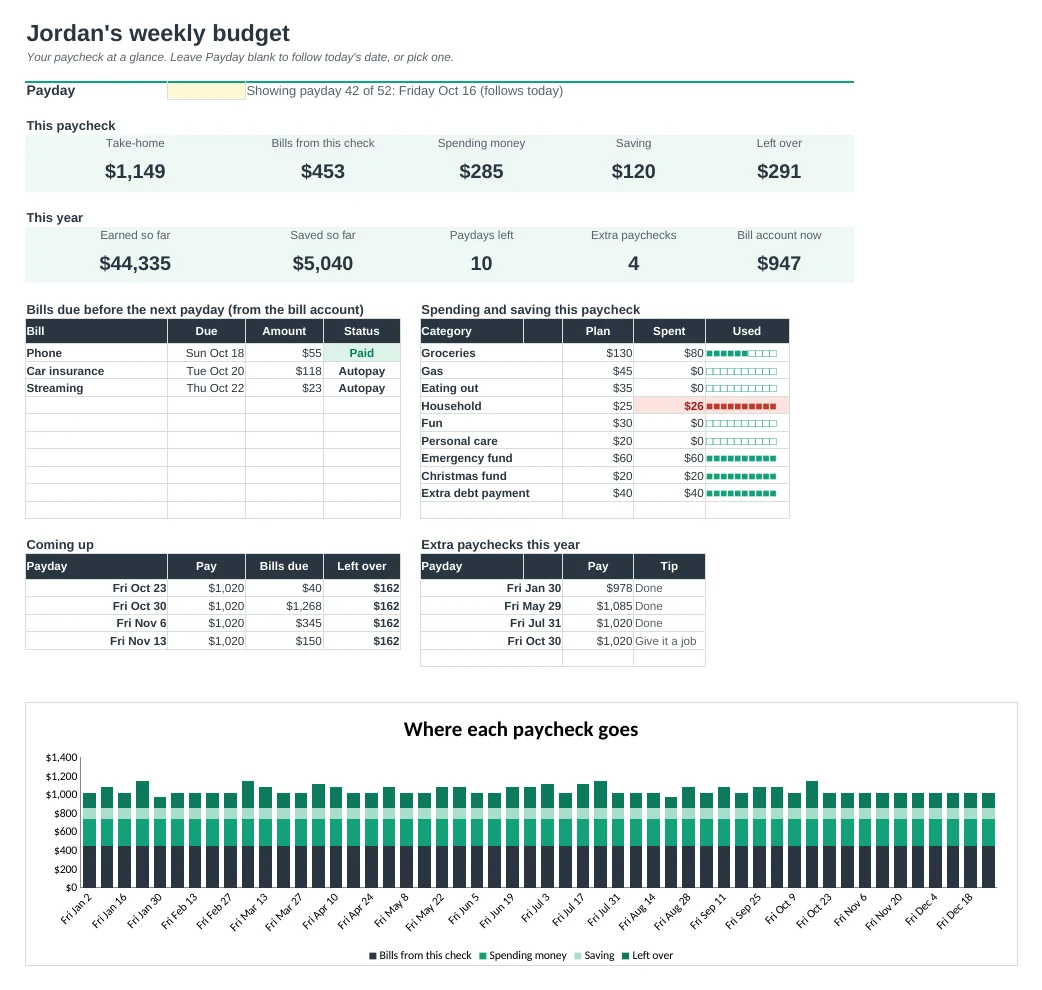
A budget built around your paychecks: every payday of the year, which bills each one pays and what's left to spend.
Plan one paycheck at a time
Each payday shows your take-home, the bills to pay, your spending money, your savings and what's left. Works for weekly or every-2-weeks pay.
Know which bills each paycheck pays
List your bills once with their due days. The sheet works out which payday covers each one, so rent and the car payment are never a surprise.
No more short rent weeks
Choose to pay bills from the check before they're due, or set aside the same amount every payday into a bill account. A running balance shows it never runs dry.
See the whole year
All 52 paydays on one page: short weeks in red, tight weeks in amber, and the months with an extra paycheck flagged so you can give it a job.
A plan you can print
The Paycheck tab is a one-page plan for any payday, with tick boxes for each bill and what's left in each spending category.
Uses your real pay
Type your actual take-home when it lands (overtime, short weeks) and everything updates. Log spending and bill payments and the bars fill up.
| Free | Pro |
|---|---|
| Four weeks at a time | Every payday of the year |
| Weekly pay only | Weekly or every 2 weeks |
| Even set-aside for bills | Bills by due date or even set-aside |
| · | Which paycheck pays each bill |
| · | Bill account balance after each payday |
| · | Extra paycheck months flagged |
| · | Printable plan for each paycheck |
| · | Spending log with paid and overdue flags |
$19 one-time
7 tabs: Start Here, Dashboard, Paycheck, 52 Weeks, Bills, Log and Setup. You get two copies: one filled in with a sample year so you can see it working, and a blank one ready for your own pay and bills.
Get Weekly Budget Pro for $19- Instant download after checkout
- Works in Google Sheets and Excel
- Yours to keep and reuse every year